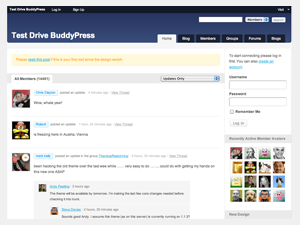
BuddyPress 1.2 is here, and it’s now ready for anyone with a WordPress installation!
There are so many new and improved features in this release it’s hard to keep this post short, but let me highlight just a few major ones for you.
Standard WordPress Support
BuddyPress is no longer limited to WordPress MU installations. It will now work with both WordPress and WordPress MU 2.9.1 and higher. You’ll get all the features of BuddyPress regardless of which WordPress version you use, the only difference being the tracking of blogs with WordPress MU.
Simplified Installation
We’ve worked hard to make BuddyPress 1.2 as simple to install as possible. Previous versions required manual installation steps, and a sometimes tough WordPress MU installation. With this version of BuddyPress you can be up and running in three simple steps that even my Mom would have no trouble with!
A Shiny New Default Theme
This version ships with a new default theme, offering out of the box support for all the new features in version 1.2. We’ve worked really hard to provide you with a theme that has great looks, great usability, and is really easy to extend. The feedback has been fantastic during the development stages, and we think you’re going to love what it has to offer.
Awesome Activity Streams
Activity streams in BuddyPress 1.2 have been completely transformed into something considerably more powerful. Activity streams form the focus of the new default theme and provide a really easy and intuitive way for users to interact.
Each activity item now has a permalink so it’s easy to bookmark or send direct links to any type of activity. Any user can also comment on activity across a site, with support for threading so your users can ignite their own individual discussions around a single activity.
There’s also direct update posting to the activity stream, so it’s easy to share your thoughts globally, or even within a particular group. Not only that, you can also mark activity items as a favorite, and send other users @username mentions.
Give 1.2 a Go
The best way to really experience what BuddyPress 1.2 has to offer is to try it for yourself. If you’d like to give it a go without downloading and installing then take a look at the BuddyPress Test Drive. This site is always running the latest version of BuddyPress and boasts a more than 15,000 strong user base, all interested in testing and discussing the newest features of BuddyPress.
Of course, downloading and installing BuddyPress yourself is going to give you the best taste of what BuddyPress can do. You’ll be able to experience just how extensible it really is with the ever growing list of great plugins. You’ll even be able to start creating your very first child theme.
Those who are upgrading from a previous version of BuddyPress should follow the official upgrade instructions.
Special Thanks
There are a large number of people who have helped BuddyPress reach this important milestone. Participation has really been fantastic, with more than double the number of tickets for 1.2 than we had for 1.1. These tickets help so much in ensuring that BuddyPress is a stable, well tested product with each milestone reached.
Special thanks goes to: 21cdb, andrea_r, DJPaul, Ezd, _DorsVenabili, arturo84, chouf1, cnorris23, developdaly, erich73, floris, grosbouff, intimez, jivany, johnjamesjacoby, madloki, miguael, mikepratt, MrMaz, nuprn1, ousep, r-a-y, rvenable, snark, teebes, windhamdavid, wpmuguru.


[…] weitere Details gibts nur hier: https://buddypress.org/blog/news/introducing-buddypress-1-2/ VN:F [1.8.2_1042]please wait…Rating: 0.0/5 (0 votes […]
[…] 1.2 has been released with some awesome features and options. The most important one is that now you don’t need to have […]
Congratulations Andy!!!, BP 1.2 is great!, thanks for your big effort 😀 and thank you very much for your mention in special thanks 🙂
Not even caring about the other updates… the simple fact this now works on regular WP hosted sites w/o MU…. SOO going to test this local and play with it…
Thanks guys for the updates and hard work!
[…] team di sviluppo di BuddyPress ha annunciato il rilascio della versione 1.2 che introduce un’importantissima novità rispetto alle precedenti: ora infatti è possibile […]
[…] die Installation wurde vereinfacht und die Aktivitätsstreams wurden ausgebaut. Im offiziellen Ankündigungsbeitrag gibt es eine detailiertere Übersicht der neuen […]
@apeatling Great new design on the buddypress website itself-A huge leap forward and a very well balanced visual design. The new homepage is very well geared towards beginners, which is good.
However maybe one of the three columns could be devoted to recent blog posts, new plugins and maybe recent forum posts. that would be helpful for current buddypress users and it would also help newcomers see that this project is very much alive.
Usually when I build websites, I think of the people that are coming to the site, and divide the homepage up according to percentage of beginner/intermediate/advanced. Usually its about 60%/30%/10%. Then put the appropriate content on the site to match the users needs.
Right now the current BP website is 100% beginner, and there is no info for intermediates or advanced users.
Again, please take this as constructive usability criticism of a wonderful new design. Very well done.
Very cool. Is this the unofficial merge of WP and WPMU? I’ve waited on fully deploying BuddyPress due to the difficulty of managing WPMU. This is now a great way to make my news blog more social.
Hi, i have a question, in the search from (up, right), only is allowed ‘Members’, ‘Groups’, and ‘Forums’,
I want to add ‘General’, that will search into ‘blog post’, and ‘blog pages’, my question is… how I could do this? I think its a very simple problem, so i think its a very simple solution.
😉
Thanks
Thank you very much for the BuddyPress package. It’s time for me to try it out and perhaps start my own blog Social Networking for people who would be interested to do so.
Loving the new BP. Looks great too. Thanks for the hard work folks….
Thanks a lot for the BP 1.2
I am newbie in wp, and off course also in BP running with WPMU.
This project is promising, and I will follow…
I like the default theme.
My struggle is with the subdirectories (blog1.nannys.dk). It seems users needs to know a little Apache. If that could be tested during install, it would be nice.
I also struggle with the avatar. When I want to change it to my own image, i get to crop an image wich is not loaded. I need to follow the geeks in the forum for the solution.
Thanks again for your effort.
Awesome, More usable and friendly. Missing part is privacy option. maybe 1.3 will get that resolved too.
[…] La version finale 1.2 de Buddypress est sortie cette semaine. Notons que BuddyPress met à disposition une page rassemblant toutes les adresses des blogs locaux de BuddyPress. […]
[…] the flavour of WordPress sometimes described as Facebook in a box. With the recent release of BuddyPress 1.2, the time to play is […]
ok, 1.2.1 is out, could you please consider adding the i18n in the bp-languages so we do not need to re-upload them each time we update?
@nexia Yes this will happen, but it needs better co-ordination, planning on getting this sorted very soon.
[…] La version finale 1.2 de Buddypress est sortie cette semaine. Notons que BuddyPress met à disposition une page rassemblant toutes les adresses des blogs locaux de BuddyPress. […]
I’m loving the new version suddenly I can feel the useability improving, a big up to Andy and the guys.
Somebody help me!
I have installed BuddyPress on my standard WordPress and things went fine except there’s no “Site-Admin” to enable registration.
Am I missing something? If BuddyPress supports standard WP without MU, should it have somewhere to enable registration without the support of “Site-Admin” which seems to be available on MU.
Thanks.
Thank you all so much! 1.2 is a lot cleaner and more streamlined than 1.1. I am inspired to take a more active role in the development.
I’ve been sleeping under a rock for a few weeks. It’s apparently flu season in my neck of the woods. 🙁
Thanks for the hat tip. Very much unexpected.
I’m even more motivated now to get my hobby site up and running with BP 1.2 as soon as possible!
@Phyo Wai Win – “Site Admin” in standard WordPress is currently just a user with admin access to the blog.
[…] » Introducing BuddyPress 1.2 […]
Thanks @Andy Peatling.
That makes sense.
Hi, I’m sorry for my ignorance, but I’m getting crazy. There’s an option to make the ”Budypress admin bar” fixed / static?
I think in a previous version of BP, there was an option to fixe it, but now i´ve installed 1.2.1, in WP 2.9.1 and I cant see that option, or I don’t know how make the ”Budypress admin bar” fixed / static.
Help me, please.
Thanks♠
[…] good news! A little over a week ago Andy Peatling, founder and lead developer of BuddyPress, announced the release of BuddyPress 1.2, which can be used on single installations of WordPress. Congratulations, BuddyPress! And […]
[…] good news! A little over a week ago Andy Peatling, founder and lead developer of BuddyPress, announced the release of BuddyPress 1.2, which can be used on single installations of WordPress. Congratulations, BuddyPress! And […]
[…] good news! A little over a week ago Andy Peatling, founder and lead developer of BuddyPress, announced the release of BuddyPress 1.2, which can be used on single installations of WordPress. Congratulations, BuddyPress! And […]
[…] זה נכתב לפני כשבוע ופורסם היום (19 בפברואר 2010). בזמן הזה הושקה גרסה 1.2 של BuddyPress (ב-16 בפברואר 2010) והיא תומכת בהתקנת […]
Great, I will be trying my best to run on my own theme my first Social community network mainly because of the new “BuddyPress for One (and All!)” is now available. Thank you, I am very happy to read this exciting news…
[…] now you have surely read the news of the release of BudyPress 1.2 (which now will work with single WordPress.org blogs, previously limited to WordPress MU) and this […]
[…] now you have surely read the news of the release of BudyPress 1.2 (which now will work with single WordPress.org blogs, previously limited to WordPress MU) and this […]
Great news. We really would like to run Buddy press on the nginx server environment. BUT it is impossible to get the re-write working.
WP is running fine, buddy press is ALWAYS missing the /index.php/ in the file name and therefore going 404.
As WPMU and buddypress is ideal to run in nginx and need private server anyway, why not making a plugin or fix / version for nginx
Thanks
I have enabled buddy press in the site to show the problem
It would be such an addition to our site, especially with the upcoming event in April.
We can’t get it done though, i get a fatal error. Have been waiting so so so so long for this.
Hope things get solved
[…] conhecer melhor esta nova versão o melhor é mesmo aceder à página oficial ou fazer uma visita a BuddyPress Test […]
Thanks for this release ! Adding social feature to single installation, a great idea for bloggers !
Good release. I have updated.
THis is great news, but can someone support this ?
I am getting an error after installation of buddypress to an existing v2.9.2 WordPress site and dont know who to turn to for the errors I am getting..
@yakos – that’s what the forums are for.
[…] my FREE BuddyPress themes are working with the latest BuddyPress version 1.2.*, tested on WordPress version 3.0.* and BuddyPress 1.2.* […]
There does not seem to be any way to moderate new user sign ups, now this would be a welcome function to add! I got fed up of the spammers signing up on my blog. I really would love to be able to veto new user sign ups!
[…] WordPress でも使用できる BuddyPress 1.2 のリリースを発表しました。おめでとう、BuddyPress ! […]
WOW! i am dying to give it a try…
Thanks 🙂
Hey, I’m looking but can’t figure out the answer to a question — can I use any standard compliant WordPress theme with BuddyPress, or do I have to install a BP child theme?? Where can I read more about how that works?
~ Josue
[…] BuddyPress 1.2 […]
[…] WordPress でも使用できる BuddyPress 1.2 のリリースを発表しました。おめでとう、BuddyPress ! […]
[…] to the RSS feed for updates on this topic.Wordpress Social Networking software BuddyPress in its latest announcement released BuddyPress 1.2 which also supports normal WordPress installation along with WordPress […]
Hello, I am “admin” of my wordpress with newly added buddypress. I believe someone else may have mentioned this issue but I am still unclear if there is a resolve. I’m unable to access my profile, notifications, messages, etc. (all of the items from My Account). I am able to do so as a regular user but have not been able to access these user features as an admin. What shall I do?
not a big fan of this new version.
Missing lot’s of old staff.
[…] BuddyPress.org – WordPress Social Network Software → Introducing BuddyPress 1.2 Need to contemplate how we can use this… (tags: wordpress buddypress) […]
[…] La version finale 1.2 de Buddypress est sortie cette semaine. Notons que BuddyPress met à disposition une page rassemblant toutes les adresses des blogs locaux de BuddyPress. […]