-
modemlooper replied to the topic Users can´t create groups! in the forum How-to & Troubleshooting 10 years, 9 months ago
you need to debug a bit, try deactivating plugins and change themes to verify those are not causing the problem.
Are you running a cache on the site?
-
modemlooper replied to the topic required Username twice at Registration in the forum How-to & Troubleshooting 10 years, 9 months ago
the column on the right are added profile fields, you can remove the field from the admin
more info on profile fields https://codex.buddypress.org/administrator-guide/extended-profiles/
-
modemlooper replied to the topic Project / Film Credit for Buddypress such as IMDB in the forum How-to & Troubleshooting 10 years, 9 months ago
If you are not a developer then you are better off using something like Gravity forms and having a front end submission for a custom post type.
-
modemlooper replied to the topic required Username twice at Registration in the forum How-to & Troubleshooting 10 years, 9 months ago
BuddyPress and WP do not have two usernames. Is this the BuddyPress registration form or another form by a plugin?
-
modemlooper replied to the topic How to create a read-only logged-in user? in the forum How-to & Troubleshooting 10 years, 9 months ago
function bp_keep_user_private( $user_login, $user ) {global $wpdb;
if( 'username' === $user->user_login ) {
$wpdb->query( $wpdb->prepare( "UPDATE $wpdb->users SET user_status = 2 WHERE ID = %d", $user->ID ) );
}}
add_action( 'wp_login', 'bp_keep_user_private', 10, 2 );you can try something like this that will set that account to…[Read more]
-
modemlooper replied to the topic What does Site Tracking do? in the forum How-to & Troubleshooting 10 years, 10 months ago
yes, sorta a misplaced admin option. its not a component at all. should be a setting and only show if activity is enabled.
-
@modemlooper updated the Post Types Activities page, on the BuddyPress Codex 10 years, 11 months ago
Note: This guide is for use with BuddyPress 2.2+.
Any public registered post type can be tracked into the activity streams once it has been published. Here are the different options to add the […]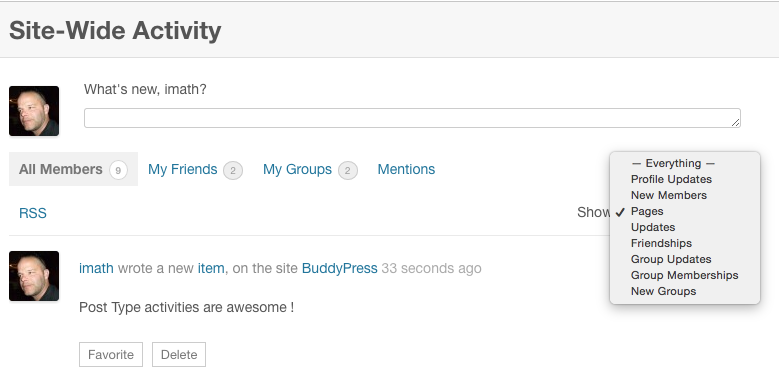
-
modemlooper replied to the topic How to hide admin details from anyone visiting the site in the forum How-to & Troubleshooting 10 years, 11 months ago
Your worrying about nothing. As long as you have some security measures in place it doesn’t matter if someone knows a username of an admin. To feel safe create an account you use for the front end and keep the admin account for only accessing the admin.
Add a plugin like this one https://wordpress.org/plugins/sucuri-scanner
Use strong passwords.
-
modemlooper replied to the topic Restricting Lapsed/Expired Members in the forum How-to & Troubleshooting 11 years, 1 month ago
how are you tracking the time of the membership? have you added a membership plugin?
-
modemlooper replied to the topic That Spam Option in the forum How-to & Troubleshooting 11 years, 1 month ago
The account is blocked and marked as spam, uses this https://codex.wordpress.org/Function_Reference/update_user_status
-
modemlooper replied to the topic That Spam Option in the forum How-to & Troubleshooting 11 years, 1 month ago
The account it blocked and marked as spam uses this https://codex.wordpress.org/Function_Reference/update_user_status
-
-
modemlooper replied to the topic [Resolved] Posting Links BP Activity Stream in the forum How-to & Troubleshooting 11 years, 1 month ago
BP use bp_activity_filter_kses to filter out somethings. This filter allows links but the link could have stuff on it that is not valid. Can you post the link here that is getting blocked?
Also plugins can filter this function. If you any activity plugins or plugins that alter wp_kses it could be issue.
-
modemlooper replied to the topic Mobile display issue (0 selected) showing in the forum How-to & Troubleshooting 11 years, 1 month ago
Your question is vague. Please tell more. Are you referring to profile fields?
-
modemlooper replied to the topic Installed Buddypress but several things won't work. in the forum How-to & Troubleshooting 11 years, 1 month ago
never use “register” as url for sign up page. Spammers look for this. Go into permalink settings and change to something else sand save. URL redirects not right
-
modemlooper replied to the topic Installed Buddypress but several things won't work. in the forum How-to & Troubleshooting 11 years, 1 month ago
never use “register” as url for sign up page. Spammers look for this.
-
modemlooper replied to the topic [Resolved] change bp_activity_content_body in the forum How-to & Troubleshooting 11 years, 1 month ago
well thats not really editing the activity content its a custom foreach loop 😉
-
modemlooper replied to the topic [Resolved] change bp_activity_content_body in the forum How-to & Troubleshooting 11 years, 1 month ago
function record_post_activity_content_update( $excerpt, $post_content, $activity ) {[Read more]
global $post;
if( $post->post_type == 'post' ) {
$post_content= '<a href="' . get_permalink( $post->ID ) . '" class="activity-content-title" >'
. get_the_post_thumbnail( $post->ID )
. get_post_field('post_title', $post->ID) . '</a>'… -
modemlooper replied to the topic Installed Buddypress but several things won't work. in the forum How-to & Troubleshooting 11 years, 1 month ago
if you have registration turned off in WordPress settings you will have registration troubles. When you got to settings > BuddyPress and on the pages tab do you have the pages assigned to components?
-
modemlooper replied to the topic Shortcode for Buddypress login? in the forum How-to & Troubleshooting 11 years, 1 month ago
BP doesn’t have a special login aside from showing an avatar in the widget. You can use any login plugin https://wordpress.org/plugins/login-sidebar-widget/
- Load More
@modemlooper
Active 1 month, 1 week ago


