Forum Replies Created
-
In reply to: Linking to a Non-root Profile URL
If you don’t need root profiles, you shouldn’t need the define line. Try removing it to see what happens.
@notpoppy – You have the right idea that your code is loading before BuddyPress and you are also correct to have read the Checking if BuddyPress is active codex article.
Now, you just need to connect the dots!
1. Create a new folder (eg. /my-bp-plugin/).
2. Copy and paste the contents of what you wrote above into a new file (eg. /my-bp-plugin/my-bp-plugin.php).
3. Now, copy and paste the contents of the codex article into a new file (eg. /my-bp-plugin/loader.php) into the folder you just created. Make sure to change the file path and name to the ones you created above as well as the meta data at the top of the file.
4. You should now have a folder with two files. Move this folder into the /wp-content/plugins/ directory, navigate to the WP admin dashboard and activate the plugin!If you have any other questions, let me know.
In reply to: Problems with Groups and ForumsIt seems like you’re using a 3rd-party plugin for the group forum editor. Please contact the plugin developer for support.
Here are a couple of editors you could try:
https://wordpress.org/extend/plugins/u-buddypress-forum-editor/
https://github.com/boonebgorges/bp-tinymce
https://wordpress.org/extend/plugins/rich-text-editor-for-comments/Please note that I haven’t tested any of these.
In reply to: FATAL ERROR! Help me please!You’re using an older version of BuddyPress Links. Please either deactivate that plugin or upgrade to the premium version of the plugin.
Then, try upgrading to BuddyPress 1.5.7.
If you’re upgrading from a version of BuddyPress 1.2, read this guide:
https://codex.buddypress.org/releases/upgrading-to-buddypress-1-5/You almost got it right!
Parameters need to be either a querystring or an array.
Try this:
`3, ‘no_stickies’ => false, ‘forum_id’ => false, ‘user_id’ => false, ‘search_terms’ => false ) ) ) : ?>`
In reply to: Not showing up in plugins listThe Custom Community theme is a BuddyPress theme; you’ll still need to install the BuddyPress plugin though.
Follow the BuddyPress installation guide:
https://codex.buddypress.org/getting-started/setting-up-a-new-installation/Once you have BuddyPress setup, install the Custom Community theme.
Also, try asking the Custom Community support team for help as well:
BuddyPress does not come with an “Add New User” admin page. You are probably referring to WordPress’ User admin page.
I just took a look at your StackExchange thread and it appears you’re using WordPress Multisite:
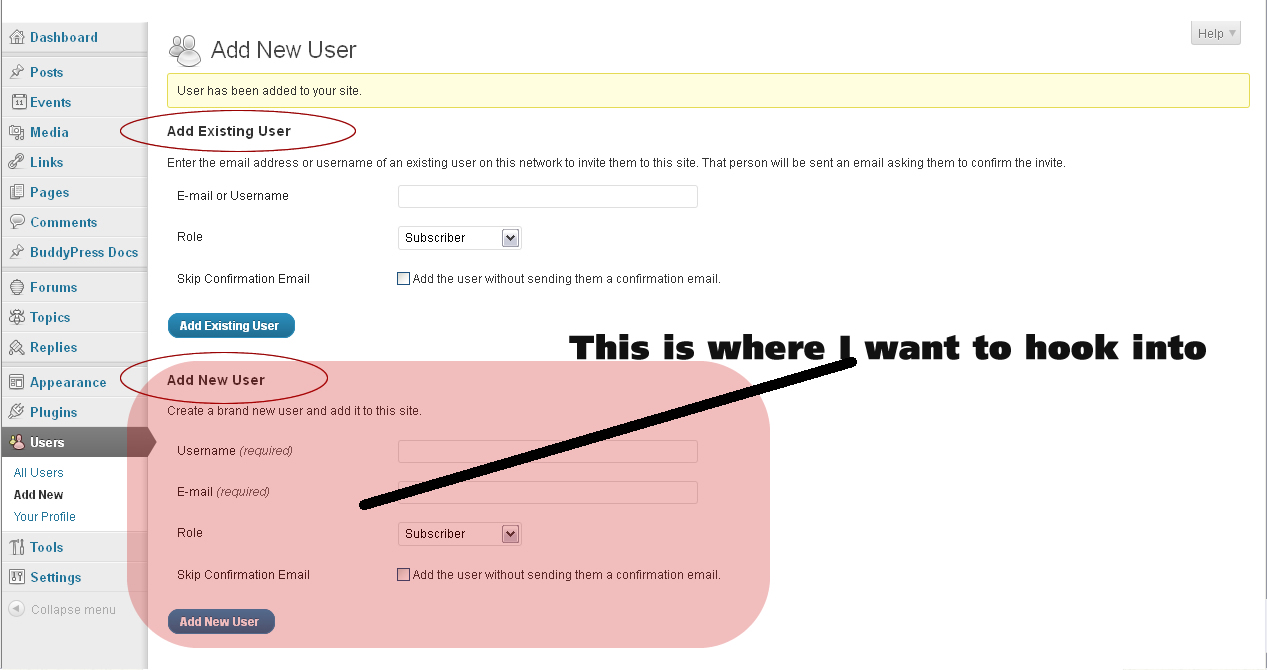
This is very important to know because you’ll need to run your script on the site that has BuddyPress installed.
Because of using WP Multisite, you’ll also have to change your hook to ‘wpmu_signup_user_notification‘.
The BuddyPress signup hooks I mention above only take effect on frontend registration (eg. testbp.org/register). Since you’re not using frontend registration, those hooks won’t work for you.
Is there any reason why you need multisite?
That will probably give you enough to go on.
In reply to: Tagging MembersLike Juan mentioned, XProfile already autolinks various profile fields.
eg. http://testbp.org/members/johnjamesjacoby/profile/Check out the links in the profile page. They will automatically redirect to the members directory with the search term.
It might not fit your spec exactly, but maybe it can give you some pointers.
The BP Profile Search plugin also enhances the xprofile search a bit as well.
Sarah Gooding’s example should work. Though it’s missing one step, you have to login to the WP admin dashboard and navigate to “Settings > Discussion”.
Next, under “Avatars”, select “Mystery Man” and save. Now, the code snippet should take effect.
@frank13 – I’m just re-reading this entire thread.
It looks like you’re registering users manually via the WP admin dashboard’s Users page, but then are wondering why these users do not show up in BP’s Members Directory.
When you register a user that way, they will not show up in BuddyPress’ members directory until they login.
You can bypass this programatically by adding a ‘last_activity’ user meta entry.
Read this thread for more details:
https://buddypress.org/community/groups/how-to-and-troubleshooting/forum/topic/make-all-members-active-1/#post-110469This hopefully addresses your problems!
In reply to: Using BuddyPress Avatars with wp_list_comments()Hi,
In your comments template, you should try using the BP avatar function:
`
if ( function_exists( ‘bp_core_fetch_avatar’ ) ) :
echo bp_core_fetch_avatar( array(
‘item_id’ => THE_USER_ID,
‘type’ => ‘full’,
‘width’ => 75,
‘height’ => 75
));
endif;
`In reply to: WPMU + BuddyPress – Use Registration PasswordWordPress MU sends them an email saying welcome, then gives them their username and a password which is not theirs! Why is it not using the password the user specified at registration?
This bug needs to be confirmed. If no one has a chance to confirm this, I’ll try and duplicate what Steve has experienced later today.
In reply to: 1.5 theme compatibility page missing?These are the pages that will interest you the most:
https://codex.buddypress.org/releases/upgrading-to-buddypress-1-5/
https://codex.buddypress.org/releases/developer-and-designer-information/Some links were altered during the new codex revamp.
In reply to: Really confused here, or am I just stupid?BuddyPress doesn’t do anything for blogs except track new blog posts and comments in the activity stream.
WordPress handles all blog creation. If you want your users to be able to create blogs, you’ll first need to change your WordPress install into a network:
https://codex.wordpress.org/Create_A_NetworkBe sure to read the “Do you really need a network?” section as well:
https://codex.wordpress.org/Create_A_Network#Do_you_really_need_a_network.3FIf you just want your users to contribute to your existing WordPress blog, then you’ll need to make your users authors:
https://codex.wordpress.org/Users_Screen
https://codex.wordpress.org/Users_Screen#Change_Roles_toIn reply to: BlogsThere’s a WordPress theme called P2:
http://p2theme.com/It’s not compatible with BuddyPress though, however there is a fork of P2 (called P2 Reloaded) that reportedly supports BuddyPress:
http://p2reloaded.com/2011/07/3-0-beta-release/I haven’t tested it myself.
In reply to: Forums Directory Table Font Bug (BP 1.5.3.1)Hi FIQ, you might want to post this as a bug on BP Trac:
https://buddypress.trac.wordpress.org/newticket/Login with the same credentials you use here on bp.org.
In reply to: override ajax and js files in bp-default themeIt’s not recommended to override /_inc/ajax.php, is there a specific reason why you’d want to do that? There are hooks in /_inc/ajax.php that you can use to add functionality.
If you need to override both ajax.php and the JS, you might as well create your own parent theme instead of creating a child theme of bp-default.
In reply to: Group Forum Subscription or Reply NotificationIf you need this functionality now, try out the BP Group Email Subscription plugin:
https://buddypress.org/community/groups/buddypress-group-email-subscription/There are a few bugs to iron out, but I’m working on a few of them with the plugin authors.
In reply to: Changing default individual & group avatarsThat’s old, old code.
Use something like this to change the default group avatar:
`
// turn gravatars off
add_filter( ‘bp_core_fetch_avatar_no_grav’, ‘__return_true’ );// change the default group avatar
function ray_change_group_avatar_default() {
return ‘URL TO GROUP DEFAULT AVATAR’;
}
add_filter( ‘bp_core_default_avatar_group’, ‘ray_change_group_avatar_default’ );`Untested! This only works with gravatars turned off.
In reply to: username capitals1) You can modify your registration template in your theme or child theme to let your users know to use lowercase letters and numbers only:
/wp-content/themes/YOUR-THEME/registration/register.php2) I believe the lowercase restriction is going to be lifted in BuddyPress 1.6.
In reply to: Forum: Unreplied RSS Feed – How to?Check out how feeds are done in BuddyPress itself.
There are two things you need to do:
1) Create an action listener to tell BuddyPress that the URL you’re on is the feed
2) Next, tell BuddyPress what template file to use for the feed and create an activity loop to generate the feed.For example, to see how BuddyPress generates the sitewide activity feed:
1) BP creates an action listener for the sitewide activity feed here:
https://buddypress.trac.wordpress.org/browser/tags/1.5.3.1/bp-activity/bp-activity-actions.php#L3592) BP uses the following template file referenced in step 1 to generate the sitewide activity feed:
https://buddypress.trac.wordpress.org/browser/tags/1.5.3.1/bp-activity/feeds/bp-activity-sitewide-feed.php#L1See how that file structures the RSS feed? It uses an activity loop (bp_has_activities()) with specific arguments to sitewide activity.
—
To create an unreplied RSS feed, follow the steps above as a guide.
Instead of an activity loop in the RSS feed, you’ll probably need to use a forum topics loop with ‘type=unreplied’ as the argument.
Hope that gives you a few pointers.
In reply to: How to add content to ACTIVITY feed RSS?Check out how activity RSS feeds are parsed in:
/wp-content/plugins/buddypress/bp-activity/feeds/There are a few hooks you could potentially use to add additional content.
If you want to filter the item description, use the “bp_get_activity_feed_item_description” hook available in the bp_get_activity_feed_item_description() function.
Various other filters are available for the item title, etc. in bp-activity-template.php as well.
In reply to: Is this a bug? –bp_is_active undefinedThis is fixed in the trunk version of BuddyPress:
https://buddypress.trac.wordpress.org/ticket/3682In reply to: Group @mentionsHere’s the link to etivite’s plugin:
https://wordpress.org/extend/plugins/buddypress-activity-stream-atgroups/In reply to: Can I auto assign a group on registration?


