Skip to:
Content
Pages
Categories
Search
Top
Bottom

Remove profile field from register page?

  • @stunley

    Participant

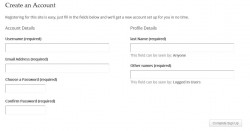
    Hi, I have a question – How can I remove the Profile details field from the WordPress registration page?

    I would like people to sign up and then edit their profile, but as well as the wordpress fields (Account Details… Username, Email Address, Choose a Password, Confirm Password) there is a Profile Details field – Name, that can’t be deleted.

    Thanks
    imagebam.com

Viewing 3 replies - 1 through 3 (of 3 total)
  • @modemlooper

    Moderator

    Any profile field in the ‘base’ section will show on the registration form. If you do not want a field on that section create a new profile section and then drag the field onto the new sections tab.

    https://codex.buddypress.org/user/buddypress-components-and-features/extended-profiles/

    @stunley

    Participant

    That’s great, thanks modemlooper.

    Can I also remove the now empty ‘Profile Details’ column?

    @stunley

    Participant

    Actually, If there are no fields in the ‘Profile Details’ column then it doesn’t send an activation email, nor does it load the Check Your Email To Activate Your Account! message; it just goes back to the homepage.

Viewing 3 replies - 1 through 3 (of 3 total)
  • The topic ‘Remove profile field from register page?’ is closed to new replies.
Skip to toolbar