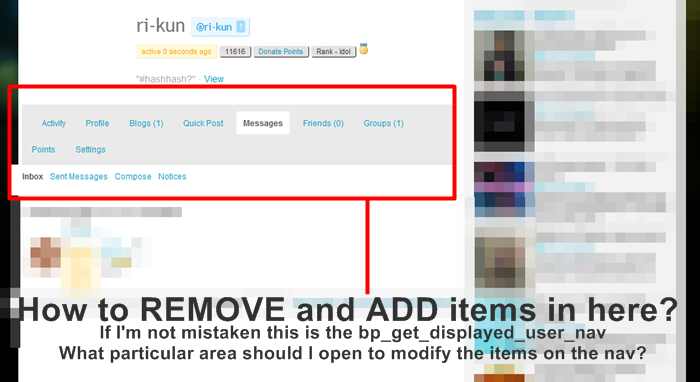
How to Remove and Add Items in “bp_get_displayed_user_nav”
-
TO UNDERSTAND MY QUESTION CLEARLY PLEASE VIEW THIS SCREENCAP I MADE:
http://i630.photobucket.com/albums/uu22/s2ne1/usernav.png
I am simply trying to remove the “blog” link and other items in the bp subnav for the profile section and would like to add other items/links… I am trying to gain some control over what items appear in the profile subnav..I cannot seem to determine where BP decides what items get placed in the subnav array when is called.
Do you have any light to shine on how user nav’s are set as “display-able”.. is there a place where which subnav items are supposed to be display are determined?
TO UNDERSTAND MY QUESTION CLEARLY PLEASE VIEW THIS SCREENCAP I MADE:
http://i630.photobucket.com/albums/uu22/s2ne1/usernav.png

-
help please….help please….help please….
help please….help please….help please….
You could look at adding a filter on: bp_get_displayed_user_nav_ . $user_nav_item to remove the blog menu.
Or, take a look at these functions in bp-core.php:
function bp_core_new_nav_item( $args = ” )
function bp_core_remove_nav_item( $parent_id )Roger’s right – bp_core_remove_nav_item() is the function you want. See bp-core.php to see how that function works.
Also, please don’t bump your question more than once every few days. This board is not so well-trafficked that you can expect an answer to every question within a few hours, especially on the weekend.
Sorry to say, a lot of us on the end publishing equation are not programmers… I used EngineSite to find the string, but have no clue as to where the parent ID for the menu item is to be found. even then, is it simply a matter of entering that ID into the argument?
‘/**
* bp_core_remove_nav_item()
*
* Removes a navigation item from the sub navigation array used in BuddyPress themes.
*
* @package BuddyPress Core
* @param $parent_id The id of the parent navigation item.
* @param $slug The slug of the sub navigation item.
*/
function bp_core_remove_nav_item( $parent_id ) {
global $bp;/* Unset subnav items for this nav item */
if ( is_array( $bp->bp_options_nav[$parent_id] ) ) {
foreach( (array)$bp->bp_options_nav[$parent_id] as $subnav_item ) {
bp_core_remove_subnav_item( $parent_id, $subnav_item );
}
}unset( $bp->bp_nav[$parent_id] );’
Thanks!
P
The following function, placed into your theme’s functions.php or bp-custom.php file, will remove the Blogs nav item from the Members section of the site:
`function boone_remove_blogs_nav() {
bp_core_remove_nav_item( ‘blogs’ );
}
add_action( ‘bp_setup_nav’, ‘boone_remove_blogs_nav’, 15 );`Other top-level nav items can be removed by replacing ‘blogs’ with the appropriate name. Subnav items will work in a similar way, except using `bp_core_remove_subnav_item` and the extra $parent_id argument:
`function boone_remove_friends_activity_nav() {
bp_core_remove_subnav_item( ‘activity’, ‘friends’ );
}
add_action( ‘bp_setup_nav’, ‘boone_remove_friends_activity_nav’, 15 );`1. How about you want to remove more than one? what additional codes you need to add?
2. This is an off topic but I wanted to get the code for the “Message”. I mean I wanted to put the link of the messages on each users sidebar. Like they can see anywhere they go in the site their message link, if theres a new message or not. Thanks in advance.
And also regarding no.2 I wanted to transfer the links SETTING, FRIENDS, GROUPS and QUICKPOST in the sidebar but dont know where to get the codes from the nav to the sidebar.
And that Sir, just brought my community site one step closer to production! I may not be a programmer, but I have had the good fortune of encountering many gracious ones across the years willing to help the hapless, hopeless, and helpless amongst the publisher ranks. Thank you!
If you ever have issues with amateur radio gear, don’t hesitate to ask me…

P
wait, I tried to add this on my bp-functions.php and functions.php but it didnt remove anything from the nav:
`<?php function boone_remove_blogs_nav() {
bp_core_remove_nav_item( ‘Profile’,’Blogs’,’Quick Post’,’Messages’,’Friends’,’Groups’,’Points’,’Settings’ );
}
add_action( ‘bp_setup_nav’, ‘boone_remove_blogs_nav’, 15 ); ?>`@blogmudgeon Glad to help
@ri-kun bp_core_remove_nav_item doesn’t take multiple arguments. Try something like:
`<?php function boone_remove_blogs_nav() {
bp_core_remove_nav_item( ‘blogs’ );
bp_core_remove_nav_item( ‘groups’ );
}
add_action( ‘bp_setup_nav’, ‘boone_remove_blogs_nav’, 15 ); ?>`Add additional lines for nav items you want to remove. And make them lowercase, as the names might be case-sensitive and they are almost certainly lowercase when they are initially added.
functions.php, in your theme directory, is the appropriate place to put this. There should be no function called bp-functions.php.
Thanks for the response @Boone Gorges
Can you also please please please answer the 2nd question?:
2. This is an off topic but I wanted to get the code for the “Message”. I mean I wanted to put the link of the messages on each users sidebar. Like they can see anywhere they go in the site their message link, if theres a new message or not. Thanks in advance.
I wanted to transfer the links SETTING, FRIENDS, GROUPS and QUICKPOST in the sidebar but dont know where to get the codes from the nav to the sidebar.
@ri-kun The answer to your second question is not straightforward, though it has been discussed before on this forum. I suggest posting it in another thread so that other users will be able to help you with it. You might also have a look at this plugin by @pollyplummer https://wordpress.org/extend/plugins/buddypress-sliding-login-panel/
The other thread, with code for the number of messages / notifications, and link across is: https://buddypress.org/community/groups/installing-buddypress/forum/topic/hi-hi-everyone-how-can-i-get-the-message-url-or-the-number-of-messages-and-settings-url/
Awesome, thanks Roger!
@boonebgorges can you think of any reason your function for removing nav items wouldn’t work?
I’m using latest 1.2 branch & can’t remove any nav items.Either you haven’t placed the function in the right place (should go right after the `<?php ` in your theme's functions.php), or you're not correctly referencing the nav items. Remember that they're case-sensitive.
I’ve had issues, not convinced there isn’t something gremlin like at work here, and yes think I’ve worked out stuff must go after the <?php thingamajig
as for case sensitive is that ‘Attache’ or ‘Briefcase’have it placed in functions.php correctly, time to start deactivating plugins to see why it isn’t working…
@boonebgorges thanks, got it working by adding it to plugins/bp-custom.php.
wouldn’t work from my own themes functions.php for some reason.Is it an order of activation issue? i.e. needing to make sure the items are removed after BP has finished adding them, and not before… bp-config.php and functions.php are ‘called’ at different points in the initialisation.
just to add to this discussion, concerning what hook to link it to…this is what works for me. i didnt have luck with bp_setup_nav for some reason. i dont recall where i got this example, but think its bp-xprofile.php itself. this worked in both theme>functions.php and in my own mmc_functions.php which i “require()” in functions.php
just to add a hint of background, we are moving these two items to the ‘settings’ tab from the profile tab. the removing is trivial, the adding is trivial, the getting all the right functions/themes/forms called, not so much. but its done and it works.
here is the code for removing sub-tabs — aka options:
`
//removes in a structural way.. no change to bp-xprofile.phpfunction mmc_bpsetupnav_removefromprofile(){
global $bp;if ( $bp->current_component == $bp->profile->slug ) {
bp_core_remove_subnav_item($bp->profile->slug, ‘edit’);
bp_core_remove_subnav_item($bp->profile->slug, ‘change-avatar’);}//end if
}//end function
add_action( ‘wp’, ‘mmc_bpsetupnav_removefromprofile’, 2 );
`here is my code for adding them to the settings tab
`
////////////////////////////////////////////////////////////
////// functions for moving to Settings tab the editprofile/change avatar sub-tabsfunction mmc_bpsetupnav_forsettings(){
global $bp;if ( $bp->current_component == $bp->settings->slug ) {
//define ( ‘BP_XPROFILE_SLUG’, ‘settings’ );//didnt have desirable effects. left her for documentation//this is essentially a clone of xprofile-settings.php, but with tweaks to change BP_XPROFILE_SLUG references tp BP_SETTINGS_SLUG
//that way didnt change any core files, and moved it out of the upgrade stream
require_once( WP_PLUGIN_DIR.’/mmc_misc/functions_xprof_settings_mmc.php’);$profile_link = $bp->loggedin_user->domain . $bp->profile->slug . ‘/’;
$settings_link = $bp->loggedin_user->domain . $bp->settings->slug . ‘/’;//EDIT PROFILE
bp_core_new_subnav_item( array(
‘name’ => __( ‘Edit Profile’, ‘buddypress’ ),
‘slug’ => ‘edit’,
‘parent_url’ => $settings_link,
//’parent_slug’ => $bp->profile->slug, //left for documentation
‘parent_slug’ => $bp->settings->slug,
‘screen_function’ => ‘xprofile_screen_edit_profile_mmc’,
‘position’ => 50, //magic number based on current items already there in SETTINGS tab
‘user_has_access’ => bp_is_my_profile() //ADDED, NOT IN ORIGINAL WHEN IN BP-XPROFILE.PHP
) );//CHANGE AVATAR
bp_core_new_subnav_item( array(
‘name’ => __( ‘Change Avatar’, ‘buddypress’ ),
‘slug’ => ‘change-avatar’,
‘parent_url’ => $settings_link,
//’parent_slug’ => $bp->profile->slug, //left for documentation
‘parent_slug’ => $bp->settings->slug,
‘screen_function’ => ‘xprofile_screen_change_avatar_mmc’,
‘position’ => 60, //magic number based on current items already there in SETTINGS tab
‘user_has_access’ => bp_is_my_profile() //ADDED, NOT IN ORIGINAL WHEN IN BP-XPROFILE.PHP
) );}//end if
}//end function
add_action( ‘wp’, ‘mmc_bpsetupnav_forsettings’, 2 );
add_action( ‘admin_menu’, ‘mmc_bpsetupnav_forsettings’, 2 );
`note the TWO add-actions at the end. also taken from example at bp-xprofile.php. why this and not bp_setup_nav.. i dont know!
ggod luck
marioThanks for the example code, @mariochampion. Action order can be a bit mystifying. I assume that your action is working because it’s getting loaded after BP is, otherwise I don’t think it would work. In any case, it’s very helpful to have more data points.
one quick update:
the double add_action is actually taken from an example at bp-core-settings.php (in the bp_core_add_settings_nav() function) NOT bp-xprofile.php, which does in fact use bp_setup_nav to hook into for setting up profile nav/sub-nav items.my guess is bp_core_new_subnav_item adds to an array, and includes a dupe check to the array (if !array_key_exists or some such) because the sub-nav items only show once…
ahh, hooks — a bit like magic!
@Boone Gorges,
using bp_core_remove_nav_item( ‘blogs’ ) at bp_setup_nav didn’t work for me. But putting it in mariochampions function right after “global $bp” did – any idea why?
sorry, but I’m new to BP, and I can’t find the xprofile-settings.php you’re referring to above – could you give me a hand? Could you also indicate where you changed the slugs in the copied file?
Thanks!


- The topic ‘How to Remove and Add Items in “bp_get_displayed_user_nav”’ is closed to new replies.