Forum Replies Created
-
In reply to: Validate a profile modification
Hi,
BuddyDev has a commercial plugin, BuddyPress Profile Data Moderator, that may serve your purpose. If you are looking for something free then you should search the WordPress Plugins Directory, if you’ve not done so.
Hi @glenphillips33,
My apologies for a belated response but, my default browser is Chromium (just a preference thing) on a Linux platform and all looks as expected. Although, Chromium, Google Chrome, Microsoft Edge, and others share the same basic engine, there may be differences in builds across the various OS platforms. Without knowing more information, it is difficult to assess the issue. For example, we currently don’t know, at a minimum, which may or may not prove to make a difference:
- WordPress version
- BuddyPress version
- PHP version
- BuddyPress template pack in use
- If you have tried using a WordPress default classic theme (non block theme or non FSE)
The layout appears broken, with profile sections overlapping or not displaying at all.
This is a generalization, meaning there isn’t enough specificity to truly understand the situation. Perhaps, a screenshot would suffice without having to visit your site.
Here is my setup as it relates to the following screenshot of an arbitrary Profile page with Google Chrome:
- WordPress: 6.7.1
- Active Theme: twentyeleven child theme (twentyeleven-child)
- PHP: 8.2.25
- OS: AlmaLinux 9.5 (Teal Serval)
- Browser: Google Chrome – 131.0.6778.85 (Official Build) (64-bit)
- Page caching: No
- Object caching: No
- BuddyPress: 14.3.3
- BuddyPress URL Parser: BP Rewrites API
- BuddyPress Active template pack: BP Nouveau
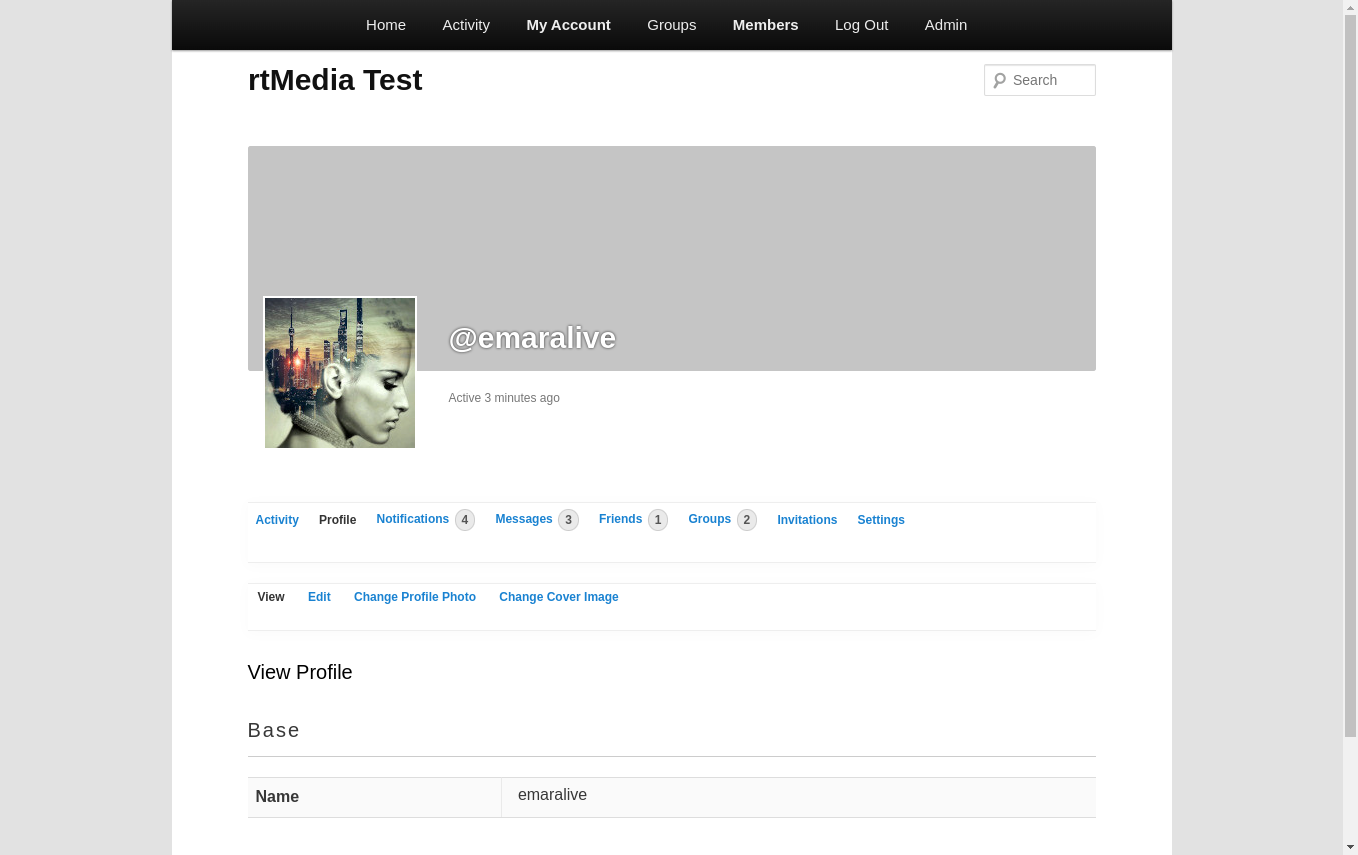
For me, the profile area renders as expected with Goggle Chrome based on the given setup. I also looked at the same page with Windows 10 and Google Chrome (131.0.6778.86 (Official Build) (64-bit), logged-in and logged-out and it looks the same. I don’t have a Mac, so I can’t provide a verification. Also, I’m serving up the profile page from a development site on my LAN.
In reply to: Deprecated Class Errors in BuddyPress 14.3.1Hi,
BuddyPress 14.3.3 Maintenance Release fixes the issue with “deprecated class” error messages.
Please upgrade at your convenience.
In reply to: Deprecated Class Errors in BuddyPress 14.3.1Hi,
Thanks for reporting this issue, I can confirm the error messages for the BP REST API when using the BP Nouveau template pack. Unfortunately, something went wrong with the build and these errors didn’t get caught when testing the build. 14.3.1 was released to fix an issue with WordPress 6.7 (_load_textdomain_just_in_time issue) and another issue (heartbeat) with the BP Legacy template pack.
Looks like we need another build to get this fixed. At the moment, the only recourse is to roll back to 14.2.1 and continue to use WordPress 6.6.2.
My apologies for the inconvenience.
In reply to: BuddyPress Group – Load Newest Activity (Bug)Hi @dreampixel,
BP 15 was taking too long to get in motion, so the BP team decided to incorporate the fix for this within the BP 14.3.1 maintenance release.
Thank you for your patience!
BuddyPress 14.3.3 is available which resolves this topic.
Edited BuddyPress version to 14.3.3, since v14.3.1 contained a regression.
BuddyPress 14.3.3 is available which resolves this topic.
Edited link to reflect the 14.3.3 release.
Hi,
It is difficult tell since the error message is missing backtrace info. Furthermore, I’m not getting that error with:
- WP 6.7
- BP 14.2.1
- PHP 8.3
Just for GP and long story short, I placed the function
bp_get_the_profile_field_id();in functions.php of a child theme in an attempt to replicate the error. Query Monitor revealed the error was caused by the aforementioned function, see the following screenshot: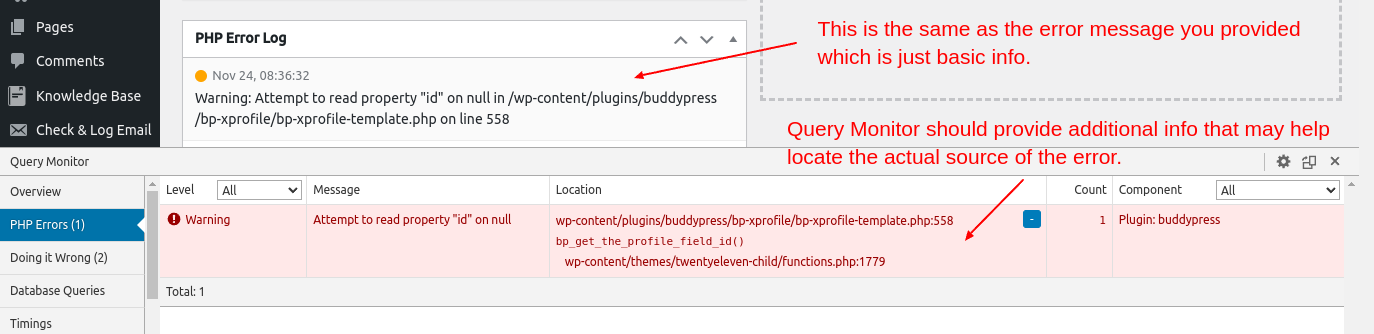
My apologies for the inconvenience, the BP Team is aware of this issue (see Trac ticket #9247) and the tentative plan is to deploy a minor release (14.3.0) for a fix. Unfortunately, at this moment, I don’t have an ETA.
Hi,
My apologies for the inconvenience, the BP Team is aware of this issue (see Trac ticket #9247) and the tentative plan is to deploy a minor release (14.3.0) for a fix. Unfortunately, at this moment, I don’t have an ETA.
In reply to: WordPress Post Updates do not show in ActivityHi @miednr,
I’m not sure why you are having difficulties with a BuddyPress installation on a multisite whereby blog posts are not showing up in the Activity stream when configured to do such.
At the moment, I’m not able to duplicate your situation because blog posts are showing up in my Activity stream in a multisite installation. As can be seen in the following screenshot:
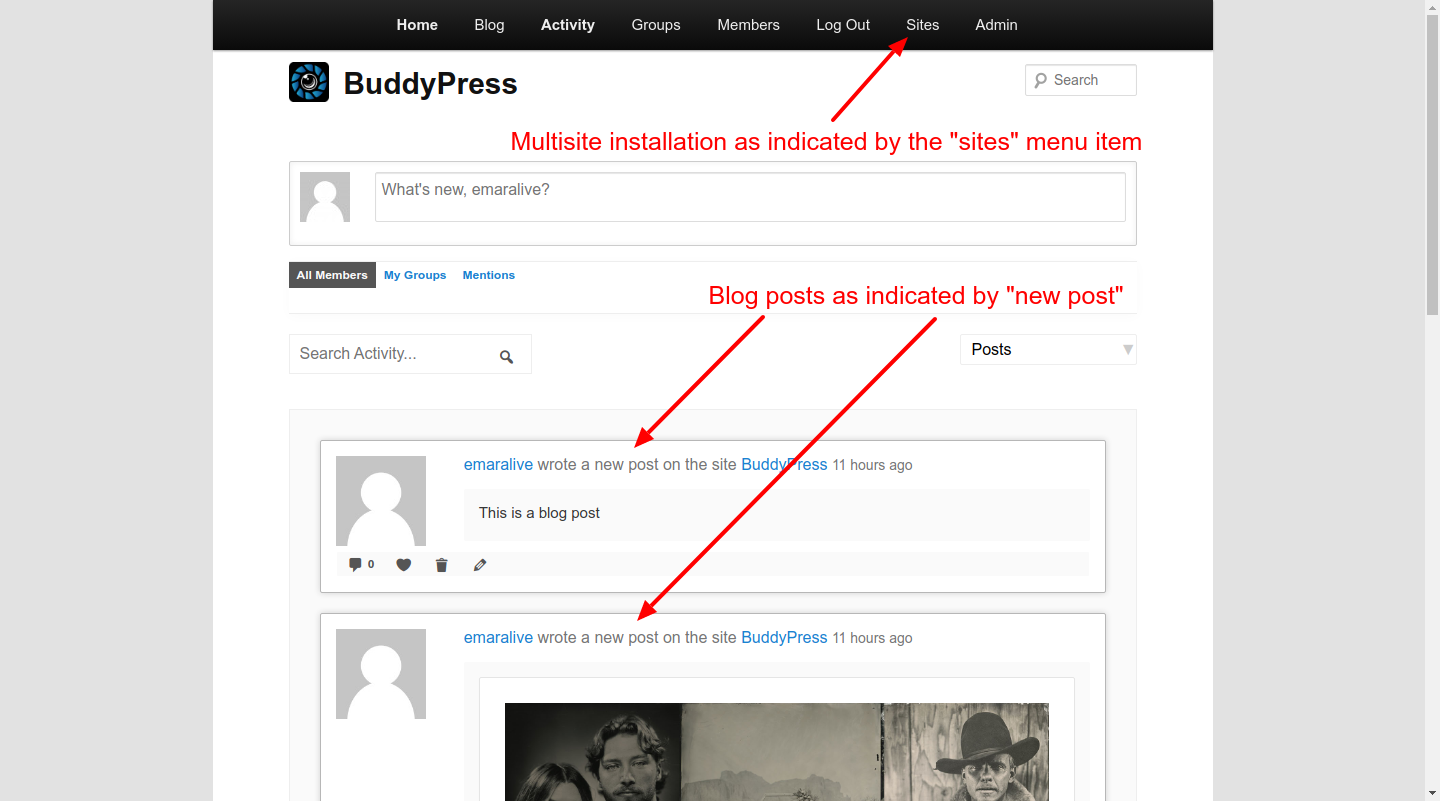
Since blog posts work for me and not for you, we need to figure out the difference(s) in our installations and what I have as the basics are (running on a LAN):
- WordPress 6.7 – multisite with subdirectories
- BuddyPress 14.2.1 – network activated on secondary site
- All BuddyPress components activated
- Default BuddyPress options plus “Post Comments” enabled
- TwentyEleven theme used on secondary site
- Pretty permalinks used on secondary site
Additionally, the installation guide I used is “Case 2” from the following document:
BuddyPress Activation Guide for WordPress Multisite
Maybe if we start on some common ground, we should eventually figure out what may be going astray with your installation, well at least that would be the theory.
In reply to: Using pregmatch with $contentThis question should be asked in the previous topic you created -> Allowing only $content with urls to be posted(Error.
The reason is to provide continuity and context to your original request since this topic is directly related. As it stands, this topic is without context and someone would have to connect the dots between this topic and your previous indicated topic in order to understand with specificity and provide some reasonable response.
So, if I can get you to post what you posted above in the indicated topic, we can continue the conversation and get you closer to your desired goal.
In reply to: Allowing only $content with urls to be posted(Error)Hi @impartialintel,
You seem to be confused between Actions vs Filters. Additionally,
bp_activity_before_saveis clearly an Action as can be seen by the following:do_action_ref_array( 'bp_activity_before_save', array( &$this ) );The reason you are receiving the error message is because the aforementioned action is only passing 1 (one) argument
$this(object) while your callback is expecting 9 (nine) arguments thus, there are “Too few arguments to function bp_require_link_in_activity(), 1 passed” as the error message has indicated.In reply to: BuddyPress Group – Load Newest Activity (Bug)Hi @dreampixel,
So as not to leave you in the dark, the ticket that @imath had referenced was incorporated in the release for BP 15.0. The 1st beta release was previously scheduled for release during the week starting with the 4th of November but, there was a decision to push the 1st beta release by 2 weeks (approx. the 19th of November). The final release will depend on the number of beta and release candidate (RC) are involved.
Since this release schedule (BP 15) is in flux, I’ll try to keep you abreast of dates for this release cycle as they solidify or change.
This topic has been resolved by BuddyPress 14.2.1 Maintenance & Security release.
Trac ticket #9245 was created to resolve the reported issue.
Hi @usercba, thanks for reporting this issue,
I can duplicate this issue by:
- Disabling the Extended Profiles component.
- Visit the Site Health Info tab.
PHP 7.4 provides error warning, i.e., Use of undefined constant, for 2 Constants –
BP_XPROFILE_BASE_GROUP_NAMEandBP_XPROFILE_FULLNAME_FIELD_NAME. With PHP 8.x, operation halts with a fatal error forBP_XPROFILE_BASE_GROUP_NAME.A Trac ticket will be opened to resolve this issue ASAP.
@mike80222, when composing a message, the “@” applies to the
BuddyPress Nouveautemplate pack, i.e, the label reads “Send @Username” as opposed to theBuddyPress Legacytemplate pack that reads “Send To (Username or Friend’s Name)” and I’m not sure why it is not the same for both but, that is current behavior. As to the inconsistency for when suggestions appear or not appear is a puzzle, at the moment.@stephunique, it is possible to filter the suggested usernames by utilizing the
bp_core_get_suggestionsfilter. If you only want to apply this filtering to messages (compose) then your callback needs to be location aware (what/which page/screen is active/loaded), as well.In reply to: Critical Error While Activating BuddyPress FollowUgh, @venutius, I didn’t realize that you had already responded.
In reply to: Critical Error While Activating BuddyPress FollowThe
create_function()was deprecated as of PHP 7.2.0 and was removed in 8.0.0 (see create_function). Since you are using PHP 8.x then, it would be best to not use this plugin until it has had all compatibility issues resolved. On another note, there seems to be some interest by individuals other than the original developers to provide some sort of future support for this plugin (see Would like to take over this plugin, or help – Support forum for BuddyPress Follow).In reply to: Blurry Avatar and Cover Images@whyknott I would have posted this sooner, but I was looking into the relationship between the
BP_AVATAR_ORIGINAL_MAX_WIDTHCONSTANT and cropping preview area, which requires a deeper dig into this process. Neither here nor there, as previously mentioned, I don’t recognize any of the filters that end in ‘_resize_args’ and AFAIK, there are technically 2 (two) but the one I used has the hook name of:bp_after_attachment_avatar_edit_image_parse_argsTo elaborate further, there is a
bp_before_..._parse_argsand abp_after_..._parse_args, FWIW. Moving along, yourcustom_bp_avatar_qualitycallback function should work with this hook, IOW use the following to set the resize quality for Avatar:add_filter( 'bp_after_attachment_avatar_edit_image_parse_args', 'custom_bp_avatar_quality' );This should remove any questions or concerns about the jpg/jpeg compression level, i.e., “quality”. assuming that a value of 100 is used for resize and crop. If the Avatar is still “horribly blurry” or utilizing your new term “lousy” then the issue resides elsewhere, e.g., scaling/zooming the Avatar to something greater than 100%. Since I don’t know your scenario/situation, I’ll stop at this point.
In reply to: Blurry Avatar and Cover Images@vapvarun I’m not recognizing any of the filters containing
resize_argsfrom the posted code snippet, do they ring a bell with you? Also, I think there is some misunderstanding about Avatars and Cover Images, i.e., the process thereof. I’m also thinking instead of all this coding requirement for end users, maybe a configuration screen would help facilitate the setting of the various parameters.Furthermore, we (BP Team) should revisit this process because it is not possible to regenerate the Avatars or Cover Images because, I believe, the original images are deleted. Thoughts?
@whyknott There are no CONSTANTS specific to Group Avatars; meaning an Avatar is an Avatar, regardless if it is used as a User Avatar or a Group Avatar, they just reside in different directories/folders. Additionally, there are 11 CONSTANTS that are associated with Avatar (if my count is accurate), you may find them in a list, along with other BP related CONSTANTS at the following URL:
As to setting the “quality” level for when a resize is triggered, I’ll have to get back to you after I confirm that the filter you should be using for resize ‘quality’, does what it should. However, I need to build a tool to grab the resized image before it gets deleted, so that I can verify the ‘quality” level.
In reply to: Blurry Avatar and Cover ImagesCurrently, there isn’t any updated documentation regarding Avatar’s. There is some outdated info/documentation which is missing some information and is inaccurate with other information. A goal of the BuddyPress Team (BP) is to make documentation available that is current and accurate. That stated this will be on my TODO list to release documentation regarding Avatars, although what I’m covering here would be considered a “developer” handbook chapter.
In the meantime, there are a number of CONSTANTS that define the size (Width x Height) of various aspects of an Avatar, some of which you already know. There are other parameters that specify the “quality” during a resize and/or cropping process and these processes utilize WordPress to accomplish these tasks.
For example the CONSTANT – BP_AVATAR_ORIGINAL_MAX_WIDTH – default set to 450 – triggers a resize of an uploaded image that exceeds the size defined by this CONSTANT at a “quality” level of 90 (default). In your case, the 610 x 610 image is resized to 450 x 450 at a “quality” level of 90. Assuming defaults for thumb (50) and full (150) the image (450 x 450 @ 90) is cropped based on the cropping boundary box to the sizes for thumb and full at a “quality” level of 82 (default). In this example, your 610 x 610 image has undergone 2 processes that has reduced the “quality” twice.
To mitigate the degradation process, you could set BP_AVATAR_ORIGINAL_MAX_WIDTH equal to or greater than 610. The point being this would be the max width size before triggering a resize. This now leaves the cropping process at a “quality” level of 82, of which, you could mitigate by setting the JPEG “quality” level to something greater than 82 (max would be 100), assuming that you are uploading a jpg/jpeg image. This is defined at the following URL:
I’ll assume you know how to create a filter with a callback to return the desired “quality” level. Whether what I’ve outlined will satisfy your requirements for not being “horribly blurry” is yet to be determined because there may be another reason for “horribly blurry” and this just represents another “process of elimination” step/stage.
In reply to: Blurry Avatar and Cover ImagesHi @whyknott,
I’m a bit confused because I’m not sure what you mean by:
I need to change the quality of the images to 100%
Is this in reference to the JPG compression value? Additionally, I find this confusing, as well:
How do I tell BuddyPress to use the full image size and just scale it down to fit the image size vs. using the thumbnail size
As your code snippet indicates, there are 2 (two) image sizes (full & thumb) for Avatars and the default sizes are 50 x 50 for thumb and 150 x 150 for full, both are in pixels. So, if you wish to change the sizes, then you need to change the numeric values to something other than the default values. These are the sizes after a crop of the original image.
To help clarify some things, what is the size (width x height) of the original image that you are using to upload as an Avatar? Let’s start here and see if we can find a solution to your “quality” issue.
In reply to: How to disable the member (directory) page?Hi @jchretien, in lieu of trying to hide the Members directory; have you considered using Member Types as a way to filter which Members are listed within the Members directory (as in admin (list all) vs non-admin (only list Therapists)?


