Forum Replies Created
-
In reply to: Database Errors
@shanebp, OK I’ll ask bbP and GP.
Just to be clear, are you saying that Legacy is not really supported anymore, or that it has problems? Or are you just saying you think Nouveau is nicer? I’ve got things looking just the way I want them with Legacy, and I don’t need any new features (on the site in question). So I wouldn’t have any reason to switch unless there are problems, or support is going away.
Thanks,
Mike
In reply to: BuddyPress 10.0.0 “La Pino’z”Just for the record, I finally did find where my Lightsail permission problem was and I was able to update.
In reply to: PMPRO + Buddypress + bbpress + bbp style packFor what it’s worth, I found my Lightsail permission problem and was able to update to 10.0.0. The little cancel icon still doesn’t work as far as I can tell. I’ve tried to search in Trac to see if this is a known bug, but I haven’t been able to find it. Maybe my ignorance about how to search Trac is mostly the issue here 🙂
In reply to: BuddyPress 10.0.0 “La Pino’z”I realize that 10.0.0 does not claim to be compatible with WP 5.9, so this is just an FYI I guess …
I haven’t been able to update to 10.0.0 on WP 5.9 running on AWS lightsail. I get “Update failed: The update cannot be installed because we will be unable to copy some files. This is usually due to inconsistent file permissions.”
Lightsail’s permission structure is different than (for example) siteground and bluehost, but I don’t *see* any permission problems and other plugins are updating OK (and BP has never failed in the past).
Anything specific I could look for?
In reply to: PMPRO + Buddypress + bbpress + bbp style packI just tried updating to 10 on a test site (on AWS Lightsail) and I got:
Update failed: The update cannot be installed because we will be unable to copy some files. This is usually due to inconsistent file permissions.
In the php log:
PHP Warning: chmod(): Operation not permitted in /opt/bitnami/wordpress/wp-admin/includes/class-wp-filesystem-direct.php on line 173
(I got five of those) I don’t have time to look into this right now. I generally don’t update plugins when the first of a major version comes up. But the bottom line is that I wasn’t able to try it.
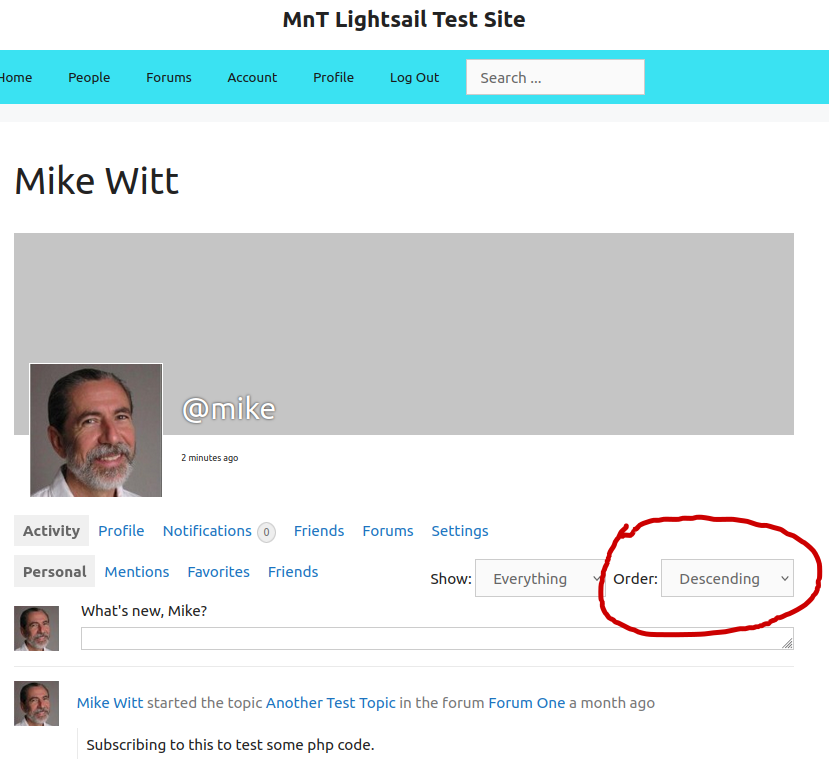
In reply to: PMPRO + Buddypress + bbpress + bbp style packIn reply to: Adding a second control to Member’s activity loopOK, here’s a picture:
https://mikeandtina.org/wp-content/uploads/2022/01/Profile.pngIn reply to: Display average response time for private messagesIf I understand what you’re asking, you should be able to add profile fields in the WordPress Dashboard under Users->Profile Fields. As long as you set “Visibility” to Everyone, then I believe that Buddypress will display those fields in the person’s profile.
In reply to: Adding a second control to Member’s activity loopIt adds option for ascending or descending order on the buddypress profile activity tab.
I don’t know of a way to (easily) post a screen shot here, but if you email me I’ll send you one.
My email is in my profile here.In reply to: Adding a second control to Member’s activity loopI finally got a lead on how to do this from the BuddyDev.com forum:
https://buddydev.com/support/forums/topic/adding-a-second-control-to-members-activity-loop/I actually ended up using a combination of filters similar to the ones at the bottom of that post, along with an override of buddypress/members/single/activity.php.
I can supply more details, in the unlikely event that anyone actually reads this and wants them 🙂
In reply to: Overriding number of Friends in the ProfileOK, well it appears that there is actually no BP template that can be overridden for this situation. I ended up doing it by filtering the code that creates the Friends Tab in the profile. Here’s what I ended up with. If anybody sees anything wrong here, let me know. All this does is create the same tab (a list item) that BP does, except I don’t include the count.
function filter_bp_friends_tab( $args ) {
    $new_args = '<li id="friends-personal-li" >'
        . '<a id="user-friends" '
        . 'href="' . bp_get_displayed_user_link() . 'friends/">'
        . 'Friends</a></li>';
    return( $new_args );
}
add_filter('bp_get_displayed_user_nav_friends', 'filter_bp_friends_tab');
note that the functions like
bp_get_displayed_user_link()are defined in the buddypress filebp-members/bp-members-template.phpIn reply to: Member Loop only MemberPress membersFor what it’s worth, I’ve *almost* gotten all this to work, but have one more slight problem with the profile. I actually just posted about it here:
But then I just remembered this thread, and I thought I would put this pointer in, just in case anyone else has the same issue.
In reply to: Member Loop only MemberPress membersThank you for posting this. I’m planning to use it.
Could you possibly explain what the “do not exclude in admin” test is doing?Thanks so much!
-Mike
In reply to: PMPRO + Buddypress + bbpress + bbp style packI have the same issue also, and have for a while. I’m using BuddyPress and bbPress. I also have a bit of custom code, but I don’t *think* it should affect the [x]. I see that no one appears to be getting an answer about this, but I just though I’d chime in 🙂
In reply to: Email notification settings. Where in database.We seem to be talking past each other. I’m looking in the WP usermeta table. I’m having trouble identifying the buddypress entries which control notifications. I’m not talking about a table that starts with bp_ I’m talking about entries in usermeta with a meta_key that starts with bp_ (sorry, I guess I wasn’t clear about that).
Maybe looking for meta_keys with bp_ is not the right way to find what I’m after. But if there is any documentation that describes how notification status is stored I would just like to see it. If this is a case where I have to simply read the code, so be it. I was just hoping for a quick pointer to exactly where I could look in the database to find out what BP notifications a user has turned on.
Again, sorry if I didn’t make that clear.
In reply to: Email notification settings. Where in database.Is there any documentation on the details? I see a number of things that start with bp_ but nothing that is obviously a flag to tell whether various notifications are turned on.
In reply to: Filter to change BP from addressHi @shanebp,
Am I missing something? I would have thought that would change the from address of all outgoing mail, not just notifications from BuddyPress?
I can’t really test $original_email_address because BP is not using a unique from address to start with.
But perhaps I’m confused about something?
-Mike
In reply to: Filter to change BP from addressI believe I should have put this in the How To and Troubleshooting forum. But after posting it there, I realize that I can’t delete this post. If one of the admins could delete this duplicate, that would be great.
In reply to: BuddyPress 7.2.1 Security ReleaseOK, thanks @imath.
In reply to: BuddyPress 7.2.1 Security ReleaseThe buddypress rest api is not installed automatically (like the wordpress api) right?
So if I haven’t specifically installed the BP REST API then I can just update normally in my next scheduled site maintenance, correct? Just checking.
In reply to: Logged in but can’t modify profileI see something like this also. If I click on “Howdy, Mike Witt” or my name in the drop down, it tries to take me to wp-admin/profile.php. But if I go further down in the drop down to the “left opening” menus, those work.
I took a quick look in track, but anything I can think of to search on gets too many hits to wade through. I wonder if anyone who knows more could comment on whether this is a known bug in the BP forum or if it means there’s something odd about my account.
In reply to: BuddyPress 2020 Survey is now openWill the results of this be posted?
In reply to: Remove the “General” tab in profile settingsThose are both good suggestions. Thanks!
I’ll have to see what the boss wants to do.In reply to: Advice regarding profile photo and change-avatar.phpGreat. I didn’t realize that (about translations). That sounds very useful. Thanks!!!