Forum Replies Created
-
In reply to: 404 on all forum pages
Make sure there’s a /bbpress/ folder in /wp-content/plugins/buddypress/bp-forums/.
In reply to: Install BP in a Sub-BlogHey gang,
For those installing BP in a secondary blog, does the message autocomplete username feature work for you?
https://trac.buddypress.org/ticket/1812
It doesn’t work for me. Just making sure if someone else can duplicate this issue.
In reply to: Buddypress theme showing up blankYou can access this by logging into the WPMU admin area and navigating to “Site Admin > Themes”. Enable the BuddyPress default theme, then head back to “Appearance > Themes” to activate it.
Did you try this?
In reply to: Buddypress theme showing up blankAvenue K9 is only compatible with the BP 1.1 series.
I’m quite sure it hasn’t been updated for 1.2 yet.
—
The BuddyPress default theme for v1.2 is located under /wp-content/plugins/buddypress/bp-themes/bp-default/.
You don’t have to move this directory anywhere.
Also make sure to enable the BP Default theme under the WPMU admin themes page.
You can access this by logging into the WPMU admin area and navigating to “Site Admin > Themes”. Enable the BuddyPress default theme, then head back to “Appearance > Themes” to activate it.
Let us know if you encounter any errors.
In reply to: Buddypress theme showing up blankDid you follow the instructions properly?
https://buddypress.org/blog/news/buddypress-1-2-beta/
I then switched the theme to the buddypress default theme (making sure it was activated in both places)
The part I highlighted in bold is odd to me.
What did you do exactly?
In reply to: Importing WP eXtended RSS XML file from WP to BPI’d go with windhamdavid’s method, since I did use the guide that Symm2112 posted before.
On that post’s comments, I list a potential problem with categories and custom taxonomies that you might encounter.
In reply to: Install BP in a Sub-BlogI guess I win the prize!

Added instructions to keep old user / group avatars:
https://codex.buddypress.org/how-to-guides/install-buddypress-on-a-secondary-blog/
Michael (or someone else), let me know if these instructions work for you.
I have a feeling the absolute path is going to throw some people off… feel free to edit the page!
In reply to: Long My Blogs and Blog Author Dropdown listI actually remove the Blog Authors menu, because we duplicate the author’s section either in the sidebar or on another page.
Here’s the rationale behind disabling the welcome email as quoted in bp-core-activation.php:
* Since the user now chooses their password, sending it over clear-text to an email address is no longer necessary. It’s also a terrible idea security wise.
I’m going to sway a little to Peter’s side and say that BP should leave this option to the site admins. I actually think there should be more options for the administrator on a fresh install.
Re #1:
Sorry I forget that you need to hook the filter to an action.
Try this:
function snark_reenable_welcome_email() {

remove_filter( 'wpmu_welcome_user_notification', 'bp_core_disable_welcome_email' );

}

add_action('init', 'snark_reenable_welcome_email');
The file is /wp-content/plugins/bp-custom.php
1) By default, an email isn’t sent to the user because the user password is sent via plain text (not a good thing security-wise).
You can re-enable this welcome email by adding the following code to /wp-content/plugins/bp-custom.php (create this file if you don’t have one – be sure to add PHP open and closing tags as well):
remove_filter( 'wpmu_welcome_user_notification', 'bp_core_disable_welcome_email' );2) Please post the avatar bug on BuddyPress Trac:
https://trac.buddypress.org/newticket
Login with the same credentials you use on buddypress.org.
3) WP-reCAPTCHA is not compatible with BuddyPress.
BuddyPress uses a different registration mechanism.
You might want to try one of these solutions listed here:
http://www.bp-tricks.com/tips_and_tricks/stopping-the-sploggers/
In reply to: Plugin Release: Group Activity Email NotificationsCool!

Glad to see the plugin!
I might omit step #2 in your instructions though, since it isn’t mandatory!
In reply to: Does somebody have a sample: bp-custom.phpHere you go!
<?php

//CUSTOM CODE FOR BUDDYPRESS

//PUT YOUR CODE HERE

?>
What can you put in bp-custom.php?
Lots of things!
Check out this codex article:
https://codex.buddypress.org/how-to-guides/changing-internal-configuration-settings/
In reply to: Color CodesIn reply to: Install BP in a Sub-BlogJust figured out we also need to put up instructions to migrate user and group avatars.
If I don’t get to it first, whomever puts up the instructions wins a prize!*
*The prize is the neat satisfaction you get for helping the BP community
In reply to: BuddyPress Classifieds Component 1-beta released !Setup instructions are interesting… requires you to create a sub blog.
Will give this a go a little later.
In reply to: BP 1.2 Accordion UI for compact sidebarWhat in particular are you having troubles with?
Most of the code you’re looking for can be done through bp-THECOMPONENT-templatetags.php or through a BP loop.
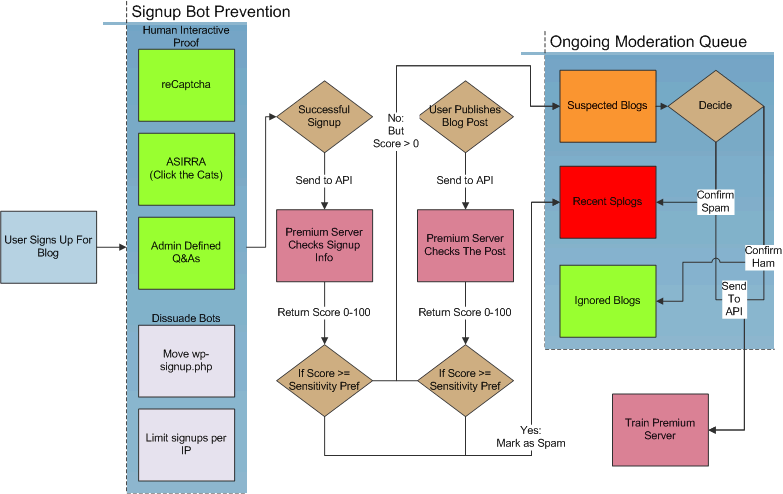
In reply to: Found this all new ‘Anti-Splog_ anti -spam for BPI’d say the noteworthy features for Anti-Splog are their API and limiting number of signups per IP per 24 hours.
I don’t really like the “changing signup page location every 24 hours” feature, although I understand the rationale, I’d prefer a permanent location for indexing reasons.
The rest of it is doable.
To make it seem like their plugin is uber-spectacular, they’ve created a flowchart :p
In reply to: BP Groupblog Error – Call to undefined functionBP will never merge into WPMU / WP.
That would be bloat overkill!
However, the BP dev team does contribute code back to the WP core (bugs, patches and such).
In reply to: What happened to “Add Prebuilt Field”It’s not in BP 1.2, and there’s no plugin I’m aware of that can add x-profile fields <i>en mass</i>.
Maybe in BP 1.3? Unless you want to use BP 1.0 and then upgrade to BP 1.2
In reply to: Hiding Buddypress from the View Source?Exactly designodyssey! If someone wanted to find out what you were using, they would find out!
Read this article on bp-tricks.com:
http://www.bp-tricks.com/tips_and_tricks/stopping-the-sploggers/
There’s a ton of methods listed there to stop spam.
In reply to: new blog posts do not show up in activity streamMake sure you have the blog tracking component turned on in the BuddyPress admin area.
It should be under “BuddyPress > Component Setup” in the WPMU admin area.
Ahh ok, the second link is a bug!
I’ll report this.
Thanks anointed!
[EDIT]
Ticket created:
Cool! Glad you fixed your problem
Sometimes when you look at the monitor too long, you get tunnel-vision!