Forum Replies Created
-
In reply to: 2 Questions – Files & Redirection
1. /wp-content/plugins/buddypress/bp-themes/bp-default/
You shouldn’t need to touch those files, instead create a child theme: https://codex.buddypress.org/theme-development/building-a-buddypress-child-theme/
2. https://buddypress.org/community/groups/welcome-pack/
https://github.com/sbrajesh/bp-redirect-to-profile/blob/master/bp-redirect-to-profile.php
http://wordpress.stackexchange.com/questions/29545/login-redirect-to-certain-bp-profile-page
?
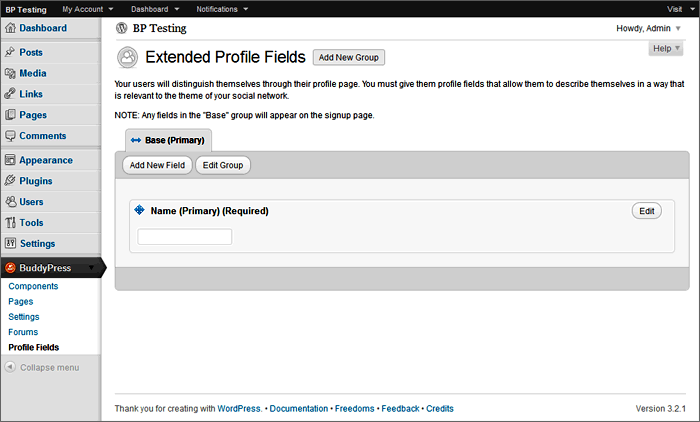
In reply to: Specify Friend, Family or Colleagueadd new field:
 In reply to: Dumb Newb question!
I’ve just done it in a non bp child theme – wrapping the new css in extra brackets for @media in style.css – ie:
`
@ media (max-width: 520px) {
.my-class {
float: none;
width:100%;
}
.whatever-class {
float: none;
width:100%;
}
}
`
Note the two sets of brackets…Please Note: There should not be a space between `@` and `media` but as someone has used that as a nickname it turns it automatically into a mention and I don’t know if it’s possible to disable that
It is probably the https://buddypress.trac.wordpress.org/browser/tags/1.5.5/bp-themes/bp-default/_inc/css/responsive.css stylesheet kicking in.
You should be able to use @media in your child theme stylesheet…..
In reply to: Error after installThe above error message normally means that wordpress only has 32 mb of memory available and it needs more.
There are various technques for increasing memory available but some hosts don’t allow those methods to be used and require a different hosting plan.
If that isn’t practical it is possible to run wordpress with less memory if you cut back on plugins, use a theme that doesn’t eat up memory, and only upload very small pictures etc…. There are various plugins around that can help you work out what is eating ram
I used to find it hard to run wordpress with 32 meg of memory, let alone buddypress…
1024 bytes in a KB,
1024KB in a MB
Thus: 1024*1024*32 = 33554432 bytes in 32MBFatal error: Allowed memory size is totally different to Fatal error: Call to undefined function
You only have 32 mb of memory available and wordpress needs more. There are various technques for increasing memory available but some hosts don’t allow those methods to be used and require a different hosting plan.
If that isn’t practical it is possible to run wordpress with less memory if you cut back on plugins, use a theme that doesn’t eat up memory, and only upload very small pictures…. There are various plugins around that can help you work out what is eating ram
I used to find it hard to run wordpress with 32 meg of memory, let alone buddypress ( fortunately my host upgraded me ).
buddypress-links would be the plugin directory/folder not a file. In that message the file is bp-links-core.php.
Is your error message exactly the same? If you quote it, please use backticks ( “` ) so it doesn’t get mangled by this website….
To get back into the site’s admin it is sometimes necessary to disable all plugins but it would be better, normally, to disable one at a time or based on your error message….
In reply to: Avatar problem on buddypress.orgYou can change your avatar here using http://gravatar.com/
In reply to: [Resolved] Registation ’not available’WordPress Admin Settings > General > Membership – select Anyone can register ?
In reply to: Adding a “New Topic” buttonbuddypress-links doesn’t appear to be compatible with bp versions 1.5+
Rename or delete the folder (via ftp or control panel) to de-activate the plugin.
See possible fix?
In reply to: [RESOLVED]Hide pages from non-membersYou need to create both menus. Without it wordpress has it’s own default menu which you have been relying on
A good guide for understanding wordpress menus is http://justintadlock.com/archives/2010/06/01/goodbye-headaches-hello-menus
In reply to: [RESOLVED]Hide pages from non-membersYes!
Which menu is served depends on whether they are logged in or not and that is the point to decide…
and please use backticks ` ` ` when quoting code
In reply to: [RESOLVED]Hide pages from non-membersYou should make a child of bp-default and backup files and db just in case…
You don’t add or remove any pages from the code. The point is that it works from the built in wordpress default menu system. ( https://codex.wordpress.org/Navigation_Menus )
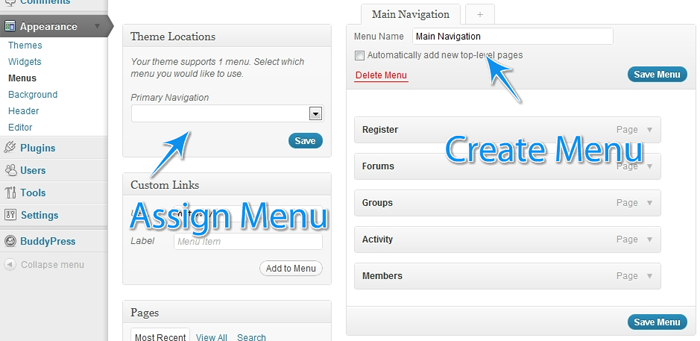
To get the second menu to appear – In your child theme’s functions.php file add:
`function register_my_menus() {
register_nav_menus( array(
‘primary’ => __( ‘Header Navigation’ ),
‘secondary-menu’ => __( ‘Alternative Menu’ ),
‘another-menu’ => __( ‘Another Menu’ )
) );
}
add_action( ‘init’, ‘register_my_menus’ );
`In reply to: [RESOLVED]Hide pages from non-membersYou shouldn’t touch wp or bp core files.
What theme are you using?
In your child theme’s header.php file you replace the `wp_nav_menu` section with either of the above ( not both ).
Then you can define two menus on appearance > menus ( primary and secondary-menu on the above example ) Set one for logged in users and one for everyone else.
In reply to: [RESOLVED]Hide pages from non-membersOne way of doing that is by serving different menus depending whether someone is logged in or not such as
`
<?php
// https://codex.wordpress.org/Function_Reference/wp_get_current_user
$current_user = wp_get_current_user();
if ( 0 == $current_user->ID ) {
wp_nav_menu( array( ‘container’ => false, ‘menu_id’ => ‘nav’, ‘theme_location’ => ‘secondary-menu’, ‘fallback_cb’ => ” ) );
// Not logged in.
} else {
wp_nav_menu( array( ‘container’ => false, ‘menu_id’ => ‘nav’, ‘theme_location’ => ‘primary’, ‘fallback_cb’ => ” ) );
// Logged in.
}
?>
`
or another approach:
`
<?php
if ( is_user_logged_in() ) {
wp_nav_menu( array( ‘container’ => false, ‘menu_id’ => ‘nav’, ‘theme_location’ => ‘primary’, ‘fallback_cb’ => ” ) );
} else {
wp_nav_menu( array( ‘container’ => false, ‘menu_id’ => ‘nav’, ‘theme_location’ => ‘secondary-menu’, ‘fallback_cb’ => ” ) );
}
?>
`
replacing the `wp_nav_menu` bit in the ( child ) theme’s header.php file. It may need adapting depending on theme etc. Remember to make backups before editing!Then use the walled garden or similar techniques to redirect users if they try to reach the page directly…
In reply to: The Register Button goes to Home page?I am also http://testbp.org/members/aces/ You should be able to pm me there, although I haven’t tested it with pm before and I’m not sure I can help…..
Did you use an auto installer provided by your host to install wordpress and/or buddypress etc? Autoinstallers have been the cause of many problems in the past.
In reply to: Automatic linking in profile fields


