Forum Replies Created
-
In reply to: BP Conflict with WP Example Content plugin
You could post in WP.org forums for that plugin as to why it’s causing that issue with BuddyPress. In the meantime, if you need sample content for your site, you could download test data which the WordPress Theme Review Team use to check out themes submitted to the WP Theme Repository https://codex.wordpress.org/Theme_Unit_Test
In reply to: Problem with THIS site?? (buddypress.org)As far as I know, changes are being done in the backend of BuddyPress.org. No timeline for completion, as people responsible are working hard on BuddyPress plugin bug fixes and compatibility with next version of bbPress and with upcoming WP 3.3 which is top priority. Thank you for your patience.
In reply to: Where are my sub-menus? – Graphene Theme@junglejinge you need to wrap your code within backticks (`) the symbol between the parentheses for short blocks of code. But for large blocks like the page.php source code, use pastebin.com as aces mentioned above
I gathered additional information from WP.org forums
https://wordpress.org/support/topic/where-have-my-sub-menus-gone?replies=3
https://wordpress.org/support/topic/buddypress-theme-knocks-out-my-navigation-structure?replies=2BP compatibility process for Graphene Theme
A. After you activate the Graphene theme, install and activate BP Template Pack
B. Go to Appearance > BP Compatibility and go through the process till you click Finish. Do not disable the Template Pack’s CSs nor JS. You’ll see this in frontend [before you make the changes, the regular page and the component page]


It’s totally unlike what you have currently at http://www.meetinbradford.org/Note: this theme has many options which may or may not work with the modifications placed below. In case the following exercise does not work, please contact the graphene theme developer and refer him/her to this post.
C. Download the 6 BP folders which were transferred to your graphene theme folder in server down to your computer hard drive. Because of your theme’s HTML structure, you will need to use the first method for fixing alignment on 16 files within the folders you downloaded. Those 16 files listed here https://codex.buddypress.org/theme-development/wordpress-to-buddypress-theme/#tplfiles
Starting with activity/index.php open it up with text editor
At the very top, replace:
``with
``At the bottom of same activity/index.php file, replace:
``
with:
`
`Save file. Then do this for the remaining 15 files listed in link except for registration/register.php where you do the same for the top portion of the file but at the bottom of the file, replace:
`
jQuery(document).ready( function() {
if ( jQuery(‘div#blog-details’).length && !jQuery(‘div#blog-details’).hasClass(‘show’) )
jQuery(‘div#blog-details’).toggle();
jQuery( ‘input#signup_with_blog’ ).click( function() {
jQuery(‘div#blog-details’).fadeOut().toggle();
});
});`
with:
`
jQuery(document).ready( function() {
if ( jQuery(‘div#blog-details’).length && !jQuery(‘div#blog-details’).hasClass(‘show’) )
jQuery(‘div#blog-details’).toggle();jQuery( ‘input#signup_with_blog’ ).click( function() {
jQuery(‘div#blog-details’).fadeOut().toggle();
});
});`
Save files and upload the six folders with modified template files to your theme folder in server.
D. Styling modifications – you’d most probably want to tweak some styles that come with bp.css. Check out style.css mods used in twenty theme as guide https://codex.buddypress.org/theme-development/theme-dev-bp-template-pack-walkthrough-twenty-ten-bp-1-5/3/
In reply to: Respond to email notifications by emailSomething like that being worked on by @r-a-y I recall.
In reply to: Couple questions before I install1. Make Twenty Eleven compatible with BuddyPress https://codex.buddypress.org/theme-development/theme-dev-bp-template-pack-walkthrough-twenty-eleven-bp-1-5/
2. In many cases, WP plugins work with BuddyPress.
Before installing it into your active/busy WP site, I recommend ichecking out BP in a test install preferably with the same server environment as your current WP install. e.g. in a physical subdomain in same server.
In reply to: Pages don’t show anythingDeactivate BuddyPress.
1. Please check requirements https://codex.buddypress.org/getting-started/before-installing/#system-server
2. Make sure that you have WP install working with pretty permalinks https://codex.buddypress.org/getting-started/before-installing/#wp-configuration
3. Then activate BuddyPressEDIT – for Windows hosting issues
https://codex.buddypress.org/developer-docs/iis7-web-config/
https://buddypress.org/community/groups/how-to-and-troubleshooting/forum/topic/new-install-on-iis-server/In reply to: MoviePress and BuddypressMake sure you totally deleted BuddyPress https://codex.buddypress.org/buddypress-site-administration/deleting-buddypress/
In reply to: Preview of Pages and Posts not working with BP 1.5.1Re-run Settings > Permalinks. Check .htaccess file in root of WP installation – was it generated at all? what’s in your file?
In reply to: Where to put my translations, or how to activate it?I would place mo and po in wp-content/plugins/buddypress-activity-plus/languages folder
In reply to: People Registering ~ Having IssuesIf you’re using a WP theme, you need to make it compatible with BuddyPress by installing, activating and going through the compatibility process via the BuddyPress Template Pack plugin. If this is the route you took, double-check in server that the register folder with 2 files within was transferred into your WP theme folder wp-content/themes/yourWPtheme/register
If you’re using the bp-default theme or a child theme of the bp-default theme, then double-check that the register folder with two files within is present in wp-content/plugins/buddypress/bp-themes/bp-default/register
Something like this http://buddydev.com/buddypress/blog-categories-for-groups-plugin/
duplicate post of https://buddypress.org/community/groups/third-party-components-plugins/forum/topic/looking-for-a-group-category-plugin-with-specific-needs-1/.
Closing this — mercime.In reply to: [Resolved] Theme Compatibility Details – Memo Theme== However, in the step 3 of the compatibility process it only listed 11 files to change. ==
True, but the BP Template Pack plugin will be updated to list 16 files which need to be changed per link above https://codex.buddypress.org/theme-development/wordpress-to-buddypress-theme/#tplfiles== There are still some outstanding formatting issues. ==
True. I have updated code above in two areas above which I have placed [Updated …] info.
1. hentry-content should be entry-content
2. whole block of what to be replaced in bottom of registration/register.phpI have to ask whether you changed style in bp.css of the BP Template Pack plugin because the `div#item-header-content` is missing the `margin-left: 170px; ` and you need to bring that back.
In addition, you need to tweak some styles in your WP theme’s style.css file. Check out the additional tweaks on the BP components divs as a guide https://codex.buddypress.org/theme-development/theme-dev-bp-template-pack-walkthrough-twenty-ten-bp-1-5/3/
In reply to: Google reader and sitewide activityThe blog’s recent blog posts feed http://socraticmama.com/feed/
In reply to: [Resolved] Adventure Journal themeYou’re welcome.
== Which file do I edit to get the BP Album profile page to display my style? ==
Not sure. Please post at https://buddypress.org/community/groups/bp-album/forum/ You can refer them to this post if needed.http://www.moe.co.uk/2009/08/17/php-running-under-mod_fcgid-read-data-timeout-in-40-seconds-on-plesk/
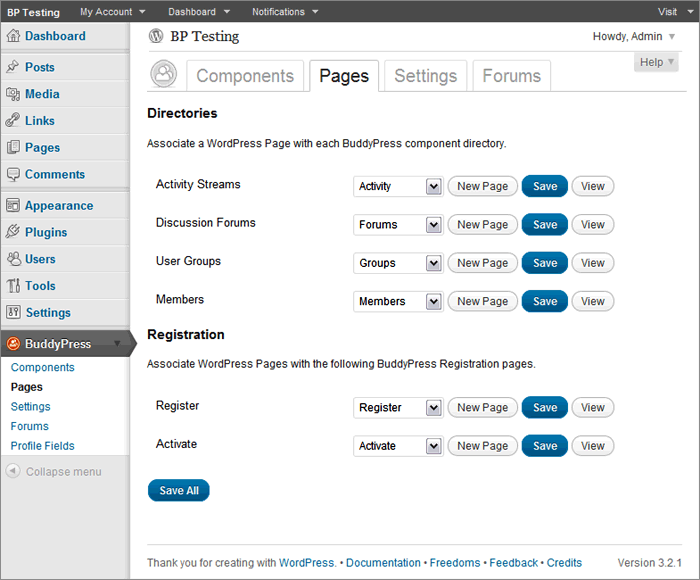
Btw, where are you hosted?In reply to: lost in buddy press== … a page with directories and registration that have drop down menus to create new pages to associate or pick an existing one. I’m not sure what to do here or if I made a new one what to call it? ==
If you had a default installation in BP 1.5 before upgrading to BP 1.5 and did not create Pages which have slugs like that of the BuddyPress components, then choose the corresponding Page in dropdown per BuddyPress component if it’s there.
 In reply to: How to fix this?
@welvincudas you need to complete Step 3 of the BP Template Pack compatibility process. If you need assistance, open up your theme’s page.php file, select all and copy, and paste onto pastebin.com. Click submit and post the generated URL here.
Illustrated guide to setting up BUddyPress group forums and/or sitewide forums coming soon.
In reply to: buddypress google analytics pluginclosing duplicate of https://buddypress.org/community/groups/third-party-components-plugins/forum/topic/buddypress-google-analytics-plugin-1/ — mercime
In reply to: [Resolved] Adventure Journal themeYou’d have to use the first method of fixing alignment in the BP Compatibility process to make your WP theme compatible with BuddyPress. The first method involves changing HTML structure in the 16 files as listed here https://codex.buddypress.org/theme-development/wordpress-to-buddypress-theme/#tplfiles
A. Download the six BP template folders which were transferred to your adventure-journal theme in server down to your computer hard drive.
** We’ll explore if the adventure-specific template tags will work within BP. It will spout errors if it’s not working, so we’ll have to delete such template tags. But if no errors show up, it’s good to go.
B. Starting with activity/index.php, open it up and at the top of the file, replace:
``with
`
<div class="content" >
<div id="col-main" role="main" style="”>
<div id="main-content" >`C, At the very bottom of the same file, replace:
``
with
`
`D. Save file and do the same to the remaining 15 files per list linked above except for registration/register.php where at the bottom of the file,
replace:
`
jQuery(document).ready( function() {
if ( jQuery(‘div#blog-details’).length && !jQuery(‘div#blog-details’).hasClass(‘show’) )
jQuery(‘div#blog-details’).toggle();
jQuery( ‘input#signup_with_blog’ ).click( function() {
jQuery(‘div#blog-details’).fadeOut().toggle();
});
});`
with
`
jQuery(document).ready( function() {
if ( jQuery(‘div#blog-details’).length && !jQuery(‘div#blog-details’).hasClass(‘show’) )
jQuery(‘div#blog-details’).toggle();
jQuery( ‘input#signup_with_blog’ ).click( function() {
jQuery(‘div#blog-details’).fadeOut().toggle();
});
});`
E, Upload the six folders to your server wp-content/themes/adventure-journal folder
In reply to: Friendship Request ErrorChange to the BuddyPress default theme and see if same behavior applies
In reply to: [Resolved] Missing Join Group button in list viewstarts with bp_group_join_button https://buddypress.trac.wordpress.org/browser/tags/1.5.1/bp-groups/bp-groups-template.php#L1507
shows up via bp_directory_groups_actions in https://buddypress.trac.wordpress.org/browser/tags/1.5.1/bp-themes/bp-default/groups/groups-loop.php#L57
@mustangus default behavior is displaying the newest/latest posts on any topic first in either the
group forums e.g. http://testbp.org/forums
or the sitewide forums e.g. http://testbp.org/discussion/Which of the two kinds are you referring to?
Site URL? Did you develop the customized BP theme or did you download it elsewhere? Some customized BP or BP-default child themes make it more complicated to change the layout while others are much easier to implement new layout.


