Forum Replies Created
-
In reply to: Force strong password in Registration
If you need to force strong password, you can simply disable the checkbox that is allowing the use of weak passwords, eg:
function no_weak_password_checkbox() { wp_add_inline_script( 'bp-nouveau', ' ( function() { document.querySelector( \'.pw-weak\').remove(); } )(); '); } add_action( 'bp_enqueue_scripts', 'no_weak_password_checkbox' );Hi,
I see the password field is causing you some issues as you posted various times about it into this support forum. If you want to use the old way of setting the password and not the current WP way of doing so, here’s a gist about it: https://gist.github.com/imath/f50a3880159ed8267726684ff0e62398
In reply to: BuddyPress 7.1.0Do you have a drop in or a a must use plugin to cache your site ? It’s usually cache plugins that might do some JS minification.
In reply to: Group admin cannot send invites on multilingual WPHi,
It looks like
bp_get_current_group_id()doesn’t manage to guess the Group ID out of the Group’s URL when using Ajax. That’s probably because your plugin is adding extra characters into the URL like the short language name.You could try filtering
bp_uriwhen doing Ajax to replace these extra characters with nothing.eg:
function myshanai_wpml_ajax_fix( $path ) {
   if ( wp_doing_ajax() ) {
      $extracharacters = ''; // replace with the language short name.
      $path = str_replace( $extracharacters, '', $path );
   }

   return $path;
}
add_filter( 'bp_uri', 'myshanai_wpml_ajax_fix' );
In reply to: BuddyPress 7.1.0@litbyu I believe you have an active plugin that is minimizing JavaScript templates instead of only minimizing JavaScript scripts.
In reply to: BuddyPress 7.1.0Hi @djsteveb
I understand you might be disappointed to have troubles with the avatar feature, but this trouble is not a generic one, it’s specific to your WordPress configuration. Saying the following is very wrong:
The edit avatar / upload profile pic is still broken for new installs.
I can confirm everything works as expected.
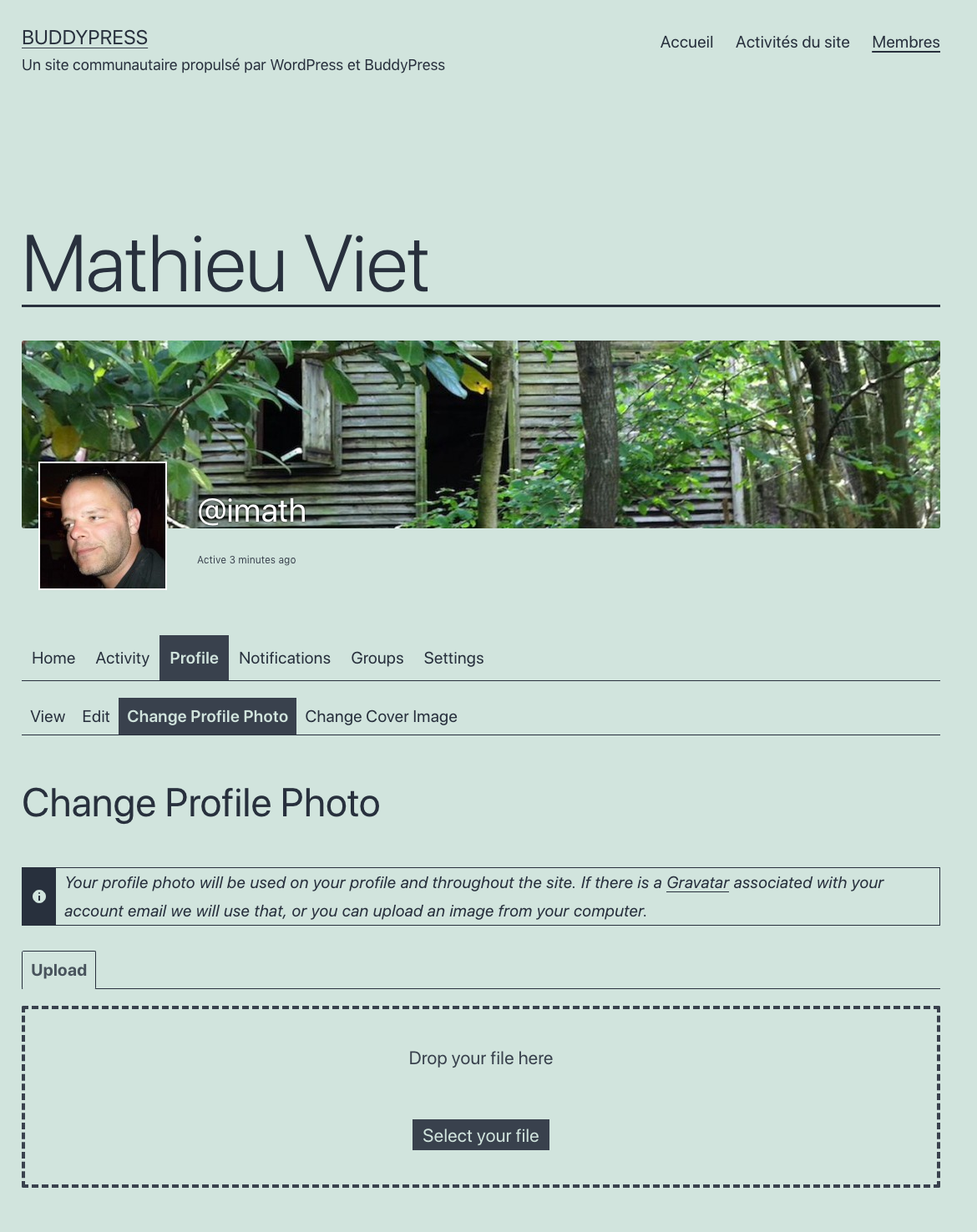
Since BuddyPress 6.0, users can manage their local avatars (hosted on the community website) whether or not the xProfile component is active. See this developer note for more information about the changes we made in 6.0.
Below is a screenshot I just made having the xProfile component active :
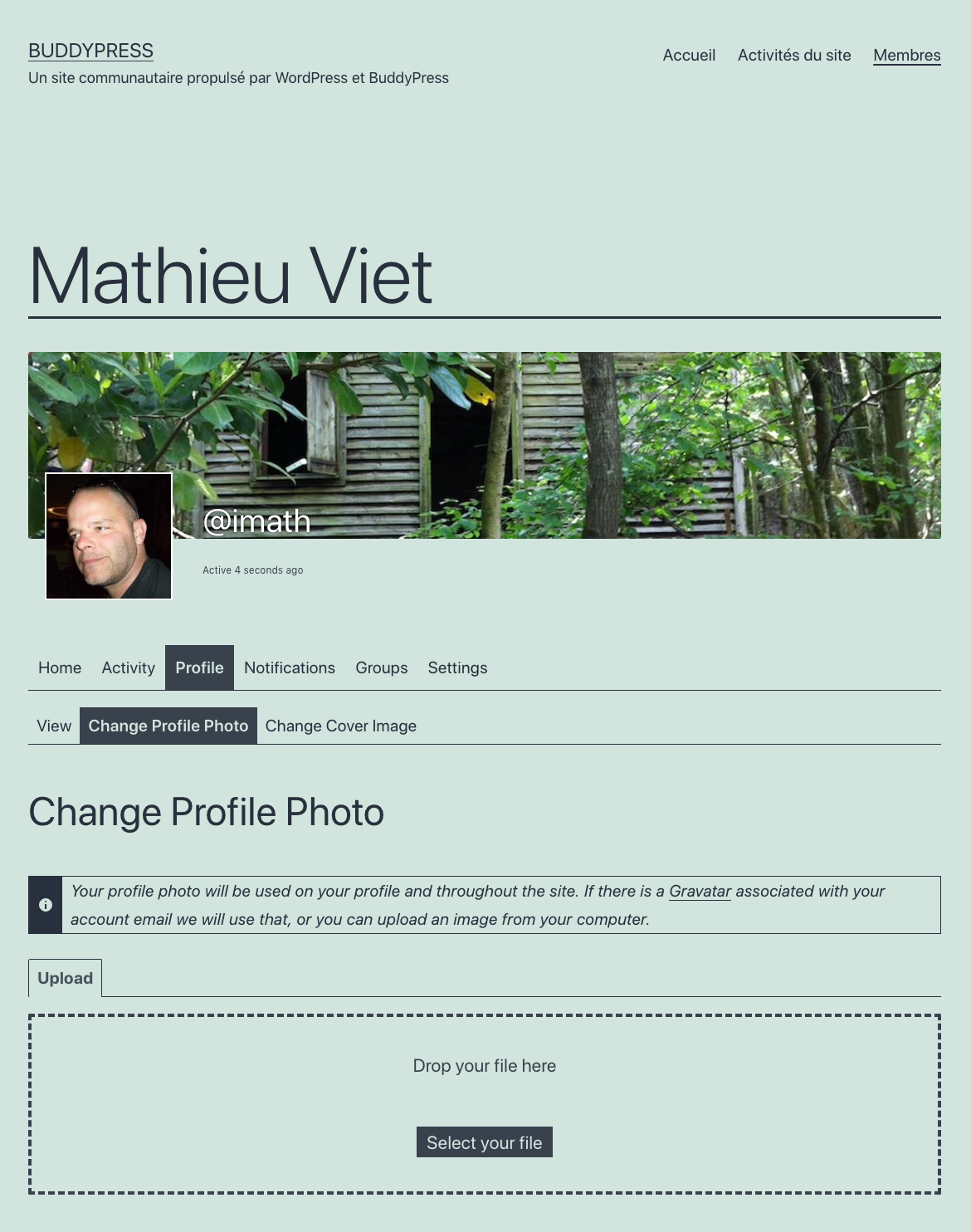
Below is another screenshot I just made having the xProfile component inactive :
To control whether or not to allow users to manage their avatars from their profile page, as you said you can use the BP option about “Profile Photo Uploads”. Below is a screenshot of the BuddyPress options screen (Settings > BuddyPress).
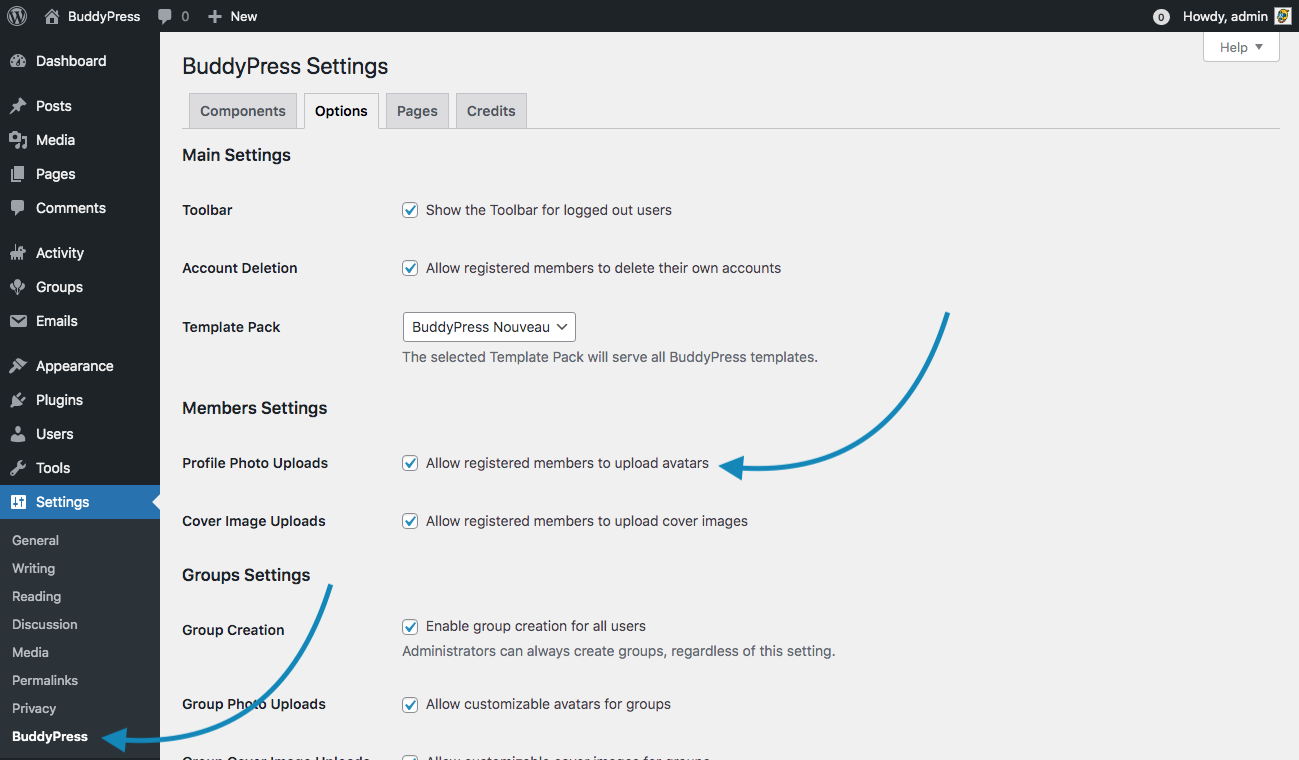
If you uncheck “Profile Photo Uploads”, then users can’t manage their locally hosted avatars.
And there’s also a WordPress setting you need to pay attention to. If you decide that Avatars shouldn’t be shown globally on your WordPress site, then users cannot manage their local avatars from the front end. This WordPress setting is available from the Discussion settings screen (Settings > Discussion). See the screenshot below :
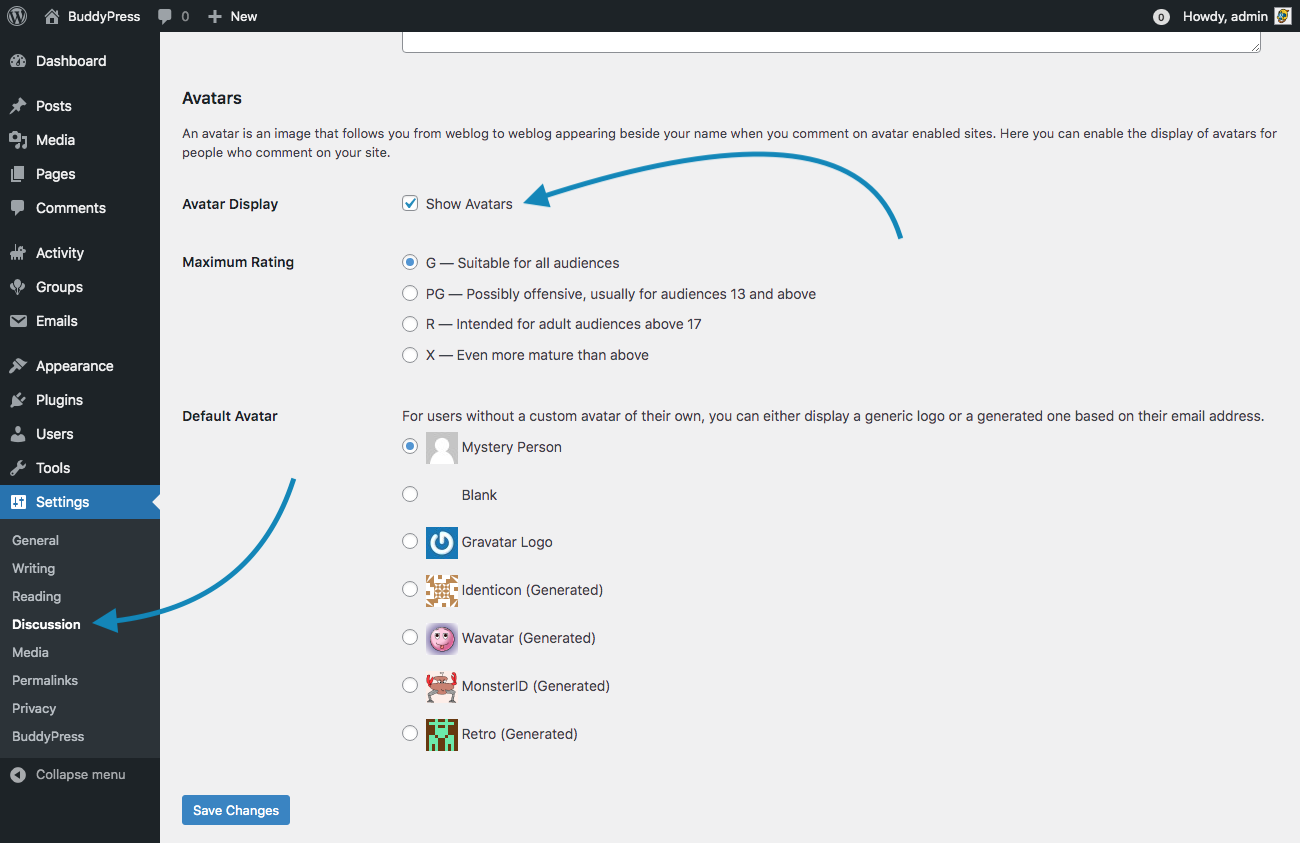
For instance, if you uncheck the “Avatar display” WP setting, then the page to manage avatars is not available even if “the Profile Photo Uploads” BP Option is checked. Here’s a screenshot below showing how a user’s profile page looks like when you globally disable Avatars in WordPress.
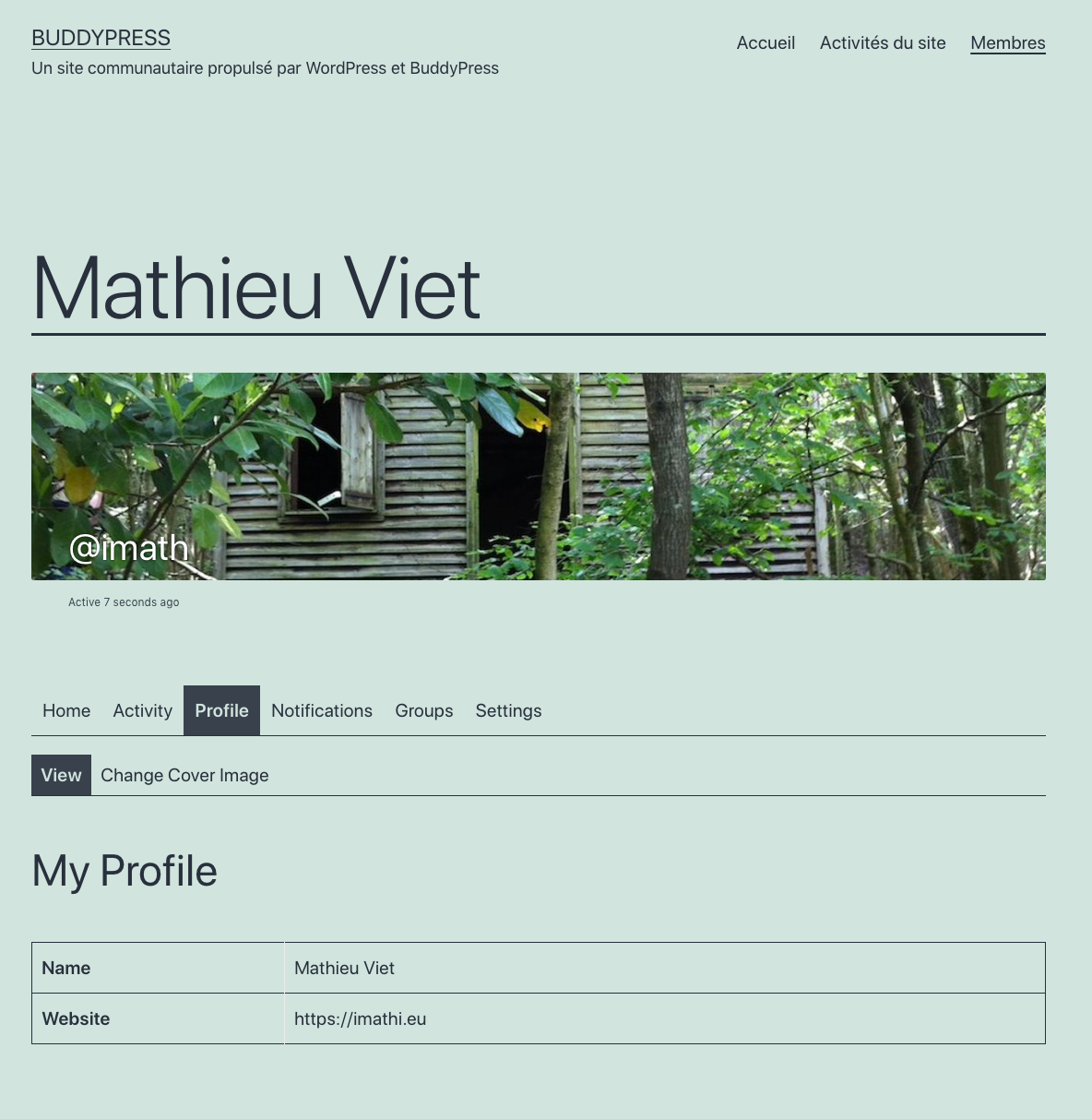
The page to manage user’s avatar is not available and the user’s profile header does not include the avatar.
Again, I confirm everything works as expected in BuddyPress, the issue you’re mentioning is specific to the way you configured WordPress &/or BuddyPress.
In reply to: BuddyPress 7.0.0 “Filippi”Thanks for your tests (and your wishes) @alersn 👌
I’ll try to explain what’s happening in your case and I believe it also concerns most people using a plugin that is managing Group or Member types. First, I had to handle a similar case for a plugin I’ve build to manage Member Types years ago.
These kind of plugins had to make a choice about how to ensure type properties persistency, because when BuddyPress introduced the feature only registering Types using custom code was possible. For instance, I chose a regular WordPress option. BP Create Group Type chose to use a Custom Post Type. So most Group Type properties like the one to show checkboxes into the Group create screen are saved as post metas.
In 7.0.0, as BP Types are custom taxonomies, we decided to use term metas to store these properties. This means, properties are not saved at the same place, that’s why you’re experiencing this issue.
I agree it’s not great for user experience to have 2 group types menu into the admin and have 2 different ways to manage Type properties: it’s confusing. Ideally, these kind of plugins should alternatively:
a. disable Group Types menu generated by BuddyPress.
b. use a specific upgrade routine when the plugin is used with BuddyPress 7.0.0.I chose b. for my plugin 😉 because I believe it’s important to enjoy the improvements brought by BuddyPress. It’s standardizing how Type properties are saved, and it will avoid users to be stuck with a BP Plugin (that might have dropped its support) in the long term.
If BuddyPress plugin developers are interested about how I’ve migrated the Member Types properties my plugin was using so it now uses the BuddyPress way, here’s a gist about it:
https://gist.github.com/imath/df65b7c856fbd02024a84c7ecc016090
Best wishes to you too 🎉
Hi @mbaysf
I’m curious, as BuddyPress doesn’t display WordPress posts written by a member into their individual page, what Theme, Plugin or custom code are you using to create this
poststab?Hi there,
Although, I understand the frustration behind this need to find a new place to discuss about BuddyPress, I’m wondering if we could find ways to improve BuddyPress support forums to match everyone needs and have :
– A place to discuss about using BuddyPress
– A place to discuss about extending BuddyPress
– A place to discuss about designing for BuddyPressIf you have ideas and want to contribute about this subject, I’m totally in favor of having a specific & regular 1 hour chat into the BuddyPress slack channel.
In reply to: Missing showcases?Hi @jenzgaard
You can read some case studies about how BuddyPress is used from our main blog’s case study category.
About your question about wether to Press or Boss: Boss has made its own fork of BuddyPress, meaning, if you choose Boss, then you choose it completely:
1. the BuddyPress community won’t be able to bring you support, you’ll need to contact Boss.
2. you won’t benefit from our security program, you’ll need again to contact Boss for this kind of issues also.I agree with you, it’s too bad people post about everything except showcases here 🤷🏻♂️
Hi,
It’s probably due to an outdated template override in your theme. In 7.0+ we’ve fixed a duplicated ID issue that required some template pack files to be updated. We published a developer note about it on September 25: https://bpdevel.wordpress.com/2020/09/25/bp-template-packs-changes-in-version-7-0-0/
In reply to: BuddyPress 7.0.0 “Filippi”Hi @alersn,
bp_groups_get_group_types()is used into the group’s individual page header to list the group types it is assigned to. This function gets all registered group types : the ones that are created using the WP Admin screen and the ones that are registered using code.codeargument of the array parameters is used to only get group types registered by code to make sure they can’t be deleted from the WP Admin Screen. BTW It’s not used into the Groups directory.I’ve tested the “BuddyPress Create Group Type” plugin in BuddyPress 7.0.0. I confirm I’m able to set the Group Types of a Group during its creation process. It’s important to make it possible when adding a Group Type from the WP Admin Screen BuddyPress introduced in 7.0.0 activating the “Show on Group creation” checkbox. See the below screen capture.
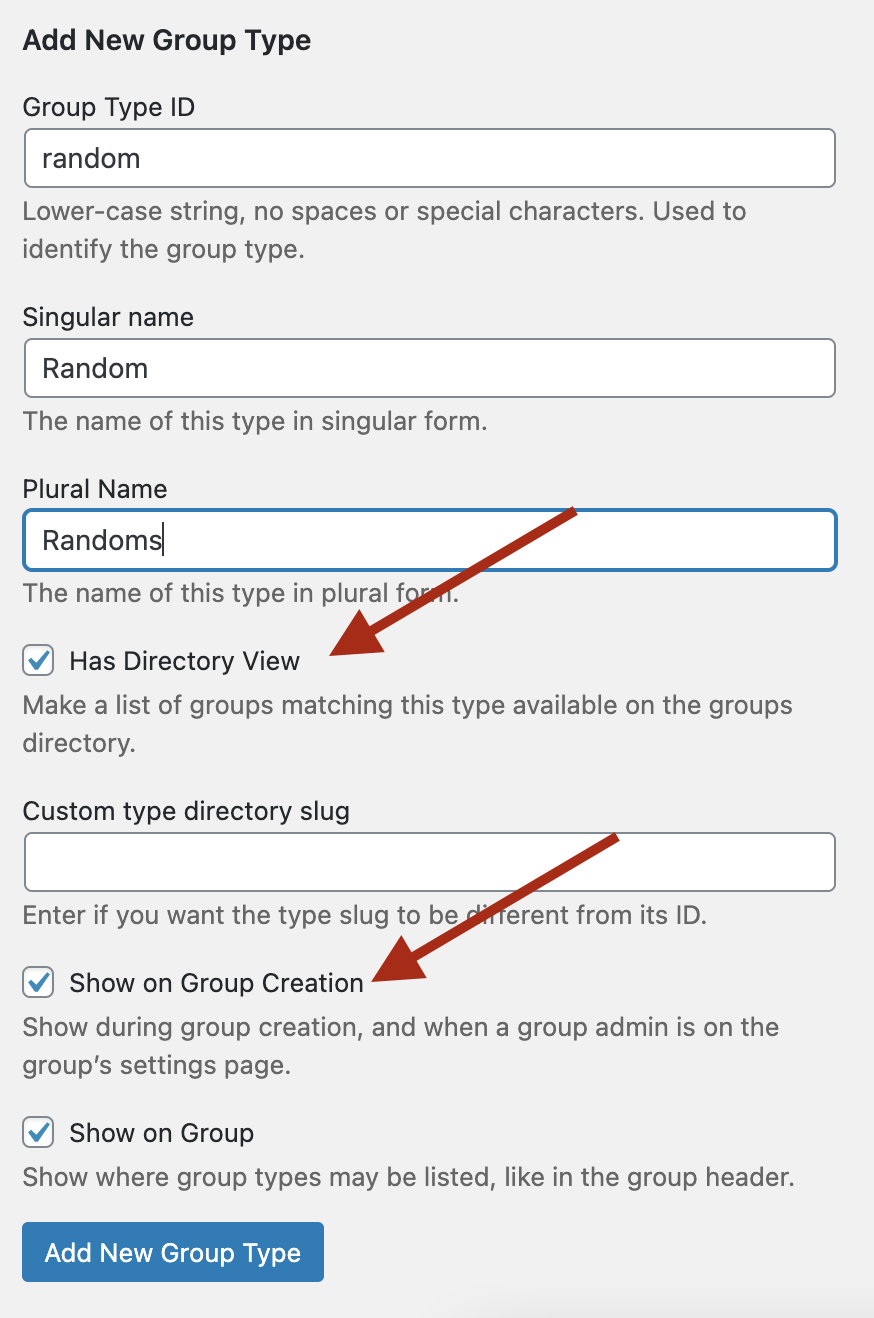
Of course, you won’t get the tabs the “BuddyPress Create Group Type” as it uses another way to store the Group Type properties.
That being said without using this plugin Admin UI, you can still enjoy these tabs with some custom code. Here’s a Gist containing the one I’ve used from a bp-custom.php file.
In reply to: BuddyPress 7.0.0 “Filippi”Hi @kerriem
Then, you have no other choice than to:
If I were you, I would deactivate plugins one by one, testing if the issue is still there after each plugin deactivated to find the problematic one. I would probably start with the ones that were lately updated. If you can narrow the cause this way you’ll be able to contact the right plugin’s support.
Because you can test by yourself BuddyPress 7.0.0 on a WordPress 5.6 fresh install with no other plugins, it works 😉
In reply to: BuddyPress 7.0.0 “Filippi”In reply to: BuddyPress 7.0.0 “Filippi”Hi @alersn
Thanks for your feedback, for now we haven’t worked on a UI for the Groups/Members directory. We only take in charge the member/group types display into the single Group/Member item header.
I believe you still need the “BuddyPress Create Group Types” to take this part in charge.
In reply to: BuddyPress 7.0.0 “Filippi”Hi, thanks for this screenshot which confirms, this is due to a JavaScript issue. FWIW, I’ve tested the members directory and the widget you are using in WP 5.6/Twenty Twenty-One and with BuddyPress as the only active plugin and I can’t reproduce your issue. This means it’s probably due to a conflict with another plugin. If I were you, I would deactivate plugins one by one, testing if the issue is still there after each plugin deactivated to find the problematic one. I would probably start with the ones that were lately updated. If you can narrow the cause this way you’ll be able to contact the right plugin’s support.
In reply to: BuddyPress 7.0.0 “Filippi”Hi @kerriem, could you click on the “Console” tab of the inspector, I drew a rectangular on your first screenshot
I’ve tested the described issue (Two friends User A & B, both subscribers, both having a group) with latest WordPress (5.6) and BuddyPress (7.0) and into the Twenty Twenty-One theme. I can’t reproduce your issue. If it was a BuddyPress issue, then it should be the case.
I advise you to try the above configuration on a testing site, you should see the issue won’t be there. Then activate your theme, check if the issue appeared, if so: the theme should fix it, then activate all the plugins you use on your site one by one making sure to test again the issue before activating a new plugin. As soon as you can reproduce the issue, you’ve found the problematic one.
Hi @jozifirecracker,
What’s the theme name you are using?
In reply to: BuddyPress 7.0.0 “Filippi”Hi @kerriem
Thanks for your feedback. If you are using the BP Nouveau Template Pack (activated by default), then it looks like JavaScript/Ajax issues. Could you open the Members directory page having your browser’s inspector console opened to see if there are JavaScript Errors. If not, keeping the browser’s inspector opened, refresh the page, then go to the network tab of the browser’s inspector activate the line where the admin-ajax.php file is listed, then activate the Response sub tab to see if it contains a server error.
If you are using the BP Legacy Template pack, I have no idea what’s going wrong. It’s not an already known issue.
I hope you’ll be able to narrow possible cause of the issue, and if you find something relative to BuddyPress, we’ll fix it & package a minor release soon after.
In reply to: BuddyPress 6.4.0Hi @savanitina
I’ve read your message on my blog. I’m replying here so that it can be useful for anyone. I advise you to:
1/ go to the page that is troubling having your browser’s console opened to check if there are JavaScript errors.
2/ If not edit your wp-config.php file to defineWP_DEBUGto true temporarily and go back to the troubling page to see if there are PHP errors.If you had errors in 1 or 2, please share them with us here making sure to hide any path/url leading to your site.
In reply to: BuddyPress 2020 Survey is now openHi,
You just need to create a group of profile fields from the WP Admin > Users > Profile Fields screen and attach your profile fields to it. Here’s the reply I gave you when you pinged me on Twitter 😉
Oui, il suffit depuis le sous menu des Utilisateurs (ou Comptes) > Champs de profil de l'administration WordPress de choisir de créer une nouvelle section de champs de profil "Entreprise" et de créer les champs depuis cette section pic.twitter.com/95KVO5MfKf
— imath (@imath) December 4, 2020
Thanks for using BuddyPress <3
In reply to: BuddyPress 7.0.0 Release CandidateYour comment wasn’t deleted, it was pending moderation and I just validated it. Here’s the link: https://buddypress.org/2020/11/buddypress-7-0-0-release-candidate/#comment-46519
I’ve just replied to your support request here: https://buddypress.org/support/topic/hey-peeps-i-have-two-issues-both-about-activating-profiles/#post-315855
Please try to avoid using strong words into your support request or comments.
In reply to: BuddyPress 6.4.0Thanks a lot for your feedback @valuser <3


