Forum Replies Created
-
In reply to: BuddyPress 8.0.0
Could you share more information about your config, eg: Is there a plugin playing with xProfile fields, multisite or not, etc..?
I guess what you call “primary cell” is the primary field of the primary Group (what we initialize as the Name field).
When on the Signup Fields group, what is the JavaScript error your browser’s console displays?
Thanks in advance for your inputs. This shouldn’t happen, sorry it did for you.
In reply to: BuddyPress 8.0.0Hi @b4ureye this notice means you are overriding the members/register.php template from your theme.
You need to update your custom template so that the signup xProfile loop uses the
bp_xprofile_signup_args()function.I guess your active Template Pack is BP Legacy, so I advise you to have a look to https://github.com/buddypress/buddypress/blob/master/src/bp-templates/bp-legacy/buddypress/members/register.php#L168 to figure out what to replace by what.
In reply to: BuddyPress 8.0.0@leahkoerper can you confirm it’s also happening when the active theme is Twenty Twenty-One ?
In reply to: BuddyPress 8.0.0Thanks a lot for your love @epgb101 We’ll double check the field visibility behaves the right way asap.
In reply to: BuddyPress 8.0.0Thanks a lot for your feedbacks. The development team will talk about it during our next dev-chat.
In reply to: BuddyPress 8.0.0Hi @firefliespilots and all,
To help us understand what’s going wrong with the line 53 of
buddypress/bp-core/classes/class-bp-invitation-manager.php, we need your help.1. Deactivate all plugins except BuddyPress: is the error still there?
2. If yes activate a Twenty theme: is the error still there ?
3. Remove bp-custom.php file or mu-plugins or dropins: is the error still there?If you have a no after 1. Reactivate plugins 1 by 1 and check the error’s appearance. It should help us find which plugin we need to check on our side.
After 2: it’s a theme issue, etc..Thanks in advance.
In reply to: BuddyPress 8.0.0Hi, we also received a « blank page » alert from Kevin in a comment to the announcement post. I’m pasting the content here as it’s a better place:
« I am getting this error.
Notice: Undefined property: BP_Members_Component::$table_name_invitations in /home/475382.cloudwaysapps.com/xvvhrjhrac/public_html/wp-content/plugins/buddypress/bp-core/classes/class-bp-invitation-manager.php on line 53
WordPress database error: [Table ‘xvvhrjhrac.i’ doesn’t exist]
SELECT DISTINCT i.id FROM i WHERE class IN (‘bp_members_invitation_manager’) AND type = ‘invite’ AND invite_sent = 1 AND accepted = 0Also it seems to not work with Youzify plugin active. The page is just blank »
In reply to: BuddyPress 8.0.0 Release CandidateHi @comminski
Thanks a lot for your feedback 😍. I’ll patch this asap into BuddyPress 8.0.0 to avoid this fatal error.
In reply to: BuddyPress 8.0.0 Release CandidateThanks for your feedback, I’ll look at it 👍
In reply to: Disable auto suggestions in mentionsHi,
1. if not already created: add a bp-custom.php file.
2. into this bp-custom.php file add the following line:add_filter( 'bp_activity_maybe_load_mentions_scripts', '__return_false' );In reply to: BuddyPress 8.0.0-beta2Hi @roman1wp
1. Thanks for your feedback about the BP Beta Tester plugin. I was able to fix it and I’ll soon deploy this release https://github.com/buddypress/bp-beta-tester/releases/tag/1.2.0 on the WP.org Plugins directory.
2. About BuddyX, I advise you to report the issue on the Theme’s support forum.In reply to: BuddyPress 8.0.0-beta1Thanks for your opinion. I replied to your comment on the blog post.
In reply to: Can’t create group, even the first, the admin one.Hi, that’s because some words are restricted and can’t be used to create a group. If you simply use « administrateur » it should work.
We can’t see the full page in your gif but there’s a good chance there’s an error message somewhere above.
I’ll check it tomorrow a soon as I’m back on a keyboard 😉. I saw your message on Trac and on my personal site 👌 Currently afk.
In reply to: BuddyPress 7.3.0 Maintenance and Security ReleaseHi @olamyklebost,
I’m sorry to read what happened to your site. I believe something went wrong during the upgrade process with the WordPress.org Plugins directory. I advise you to remove completely the BuddyPress plugin directory to reinstall a fresh download of the 7.3.0 package.
All previous BuddyPress versions can be downloaded from the advanced area of our plugin’s page on WordPress.org:
https://wordpress.org/plugins/buddypress/advanced/You’ll find a dropdown control where you can choose the needed previous version. Before reverting I strongly encourage you to try again to download 7.3.0 from there https://downloads.wordpress.org/plugin/buddypress.7.3.0.zip and reinstall it.
The error message says a file is missing, but if you look into the 7.3.0 tag you’ll see the file the error is mentioning
bp-core-wp-abstraction.phpis not missing into the tag:
https://plugins.trac.wordpress.org/browser/buddypress/tags/7.3.0/bp-coreI hope this will help you fix the issue.
In reply to: Having multiple group slugs@vapvarun brought your topic to our attention during today’s dev-chat. I believe both needs can be satisfied if we migrate our custom URI to WP’s Rewrite API.
If you look at this comment/patch I had a proof of concept working (the patch probably needs a huge refresh). Our main concern is the potential damage that BuddyPress Plugins/Themes could face.
One possible way to finally progress about it is to use the patch to build a plugin so that it’s easy to deactivate if there’s an issue, and it’s also faster to iterate from the plugin to solve one by one the compatibility issues as they arrive.
I’ll look into it once 8.0.0 is released 👋
In reply to: BuddyPress 7.2.0Hi I don’t see any reason for this. But 7.2 is not the latest release. We’ve published 7.2.1:
In reply to: BuddyPress 7.2.1 Security ReleaseHi @mike80222
By default just like the WordPress REST API, the BuddyPress one is active by default and is used into the UI to manage group members from the Group’s Administration & Management screens. If you want to disable the BP REST API, you need to use this filter into a bp-custom.php file for example:
add_filter( 'bp_rest_api_is_available', '__return_false' );In reply to: BuddyPress 7.2.1 Security ReleaseThanks a lot! It’s fixed 🙂
In reply to: BuddyPress 7.2.0In reply to: BuddyPress 7.2.0Hi @djsteveb,
I have doubt 7.2.0 caused this issue. As the file you’re referring to was lastly modified 11 months ago.
The function
bp_nouveau_sanitize_nav_order()is used to sanitize navigation slugs. I’d advise you to launch the customizer, activate the BuddyPress Nouveau > Member navigation Panel and edit the navigation order using the drag/drop control and then save your edits to see if it’s fixing the issue. See the screenshot below: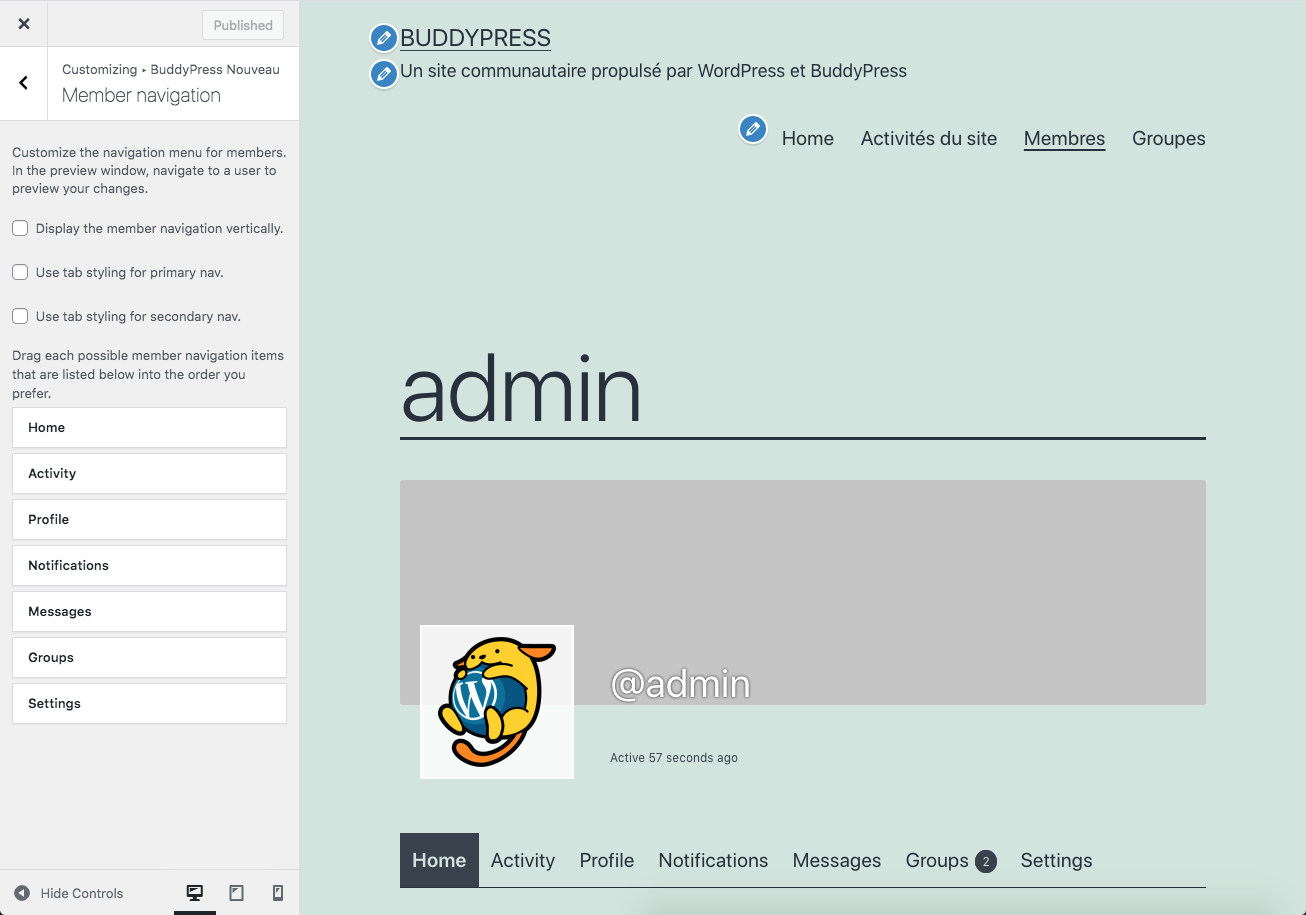 In reply to: Modern Private Messaging
Hi,
BP Nouveau introduced a new interface for dealing with private conversations. It now uses an instance of the classic editor, so I believe it’s using paragraphs.
I like the idea of having a period of time to edit the message content, thanks for suggesting it. We’ll see how to implement this for private conversations and activities (public conversations).
In reply to: Buddypress email SMPT not the same as wordrpessHi @paulw32,
To force BuddyPress to use the
wp_mail()WordPress function, you need to add a filter this way:add_filter( 'bp_email_use_wp_mail', '__return_true' );You can add this into the
functions.phpfile of your active theme or into a bp-custom.php file at the root of your/pluginsdirectory.PS: if you’re using the bp-custom.php file, make sure the first line of the file is used to open a PHP tag:
<?phpIn reply to: Buddypress registration not workingSee the other topic you opened on the same subject:
In reply to: Registration and Activate not workingHi,
You should:
– check the WordPress settings allowes account to be created (Anyone can register checkbox needs to be active) See: https://wordpress.org/support/article/settings-general-screen/#membership
– check your permalink settings are using one of the pretty permalink options (not plain), see this documentation page https://wordpress.org/support/article/using-permalinks/#mod_rewrite-pretty-permalinks
– check the activate and register actions are associated with a public WordPress page. You can find some inputs about it from this documentation page : https://codex.buddypress.org/getting-started/configure-components/#settings-buddypress-pagesNB: the registration and activation pages are only displayed to users who are not logged in, so if you try to visit these being logged in you’ll be redirected to home page. To test the pages, log out first 😉
In reply to: BuddyPress 7.1.0There should be an option into the Plugin’s settings or a filter into the Plugin’s code to disable **inline JavaScript minification**. I’m unsure it’s about security, I believe it’s more about performance.


