Forum Replies Created
-
In reply to: Lost admin access after 2.o update
Thanks for your feedback, can you confirm this patch is solving your issue ?
In reply to: Lost admin access after 2.o updateFrom what i see, the latest user you registered “Leon123” is an author. Have you changed his role manually ? else the signup process is ok.
174 users seems to be problematic
I wonder who is adding ‘signup_ip’ in the usermeta, have you reactivated the plugins ? Or it maybe the theme you are using ? In options i see that “buddycorp” is adding a lot of options and some are related to signups, is it your theme ?
Otherwise, i think i would test this :
0/ make a back up of the database.1/ It looks like you deactivated BuddyPress and rollback to a previous version of the database several time because in the signups table, there were signups in “8plicate”
So before batch activate or activate, you’ll surely need to run this query :
DELETE FROM wp_signups WHERE signup_id > 1732/ try with one user (for example “sert” ID = 2006) to edit his user_status to 2 and then go into the BuddyPress signups management screen and try to activate him. Once done check his role.
3/ If everything went fine, i think, i’ll update the user status of the 174 users to 2, then form the signups management screen batch activate the 174 users, i think it’s best to do it step by step, you can increase the number of signups displayed from the screen options, but i advise you not to set it to 174, maybe 40.
to update the 174 user status, you can run this query in PhpMyAdmin for example :
UPDATE wp_users SET user_status = 2 WHERE ID NOT IN ( SELECT user_id FROM wp_usermeta WHERE meta_key = "wp_capabilities" );For your info activating the signup for the “admin” user won’t work as the activation key is empty, so you can just delete it for this user.
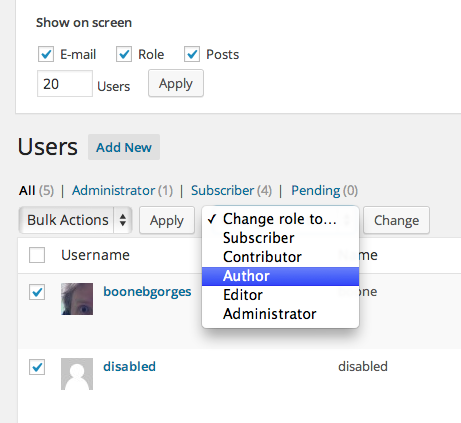
I wonder if it’s not simpler for you to batch edit the user roles.
In reply to: Lost admin access after 2.o updateok downloaded it. Deleted the link in your reply. You can delete it from you google drive.
Thanks a lot checking it.
In reply to: Lost admin access after 2.o updateAnd you can “batch” edit roles :
 In reply to: Lost admin access after 2.o update
I registered a new user by myself a minute ago. And I saw in his profile – he has no role for my site
This shouldn’t happen.
What is your config ? The upgrade problem concerns a non multisite WordPress. Is it your config ?
“Viewing the sql tables” means that you’ll need to export it using PhpMyAdmin for instance and send it to me.
By the way, i’ve tested BP Disable Activation Reloaded and it’s not the cause of the problem. It’s “someone” else.
In reply to: Lost admin access after 2.o update@livsy if you try to register a new account, this account should have the role you defined in WordPress settings.
I’m very curious about what happened during upgrade. If it were possible i’d really like to view the users, usermeta and signups tables!
Can you see the users with no role in your users list ?
If so, you can batch create roles for these users using the “change role to” select box on top of the users list.i’m going to test BP Disable Activation Reloaded to see if the problem was linked to this plugin.
In reply to: Lost admin access after 2.o updateJust tested in WP 3.9/ BuddyPress 2.0, the role set for a new user is the one that is defined in the WordPress setting (wp-admin/options-general) > New User Default Role dropdown field.
In reply to: Lost admin access after 2.o updatehi @livsy
How were you doing before ? Once a user registered, you were changing the role before he activated his account ?
Or are you choosing a role different than Subscriber in the WordPress setting (wp-admin/options-general) > New User Default Role dropdown field ?
About the upgrade difficulties, were you using a plugin that was dealing with registrations, and if yes which one ?
Thanks for your feedback.
This line should only be run if a user query is made, in administration and if it’s not an ajax request. So this is really weird. Can you share the plugin you activated on your site that are dealing with users ?
I think a simpler fix can be to add another if statement above like :
if ( ! function_exists( 'get_current_screen' ) )
     return;
Sorry for the inconvenience and thank you for the feedback.
Hi @godavid33,
If you use Chrome browser, you can display the inspector, then you’ll see a tab “Network”. If you activate it, every 15 seconds you should see that admin-ajax is called. If it’s not the case, there might be a javascript error OR you are using BP-Default theme or a child theme of it.
This feature is not available in BP-Default/child of BP-Default
In reply to: Lost admin access after 2.o update@notpoppy Great! Sorry again for the inconvenience. I’m not sure User Role Editor deals with registration as it seems to be a role management plugin. But i’ll check it.
In reply to: Lost admin access after 2.o updateDo you have any plugins that deal with registration on your config ?
In reply to: Lost admin access after 2.o updateIn this reply https://buddypress.org/support/topic/lost-admin-access-after-2-o-update/page/2/#post-181524, @boonebgorges explained how to fix it :
i’m re-pasting the url to the gist here: https://gist.github.com/boonebgorges/4ee64723ba75caa3c7e1
In reply to: 2.0 no Extended profile tab under edit userHi @boblebad
The extended profile in wp-admin is available to help you moderate profiles in the WP Admin area. One of the metabox is there to spam/unspam users.
You will see the link if :
– you’re not trying to “moderate” yourself.
– you have the capacity to moderate the user.For instance:
– an admin shouldn’t be able to moderate a super admin
– a super admin should be able to moderate an admin
– a super admin shouldn’t be able to moderate himself.There’s an enhancement ticket on BuddyPress trac about it.
In reply to: Lost admin access after 2.o updateHi @textrat
I’m really sorry to read about this issue. I’ve run some tests to try to reproduce. This is the results of it:
1/ “Confirm User Registration” doesn’t seem to interfere. The plugin is adding a user_meta “authentication” set to 1 for each users. When a user logs in it checks if this user meta is there and if so allow the log in, else display a message saying the account is not authenticated.
2/ The only way i’ve managed to have a user_status set to 0 and the activation_key still in usermeta for this user was to set the user_status to 0 myself directly in the database (testing config WP 3.8.3, BP 1.9.2 > 2.0 and Confirm User Registration)
3/ From the Manage Signups screen if i activate this kind of user (user_status 0 and activation_key not empty), i have the message that user is already activated, but the user is no more in the list of pending accounts and is now available in the users list with the default role
4/ About the 152 pre-existing, the only way i’ve managed to reproduce a similar problem was to restart all again and to delete the value of activation_key meta in the database. eg : activation_key > “” : The meta is there but empty. In this case, the user keeps on being in pending after trying to activate it.I think clearing the “pending bit” can be achieve by updating the “active” field to 1 into the signups table for the 152 pre-existing users. But, before doing so, you should check the ‘activation_key’ meta values for some of the 152 users to see if the value is empty. This way it could confirm my point 4.
Then you should check for the corresponding user_status to be sure it is not set to 2.Whatever you do, i advise you to backup your database before.
In reply to: Friendships are missing in Requests and InvitesHi @nat0n
I think you are using a deprecated method to get users. The only way I’ve found to reproduce the issue was to force BuddyPress to use BP_Core_User::get_users() which is deprecated since version 1.7 of BuddyPress.
If i’m right about the above paragraph, I strongly advise you to use BP_User_Query to quickly solve the trouble.
In reply to: Member photo galleriesHi @sooskriszta
Thanks for the ticket reference, i’m actually building a list of tickets around the need to attach media to components.
I think what @boonebgorges says in comment of your ticket is really important :
“… it’s not impossible that some simple media capabilities would one day be built into BP. … If anything were to be included, it would have to be done very carefully, working closely with teams like the BP Media team to determine how we could build something minimal in BP that could be scaffolded by other plugins.”I totally agree with him. Although i feel there’s a lot of expectations having features incorporated in BuddyPress, doing it carefully and in a way that would help other plugins is very important.
When you say “Photos are the biggest attraction in social networking”, sometimes it’s not the case : for instance in the corporate world, the document really matters more.
As i’ve said in last wednesday’s dev chat : “Media is a great challenge. I have some ideas about it, mainly around the concept of attachments for other components”
In BuddyPress, the groups component and the members component are dealing in a way with media using the core avatar functions. It can be a good start to see how to provide a quickest way for community administrators to view/manage all these media in a media Administration screen, in a group/member administration screen etc.. I think that building this can help us to extend it to other media capabilities.
Thanks a lot for the alert. Have a lovely day.
In reply to: [Resolved] How do I make a sticky wall update?Thanks for your feedback @hnla 🙂
In reply to: bp-fr.net, the french buddypress communityThanks @mercime, @giannisff, @henrywright-1, @valuser, @bphelp & @charise 4 your feedbacks 🙂
In reply to: File manager for BuddyPressHi Renato, download poedit, then create a new catalog from buddydrive.pot and save it as buddydrive-xx_XX.po where xx_XX is the code for your language (https://codex.wordpress.org/WordPress_in_Your_Language#Portuguese_-_Portugu.C3.AAs) looks it’s pt_PT, then you can add a link here i’ll add it to WordPress repo.
Thanks for your interest in this plugin.
In reply to: File manager for BuddyPressHi !
Actually BuddyDrive requires BuddyPress 1.7, so make sure to upgrade before trying to install and activate it.
Hi Brendino,
I think it’s a bug in the function xprofile_format_profile_field as it’s working great when seeing the birthday in the profile of the user. I’ve just posted this ticket on the dev trac.
While waiting for core developers review / patch, i suggest you to use this little hack to achieve what you’re trying to do. Adapt your snippet this way :
if ( bp_has_members() ) :
    while ( bp_members() ) : bp_the_member();

        echo bp_member_name();
        echo ': ';
        /* this functions is detailed after */
        xprofile_birthday_patch();
        echo '<br />';

    endwhile;
endif;
Now in the functions.php of your active theme, paste the content of the xprofile_birthday_patch() function :
function xprofile_birthday_patch() {
	$birthday = xprofile_get_field_data( 'Birthday', bp_get_member_user_id() );

	if ( is_numeric( $birthday ) )
		$birthday = bp_format_time( $birthday, true, false );

	else
		$birthday = bp_format_time( strtotime( $birthday ), true, false );

	echo $birthday;
}
In reply to: [Resolved] How to detect use is on a bp pageHi,
The different conditionnal tags are located in /bp-core/bp-core-template.php so you’ll find there all you need to restrict the display of content to specific areas.
For instance, if you want your content to only show when not in members area and not in the user’s area, you can use something like this :
if( !bp_is_members_component() && !bp_is_user() ) {

        echo "not in members or user's area";

}
In reply to: Display only members who have uploaded avatarHello Evo252,
You should try this trick https://gist.github.com/imath/5083281
The trick will first add (as soon as you go in your WordPress Backend) a user_meta “evo_user_uploaded_avatar” to all the users that have uploaded an avatar thanks to the init function init_evo_meta() (don’t forget to delete lines 50 to 73 once ran) .
Then from now on functions evo_user_uploaded_avatar and evo_user_deleted_avatar will manage your users avatar uploads.
!Important:
I suggest you to first test it on a local dev environment, I also suggest that before uncommenting lines 67 and 68 you make a db back up.
Finally Once you ran the init_evo_meta() function, i suggest that you delete lines 50 to 73


