Forum Replies Created
-
In reply to: BuddyPress 2.1.1 is available for download.In reply to: [Resolved] Group Edit Dashboard broken
@seeingblues2 seems to be fixed:
see https://buddypress.trac.wordpress.org/ticket/5868#comment:8In reply to: Conflict with my pluginoopsy spoke too quick, sorry. doing_action( ‘admin_init’ ) is only available since WordPress 3.9
In reply to: Conflict with my pluginThanks @djpaul & @pauldewouters,
i think the doing_action( ‘admin_init’ ) check is ok, thanks a lot for your feedback.
No. You’ll need to add a common capability to the roles you are targeting, see
https://codex.wordpress.org/Function_Reference/add_capHi,
Depending on the theme you use (regular WordPress theme, BP Default or a child of it, or a standalone BuddyPress theme), you can override some templates to achieve your goal.
Have a look at the codex starting with this page : https://codex.buddypress.org/themes/theme-compatibility-1-7/a-quick-look-at-1-7-theme-compatibility/
If it’s a regular WordPress theme, then you can can add a
buddypressfolder in it and copy these templates into it respecting the ‘tree’ :
–bp-templates/bp-legacy/buddypress/activity/index.php
–bp-templates/bp-legacy/buddypress/members/single/activity.phpOnce done, you should have :
–yourthemefolder/buddypress/activity/index.php
–yourthemefolder/buddypress/members/single/activity.phpThen into these two files search for
bp_get_template_part( 'activity/post-form' );and you should see a line above an if statement containingis_user_logged_in().... Replaceis_user_logged_in()bybp_current_user_can( 'theminimumcapability' )where theminimumcapability is the the role capability you’re targeting. See the WordPress codex to define it : https://codex.wordpress.org/Roles_and_Capabilities
Hi,
You can use the Group Extension API to build your own group area : https://codex.buddypress.org/developer/group-extension-api/
In reply to: WordPress 3.9.1 BuddyPress menu issueHi @thetwister
When in the Menu Administration screen, can you click on the tab screen options at the top. You should see some checkboxes. Check if the one for BuddyPress is activated. If not, clicking on it should display the BuddyPress menu section.
In reply to: Lost admin access after 2.o updateHi @moonhopper
No i’m.not saying this. If you start from the begining :
Creating the network, then activating BuddyPress is ok.In reply to: Lost admin access after 2.o updateI don’t think the issue is the same. I just reread your first description and using a regular theme seems to make it disappear.
When you say “there’s a number of hacks and mods in there” It means you’ve edited the premium theme ?
If so have you tried with a not modified version of the theme ?
In reply to: Lost admin access after 2.o updateyou’re welcome.
Just to be sure. You had a single site (not multisite) with BuddyPress activated on this site and you made the 2.0 upgrade while still on a non multisite config ? Then you’ve created the network ?
Or did you activate BuddyPress once the multisite was created and then made the 2.0 upgrade ?It’s an important difference as the upgrade trouble we discussed on this thread only concerns non multisite configs.
Finally if it was a non multisite, can you reply to 3, it’s also an important check:
3/ Can you check into the usermeta table of your site if for the problematic users you have a meta_key ‘activation_key’ with a meta value or not ? If so in the users table are these users having a user_status set to 0 ?In reply to: Lost admin access after 2.o updateHi @moonhopper
1/ Did you make a backup of your database before upgrading to BuddyPress 2.0 and creating the network ?
2/ Is it a live website or a dev one ?
3/ Can you check into the usermeta table of your site if for the problematic users you have a meta_key ‘activation_key’ with a meta value or not ? If so in the users table are these users having a user_status set to 0 ?
4/ What is the name of the theme ? Is it available on WordPress repository ?Just a quick follow up to inform you, i’ve read your discussion with @boonebgorges on 5603.
I’ve attached an alternative patch to the ticket, it would be great if you could test it.Thanks again for your feedback.
In reply to: Page Hierarchy PainHi @localiseorg
Socialise (sitewide activity assigned to this)
– Members (members directory assigned to this)
– Groups (groups directory assigned to this)
– Forums (bbPress forum root assigned to this)Have you tried using a wp_nav_menu instead ?
I think, if i was in your situation, i’d make a wp_nav_menu with your different pages.. It could be “home”, “blog”, “socialise” for instance. And from the wp_nav_menu WordPress UI, i’d attach the Members/Groups and forums as submenus of Socialise.
Then concerning the Socialise title that is “Sitewide Activity”, i’ll begin to edit the activity page changing the title from Activity to Socialise and use a little code like the following:
function change_activity_directory_title() { buddypress()->activity->directory_title = buddypress()->pages->activity->title; } add_action( 'bp_activity_setup_globals', 'change_activity_directory_title' );hi @xyhavoc
Personally, i don’t really like this method “hardcoding the type into the template“. I’ve made a gist using another method, tested it and it’s restricting the activity type the way you want even in case of a new activity post.
By default, this will restrict for all activity loops.
But See the commented parts if you want this behavior to only happen in user’s profile, or in group’s home or in directory..).I don’t know if you use the bp-custom.php file, if not, i recommend you to do so, so that this will happen whatever the activated theme is.
Here’s the link to the gist:
https://gist.github.com/imath/5c7e4db74513ca4b30b8In reply to: Registration & Activation Pages reverting to HomeNo i thought you were using a specific theme for the administration of WordPress. Because i thought it was a css issue or something like it.
I think i’ll try to see if the button is in the html source of the page using a search for ‘bp-admin-component-submit’. If you are using the Chrome Browser, you can for instance launch the inspector and once done, and on the tab “Element” click on ctrl + F to display the search input.
If you are using another browser simply display the source in a text editor for instance and do the search from there.
I think you’ll find the button meaning it’s a css/browser issue.
If not it may means there’s a “fatal” that avoids the html to be completely output. In this case you can set the WP_DEBUG constant to true in your wp-config.php file, check what’s going wrong in this part and eventually try to fix it. Once done, don’t forget to set back the WP_DEBUG constant to false.
Hi,
Make sure to leave the base group profile fields available for all users
Then explore in this direction :
/* Profile display */
function excluding_group_id_depending_on_user_role( $args = array() ) {
	if ( user_can( bp_dispayed_user_id(), 'capability_to_check' ) {
		$args['exclude_groups'] = "2,3,4"; //Comma-separated list of profile field group IDs to exclude
	}
	return $args;
}
add_filter( 'has_profile', 'excluding_group_id_depending_on_user_role', 10, 1 );
/* profile editing */
It will be a bit more complex as you’ll need to filter ‘xprofile_filter_profile_group_tabs’ and use a pattern to exclude the tabs you don’t want the role to edit.Finally to restrict group creation, i’ve shared a code on the BuddyPress fr community :
http://bp-fr.net/agora/sujet/restreindre-la-creation-des-groupes-a-des-roles-wp/In reply to: turn off comment function in activity streamHi,
In the BuddyPress settings, you can deactivate the activity comment feature for blog/forum posts
see https://codex.buddypress.org/getting-started/configure-components/#settings-buddypress-settingsThere’s a setting called “Blog & forum comments”, simply make sure it’s not checked.
How did you force the status to be ‘&action=activity_update’ ?
Because if you’ve edited a template that is within the /plugins/buddypress folder, then upgrading the plugin removed the things you eventually edited..
In reply to: Registration & Activation Pages reverting to HomeHi,
I can see your signup page : http://galleryhop.com/sign-up/
When the user is already logged in, he doesn’t need to signup again, so BuddyPress is redirecting the user. It’s the correct behavior. Try to log out and then you’ll be able to access to the signup page.
About the component activation issue, you need to have the submit button “Save Settings” to update your active components
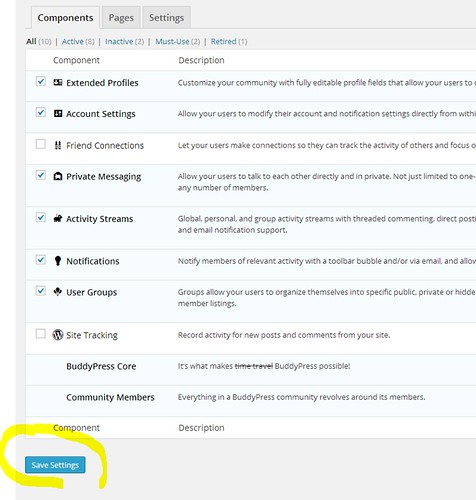
If you don’t see the button, there’s a trouble with your config, are you using an admin theme ?
In reply to: Start Up ProblemsHi,
compatibility pack == https://wordpress.org/support/plugin/bp-template-pack ?
If so, have you tried without this plugin as since BuddyPress 1.7, there’s now a theme compatibility feature included in core that makes BuddyPress loads its template in a nice way with most WordPress themes ?
In reply to: Problem Adding divs to Activity Stream templatesHi,
I have made a child theme
Is it a BP-Default child theme (1) or a WordPress theme child theme (2) ?
(1) put the templates at root level of your theme ex: bp-default-child/activity/index.php etc..
(2) use a specific folder to put your template (community or buddypress) ex: twentytwelve-child/buddypress/activity/index.php etc..You can find interesting documentation in BuddyPress codex: for example about (2) https://codex.buddypress.org/themes/theme-compatibility-1-7/a-quick-look-at-1-7-theme-compatibility/
you’re welcome @reichertbrothers and thanks for your feedback 🙂
hi @bitpath
Don’t worry, it’s been committed to core and will be included in next upgrade
https://buddypress.trac.wordpress.org/changeset/8304In reply to: Activating buddypress on the latest WordPress1. Do you use BuddyPress on a non multisite config ?
2. Do you have a lot of members ?
3. Do you allow registration ?
4. If so and if you have an access to a MySql admin tool such as PhpMyAdmin, can you run this query :SELECT count(u.ID) FROM wp_users as u LEFT JOIN wp_usermeta as um ON u.ID = um.user_id where u.user_status = 0 and um.meta_key = 'activation_key';‘wp_’ might be to replace with the table prefix you may have customized in wp-config.php
Once done can you share the result of the query in this forum ?


