Forum Replies Created
-
In reply to: Buddypress Settings Won't Save?
@gina i’ve managed to reproduce. It looks like activating this option : “Logged in users may register new sites” is problematic. Working on it. I’ll keep this thread updated with my progress.
In reply to: Buddypress Settings Won't Save?@gina have you tested by de activating invite anyone plugin ?
In reply to: Update Broke RegistrationHi @betro99
Sorry you have this issue after upgrading. If you go in Settings > BuddyPress > Page are the registration and activate page set ? If you go in Settings > General > Anyone can register is activated ?
In reply to: Buddypress Settings Won't Save?Hi @espyd,
Sorry you are having this issue after upgrading. Just to help us understand why it’s happening, could you reply to these questions:
WordPress version ?
WordPress configuation ? (Multisite or not)
If multisite: is BuddyPress activated on the main site or in a sub site ?
In the General settings of WordPress is the registration setting on ?
Are you using a cache plugin ?In reply to: Custom Post Type Support for Activity@monkey1980, this is the missing step.
Here’s how you can add the post type title into the link in replacement of ‘Artikel’
function monkey1980_include_post_type_title( $action, $activity ) {
	if ( empty( $activity->id ) ) {
		return $action;
	}

	if ( 'new_sd_article' != $activity->type ) {
		return $action;
	}

	preg_match_all( '/<a.*?>([^>]*)<\/a>/', $activity->action, $matches );

	if ( empty( $matches[1][1] ) || 'Artikel' != $matches[1][1] ) {
		return $action;
	}

	$post_type_title = bp_activity_get_meta( $activity->id, 'post_title' );

	if ( empty( $post_type_title ) ) {
		switch_to_blog( $activity->item_id );

		$post_type_title = get_post_field( 'post_title', $activity->secondary_item_id );

		// We have a title save it in activity meta to avoid switching blogs too much
		if ( ! empty( $post_type_title ) ) {
			bp_activity_update_meta( $activity->id, 'post_title', $post_type_title );
		}

		restore_current_blog();
	}

	return str_replace( $matches[1][1], esc_html( $post_type_title ), $activity->action );
}
add_filter( 'bp_activity_custom_post_type_post_action', 'monkey1980_include_post_type_title', 10, 2 );
In reply to: Custom Post Type Support for ActivityInteresting discussion 🙂
First i’ll explain why i’m using
bp_is_active( 'activity' ): it’s just an extra check to be absolutely sure the activity component is active. I do it because BuddyPress is a set of components you can activate / deactivate from the BuddyPress settings. So if the activity component is not active, no need to add Post Type activities. And when you develop a BuddyPress plugin, you need to remember there can be configs that deactivated the component you are extending.Second, about the contexts argument. In this codex page https://codex.buddypress.org/plugindev/post-types-activities/ i’m describing a bit his role
Here https://codex.buddypress.org/themes/activity-dropdown-filters-in-templates/ i’m talking about the way we are getting the activity types since BuddyPress 2.1 And finally reading this page https://codex.buddypress.org/developer/function-examples/bp_activity_set_action/ you will see the interest of the contexts argument.
In short the contexts argument is a way to control where you want an option (activity action) to be displayed. For instance if you want to include an option into the single group’s home page dropdown filter you docontexts => array( 'group' )In the case of a post type, i think in most cases there’s not a great interest to have the activity filter in the group’s single home page because in most cases the post type have been created out of a BuddyPress group (mainly in WP Admin actually). That’s why in my example i suggest to use
'contexts' => array( 'activity', 'member' ),‘activity’ means display the dropdown option into the activity directory and ‘member’ display it into the member’s profile. The ‘member’ context is interesting in the case of Post Types activities because a post type is always created by a user_id.Now with the question “could it be possible to display Post type activities into a given group’s stream ?” we must understand this part
'component_id' => 'activity'Here you are defining the component you want the Post type activities to be linked to. So you could say cool! lets put ‘groups’ to have activities in groups. But here you’d be wrong because all generated activities would be displayed in the first group the one having the id #1 (If multisite it could give another illusion…) Why id #1, because it’s the id of the blog where was created the post type. So you would need to have a different value depending from which group the post type was posted. As in core we don’t include a feature to post a post type from a group, by default we are setting the item_id field to the current blog.Unless you want to arbitrary display the activity in one particular group, i’d say this need should only concern Plugins extending the Groups component. Of course it’s possible, and i’ve done it for one of my plugin.
I hope my explanations will help you @youmin.
In reply to: Custom Post Type Support for ActivityThis can be done using a specific filter. I’ll look at it soon. Glad the first step is achieved 🙂
In reply to: Custom Post Type Support for ActivityAt What priority does Easy Custom Post Types hooks ‘init’ ?
You need to be sure the post type has been defined before using
bp_activity_set_post_type_tracking_args()so change ‘bp_init’ to ‘init’ and try to add a very late priority, eg:// Don't forget to add the 'buddypress-activity' support! add_post_type_support( 'sd_article', 'buddypress-activity' ); function customize_page_tracking_args() { // Check if the Activity component is active before using it. if ( ! bp_is_active( 'activity' ) ) { return; } bp_activity_set_post_type_tracking_args( 'sd_article', array( 'component_id' => 'activity', 'action_id' => 'new_sd_article', 'bp_activity_admin_filter' => __( 'Neuer Artikel veröffentlicht', 'custom-domain' ), 'bp_activity_front_filter' => __( 'Artikel', 'custom-domain' ), 'contexts' => array( 'activity', 'member' ), 'bp_activity_new_post' => __( '%1$s hat den neuen <a href="%2$s">Artikel</a>', 'sozialdynamik' ), 'bp_activity_new_post_ms' => __( '%1$s hat den neuen <a href="%2$s">Artikel</a>, on the site %3$s', 'sozialdynamik' ), 'position' => 100, ) ); } add_action( 'init', 'customize_page_tracking_args', 1000 );In reply to: bp_get_member_type() is not working in the loopYou’re welcome 🙂 BuddyPress 2.2 is awesome !
In reply to: Custom Post Type Support for Activity1/ I don’t understand why you are switching to the page post type ?
2/ Where is registered the
sd_articlepost type ?3/ if you’re the one registering the post type, maybe you should define the BuddyPress activity support directly when registering it. eg:
function plugin_registers_post_type() {
	$args = array(
		'public'   => true,
		'labels'   => array(
			'name'                     => __( 'Artikel', 'your-plugin-textdomain' ),
			'singular_name'            => __( 'Artikel', 'sozialdynamik' ),
			'bp_activity_admin_filter' => __( 'Neuer Artikel veröffentlicht', 'sozialdynamik' ),
			'bp_activity_front_filter' => __( 'Artikel', 'sozialdynamik' ),
 			'bp_activity_new_post'     => __( '%1$s hat den neuen <a href="%2$s">Artikel</a>', 'sozialdynamik' ),
 			'bp_activity_new_post_ms'  => __( '%1$s hat den neuen <a href="%2$s">Artikel</a>, on the site %3$s', 'sozialdynamik' ),
		),
		'supports'    => array( 'title', 'editor', 'buddypress-activity' ),
		'bp_activity' => array(
			'component_id' => 'activity',
			'action_id'    => 'new_sd_article',
			'contexts'     => array( 'activity', 'member' ),
			'position'     => 100,
		),
	);
	register_post_type( 'sd_article', $args );
}
add_action( 'init', 'plugin_registers_post_type' );
Just like it’s explained here: https://codex.buddypress.org/plugindev/post-types-activities/#adding-the-buddypress-support-and-specific-labels-at-post-type-registration
In reply to: Custom Post Type Support for ActivityHi i’m sorry. It must be because i’m french, but i’m not sure to understand what you reported 🙁
If i “rephrase” like this :
When adding the buddypress-activity support for my custom post type and specifying custom action strings arguments i don’t manage to have my custom strings displayed into the activity stream but instead the default action string eg : user wrote a new item
Would it be ok with your description of the trouble ?
%3$s should do something if your config is multisite. Is your config multisite ?
I would also prefer to show the page title as is shown when a blog is posted as supposed to just showing “User has posted a new ‘item’” – perhaps a %4$s can be added???
This would require some more activity meta. I haven’t included this part in core, so you’ll need to add a filter to achieve your goal. But let’s try to fix things step by step. I’m going to investigate on the “rephrase” i’ve just done.
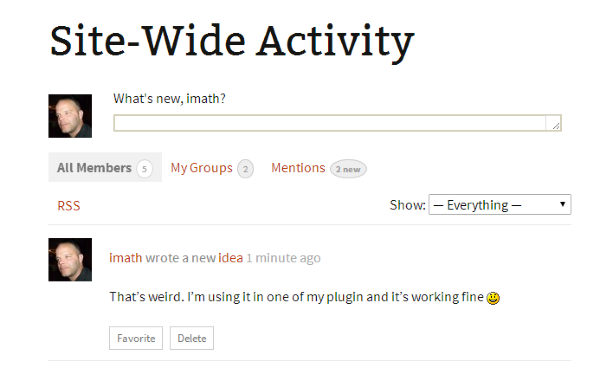
My first impression is i’m a bit surprised as i’m using Post type activities for one of my plugin and everything seems to be ok… See this image :
 In reply to: bp_get_member_type() is not working in the loop
Ok got it.
First i’ve just created this ticket and suggested a patch to solve the issue.
Now, you can still have it working by simply requesting a ‘not single’ member type using false as an extra argument eg :
bp_get_member_type( bp_get_member_user_id(), false );So you’ll get the member type name, but not the singular name. If you want to have the singular name, here’s another gist :
https://gist.github.com/imath/3a5c5ade44eae997fdfdIn reply to: bp_get_member_type() is not working in the loopThanks for your feedback about the gist 🙂
I’m on your issue. I think i’ve found what’s going wrong. Checking and will be back in a few if it’s confirmed.
In reply to: Custom Post TypeLet’s take an example : Custom Tags for your custom post type.
if the question is : “is it possible to have an activity generated each time a custom post type tag is created ?”
My reply is it’s not included in core. And by the way, creating a post tag doesn’t generate an activity.
Post types activities is easing the process of generating activities when an item of a ‘buddypress-activity’ supported post type is added.
We still need to work on generating activitiies when a comment is made on a post type.
About generating an activity when a taxonomy (hierarchical or not) is created is an interesting idea but seems inmho specific to a given post type. For example i have difficulties seeing an interest for post categories or post tags (but why not afterall!) but i do see an interest for one of my plugin. So i will explore this for the plugin i have in mind 😉
In reply to: Buddypress 2.2 and Links pageThe code will make sure the BP Links directory page is displayed.
I think, there’s no problem with the database. It’s a good practice (i really advise you to follow) to make a backup of all your files and/or at least your database before any upgrade of your WordPress configuration.
In reply to: [Resolved] Latest Update IssueJust tested on a fresh install, i’m not able to reproduce, that’s why i’ve asked you about a specific config.
When you say “Register and Activate pages cannot be created” Have you created the pages from the Add new page WordPress menu. You need to create 2 pages there and then come back to the BuddyPress settings > Page to set for Register and Activate one of the pages you’ve created.
In reply to: Buddypress 2.2 and Links pageHi Brandon,
I’m really sorry about the inconvenience.
I think this is very specific to the way the BuddyPress links plugin is built. Maybe the plugin developer will be able to find a quick fix.
In the meantime, @venutius @scaffies you can use a bp-custom.php file and paste in it this temporary fix :
https://gist.github.com/imath/ef0d44e21bd2dd195147I really suggest you to remove the code as soon as the plugin author fixed the trouble.
In reply to: [Resolved] Latest Update IssueThank you. Are you using a Multisite config or a specific config like BuddyPress activated on a subsite of a network ?
In reply to: [Resolved] Latest Update IssueHi,
Could you describe your configuration :
– Multisite ?
– WordPress version 4.1 ?
– Any BuddyPress plugin activated ?In reply to: Buddypress 2.2 and Links pagehi @venutius
Sorry something went wrong with BuddyPress Links.
It appears this plugin has a specific way to build its component. It’s actually not using the BP_Component class.
I’ve run some test with branch 1.7 of the BuddyPress skeleton component (https://github.com/boonebgorges/buddypress-skeleton-component/tree/1.7) which is using the BP_Component class to set its example component. With this plugin, the directory page issue is not happening.
So i’d recommand the author of the plugin to use the BP_Component class making sure the Links component is set as active using this kind of code https://github.com/boonebgorges/buddypress-skeleton-component/blob/1.7/includes/bp-example-loader.php#L64
In 2.2 we’ve introduced a bp_is_active() check in the function bp_core_get_directory_page_ids(), i think it’s the reason why this problem has occured with this plugin. See https://buddypress.trac.wordpress.org/browser/tags/2.2.0/src/bp-core/bp-core-functions.php#L439
In reply to: BuddyPress 2.2.0 Breaks Featured PostsHi,
If “featured posts” are sticky posts, just tested on twentyfourteen with latest BuddyPress and i don’t see any troubles. Posts are listed above the other ones.
In reply to: UpdatingHi,
Sorry to read you’re having an issue after updating to latest version.
The problem is due to the BuddyBoss media plugin. It looks like it’s calling a BuddyPress function too early in the process. Unfortunately, it’s a premium plugin so it’s hard for me to find what’s going wrong. Could you contact the support team of this plugin to report the problem ?
If the support team needs any help, i’ll be glad to bring my hands on it.
In reply to: Admin Area Turned to Persistent Blank PageHi @tranny
I’m sorry to read about the problem you’re having when activating BuddyPress. From what you’ve described it looks like a plugin or a theme is checking for a capacity very early in the process, well at least before the BuddyPress members component has been fully loaded.
BuddyPress hooks ‘plugins_loaded’ at a 10 priority and define its components a little while after. So your target is a plugin, a theme, or a specific code direclty loaded in global scope that is doing a
current_user_can()before the action ‘plugins_loaded’ has been fired.If you look at this page, you’ll see there are 3 actions fired before ‘plugins_loaded’ : https://codex.wordpress.org/Plugin_API/Action_Reference#Actions_Run_During_an_Admin_Page_Request
Searching the cause of the problem won’t be easy, if i were you i’d do a back up of your entire site and would do some tests on a local server making sure the local server environment contains a x-debug client so that it would display the different functions called before the error appears.
In reply to: How to remove tabs from group admin navOopsy. I just realized you’ll need to wait till BuddyPress 2.2 to use this snippet.
See my post here https://bpdevel.wordpress.com/2014/11/08/the-way-the-groups-manage-subnav-is-generated-has-been-improved/
In reply to: How to remove tabs from group admin navHi @danbp asked me about this.. So here’s a way to hide the tabs
function turker_remove_group_admin_tab() {
	if ( ! bp_is_group() || ! ( bp_is_current_action( 'admin' ) && bp_action_variable( 0 ) ) || is_super_admin() ) {
		return;
	}

	// Add the admin subnav slug you want to hide in the
	// following array
	$hide_tabs = array(
		'group-avatar' => 1,
		'delete-group' => 1,
	);

	$parent_nav_slug = bp_get_current_group_slug() . '_manage';

	// Remove the nav items
	foreach ( array_keys( $hide_tabs ) as $tab ) {
		bp_core_remove_subnav_item( $parent_nav_slug, $tab );
	}

	// You may want to be sure the user can't access
	if ( ! empty( $hide_tabs[ bp_action_variable( 0 ) ] ) ) {
		bp_core_add_message( 'Sorry buddy, but this part is restricted to super admins!', 'error' );
		bp_core_redirect( bp_get_group_permalink( groups_get_current_group() ) );
	}
}
add_action( 'bp_actions', 'turker_remove_group_admin_tab', 9 );


