Forum Replies Created
-
In reply to: Error When Adding Custom Post Type to Activity Feed
Hi there,
There’s a chance your theme hasn’t updated its templates. In order to have the activity dropdowns populated, please check your templates are up to date see https://codex.buddypress.org/themes/activity-dropdown-filters-in-templates/#use-bp_activity_show_filters-within-your-bp-default-child-theme
In reply to: Activity Feed not showing new membersWell, i think they are complicating their task.
It seems to me that to be sure BuddyPress will do all what it needs to do, you simply need to use :
do_action( 'bp_core_activated_user', $user_id );eg:
function on_user_registration( $user_id, $userdata, $form_id ) {
       $this->update_user_data( $user_id, $form_id );
       do_action( 'bp_core_activated_user', $user_id );
}
Because we hook to this action to :
– clear the member count cache
– create the ‘new_member’ activity
– Sync WP/BP profile if the xProfile component is activeIf that doesn’t fix the issue. A BuddyPress plugin should always launch itself hooking ‘bp_include’ to be sure every active BuddyPress parts are loaded.
So instead of
add_action( 'plugins_loaded', 'wpuf_bp_init' );
the plugin developer can tryadd_action( 'bp_include', 'wpuf_bp_init' );In reply to: Custom Post Type Support for ActivityFirst ‘text-domain’ or ‘custom-domain’. When you build a plugin, to make it an “international” plugin so that it can be translated in any language, you choose a text domain. See: https://codex.wordpress.org/I18n_for_WordPress_Developers#Text_Domains
Then Using post type activities. You were actually missing one of the functions i’ve shared in this thread. So here’s a gist that will work for the WP Job Manager plugin, you’ll have to observe, learn some WordPress/BuddyPress developing stuff (such as the Plugin API) by yourself to understand it and be able to apply for any post types.
In reply to: [Resolved] Fatal error after update to 2.2.2.1Thanks for the ping @mercime, and sorry for this annoying behavior about BP Checkins @akecheta1983. I need to find the time to improve this plugin.
In reply to: Custom Post Type Support for ActivityI’ll look at it soon, but in the meantime is there any reason why you are not using the buddypress-activity support/custom labels when registering the post type. As far as i can remember this code was shared because the post type was registered by another plugin. Is it the case of your “job” post type ?
In reply to: Groups function not workingRemoved the gist as it’s not fixing the issue
In reply to: [Resolved] Fatal Error after UpdateYou can try to see if the gist here https://buddypress.org/support/topic/groups-function-not-working/#post-237657 is fixing the issue
In reply to: Groups function not workingHi,
the trouble seems to be that
_bp_strip_spans_from_title()is declared by another plugin or a theme or a code in bp-custom.php or in a mu-plugin…You should try to find the place were this function is already declared.
In the meantime you can create a bp-custom.php file at the root of /wp-content/plugins/ and use this gist in it to see if it solves the issue :
In reply to: [Resolved] How to remove tabs from group admin navHi @svenl77,
It’s the case, just tested it and the function does what it intends to do : remove the group-avatar && the delete-group manage tabs.
I don’t manage to reproduce your issue. If i go to
groups/GROUP-SLUG/adminthen i’m automatically redirected togroups/GROUP-SLUG/admin/edit-detailsso no 404.My config is :
fresh install
WordPress latest trunk
BuddyPress latest trunk
twentytwelveI don’t think we’ve played in this area since 2.2.1
FYI : if i add the edit-details to the list of restricted tabs, then the group admin cannot access to any manage page without knowing the url of the allowed tabs. So i’d say the edit-details should always be there.
In reply to: Change parent for groups page and get 404Hi @aglekis
I can imagine why setting the Members directory page as a Parent of the groups directory page is not working: the built url must Be in this case site.url/members/groups and then BuddyPress is looking for a member having the username “groups” and do not find it 🙂
Instead of using the Parent attribute, you can use wp_nav_menus 😉
In reply to: Change parent for groups page and get 404Hi Grégoire,
Thanks for the ping 🙂 To make sure i understand well :
When the directory page for the group is a child of another page then you get a 404, is that correct ?In reply to: Buddypress Settings Won't Save?Very strange.
Have you tried to deactivate all plugins except BuddyPress to see if that wasn’t a problem with another plugin ?
Have you tried to activate a WordPress default theme to see if it wasn’t a problem with the active theme ?
Do you have custom function in bp-custom.php, if so try to remove them temporarly.
If all of the above is not changing anything to your trouble, if you deactivate BuddyPress is the problem still there (you can actually begin by this step, if you prefer) ?
In reply to: Buddypress Settings Won't Save?I don’t think it’s the same issue as you’re getting the register page even if signups are not allowed. So i advise you to remove the code of the gist if you are using it.
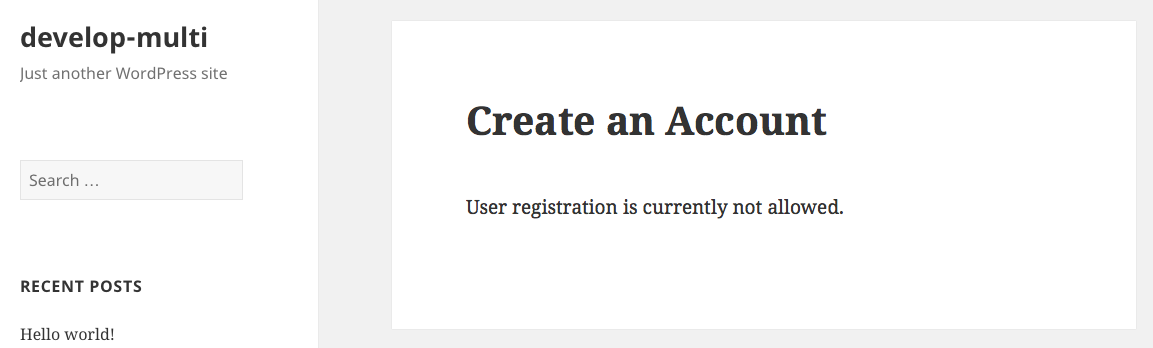
If i understand well, your issue is when you save the general settings having the “anyone can register” option checked, this option is not saved and you keep having the message “User Registration is Currently Not Allowed” when a user tries to register. Is that correct ?
In reply to: Register and Activate Association ProblemAdding a trailing slash is fixing the issue :
http://kompanio.de/register/In reply to: Buddypress Settings Won't Save?Thanks a lot @gina yes we need to test this fix on 2.2.0 so you’ll need to backup your database (and wp-content files just in case) and upgrade again. Once done paste the script in a bp-custom.php file you will put in your plugins directory. The test patch will only be run If BuddyPress 2.2 is activated. If it’s fixing the issue with invite anyone you can choose to keep it till 2.2.1 is released or If you are afraid to Forget to remove it by then, revert once again to 2.1.1.
In reply to: Buddypress Settings Won't Save?As i told you we’ve been working on a patch and i would like to have your feedback on what we’re planning to do to be sure it’s the right fix to your problem.
Simply put the content of this gist https://gist.github.com/imath/07e79c2244c5ab2e0a1b in a file you will name
bp-custom.phpand that you will put at the root of your plugins directory.Thanks a lot for your help.
In reply to: Register and Activate Association Problem@r-a-y is right, pages will come back as soon as signups are allowed.
But if you are using a plugin like invite anyone, you might need to set these pages. We’re currently working on a patch and if you are in this case please consider testing/giving your feedback about this script https://gist.github.com/imath/07e79c2244c5ab2e0a1b (simply add it in a bp-custom.php file at the root of your plugins directory)
In reply to: Custom Post TypeSo the question is ‘How can i edit the action string eg: someone wrote a new event, if the event was posted having a race tag or a training session tag ?’
is this correct ?
If so, you’ll need to filter ‘bp_activity_custom_post_type_post_action’, get the secondary item id which is the post type id, fetch the tag for this post type id and override the action string.
@rossagrant you’re very welcome 🙂
If you define a
contextsargument in thebp_activitypost type parameter, it allows you to controle the front dropdown filters where the option will be output : see https://codex.buddypress.org/developer/function-examples/bp_activity_set_action/ for a full explanation.If this is still not working, i can see 2 explanations :
1/ The active theme is a standalone BuddyPress theme or a theme that overrides some templates without being ready for the way of fetching activity filters introduced in BuddyPress 2.1 see : https://codex.buddypress.org/themes/activity-dropdown-filters-in-templates/
2/ Or the post type is registered within a subsite scope and not registered network widely.Hi i only see labels argument of your custom post type in your description how do you actually add the ‘buddpress-activity’ support and do you use a bp_activity argument where you define the contexts for the front end dropdown filters.
In reply to: Buddypress Settings Won't Save?Thanks for your help, it’s what i’m working on as in this case in version 2.1.1 we had this screen shown :
https://cldup.com/JJiIskSjTR.pngIn reply to: Buddypress Settings Won't Save?having this settings on “Logged in users may register new sites” means registrations are off for WordPress. Deactivate BuddyPress and you will see WordPress will not allow you to register. Activate BuddyPress 2.1.1 and you’ll see that there are no regressions.
The problem is elsewhere.
In reply to: Buddypress Settings Won't Save?@gina i’m not so sure about invite anyone i think there might Be a problem with BuddyPress. I need some time to Fully understand
In reply to: Buddypress Settings Won't Save?In BuddyPress 2.1.1, when using this setting “Logged in users may register new sites” > registering new users is not available.
If you deactivate BuddyPress to only let WordPress, this setting doesn’t generate a registration link.
In BuddyPress 2.2 same behavior. So no bug.This means the problem is coming from the plugin invite anyone. Since BuddyPress 2.2, the way this plugin was overriding BuddyPress site options is not working anymore. I’m going to inform the developer of the plugin.