Forum Replies Created
-
In reply to: Can´t upload avatars and proflie covers
Hi all,
Thanks a lot for your feedback, but just saying “it’s not working for me” is not helping that much 🙂
Let’s share as much infos as possible..
WordPress version?
Theme activated?
Plugins dealing with media activated?
Browser used?
Host ?I’m saying this because i was able to set my cover image on @christopherwayne website and set my avatar using the wp-admin/profile Extended profile area of his website.
Perhaps try to clean your browser’s cache…
In reply to: Can´t upload avatars and proflie covers@christopherwayne found the problem was relative to the theme he is using. @leg3ndary can you switch theme to see if that’s also the case for you.
If the theme is problematic for the new avatar UI, can you tell me if the content of the page is loaded using Ajax ?
In reply to: Can´t upload avatars and proflie coversOh sorry, you can use the bp-custom.php file to put these filters: https://codex.buddypress.org/themes/bp-custom-php/
In reply to: Can´t upload avatars and proflie coversi have the problem after migrating my wordpress installation from one server to another
Meaning this wasn’t happening before this migration?
In the meantime, you can temporarly fallback to the “old” Avatar UI by adding this filter:
// This will disable the Avatar UI and let you use the old UI
add_filter( 'bp_avatar_is_front_edit', '__return_false' );

// These will disable the cover image.
add_filter( 'bp_is_profile_cover_image_active', '__return_false' );
add_filter( 'bp_is_groups_cover_image_active', '__return_false' );
In reply to: Can´t upload avatars and proflie coversHi,
thanks everyone for reporting this issue. Could you give us details about your configs ?
WordPress version?
Theme activated?
Plugins dealing with media activated?In reply to: bp_activity_add() creating double activitiesI’ve replied directly on the gist : https://gist.github.com/ryanhellyer/c31bf993d55e1d7450a8#gistcomment-1690188
In reply to: bp_activity_add() creating double activitiesHi,
could you share a gist with the code you’re using to add the activity to the group ?
Hi,
if the message “That photo is too big” appeared on avatar upload and not on cover image upload for the same image, i guess it’s possible a plugin/script/function or something i can’t have an idea of at the moment is either:
– usingdefine( 'BP_AVATAR_ORIGINAL_MAX_FILESIZE', x );
– using `add_filter( ‘bp_core_avatar_original_max_filesize’, function( $size ) {
return x;
} );`
– using `add_filter( ‘bp_attachments_get_max_upload_file_size’, function( $size, $type ) {
if ( ‘avatar’ === $type ) {
$size = x;
}
return $size;
} );`where x is an int for the max filesize.
Just tested on a fresh install (regular config & multisite one).
When a user registers from the front-end registration form on both configs, i can’t manage to reproduce your issue.
first_name/last_name user meta are created
display_name field in tablewp_usersis created
value for the xProfile Name field is created inwp_bp_xprofile_datatableTitle of the page is looking like this
FirstName LastName - Site Namefor profile’s page.So everything works fine for me.
Are you sure it’s happening when a user registers ?
Have you tried without any other plugin activated than BuddyPress ?In reply to: BuddyPress 2.4.3 – Maintenance release@aldin_abdagic thanks for your enthousiasm about the suggestion plugin 🙂
@djpaul i’m not sure it’s linked to xprofile sync it could be something going wrong during the signup process. I will check 4.4.1 changelog and run some tests this week end. Is it a multisite config or a regular one ?
In reply to: Displaying cover image BuddyPress 2.4yw @sm60 🙂
In reply to: BuddyPress 2.4.0 – PietroThanks a lot for your feedbacks @joost-abrahams & @jpospina 🙂
In reply to: Some feedback regarding cover imagesThanks for your feedback
For the shortcuts, you can try this plugin: https://github.com/imath/modal-buddy
I’ll keep in mind the 2 other points.
In reply to: Displaying cover image BuddyPress 2.4You can do it without the cover image settings.
if ( ! $cover_image_url ) {
    $cover_image_url = 'http://mysite/link-to-default-coverimage.jpg';
}
In reply to: 2.4 Cover Photo’s does not work with Graphene Theme@garprogram yw 🙂
In reply to: 2.4 Cover Photo’s does not work with Graphene Themeyw @venutius
if you’re overridding templates, i advise you to update them according to the changes we introduced in 2.4.
In reply to: 2.4 Cover Photo’s does not work with Graphene ThemeFYI there’s a codex page you can read in case of problem. By default, the Cover Images feature is adding an inline style to
bp-legacy-css, you can see it in the head tag of your pages: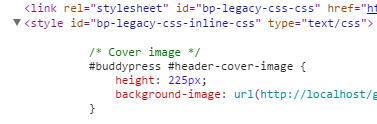
I’ve just tested with a child theme, your problem should only happen if you are overriding buddypress.css within your child theme. In this case you’ll need some extra work as explained here:
In reply to: profile not foundAre you using pretty links ?
I advise you to check > WordPress Administration > Settings > Permalinks and make sure to use something else than default.
In reply to: BuddyPress 2.4.0 – PietroThanks for your feedbacks @henrywright & @freakyy85 🙂
In reply to: No Profile TabsI’m really sorry to read this thread. I think we’ve done our best to prevent this kind of situation by including some easy ways to deactivate the cover images if the theme you are using haven’t upgraded to support it.
On september 3Oth, more than a month ago, we’ve posted on our blog to explain to everyone how the Cover Images could impact themes, see https://bpdevel.wordpress.com/2015/09/30/buddypress-2-4-0-will-introduce-cover-images-for-members-groups/
At the end of this post i’ve insisted on this point :
If you are a theme designer or the author of a plugin managing Cover images, we recommend that you don’t forget to test that everything works fine for you during the 2.4.0 beta period.
Then, a month ago, we’ve added a codex page to explain to everyone how to implement cover images for specific themes : https://codex.buddypress.org/themes/buddypress-cover-images/
Then we published a beta and a release candidate to let people test it, to make sure everything was working fine.
I understand your frustration, but be sure we’re always trying to do our best. BuddyPress is free, open source and is maintained by volunteers like @r-a-y and me. We’ve been testing as much themes as we could, unfortunately your particular theme wasn’t available for us. I’m convinced the TagDiv team will soon implement the cover images feature into their themes, and if they have any question, i’ll be happy to help them.
Best wishes.
In reply to: BuddyPress 2.4.0 – PietroIn reply to: Custom Post Type Support for ActivityHi @milenushka,
I see you are also filtering
bp_blogs_record_comment_post_typesto track comments about the “projects” post type. I’ve changed my mind 🙂 I think we should wait to have this ticket fixed first.Since 2.3 your code should work fine.
In reply to: Create Cover Photos using the new BP_Attachment APIhi @brianbws
Here are some advices :
1/ I wouldn’t “mix” a cover photo into the avatar UI, it’s not the same need
2/ I would create a new profile tab “Change cover photo”
3/ From there, i’ll use a regular upload/crop experience or build a new UI using Backbone like i’m doing in the next version of this plugin https://github.com/imath/buddydrive/tree/1.3 > follow thebuddydrive_editor()function to see how to do this.
4/ I’ll extend the BP Attachment class > the codex page should help you.To extend the avatar UI, you can have a look at the plugin BP Avatar Suggestions 1.3, i’ve updated it to add a new tab to the UI because : it is to set an avatar 🙂
This plugin also creates an upload UI and extends the BP Attachment class.I think watching the codex page, the 2 plugins, will help you. Bye.
In reply to: Custom Post Type Support for ActivityHi @milenushka,
Using your old code means using the old filters, i guess. If you do so right now, it will not be ok, 2.3 will include a fix to make this works. But you must know these filters will be deprecated, so it might Be a good idea to use the new way of registering activity support for your post types. Could you share the code you were using and i’ll share with you the code that Will mimic your old code using the new way of registering activity support.


