Forum Replies Created
-
Hi,
Could you check if the xProfile (Extended Profile) component is active?
The locally managed Avatar feature of BuddyPress needs this component to be active.
In reply to: buddypress still activeHi,
The plugin “BuddyPress Reply by email” you are mentionning is probably using a function located into BuddyPress, that’s the reason why you get the WordPress message about technical difficulties.
You should re-install BuddyPress and activate it. Then deactivate “BuddyPress Reply by email” and completely remove it from you WordPress, and do the same for BuddyPress (deactivate then remove completely).
In reply to: BuddyPress 4.4.0It’s always safer to update to latest stable version.
In reply to: Profile default navHi @eloyruiz
You can add this Gist into a bp-custom.php file to achieve what you want to do:
https://gist.github.com/imath/113ad3226c9a01ac56c2d2edabb458f3PS: you need to keep the public view for users viewing other profiles.
In reply to: Buddypress as a Business Listing Directory?Hi @coolhunt 🙂
I think it depends on the level of user interactions you need. If your need is simply to list businesses, then yes a plugin like the one above should do the job.
But if your need is to build something more “social”, like having business fans listed, discussions about the businesses, reviews. Then I’d probably choose BuddyPress and use one of my plugins to add profiles to group 🙂
There’s a ticket on BuddyPress Trac about it: https://buddypress.trac.wordpress.org/ticket/6783
About SEO, I’d love to see a plugin making BuddyPress more friendly in this area and we’d be very happy to help improving this part as soon as we could have guidelines about the needs.
In reply to: Buddypress.org shutting downThanks a lot for your interesting suggestions @coolhunt. I agree we need to talk about how we can improve BuddyPress documentation and about how to find help to start using/resolve issues.
We are currently working on the next major version of BuddyPress (5.0.0). As soon as it’s released, I’ll start a discussion about it from our Development news blog.
PS: really happy you like the work accomplished in Bowe Codes (although it would benefit from some improvements, but that’s another topic 😉 )
In reply to: Buddypress.org shutting downHi @coolhunt
Everybody is welcome to contribute to BuddyPress, here are possible ways to do so https://codex.buddypress.org/participate-and-contribute/
Writing documentation, helping others in support forums or translating BuddyPress in other languages are examples of contributions which does not require development skills.
Hi @philippebrousse and @shanebp
I’ve seen the ticket(s) (I think #8104 & #8108 are duplicates) about this need.
In the meantime, you can still send BP Emails in
text/htmlusingwp_mailusing these filters:
https://gist.github.com/imath/4faef242ae104c65ddb9ec711ea37189In reply to: Can’t Post in Activity Stream@aaronpods no problems.
Have you deactivated all plugins/bp-custom.php/mu-plugins/ except BuddyPress ?
I think there’s something preventing the regular Nouveau JavaScripts to load. As the post form needs it to be displayed because it uses BackBone.JS views, it’s the reason. The other script/plugin is only conflicting with the activity directory, as i’ve checked your profile, the Nouveau JavaScript are loading.
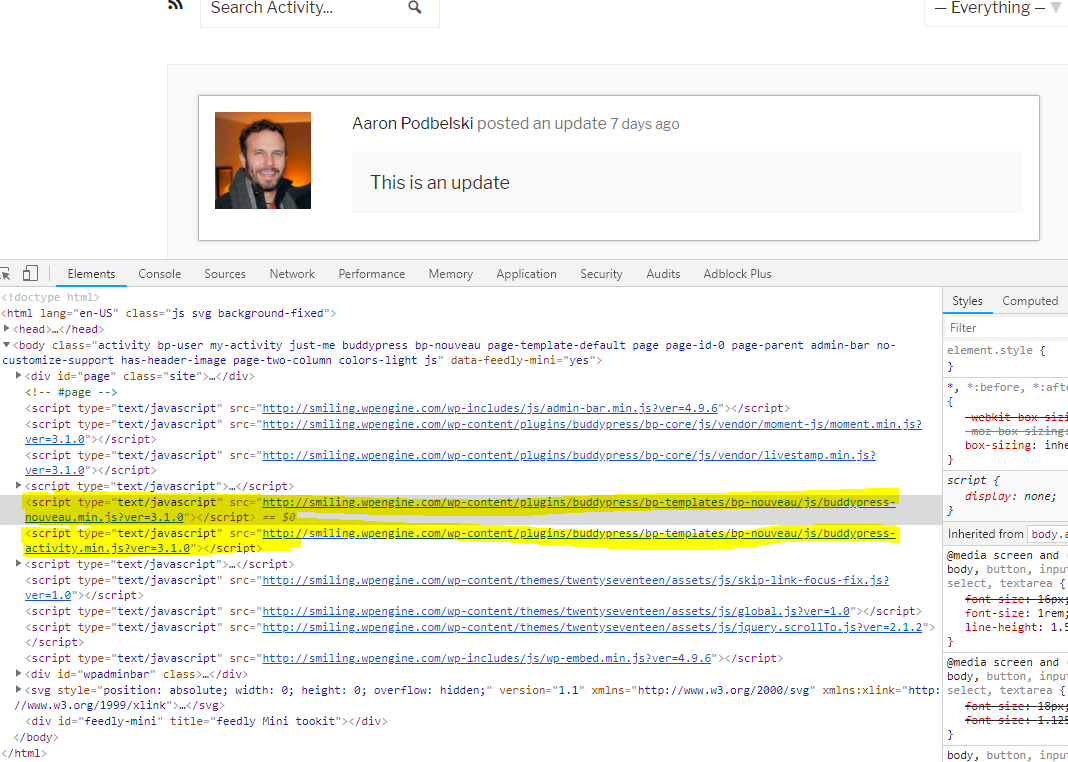 In reply to: Can’t Post in Activity Stream
Hi @aaronpods,
Are you really sure it’s the 2017 theme that is activated ? Because if you look at the console messages in this screencap http://smiling.wpengine.com/wp-content/uploads/2018/06/Screen-Shot-2018-06-11-at-11.32.56-AM.png the theme Divi is activated and tries to load
wp-content/themes/Divi/js/buddypress.min.jsPlease, try to flush your cache if you use a cache plugin, and activate TwentySeventeen to see if it fixes the issue.
In reply to: Some activity stream issuesBTW You can fix it by switching back to the Legacy template pack from your BuddyPress Options Administration screen.
In reply to: Some activity stream issuesHi @akkoxe,
I think your theme is using a custom
buddypress/activity/post-form.phptemplate as there are two textarea tags. Can you confirm ?The error you get about the undefined message is there because the Nouveau JS Templates are not being included.
In reply to: Can’t Post in Activity StreamHi,
There’s probably a JavaScript issue blocking the UI.
Can you check what’s in your browser’s Console ? Are you sure it’s the default theme ?For your info, the Nouveau template pack is not showing the number of users into these bubbles but the number of new activities of the load newest feature.
hi @strothi
here’s a gist to do what you need to do, the right way 😉
https://gist.github.com/imath/e964da41a85b9e76b679fb946114219c
For your specific case, you’ll also need to add an extra line to the bp-custom.php file:
remove_action( 'bp_setup_nav', 'rt_change_profile_tab_order', 999 );So that your theme stops doing it the deprecated way.
In reply to: how to shorten Buddypress activation key@djpaul that was to avoid breaking plugins playing with the user meta for regular WordPress install (non multisite).
You can skip it by using:
define( 'BP_SIGNUPS_SKIP_USER_CREATION', true );In reply to: Users cannot register since update 2.53As the registration process can be different according to WordPress configs, can you please provide some details about yours :
– Multisite ? If so is BuddyPress network activated or activated on a specific blog of the network
– Plugins ? Especially the ones that might play into the registration process.FYI, i’ve just rechecked on 2 freshes WordPress configs (regular & multisite) having only the BuddyPress plugin activated. Registration is working great.
In reply to: Cover photo not showing@nnyorker you’re probably activated a standalone BuddyPress theme that has no support for the cover image feature.
I advise you to have a look at this post:
BuddyPress 2.4.0 will introduce Cover Images for members & groups!In reply to: Can´t upload avatars and proflie coversLet’s be sure it’s a problem!
Could you go in WordPress Administration / Settings / Discussion and check you are allowing avatar display in your WordPress.

I’m saying this because you should at least view a mystery man as your avatar 😉
In reply to: Post comments not appearing in activity stream?Hi there, let’s try to reply to one problem at a time!
Now the posts do appear in activity stream, but not the comments. If i comment on a post, the stream doesn’t show the comments, but if i comment on a post via activity stream, the comment is then seen on a post and on the activity stream.
I guess, this means the BuddyPress “Site Tracking” is active.
1/ WordPress Administration > BuddyPress Settings > Options Tab – Activity Settings section:
Setting ‘Allow activity stream commenting on blog and forum posts’ is not checked. It means when a post or a comment is posted, then an activity will be generated, but it’s not possible to add an “Activity comment” to the generated activities. Just tested with latest WordPress and BuddyPress 2.5.2 and it works as expected:
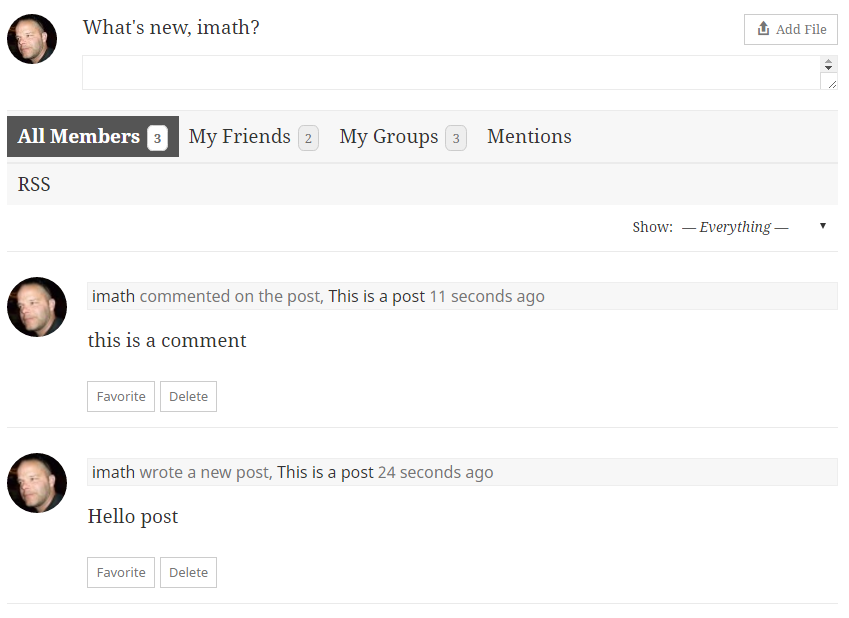
2/ WordPress Administration > BuddyPress Settings > Options Tab – Activity Settings section:
Setting ‘Allow activity stream commenting on blog and forum posts’ is checked. This means you chose to synchronize comments between the Post object and the corresponding activity object. So a comment on the activity about the post will generate a regular post comment and a regular post comment will generate an activity comment on the activity about the Post. Just tested with latest WordPress and BuddyPress 2.5.2 and it works as expected:
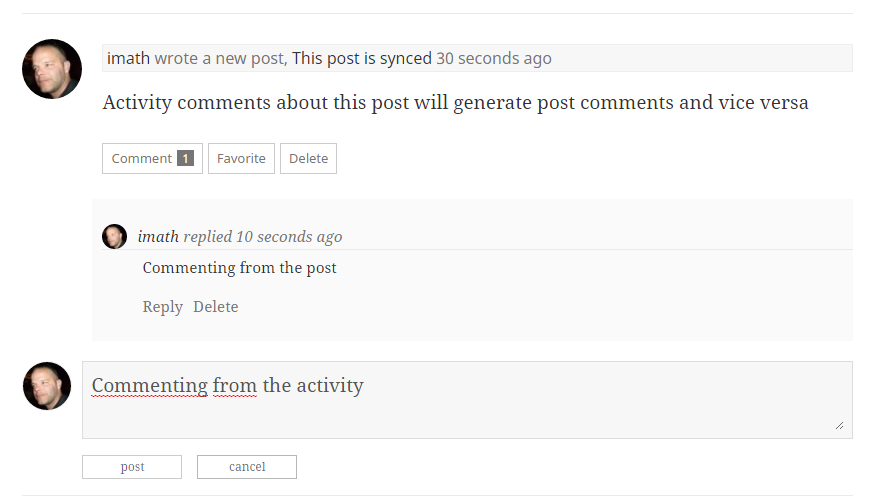
Now @cmavrikas is talking about something else i think. He wants the activity comments to also be displayed like regular activities: in stream mode.
I then advise to use another filter to avoid parsing args / checking the current object of the Ajax querystring:function activity_comments_stream_mode( $args = array() ) { return array_merge( $args, array( 'display_comments' => 'stream', ) ); } add_filter( 'bp_before_has_activities_parse_args', 'activity_comments_stream_mode', 20, 1 );I just tested it, and again it’s working fine in latest WordPress / BuddyPress 2.5.2…
I advise you to deactivate plugins/come back to a default WordPress theme and do the opposite work to find the plugins or theme that prevents this regular behaviors.
In reply to: BuddyPress 2.5.2 – Maintenance releaseGreat work on the packaging @dcavins 🙂
Hi there, what happens if you do something like this :
<?php
global $members_template;
$reset_members_template = $members_template;

if ( bp_has_members( 'type=newest&max=6' ) ) : ?>
                    <?php while ( bp_members() ) : bp_the_member(); ?>
                        <a href="<?php bp_member_permalink() ?>"><?php bp_member_avatar('type=full&width=125&height=125') ?></a>
                    <?php endwhile; ?>
<?php endif;

$members_template = $reset_members_template;
?>
Is the issue still there ?
In reply to: Same Cover Update Across Network – MultisiteThanks @djpaul
I’ve replied on the ticket:
https://buddypress.trac.wordpress.org/ticket/6931#comment:1And here’s a gist if you’re eager to have this behavior for your Multiblog set up:
https://gist.github.com/imath/91d56292673e6de61597In reply to: Avatar Upload ‘Wrong Size’ Message Is WrongHi,
By default the avatar sizes are :
– 150x150px for Full size
– 50x50px for thumb sizeIf a message is asking for a different minimum size, then it’s meaning a plugin or a theme is using some of our filters/constants to edit these sizes.
You can search for this filter
bp_core_avatar_full_widthor this constantBP_AVATAR_FULL_WIDTHoutside of BuddyPress to find who’s setting the size to be 580x580px.In reply to: Can´t upload avatars and proflie coversyw @airsid, thanks for sharing about the trouble with Ewww Image Optimizer. I’ll try to understand why it happens.
In reply to: Can´t upload avatars and proflie coversOk the problem is W3 Total Cache
See https://buddypress.trac.wordpress.org/ticket/6893#comment:14


