Forum Replies Created
-
In reply to: buddypress login widget broken
Do you have any custom code in bp-custom.php or plugins that redirect the user after login active? The normal behavior for login from that member theme sidebar area is to drop right back into to the same blog you logged in from.
In reply to: buddypress login widget brokenIn 1.0.1 I tried the login from the member theme sidebar area and if you have the bp root blog defined properly it works just fine. I assigned another blog as the BP_ROOT_BLOG and everything bp stopped working on blog id 1 as expected. It works just fine from blog id 17 that I switched it to.
In reply to: buddypress login widget brokenI can only comment on how bp 1.0+ operates. What version bp? I don’t know that the image upload or login problems have anything to do with what we are talking about. When you select one of the directories such as members, groups or blogs from the theme main nav, does it run the directories properly? If the answer is yes to that and your member theme works properly then bp is happy with whatever blog id it thinks you’ve defined as it’s root blog.
There are also two different types of image uploads in bp/wpmu. bp’s avatars and the blog post images that are associated with them. Which one are you referring to?
In reply to: install bbpress – no dropdown to select adminbbpress RC2 and RC3 integration is broke. See: https://buddypress.org/forums/topic.php?id=3199
Neither one of us in that thread had any success. I’m particularly proud of my discovery of the true nature of the relationship between bp/wpmu/bbpress when it comes to integrating the three:
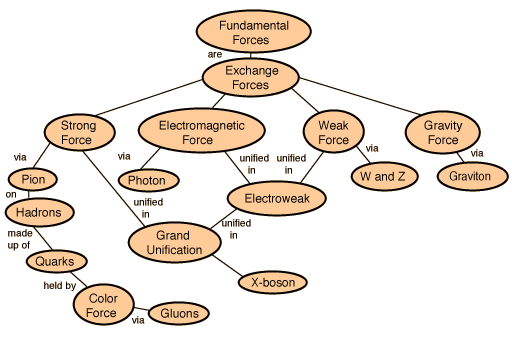
http://hyperphysics.phy-astr.gsu.edu/hbase/forces/imgfor/fforcon.gif
I changed the title to indicate that it’s here that the problem exists.
In reply to: buddypress login widget brokenYou can indicate to bp that it should consider a particular blog/subdomain as the one it should operate on. That is defined by the BP_ROOT_BLOG in bp-core.php. Change that to the blog id that you want bp to consider it’s own. In bp-custom.php:
define( ‘BP_ROOT_BLOG’, X );
Where X is the blog id of your subdomain.
I’m not sure what you mean by ‘buddypress installed in a subdomain’. There are VPS defined ‘subdomains’ done at the server level and there are wpmu’s concept of multiple blogs as wildcard ‘subdomains’ mapping to a particular blog id.
bp is installed wherever wpmu is installed. It has no independent relationship to domains. bp only has knowledge of blog ids.
Ha! Well that isn’t terribly optimal is it? Since the skel theme is distributed with bp I guess the best place to have this issue brought up is in trac. You found it and the solution. You get the credit and honor of reporting it with a patch.
https://trac.buddypress.org/newticket
Same credentials as here if you’ve never been there before.
In reply to: Crop & save button disappearsI’ve heard of some issues related to IE8. That the ver you are having problems with?
In reply to: How to make bbpress permalinks work in Group forumsI just don’t think anybody really knows. What version bp, wpmu, bbpress? That’s got to be somewhere around bbpress rc2 though. Not sure when bbpress went with the permalinks options. I can’t help you at the moment. I wiped my dev server’s bbpress, upgraded to bbpress rc2 and can’t get group forums to work at all. I can’t get that to work or wp/bbpress cookie integration. It’s the usual issue with conflicting, incorrect or just plain missing docs on how to make it happen properly.
We have wordpress config settings, bbpress config settings, bp config settings. After careful and lengthy research, I’ve determined that it all is somehow related to this:
http://hyperphysics.phy-astr.gsu.edu/hbase/forces/imgfor/fforcon.gif
I guess I get to wait until Automattic decides that integration of their three products is actually important. This is a back burner issue with my dev server. I just don’t have the time to track down the problem at the moment.
In reply to: BuddyPress Kills WordPress ThemesWell, that is partially true. bp hijacks the theme root and alters it to point to /bp-themes when it detects an url that belongs to the member theme. Those urls are things that are of the form mysite.org/members, mysite.org/groups …
By default it only does this for the root blog of the installation. Blog id 1.
You upgraded from what ver of bp and what ver of wpmu? wpmu now will not allow theme directory names that have a dash in them. So the non-2.7.1 theme /themes/my-theme doesn’t work anymore. It has to be /themes/mytheme
Same goes for the themes that live in /bp-themes. Did you upgrade your bp member theme and the bp home theme also?
You didn’t leave a link to your site or specify what versions of bp and wpmu you used to be running so I’m just shooting in the dark here.
You can’t do it but manoj can. He needs to hook up his component to the activity streams. Send him a message. Perhaps he has this planned for an upcoming version.
Roger, I haven’t looked at the skel member theme yet but perhaps it’s missing a :
$bp->is_directory = true; declaration.
That goes right before you do:
wp_enqueue_script( )
bp_core_load_template( );
Which launches the directory template. Setting that var turns off the userbar and the options bar.
In reply to: Blog Link on Group PageYou’ll have to modify the group theme templates to display your ‘group blog’ link someplace and then you can use (blatant self-serving recommendation) https://wordpress.org/extend/plugins/bp-community-blogs/ to allow automatic registered user status for all members of a group on a specific blog.
What you are talking about is the facebuddy member theme. Like any other theme you are free to modify it to suit your needs.
I’m not sure that is what he’s saying Mike. I think he’s just asking if he installs wpmu will all users have access to all subdomains. The answer is yes. Any user registered will have limited access as a ‘subscriber’ to all subdomains you create through wpmu.
You don’t need multiple installs to get multiple subdomains. Your root install, blog id 1, is the ‘main site’. All other blogs/sites are subdomains in wpmu.
In reply to: Admin bar acting weirdDid you upgrade your theme? Then force a browser refresh.
In reply to: lost my status as site admin. how to restore?You can create another user and make them a site admin in: Site Admin > Options > Administration Settings (Site Admins)
That lists all the users who are desginated ‘site admins’. This might help: https://wordpress.org/support/topic/184012
Perhaps your earlier trial at this didn’t work because your new username wasn’t on the list? If you are going to do the db route again add the new username first.

#3 all new blogs use the theme in the /themes/default dir unless you have some plugin installed that changes that behavior. There is no option in wpmu to select the theme for all new blogs with any kind of back end setting.
You can choose the theme that your main blog (id 1) uses but it has no effect on other blogs.
In reply to: Pulling BP Data into WPMU BlogReplace the standard bp_has_profile() call with:
$author_id = get_the_author_id_from_someplace();
bp_has_profile(‘user_id=’ . $author_id);
In your theme template.
In reply to: How to remove /member/ from URLYou can’t.
In reply to: New User Registration Bugwillpcg, this an issue that is known. Fixed in trunk bp. It’s related to the cookies that 1.0.1 uses now. Can’t sign up multiple users on the same computer. It’ll be fixed in 1.0.2.
In reply to: bpContents 1.0 Alpha 2 ReleasedThe release of bpc alpha 3 is going to be delayed. I’ve come to the conclusion that the use of MPTT is just too aggressive and problematic. There is also the issue of deriving classes from bp’s classes. That just isn’t going to work well either.
So I’ve got some re-engineering to do down at the lowest levels to eliminate the MPTT. I also have to implement a ‘content browser’ earlier than I had planned. This is going to take a little while longer.
In reply to: BuddyPress plugins and theme not loading@honewatson, I’m glad that you have things up and running to that point. I was trying to determine if you and hempsworth have any configuration or host properties in common. What I was looking for is:
Web server
PHP version
Subdirectory or subdomain for wpmu
In reply to: BuddyPress plugins and theme not loadingWhat is your install configuration like honewatson?
In reply to: BuddyPress plugins and theme not loadingIt shows up on the list like that because that’s where bp is looking for it’s themes. In the /wp-content/themes dir. It shouldn’t be. It should be looking in /wp-content/bp-themes.
Do you have any kind if aliasing going on for the dirs?
I’m looking at the code that does the theme hijacking and can’t understand how it’s failing.