`
Save file.
And did you go through Appearance > BP compatibility process? It looks like you have not finished with Step 3 – https://codex.buddypress.org/theme-development/wordpress-to-buddypress-theme/#step-three – where you need to fix alignment, then keep the bp.css enabled and adjust some styles to your theme.
Code has been updated and posted at http://wp.me/p1I84P-3O
@artisantopia Per scan of your theme’s HTML structure, you’d need to use the first option, i.e., change 16 template files within the 6 BP folders transferred to your Alyeska theme folder in server during the compatibility process.
== I am using custom admin bar from wpmu dev ==
Please contact wpmu dev for support or post at https://wordpress.org/tags/custom-admin-bar
@zturton you should be contacting the theme author for your premium theme. We have no ready access to the theme. Either there are missing files or you have to configure BuddyPress settings in theme options panel, if any or the theme needs to be updated.
@storyaday change to bp-default theme and check if issue is corrected. If so, contact your custom theme author about the issue.
What theme are you using? Have you changed to bp-default theme and check if issue is resolved?
Change to bp-default theme and see if activation is fixed. If issue is corrected, please contact theme author of Custom Community about this matter.
@davidvess Sorry for the inconvenience. We are aware of the issue. You can search via Google in the meantime. Thanks.
@babray for multisite installations @valuser‘s recommendation is spot on. For single WP installations, you could consider http://buddydev.com/buddypress/blog-categories-for-groups-plugin/
@khanyay what theme are you using? If you’re using a WP theme and activated BP Template Pack plugin and gone through Appearance > BP Compatibility. Make sure that you did not deactivate bp.css in the final panel.
== Do I have to separately install bbPress? ==
No, you don’t have to install the bbPress plugin if you want to use Group Forums at all. Go to the specific Group’s page > Admin tab to manage your Group.
== I want to be able to limit access to a group / forum based on the user role ==
You need create a plugin to do that. Or, make the Group either Private or Hidden. Members can only request to join in or members can be invited to join Private groups. Membership in Hidden Groups is by invitation only.
That plugin has been tested up to WP 3.0.1 only == BP 1.2.6/1.2.7. It’s just weird that your site went down before even activating the plugin and that you don’t see the plugin’s folder in wp-content/plugins/ since that’s where you should manually uninstall/delete the folder.
– Check wp-content/uploads/ folder via FTP and see if the zip file of the plugin is there and delete it. If by chance the kaltura plugin was unzipped there, delete it as well.
– if the above doesn’t work, then rename the whole plugins folder from wp-content/plugins to wp-content/plugins-xx. You can rename it to correct folder name later.
@cipes Hi there. The issue should be brought to the attention of your theme author who should be able to answer your question. Cheers.
@artisantopia do post the pastebin url for content-page.php file. If you don’t have it, do ask the theme author where `et_template_part( ‘content’, themeblvd_get_part( ‘page’ ) )` is so I can help you fix alignment of the BP template files.
@johnnyscience http://ohiocannabis.com/forums/forum/medical would be the normal structure of a default sitewide install. /forums/ is the slug of the sitewide forums directory and /forum/ refers to the specific forum – medical.
However when I go to ohiocannabis.com/forums/ I get a “The forums component has not been set up yet.” error which leads me to think that there’s a conflict of the /forums/ slug between Group Forums and Sitewide Forums or that you have not created a page named Forums and added the bbPress shortcode on that page.
Check Codex reference for setting up Sitewide Forums – https://codex.buddypress.org/getting-started/installing-group-and-sitewide-forums/
For more information about the Sitewide Forums (bbPress plugin 2+) please post at the bbpress.org forums
B. COPY your theme’s sidebar.php and Save As > sidebar-buddypress.php
Open up sidebar-buddypress.php and at the TOP, above all code contained within, add this
``
Then at the BOTTOM of sidebar-buddypress.php, below all other code, add this:
`
jQuery(document).ready( function() {
if ( jQuery(‘div#blog-details’).length && !jQuery(‘div#blog-details’).hasClass(‘show’) )
jQuery(‘div#blog-details’).toggle();
jQuery( ‘input#signup_with_blog’ ).click( function() {
jQuery(‘div#blog-details’).fadeOut().toggle();
});
});
`
Save file.
C. Upload header-buddypress.php and sidebar-buddypress.php to your theme folder in server wp-content/themes/unstandard/ at the same directory where your regular header.php and sidebar.php files are in
D. Final note: Copy the style modifications for some BP elements https://codex.buddypress.org/theme-development/theme-dev-bp-template-pack-walkthrough-twenty-ten-bp-1-5/3/ and paste those at the bottom of your theme’s stylesheet, then adjust to taste.
@sarbanharble I downloaded The Unstandard theme from http://5thirtyone.com
See if the instructions below to fix alignment will work for you:
You will only need to create two new files, header-buddypress.php and sidebar-buddypress.php
If you’ve revised any of the BP template files transferred to your unstandard theme folder in server during the BP Compatibility process, please delete the 6 BP folders transferred to your Unstandard theme folder in server – activity, blogs, forums, members, groups, register – then re-run Appearance > BP Compatibility again to make sure that you have clean template files.
A. COPY your theme’s header.php and Save As > header-buddypress.php
Open up header-buddypress.php and at the BOTTOM of the file, below other code contained within, add this:
`
Save file.
@sarbanharble looks like you’ve not completed Step 3 of the BP Compatibility process for members, groups, activity and registration/activation pages- https://codex.buddypress.org/theme-development/wordpress-to-buddypress-theme/#step-three
Based on a quick scan of the HTML structure of The Unstandard theme, you can use the 2nd method per link above to fix alignment of the BP template files – i.e., create necessary content/files header-buddypress.php, sidebar-buddypress.php and/or footer-buddypress.php and upload these to your theme folder – instead of the 1st method which involves changing 16 BP template files.
@starprintbrokers before deleting everything. Follow my instructions in my post above to change to bp-default theme etc.
@nsbalgcom Open up your theme’s header.php file, copy all, paste in pastebin.com, click submit, and post the generated URI here.
Do the same for your theme’s (The Global News Theme, right?) index.php, page.php, sidebar.php, and footer.php
Sanity check: When you said you activated the “default theme” in your first post, did you mean the WordPress default theme Twenty Eleven or the bp-default theme? It should be the bp-default theme. And if you’re using Twenty Eleven or any other WordPress theme, you need to install and activate the BP Template Pack plugin then go through Appearance > BP Compatibility process.
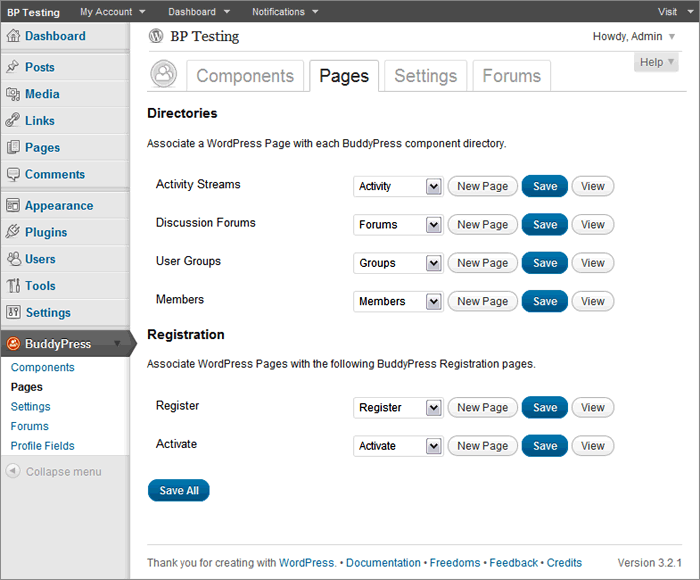
Now if you are using the bp-default theme, go to BuddyPress Pages again and double-check that BP components are indeed associated with respective pages https://mercime.files.wordpress.com/2011/11/bp-installation-wizard-08.gif
If that doesn’t cut it, https://buddypress.org/community/groups/how-to-and-troubleshooting/forum/topic/when-asking-for-support/
@nsbalgcom I see you’ve installed the BP Template Pack plugin. Now you need to fix the alignment within the BP template files to be compatible with your WP theme WPSN – via 1st method of changing 16 BP template files or via 2nd method of creating only the header-buddypress.php, sidebar-buddypress.php and/or footer-buddypress.php.
Initial scan of online source code shows that you need only to implement the 2nd method and adding some styles to fix the alignment of your theme. https://codex.buddypress.org/theme-development/wordpress-to-buddypress-theme/#fixalignment