Forum Replies Created
-
In reply to: [Resolved] Registration Empty Page?
Hi,
No post on the net is useful for for me.
They’re tons on this forum, related to this same problem…
Which is not a problem, but you have to setup the BP pages correctly.
This slug is false (malformed):
http://festivals.my/index.php/register/index.phpis a document./register/is a folder. Do you have documents containing folders on your computer ? Certainly not. Why would you that a web server would be configured differently ?Read the install guide and the chapter related to “pages“, setup BP and activate the permalinks to whatever but “default”.
In reply to: How to list all active membersActive is the defaut status of the members directory. Member who never logged-in have a different meta key value as active users. Search the user_meta table to find the correct value name.
Once you have it, you can sort your directory by meta…In reply to: Member Directory OrderIn reply to: Sorting activity streamTake it as example. Read here if it helps:
In reply to: Trying to get property of non-object@airathalitov, yes you have 😉
you’re right but not in this case. PHP 7.x related issues can be reported on that ticket (7392).
See Paul’s answer on #7406.
In reply to: Trying to get property of non-objectHi,
there is a ticket where you can report your issue:
https://buddypress.trac.wordpress.org/ticket/7392Hi,
try
bp_get_loggedin_user_link()More here: http://hookr.io/plugins/buddypress/#index=g&search=loggedin_user
In reply to: How to hide the RSS buttonThey are several possibilities. Read :
To change the text, use the language file
or modify directly the template(s) in your child theme.
In reply to: Another registration page questionNo, it doesnt qualify that and it is not a BP issue. As you use a specific designed theme for BP and some other plugins, it is that theme who manage the output of BP.
That said, feel free to read WP’s registration documentation. BP is a plugin who use that process. Then read BP’s documentation and do the same for the theme.
In reply to: I need Buddypress verified for 4.7.2 and +No, sorry, i talked about BuddyPress.
Do you have a problem with BP Verified ? In that case, you have to ask on its support, not here.In reply to: I need Buddypress verified for 4.7.2 and +You certainly use the latest version.
BuddyPress 2.8.1 Maintenance Release was published on February 22nd, 2017
You may better refer to the readme.txt file content when you want to verify such information.
Here the header of 2.8.1
=== BuddyPress ===
Contributors: johnjamesjacoby, DJPaul, boonebgorges, r-a-y, imath, mercime, tw2113, dcavins, hnla
Tags: social networking, activity, profiles, messaging, friends, groups, forums, notifications, settings, social, community, networks, networking
Requires at least: 4.3
Tested up to: 4.7.2
Stable tag: 2.8.1
License: GPLv2 or later
License URI: https://www.gnu.org/licenses/gpl-2.0.htmlCheers ! 😉
In reply to: Another registration page questionSorry, but this forum is for BuddyPress support.
We can’t assist you for premium theme. Please, ask on your theme support.
In reply to: MediaPlease, don’t double post.
Please, don’t double post.
See with your theme support and rtmedia support.
We can’t help with third party plugin and premium theme.
FYI, BuddyPress 2.8.1 works correctly with any Twenty theme (WP default theme)In reply to: How to query BP Member Types (Member Type List)Hi,
unfortunately for you, the plugin you use has poor support. The good news is that you could do that manually and that MT received some improvements since that plugin appeared. Personnaly, i think it is useless today (imho).
The magic starts by reading and copy/pasting the code explained on the codex. Once you get a result by example, and once you understand how it works, you can adapt to your need.
In reply to: Group moderation warningHi,
give details please.
WP and BP version ?
Php version ?
Theme name ?
Steps to reproduce your issue…In reply to: 2017- Hiding The Menu Tabs on the Profile PageHi !
That wonder is called bp-custom 🙂
In reply to: MembersHi,
sorry, but we can’t help you as you use a premium theme. And it looks like you have to adjust your CSS.
To do that, or a similar thing, like creating a child-theme, you need to read your theme documentation first. You have also to search on this forum for any topic related to “button not showing”.
And if you want a good advice, develop your site locally, so you can fearless do and undo while testing. You should also setup your BP properly with WP and a Twenty something theme first, before activating any other plugin…
All this is also documented on the codex, which you should read attentively (it seems to me you messed a little your install at the moment…).
In reply to: Styling BuddyPressHi,
in brief: yes!
But it depends greatly of your CSS and design knowledge. Fortunately, you can access to the whole theme code used on buddypress.org, by clicking here.Official announcement of this was in 2014.
In reply to: hide members from search resultsWe agree! But it is how it works actually, not a bug, eventually a lack of options.
I would suggest you open an enhancement ticket for this with some more arguments.
@djpaul, any thoughts ?
In reply to: hide members from search resultsi’m unable to reproduce what you’re telling. Sorry.
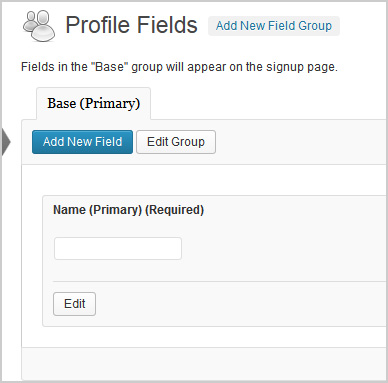
I think you have to set up correctly that field in the profile field admin.When a field is created, you have 4 status options and 2 options for the status visibility. One to give users the possibility to change themselve the field status or to enforce it for all.
Default setting is to let everybody set the visibility himself, whatever the status.
If you choose, as admin, to enforce this field with the “only me” option, this status will be applied to all, without possibility to modify it later.
The other important thing is to disable the autolink. When you set a field to be only viewable by one user, it is absolutely unecessary to make his value searchable!
Once you deactivate the autolinking of your city field, you couldn’t no more search for cities.
None of the built-in search forms on frontend will bring a result (wp search, BP members search) when autolink is disabled.
When autolink is enabled, you can get the user’s living in the same city, but only via the profile link, not via the search form.
If it is different for you, try to disable any additionnal search plugin before testing the standard BP environment.
In reply to: Display activity of a specific groupDid you read the related documentation ? Specially the one related to the groups-loop ?
My previous answer contained a solution to do that programmatically. But you (continue to) use the template method. If you want this method, see the mentionned groups-loop.
In reply to: Random User when /Members is loaded?Hi,
you need a child theme and a small code modification.
The code is explained here.
if ( bp_has_members( bp_ajax_querystring( 'members' ) ) )is to replace by something like (can be different)
if ( bp_has_members( 'type=random' ) )In a “buddypress” folder of your child theme, you add a copy of this file:
wp-content/plugins/buddypress/bp-templates/bp-legacy/buddypress/members/members-loop.phpWhat ever you modify in that file while now be interpreted by BuddyPress. The advantage of this method is that BP can be updated while your modification in the child will always be save and taken in account over the current version.
You can also search the forum for members-loop to get other information.
In reply to: whats-new-textarea – sizeI would recommand you try first the CSS trick. And of course, what ever you do, from within a child theme !