Forum Replies Created
-
The URL provided in the email notification is just to a page that requires access by an appropriate logged-in user. The issue appears to be related to the process that is constructing the redirect URL. The example you provided appears to be mangled for an unknown reason:
https://infosecportal.ru/wp-login.php/?redirect_to=https%3A%2F%2Finfosecportal.ru%2Fpolzovateli%2Fpauls%2Fbp-messages%2F#/conversation/11The slash that is after
wp-login.phpseems to be misplaced, additionally, there should be a slash after11and then I would expect&bp-auth=1&action=bpnoaccessafter that.The redirect is constructed in the function
bp_core_no_access()which can be viewed at the following URL for BP 14.3.4:https://github.com/buddypress/buddypress/blob/14.3.4/src/bp-core/bp-core-catchuri.php#L328-L405
Typically, $mode is equal to 2 which will then execute the code represented by lines 371 through 381: i.e.:
		case 2:
			if ( ! empty( $redirect ) ) {
				bp_core_redirect(
					add_query_arg(
						array(
							'bp-auth' => 1,
							'action'  => 'bpnoaccess',
						),
						wp_login_url( $redirect )
					)
				);
$redirect should be the URL that is represented in the email notification. The function
wp_login_url(), which is a WordPress function, constructs/builds the redirect URL. The functionwp_login_url()without arguments should, in your case, return:https://infosecportal.ru/wp-login.phpThe fact that there is a slash after the
.phpindicates that you should look there for why the slash is present, see the following regarding information onwp_login_url():Hi,
BuddyPress doesn’t have chat. Out of curiosity, what plugin are you using for chat?
In reply to: BuddyPress plugin not tested with my WP versionHi,
Unofficially, AFAIK, BuddyPress v14.3.4 is compatible with the 6.8 branch of WordPress.
Officially, we (the BP team) are behind with the scheduling of the next release. As to when this will occur is, currently, up in the air. Lastly, thanks for the reminder, I’ll have a chat with one of the BP committers to see if we can get things moving forward.
Just so you know, I edited your original post to remove your statement regarding the solicitation for hired help.
Support is provided by volunteers and is subject to when someone has time and/or expertise for any given topic request. Additionally, this is not a Job Board, if you require this type of help then you may want to use the following link to make a request of such type:
In reply to: How long my topic will be pending moderation?Hi,
Your best option is to flag it in the #buddypress channel on Slack or to flag it in this forum (Request & Feedback), given that posting in any of the forums doesn’t automatically flag a post as spam or as requiring moderation.
That said, your post was automatically flagged for moderation due having 3 links (3 or more links will automatically place your post into moderation). As to how long it will take will depend on whether a moderator notices the post or is made aware of such, as you have done.
Last but not least, I edited your initial post such that the links don’t register as links, basically encapsulated the links within the
codetag/element. Additionally, I released your Topic from moderation.Hi,
In order to select WP pages (as it was prior to BP 12), you will have to install the BP Classic add-on/plugin.
In reply to: Users stopped receiving password reset emailsThose are the 21 situations that are installed by BuddyPress. If a situation for password reset had existed it would have had to be installed by, at the momenent, an unknown plugin which then would have made the count 22.
So, at this point, it is still unclear whether an email template and associated situation existed prior to March 25. OK, so let’s try something that might provide some insight as to what may be occurring:
- In an Activity post, @mention yourself, so that you would receive and email. We need to look at the email header information to see whether that email was sent by BuddyPress or by WP Mail SMTP.
- Send yourself a test message from WP Mail SMTP (once for HTML and once for plain text), again to check the email header information.
Personally, I only use the built-in emailing capabilities for WordPress related messages and BuddyPress for its related messages. However, I did install WP Mail SMTP (default PHP configuration) just to check how it functions with sending emails.
I will also attempt to install All-In-One Security (AIOS) to see if it is installing the password email template and situation.
In the meantime, I’m interested in knowing the results of the email header information specifically 2 key value pairs:
- Content-Type
- X-Mailer
The above list are the keys and an example for the @mention test would be:
Content-Type: multipart/alternative; boundary="b1=_pryh1yml4xJIzLfYeFcRRVRuhNzbjtZon2KyTKgas"
X-Mailer: PHPMailer 6.9.3 (https://github.com/PHPMailer/PHPMailer)
For WP Mail SMTP the results for the HTML test would be:
Content-Type: text/html; charset=UTF-8
X-Mailer: WPMailSMTP/Mailer/mail 4.4.0
For WP Mail SMTP the results for the plain text would be:
Content-Type: text/plain; charset=UTF-8
X-Mailer: WPMailSMTP/Mailer/mail 4.4.0
What I’m attempting to do here is to fill in the blanks, in my mind/have an historical record, and via the process of elimination attempt to figure out what is preventing password reset emails from being delivered.
In reply to: Users stopped receiving password reset emailsThe issue at this point, as I see it, is that there is additional information that is missing or yet to be uncovered/disclosed. Do you know as a matter of fact that this email template existed prior to March 25? If the email template, it’s corresponding situation (what you call a trigger) and any underlying code to make all of this function, for a password reset to be sent via BuddyPress, would have had to have been created by a plugin (that is not BuddyPress) and if true then that plugin needs to be identified in order to figure out why it has not reinstalled the email template with an associated situation (trigger). Otherwise, if the email template never existed then your problem lies elsewhere.
Normally, password resets are a function of WordPress and are sent via the
wp_mail()function that is executed via the retrieve_password() function. However, I noticed that you are using the WP Mail SMTP plugin of which password resets would be sent via this plugin instead of thewp_mail()function (WordPress).In reply to: Users stopped receiving password reset emailsIt seems that there isn’t enough information to make heads or tails of what might be occurring. Are you using the Youzify plugin? I ask because there are only 21 email templates (with corresponding situations) that come standard with BuddyPress. The email template shown in the screenshot you provided would have had to be installed by a 3rd party plugin.
In reply to: Active Page Colour in Dropdown MenuEither you have been misinformed or you have misunderstood what was being conveyed to you. The BuddyBoss Platform is not BuddyPress. Try BB again for support.
In reply to: [Resolved] Display on members pageThanks for the screenshots, they do help. The page shown (General Settings) looks very similar to a page that is provided by the BuddyPress Groups Extras (BPGE) plugin, see the following screenshot:
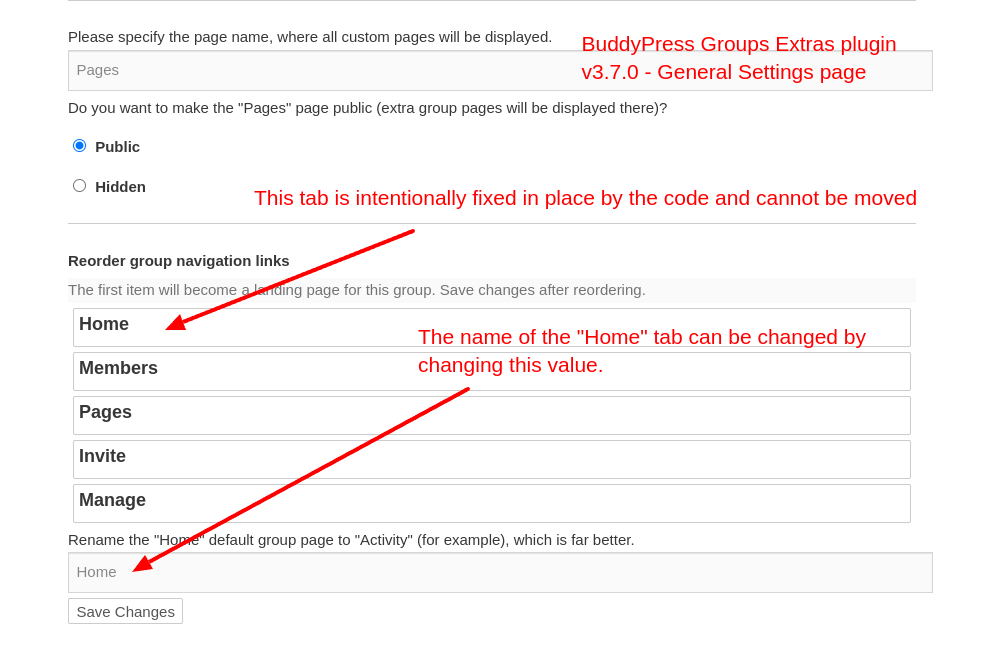
As indicated in the screenshot, the Home or, in your case, the
Activities tab is fixed in place by the code:if ( $nav['slug'] === 'home' ) { $disabled = 'ui-state-disabled'; }The above snippet can be found here and just indicates that the Home tab is disabled from being sortable. The following is what the element (li) has as classname (
default ui-state-disabled) for a non sortable tab of which the only one is the Home tab.<li id="position_686f6d65" class="default ui-state-disabled"> <strong>Home</strong> </li>While a sortable tab has
default ui-sortable-handleas a classname.<li id="position_6d656d62657273" class="default ui-sortable-handle" style=""> <strong>Members <span>1</span></strong> </li>The BPGE plugin author claims this change was due to:
Group's "Activity"/"Home" navigation link is hard coded in BuddyPress to always be the first one, so disable its reordering.However, when I rollback from v3.7.0 to v3.6.10, the Home tab is now sortable and can be moved. So the reason for the change is not entirely true.
Moving along, since the General Settings page from the BPGE plugin is similar to the page from your screenshots, we may be able to infer that there was a fork of some the code (the pages portion) from the BPGE plugin and was included in the BuddyBoss theme which AFAIK is a commercial (paid) theme, meaning I can’t verify the code within this theme due the status of free vs paid. If this is the case, then your resolve will have to come from the BuddyBoss developers. However, if the code that supports manage Page general setting resides elsewhere, e.g., custom code or 3rd party plugin, then the resolve is the responsibility of those who authored the code.
As an aside, as it relates to the BPGE plugin, there is an appearance of wonkiness with the reordering of group tabs which appears to be a factor that caused the change to make the Home tab not sortable, however, I’m not sure if BuddyPress is causing the wonkiness,
Having stated all of the above, it seems to me, the reason that you want the Pages tab to be the first tab is because you want that to be the landing page. Would this be a correct assumption? If so, there may be the possibility of changing the landing page to Pages, regardless of the tab order, which will depend on similar the code is similar enough to the BPGE plugin.
Hi,
First off, this is not the same issue as was the other topic you tried to hijack.
What may help is that you provide a screenshot of Manage Page General Setting.
2) … Also there, there is no way to change things here ? Add the thumbnail on the posts list for example, or separate the “comments” and “posts” tabs,…
“Things” can be changed programmatically. Additionally, BuddyPress does not come standard with “Posts” or “Comment” tabs. The only separation for these items is via the dropdown filter selection for “Posts” or “Comments” located in the Sitewide or User Activity streams which is standard for BuddyPress.
3) OK, really confusing.
And if the displyed name and real name arent the same, how can a user know the real @ he has to use to tag someone ?
BTW, i’ve made some tests and even if i use @displayname or @username, it doesnt send a notification to the user,…Users typically figure out who is who and for @mentions, only the username is used for notifications. For example, a scenario where there are 2 users with the same displayname which happens to be Apple, however, each has a different username because usernames must be unique. Maybe a visual will help you digest this information:

If you are having issues with notifications, that is a different issue and might be related to some external factor such as a plugin or theme that is interfering with the notification process.
As for Main settings, yes, those available via a UI are limited, however, programmatically, there are plenty via constants, filter hooks and action hooks.
In reply to: Change the default profile tab in BuddyPressHi,
I’m not sure I understand, there are 2 aspects to User (Profile) tabs/menus:
- Menu/tab order, e.g., Activity, Profile, Notifications, etc. vs Friends, Activity, Profile, etc.
- Landing page, of which the default is Activity
The menu/tab order is independent of the landing page or vice versus, IOW, if the menu had Friends as the 1st tab, the landing page would still be Activity, just to add some clarity.
So are your trying to (1) change the menu/tab order, (2) change the landing page or (3) both?
Also which template pack are you using, e.g., BP Legacy or BP Nouveau? Additionally, may I assume that you are using BP 14.3.4? If not, please state the version you are using.
Hi,
I’m not sure I, totally, understand your inquiry but, I’ll provide some information that may be of some help. The BP Nouveau template pack provides for use of the
wp_editor()function configured as TinyMCE and by default provides 7 buttons, e.g.:- Bold
- Italic
- Bulleted list
- Numbered (ordered) list
- Blockquote
- Link
- Image
Compose and Reply makes use of the same
wp_editorand due the use of various filter hooks, the number of buttons can be altered by a plugin or someone implementing custom code. Depending on the code that is external to BuddyPress, there is opportunity to make various buttons available to different users.For the sake of simplicity, the following screenshot is a simple illustration:
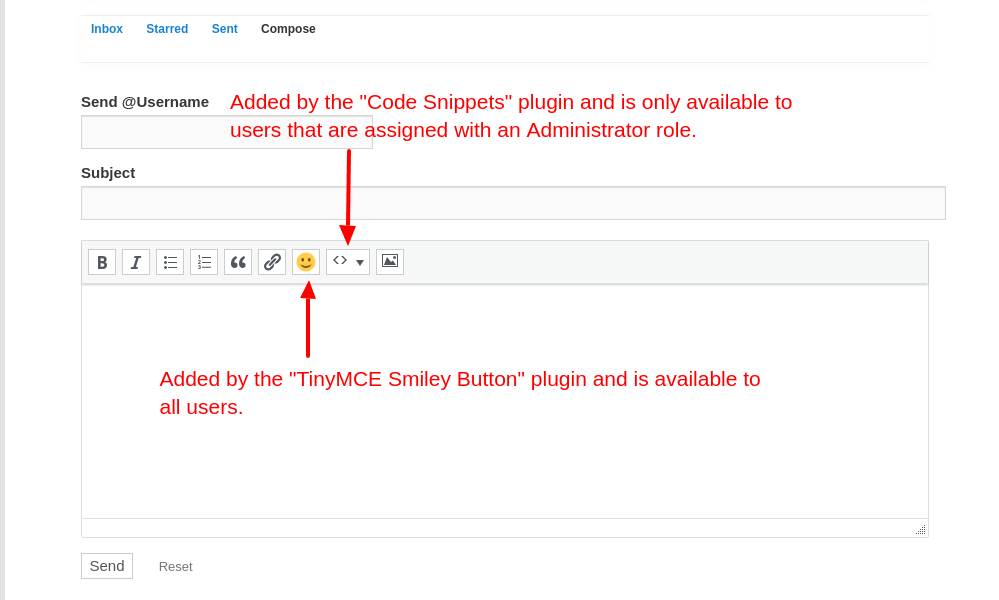
As for settings within BuddyPress, there isn’t a UI available for this purpose. However, some plugins that provide additional TinyMCE buttons, may offer UI settings.
Hi,
I’m not sure how soon the BP Team can address this anomaly. I’m not sure what you meant by “crashes“, so perhaps further conversation regarding this term is warranted as in; what is your definition of “crashes“?.
That said, what I am able to ascertain is that with “Modern Image Formats (v 2.5.0)” installed and activated, any attempt to upload a profile image (avatar) results in a user defined error message of:
There was a problem cropping your profile photo.Additionally, depending on which PHP version is installed, e.g. v8+, additional observations are:
- PHP errors may be observed (v8.0.30)
- Cropping bounding box may be missing with the crop window limited to the upper left quandrant (v8.0.30 & v8.1.31)
All I can say, at the moment, is that this anomaly is under investigation and may require more information from you.
In reply to: settings for Recently Active Members widgetHi,
If you’ve not discovered this yet and given the standard Recently Active Members Block Widget, if you have the Settings button enabled/active, you will be able to change the settings, e.g.:

If you are looking for the Legacy Widget version then you will have to install and activate the BP Classic plugin.
Additionally, 15 is the default number of members. As for the changing number of members after some period of time, I’m not able, at the moment, to duplicate what your are experiencing, meaning, given the default of 15 members I’ve yet to see the displayed number decrease from 15 and I’ve been observing for over a week. I’m just saying, I’m yet to experience the anomaly that you have described.
Furthermore, the data is retrieved from the bp_activity database table for the rows that have the component column equal to “members“, the type column equal to “last_activity“, as well as other criteria, e.g. number of members to return based on the number that is stipulated.
In reply to: No Menu Items for BuddypressHi,
Try reading through the following document to see if the information provides some insight:
Hi,
Some of the answers may have to come from the Theme developer, i.e. Re-Hub theme, for example:
1) How can I configure the user profile page? There are elements I find unnecessary for my website, and I’d like to remove them: the sharing buttons, the “write a note” option, etc.
The “sharing buttons” and “write a note” options are not standard for BuddyPress and are either introduced by your theme in use or possibly from a plugin you have actuated.
Additionally, without getting into a lot of detail, depending on the template pack in use, e.g., Legacy or Nouveau, there are an assortment of template pages that can be overloaded/overridden (requres advanced knownledge).
2) Users registered on my site can publish articles using a frontend plugin, comment, etc.
However, nothing appears in the “Activity” section: even if someone has published an article, nothing shows up. Similarly, nothing appears if they leave comments, someone replies to their comment, or tags them.
Also, what does the “Favorites” button correspond to? With the theme I’m using, users can save articles as favorites, which are then displayed on a dedicated page. Is that what it’s supposed to refer to?As to “articles“, I’ll assume these are synonymous with “blog posts“, typically these are synced to “Activities” via BuddyPress settings (wp-admin > Settings > BuddyPress) by enabling the “Site Tracking” component within the “Components” tab and enabling the “Post Comments” option under “Activity Streams” within the “Options” tab. See Post comments
As to “Favorites”, think of these as “bookmarks”, IOW, Activity items may be marked as “favorites” or unmarked as “Favorites” which will be listed within the “Favorites” tab, if marked accordingly and, yes, Favorites behave as you have indicated.
3) On the profile page, users can change their username and select a username that’s already in use (which isn’t allowed during registration). How can I fix this?
Usernames are unique and cannot be changed. In a “users” profile, the username is preceded/prefixed with the
@symbol. What may be confusing is the “Name” field which is more akin to the display name, to be more precise, it appears to be the “Display name publicly as”, which can be the same as the username or can be different from the username. What’s confusing is that there specific BuddyPress profile fields that correspond WordPress profile fields that may or may not have the same nomenclature. See Your Profile Screen – names section.It seems like you are trying to fix something like,
there can only be one user with a display name of "Alice". Rightly or wrongly, I suppose confusion abounds when a “display name” is conflated as being a “username”.Perhaps, someone else will have a better or more precise explanation than I have provided.
In reply to: BuddyPress Single Group Pages showing emptyHi @asmaajaved,
Wonderful news, glad you could resolve the issue. 🙂 🎉
The answer to your initial post can be found at the following:
As to your 2nd post, most likely via the following:
wp_localize_script( 'bp-nouveau', 'BP_Nouveau', apply_filters( 'bp_core_get_js_strings', $params ) );In reply to: BuddyPress Single Group Pages showing emptyI see that this is a multisite installation, not that this should matter, it’s just that more information gets revealed over time. I noticed that
define(‘WP_ALLOW_MULTISITE’, true);is listed twice; is this verbatim or just something that happened with copy & paste, just curious?As to base64_decode, this may not apply, this would have been a malicious attempt to obfuscate, I was just trying to rationalize why you aren’t finding where the
BP_GROUPS_DEFAULT_EXTENSIONconstant is being defined.Perhaps I should ask the question differently; what tool are you using to search for the
BP_GROUPS_DEFAULT_EXTENSIONconstant? Typically constants are defined inwp-config.php, it appears, however, the BP_GROUPS_DEFAULT_EXTENSIONcan be defined in a child theme'sfunctions.php` or a “Must Use” plugin, etc, etc.In reply to: BuddyPress Single Group Pages showing emptyHiding – not easily seen.
The constants you’ve indicated are for WordPress and are typically defined within
wp-config.php, if you search for one of those constant names, does it show up in your search results?


