Forum Replies Created
-
In reply to: Default to “Display name publicly as” username.
You could use this plugin — https://github.com/r-a-y/buddypress-usernames-only — to override the Display name so that only the username shows. I find this makes a lot of sense in communities where @mentions are a prevalent means of connecting. By default the Display name on the profile will still be the Nice Name, rather than the username, but you can change that by adding this snippet to your wp-config.php file
define( 'BP_SHOW_DISPLAYNAME_ON_PROFILE', false );In reply to: Multi date select profile fieldDoes this plugin fit your needs: https://wordpress.org/plugins/rendez-vous/
In reply to: Wrong Member CountIf you go into Tools/BuddyPress there is a function called Data to Repair: Count Total Members which might help. Otherwise I have noticed that occasionally user count is updated when the user actually starts participating on the site, not immediately after they register. I can’t test this, but I feel like I noticed something similar previously, and it sorted itself out.
On a multisite, you activate BuddyPress Network wide, and it then exists as a Social Network on the main domain (it doesn’t affect your multisite otherwise, and subdomains or subdirectories — depending on how you have set things up — will not be able to create their own social networks). Once activated, BP will track your users’ activity across the entire network (comments they leave on other blogs, posts they create, etc.)
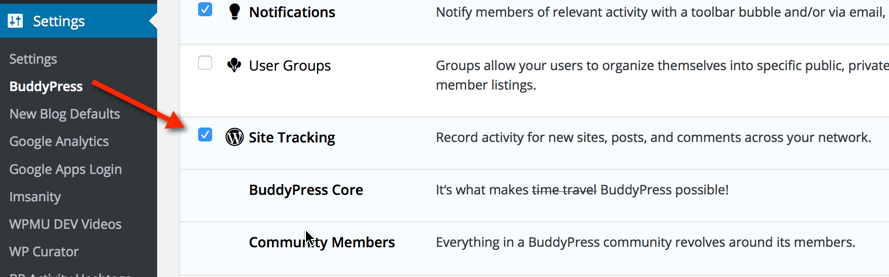
Once activated, go into Network Admin/Settings/BuddyPress, and make sure that Site Tracking is enabled to get the full benefit. Users will need to be subscribers on the main domain in order to contribute: a role they should be assigned automatically when they are registered.
In reply to: Fatal Error When Plugin activatedIf you change themes you will lose all the customization that your theme provides through that Cornerstone custom page builder (I assume this is your theme http://themeforest.net/item/x-the-theme/full_screen_preview/5871901)
I would suggest — because you have paid for the theme — that you go back to the theme developer and let them know that code in their theme is causing an error. The error message you provided shows exactly where the offending code is. It looks as though your theme has some additional customizations applicable to BuddyPress specifically.
If the theme author won’t help, and you have FTP access to your site’s server, you could go in under public_html/DRSTEPHANIEDANIEL.COM/wp-content/themes/x/framework/functions/global/plugins/buddypress.php and see what is on line 427 of that buddpress.php file that might be screwing things up.
In reply to: Page Templates DisassociateIn reply to: Change Buddypress Nav MenuThis might be helpful. You can go through and change every instance of the word Messages to Mail using a language file.
In reply to: Showing Forums in GroupsBy default the Activity Component is the home page of the Group. There seems to be a few different options out on the Googles to change the default landing page of your group to Forums instead.
A potential implementation could have each class set up as a Private or Hidden Group. Each teacher attached to the class could be added as either an admin or a moderator of the group, giving them access to these private spaces.
We have used that in our school board with great success.
In reply to: can’t repair search pageBy default, there isn’t a search component in the BuddyPress settings. Are you using a plugin or code snippet to create that page? You’ll need to check with the plugin author to provide a fix.
In reply to: URGENT – Nickname displays in address barYou could use this plugin: https://github.com/r-a-y/buddypress-usernames-only
Which extends across to the bbPress side of a BuddyPress install. Note that by default, display names are enabled in the member header on profile pages. If you prefer usernames to be shown everywhere, add the following snippet to your wp-config.php file:
define( 'BP_SHOW_DISPLAYNAME_ON_PROFILE', false );@djpaul had a Like component in his BP Labs plugin that you might want to look at:
https://wordpress.org/plugins/bp-labs/
Between that and the BuddyPress Likes plugin that allows likes for other components, maybe you could develop something to help the broader community, or at least to fit your site’s needs.
One of the benefits of open source is the availability of code you can iterate upon to create something that fits your needs so you don’t have to continually start from scratch when developing a site. Note that many plugins are not built to appease the masses, as much as they are custom built for specific sites and specific purposes. The developers are then gracious enough to share that creation to the community, but I don’t believe that means they need to ensure that their plugin is a swiss army knife, when they had created it to merely open cans. You can’t always expect to find something that perfectly fits your needs (although it’s great when it happens, and it happens often).
There seems to be enough blocks out there for you to build/commision to have built, something that does what you need.
In reply to: Add User to Blog as Subscriber on RegistrationI’m not sure if this is helpful. On our BP Network users are automatically added as a Subscriber on the main site (this is default BP behaviour) and then we use this plugin to create a widget on subsites for users to either automatically, or through a request process, get added to subsites across the network.
It’s not exactly what you are going for, but it might meet the same goal:
In reply to: Disallow Non logged users on certain pagesThis is what I use. It blocks access to all the BP and bbPress components, but allows visitors to see the blog. I’m sure you could customize it to kill access to that too.
When you attempt to access a page you shouldn’t be able to see, you are redirected back to the home page
/**
 * Block public access to site with some exceptions.
 */
function hwdsb_block_access() {
	if ( is_user_logged_in() ) {
		return;
	}

	$redirect = is_buddypress();

	$site_path = bp_core_get_site_path();

	// subdirectory install
	if ( is_multisite() && ! is_subdomain_install() ) {
		global $current_blog;
		$site_path = $current_blog->path;
	}

	// strip site path from URI
	$path = substr( esc_url( $_SERVER['REQUEST_URI'] ), strlen( $site_path ) );

	if ( ! $redirect && function_exists( 'is_bbpress' ) ) {
		$redirect = is_bbpress();
	}

	// redirect if we match a condition and we're not on the homepage
	if ( (bool) $redirect === true && $path != '' ) {
		bp_core_redirect( bp_core_get_root_domain() );
		exit();
	}

}
add_action( 'template_redirect', 'hwdsb_block_access', 0 );
In reply to: Private messaging user blocking/ignoring?Another option might be something like this: https://wordpress.org/plugins/buddypress-private-message-for-friends-only/. I haven’t used it myself, so I’m not positive it still works.
If P2 fits your needs, there is a P2-Likes plugin. https://wordpress.org/plugins/p2-likes/
P2 is not a standard theme. There is a lot of custom stuff going on there, so unlike most themes, you will have trouble making BP and P2 play nice.
If you need Likes on BP, this looks to be an option: https://wordpress.org/plugins/buddypress-like/
In reply to: how to add new members to groups automatically?You could add a snippet of code like that to the bp-custom.php file. This file isn’t there by default so you might not have one yet, but you can create it if you have FTP access to your site. It should be placed in the wp-content/plugins directory.
You can read more about it here: https://codex.buddypress.org/themes/bp-custom-php/
If you are creating it for the first time, remember to include a the <?php tag on the first line before the function @modemlooper has provided for you here.
In reply to: Sitewide Activity Feed CSSHere’s the fix if anyone else is having issues. https://buddypress.trac.wordpress.org/attachment/ticket/6190/6190.01.patch
In reply to: How to change Last activeTry this plugin:
In reply to: Pagination on buddypress.org broken?Cool. That’s kinda a hidden trac milestone. Thought it might be of use.
In reply to: Pagination on buddypress.org broken?You might want to post a trac ticket here:
https://buddypress.trac.wordpress.org/milestone/BuddyPress.org
In reply to: Can’t see bbPress in activity streamsSimple answer: Yes, bbPress should be appearing in your activity feed. In mine, both the forum from the main domain and forums from Public Groups create an activity entry (You can enable Group Forums in Settings/Forums)
“username” replied to the topic “forum topic name” in the forum “Forum Name” 3 months, 4 weeks ago
Sorry I can’t offer more assistance as to why this isn’t working for you. In my install, on the Activity Feed, there are separate filters in the dropdown for Topics and Replies to filter and locate bbpress content on the activity feed. It’s fully integrated out-of-the-box for me.
In reply to: Buddypress.org – used Extensions/Theme ??This is a complete custom job; but you can find out how it was made by looking through this trac Milestone that compiles all the details of the fixes and enhancements made to the site. Sadly it isn’t just a theme and a couple plugins you could easily activate on your own site.
https://buddypress.trac.wordpress.org/milestone/BuddyPress.org
Forget it. I just sorted it out. If it’s a public group, you can’t delete it from the main activity feed, but you can do so from within the group itself.
In reply to: Join GroupYou could use this plugin to create mandatory groups that users can’t leave.
https://wordpress.org/plugins/buddypress-mandatory-groups/
The Group management functionality in the dashboard could help you sort users into the appropriate group.
Something like this would allow you to have users select groups when they are registering
https://wordpress.org/plugins/buddypress-registration-groups-1/


