Forum Replies Created
-
@stephenbuck415 log out first before going to the register page.
In reply to: blogs in buddypress@marathifacebook First of all, I suggest that you change your domain name to exclude facebook unless you have a written permission from the organization. Facebook has previously won trademark lawsuits against the owners of domains that included the “Facebook” name, such as FacebookStuff.com and KillFacebook.com etc. You wouldn’t want to be on the receiving end of a lawsuit, would you?
As for your query about public and private blog posts, you can already do that using the privacy setting on the metabox in write/edit panel …
In reply to: [Resolved] RTL problem in members page.@mahdiar thanks for confirming the fix 🙂 I will create a trac ticket to report the issue. Cheers.
EDIT – issue posted https://buddypress.trac.wordpress.org/ticket/5057
In reply to: How to make Buddy Press Compatible with ThemeMy problem is that i can’t create groups.
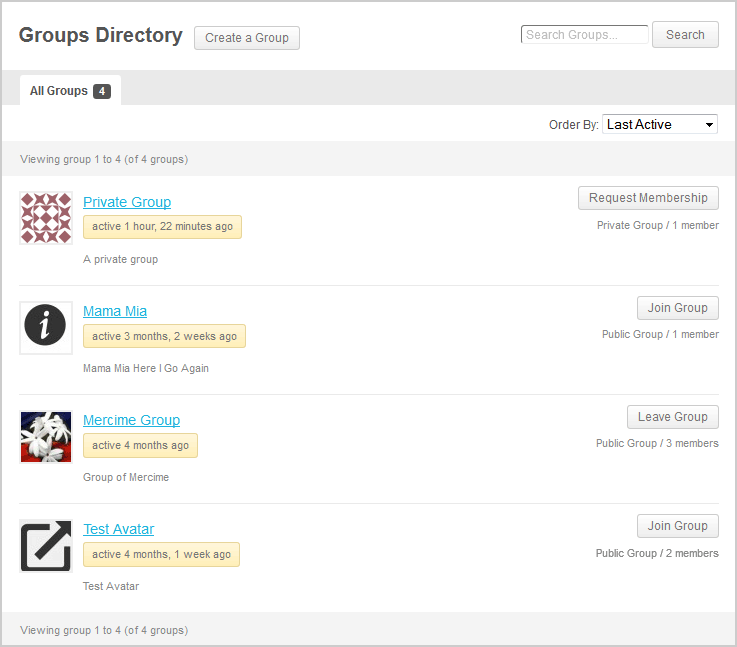
I have the groups section, i’ve even installed groups pages plugin and still can’t do it.@minigamers Do you mean that you have no “Create a Group” button beside the Groups Directory page title as seen in this image? That button is absent when the theme developer sets the_title() outside of the WordPress loop. There’s a way to create a link to create a group if that is indeed your issue?
What groups pages plugin?
In reply to: [Resolved] RTL problem in members page.@mahdiar Add this to your theme’s stylesheet
#buddypress ul.item-list li div.action {
left: 0 !important;
}In reply to: How to create different user accounts@kansas3d there are instructions on the link I gave you and for more assistance with the plugin, you should ask the developer. Looks like what you need is in the PRO version at http://rimonhabib.com/buddypress-user-account-type-pro-has-been-released/ but link to the shop shows it’s under maintenance. Other than that, you’d need a developer to create the plugin for you and would cost more than what the plugin could cost.
In reply to: [Resolved] buddypress and localhostCool. Marking this as resolved.
In reply to: How to create different user accountssomething like this? https://wordpress.org/plugins/buddypress-user-account-type-lite/ to start off
In reply to: [Resolved] RTL problem in members page.@mahdiar cannot guess, have to see. Or you could Chrome > Web Inspector or Firefox > Firebug to ID the element and add the correction in your theme’s stylesheet.
In reply to: [Resolved] No page title? (in the browser bar)@ivevera Thank you for posting back with the culprit, an SEO plugin as one of suspected conflicts. You could also post at that seo plugin author’s forums that it’s not “playing nice” with BuddyPress pages.
Marking this topic as resolved.
In reply to: MEMBER PROFILE PAGE@pedropapito BuddyPress is installed by default in the main site. If you want BuddyPress to be “installed” in sub.dominio.com, then you’d have to add the following to your wp-config.php file:
define ( 'BP_ROOT_BLOG', $blog_id );
That way, the avatar link would go to the profile page of the member in sub.dominio.com and not to the main site.
reference: https://codex.buddypress.org/user/install-buddypress-on-a-secondary-blog/In reply to: Send all private messages to admin for approval@imagine81 The functions you want would require some custom plugin which is not available at this time. You could hire a developer to do this for you or wait till someone creates one and release it to the public.
In reply to: Is this even possible to do with BuddyPress?@visualizeedits assuming you’ve found the bridge script between MyBB forum and WordPress, you would still be required to bridge MyBB with BuddyPress and Cubepoints unless you do not intend to record the activities of the members in your forums in their profile pages.
If you only need members to pay for some enhancements in their forum profiles, adding BuddyPress may be an overkill for your site. You might be better off just using s2member plugin.
@mahdiar Thanks for responding! Marking this as resolved then 🙂
In reply to: [Resolved] No page title? (in the browser bar)@ivevera could be either the theme author modified output for wp_title in header.php and functions.php file or there’s a SEO plugin conflict or something else entirely. Change to Twenty Twelve theme and if you don’t see the title of page in browser then could be plugin conflict.
In reply to: [Resolved] buddypress and localhost@dmd54 what hnla said.
When I press view I just get the home page
That’s default behavior when you go to register page while you’re logged in. Log out first.
In reply to: Register page bug@gothmarilyne check Settings > BuddyPress > Pages and check if there are Pages assigned to Register and Activate.
@mahdiar Does that mean we can close this topic as resolved? 😀
In reply to: Register Page Blank@fatspell redirection to home page when you go to register page while logged in is normal/default. Log out first.
Submit Trac Ticket about this issue – https://buddypress.trac.wordpress.org/newticket log in with WP username/password
@mahdiar I’ve deleted your post with blocks of code. Next time, please post long lines of code at pastebin.com where I moved your code with the generated uri at http://pastebin.com/dJMVd3WS
The theme author wrongly dequeued jQuery (version 1.8.3 as of now) used by WP and BP, then enqueued to Google’s archive of an old jQuery version 1.4.2
Back up your files and remove the lines:
    // use Google JS script
       wp_deregister_script('jquery');
       wp_register_script('jquery', ("http://ajax.googleapis.com/ajax/libs/jquery/1.4.2/jquery.min.js"), false, '1.4.2');
       wp_enqueue_script('jquery');
from your functions.php file. It’s possible thought that some scripts in your theme might not work anymore. It’s worth a shot though. Good luck.
In reply to: [Resolved] 404 message when trying to edit profile@tribblehunter Great. Marking this topic as resolved.
@hunchback since we don’t have specific info about what your site is really about, recommend that you check out plugins which are tagged BuddyPress (BP-friendly) to find the right match for your site https://wordpress.org/plugins/search.php?q=buddypress
You can find more information about BuddyPress components and features at https://codex.buddypress.org/
Good luck.
In reply to: BuddyPress community 3.0@dreampress you can find many of the plugins you need at https://wordpress.org/plugins/search.php?q=buddypress and https://wordpress.org/plugins/search.php?q=ecommerce
Good luck.
In reply to: Notifications@dswd in a section of the same codex page you linked to, https://codex.buddypress.org/user/buddypress-components-and-features/member/#member-settings > Notifications listed there are what you would expect in site and via email (unless you disable portions or all). I’ve added a line in the Notifications section to include site notification.