Search Results for 'buddypress'
-
AuthorSearch Results
-
September 23, 2015 at 6:55 pm #244729
In reply to: Registration and Activation pages
wakeatlas
ParticipantI tried adding a new field group as instructed in this page https://codex.buddypress.org/getting-started/guides/modifying-the-registration-form/ but i couldn’t see them on the /registration page. How do i make them visible on the registration page?
September 23, 2015 at 4:40 pm #244724In reply to: Change text on Registration page
Eskymo
ParticipantHi danbp
I’ve read through that before and it doesn’t sound so easy to me.
I’m not a PHP, BuddyPress or WordPress expert I’m afraid, so editing core files is not something I feel comfortable doing. Plus if I wanted to add an image where would I do that? That’s why I was hoping there was a way to do this using a template file as I want to do more than just change the page title.
I don’t know how to generate a .MO file and I wouldn’t know how to edit a .PO or a .MO file either or what to put in them.
If you offer any further support, that’d be great.
So far, I’ve copied this file: buddypress/bp-themes/bp-default/registration/register.php into my child theme and edited it and added content form tips where I want them, but I’m still left with the ‘Create an Account’ text at the top that I can’t get rid of – any ideas?
Evie
September 23, 2015 at 4:16 pm #244721In reply to: How to replace “Groups” with “Campaigns”
danbp
ParticipantThe easiest way for that is to use the language file.
September 23, 2015 at 3:39 pm #244719In reply to: Registration and Activation pages
ParticipantPlease, try to do something before asking such trivial question. Seems you never used/modified a profile avatar. BuddyPress has no album or gallery. This can be added by plugin.
September 23, 2015 at 3:34 pm #244718ParticipantYou can add custom option fields for References and Places Worked:
Not sure that adding a memberlist as drop down is very clever. What if you get a community of hundreds of members ?
To get database info, see here: (that’s a common WP task)
https://codex.wordpress.org/Class_Reference/wpdbSeptember 23, 2015 at 3:25 pm #244716In reply to: Registration and Activation pages
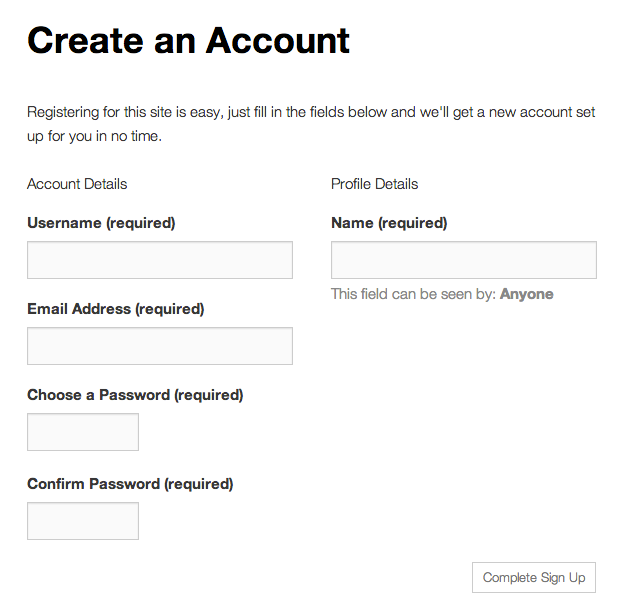
ParticipantI dont see this page https://buddypress.org/wp-content/uploads/15/2013/10/reg-form-default-state.png
when i go to my site /register.September 23, 2015 at 3:25 pm #244715In reply to: Change text on Registration page
ParticipantThe easiest way for that is to use the language file.
September 23, 2015 at 11:47 am #244707In reply to: Hiding Admin from Members List
ParticipantThanks for the link, but I’m not a WordPress or Buddypress coder, so it’s all a bit beyond me to be honest…
September 23, 2015 at 11:37 am #244706In reply to: Hiding Admin from Members List
Henry Wright
ModeratorThis can be done with
bp_parse_args(). See the Using bp_parse_args() to filter BuddyPress template loops article for a tutorial.September 23, 2015 at 11:05 am #244705In reply to: Change text on Registration page
ParticipantOK, I’ve gone through the buddypress plugin folder and found all instances of the words ‘Create an Account’ and there is only one file in which added edits will appear on the site and it’s this file:
/wp-content/plugins/buddypress/bp-members/bp-members-screens.php
How can I add this file to my buddy child theme so that I can make the text changes I require so that I’m not edited core plugin files?
However this doesn’t help with wanting to edit the ‘Registering for this site is easy….’ bit of text. So Can anyone help with a complete solution here?
Thanks
September 23, 2015 at 11:00 am #244704In reply to: Activity stream disappears in WordPress dashboard
Skvirly
Participant@danbp: Thank you for the suggestion. I forgot that. I did try and I get exactly the same behaviour so we can rule out any theme related issue. It really seems to be a Buddypress problem with several plugins.
Any other suggestions to see where the problem might be ?
Thanks.September 22, 2015 at 9:56 pm #244694In reply to: Edit profile groups on single page
shanebp
ModeratorThen create a template overload of this file:
buddypress\bp-templates\bp-legacy\buddypress\members\register.phpIn that file, prevent the display of certain fields by checking them by using
bp_get_the_profile_field_id()orbp_get_the_profile_field_input_name()
in the loop:while ( bp_profile_fields() ) : bp_the_profile_field();September 22, 2015 at 9:33 pm #244692In reply to: Edit profile groups on single page
DanielEngelhardt
Participantthanks for your input, @danbp.
There is, of course, a reason why i want it as requested 🙂
On my registration form, i only want to show one field to not bother new users with unnecessary fields. this one field is in my base group.
All other fields are arranged in another group.From my point of view, it doesn’t make sense to show two tabs on the profile-edit page, but it does make sense to show as less fields as possible on the registration page. I think UX comes first today. Customers pay our rent, so we should avoid putting spokes in there wheel. I also think buddypress is doing a pretty bad job here regarding UX (Of course this behavior gives structure, but we pay with UX for it). Since we live in 2015 it shouldn’t be a matter of “hacking” to reduce the amount of inputs and clicks for such “trivial” actions (from a users perspective) like editing a profile.
Is that reason enough? 🙂
September 22, 2015 at 3:32 pm #244688In reply to: Customizing Members Profile Link Structure
ParticipantSee here:
About
bp_get_displayed_user_nav_As you see, there is a a final undescore
This is a dynamic function name which need to be completed, depending the place you want it to be modified.
bp_get_displayed_user_nav_<css_id>.See a working example here, to understand how to use it
https://buddypress.org/support/topic/how-to-remove-sub-nav-only-for-displayed-user/#post-234852September 22, 2015 at 11:25 am #244674In reply to: Home URL redirects to Members page
ModeratorThe Theme My Login plugin is useful in handling redirection. Taken from the plugin’s feature list:
Redirect users upon log in and log out based upon their role
I’ve done this myself using the plugin and can confirm it works quite well with BuddyPress installed.
September 22, 2015 at 8:36 am #244663In reply to: Blank pop-up screen in change avatar link
ParticipantHi,
you need to track down the issue,perhaps a JS conflict in backend. Or have you the same problem on front end too ?
Follow instructions from here:
September 22, 2015 at 3:01 am #244658In reply to: Error when delete activity stream comment on post
buddywhatshisname
ParticipantHere’s a backtrace:
[22-Sep-2015 02:59:19 UTC] bp_blogs_sync_delete_from_activity_comment::Started with $activity_id=14062
[22-Sep-2015 02:59:19 UTC] bp_blogs_sync_delete_from_activity_comment::Done - about to return false
[22-Sep-2015 02:59:19 UTC] bp_blogs_sync_delete_from_activity_comment::backtrace=Array
(
    [0] => Array
        (
            [function] => bp_blogs_sync_delete_from_activity_comment
            [args] => Array
                (
                    [0] => 1
                    [1] => 14043
                    [2] => 14062
                )

        )

    [1] => Array
        (
            [file] => /wp-includes/plugin.php
            [line] => 213
            [function] => call_user_func_array
            [args] => Array
                (
                    [0] => bp_blogs_sync_delete_from_activity_comment
                    [1] => Array
                        (
                            [0] => 1
                            [1] => 14043
                            [2] => 14062
                        )

                )

        )

    [2] => Array
        (
            [file] => /wp-content/plugins/buddypress/bp-activity/bp-activity-functions.php
            [line] => 2468
            [function] => apply_filters
            [args] => Array
                (
                    [0] => bp_activity_delete_comment_pre
                    [1] => 1
                    [2] => 14043
                    [3] => 14062
                )

        )

    [3] => Array
        (
            [file] => /wp-content/plugins/buddypress/bp-templates/bp-legacy/buddypress-functions.php
            [line] => 1115
            [function] => bp_activity_delete_comment
            [args] => Array
                (
                    [0] => 14043
                    [1] => 14062
                )

        )

    [4] => Array
        (
            [function] => bp_legacy_theme_delete_activity_comment
            [args] => Array
                (
                    [0] =>
                )

        )

    [5] => Array
        (
            [file] => /wp-includes/plugin.php
            [line] => 508
            [function] => call_user_func_array
            [args] => Array
                (
                    [0] => bp_legacy_theme_delete_activity_comment
                    [1] => Array
                        (
                            [0] =>
                        )

                )

        )

    [6] => Array
        (
            [file] => /wp-admin/admin-ajax.php
            [line] => 91
            [function] => do_action
            [args] => Array
                (
                    [0] => wp_ajax_delete_activity_comment
                )

        )

)

[22-Sep-2015 02:59:19 UTC] bp_activity_delete_comment::Quit after apply_filters
September 21, 2015 at 9:45 pm #244654In reply to: Registration and Activation pages
ParticipantSeptember 21, 2015 at 9:36 pm #244653In reply to: Featured image for directories (page ID)
ParticipantSeptember 21, 2015 at 9:26 pm #244651ModeratorTo the best of my knowledge, @-mentions in BuddyPress require the activity component to be active.
September 21, 2015 at 9:26 pm #244650In reply to: Featured image for directories (page ID)
ParticipantBuddyPress use 3 pages by default: members, groups and activity and a small bunch of templates depending the context.
These 3 pages are not used as ordinary WP pages, and exist for internal usage with WordPress, as slug placeholder only. These pages must stay empty and independant of any template or model.The best way to add featured images, is to hook into an existing function/filter or action. There’s no need for a static page.
For more complex addition, you can use plugin.php template file which exist in /single/ directory of members and groups component template.
See get_posts and get_the_post_thumbnail on WP Codex
Post type of featured image isattachementRead also about BuddyPress:
or a working example similar to what you try to do (if i understand you correctly).
https://buddypress.org/support/topic/my-contributions-tab-with-subtabs/#post-244609September 21, 2015 at 6:28 pm #244642In reply to: Why bpthumb == bpfull ?
DAM
Participant@henrywright Buddypress is the only plugin
September 21, 2015 at 4:07 pm #244633In reply to: Removal of html from all message boxes
ModeratorPlease don’t double post.
The answer to your question is similar to the answer in the same thread where you also asked this question.
https://buddypress.org/support/topic/how-to-disable-html-in-buddypress-private-message/There is no global filter for message boxes.
You have to find the filter hook as in the thread referred to above.September 21, 2015 at 9:11 am #244621In reply to: menu logged out list
ParticipantSeptember 20, 2015 at 10:56 pm #244614In reply to: Can’t register user through front end
MvdO79
ParticipantHi, I have the same issues:
– the buddypress register page is not creating users, after submit it shows the register page again and the passwords are gone.
– there are no users displayed in the backend
– there are no pending users
i have followed all directions found online and on this forum, fresh install of wp with fresh install of bp, no other plugins active etc…
Should I use an older version of bp? Do I have to create manual pages as the default bp theme is not active anymore?
-
AuthorSearch Results