Search Results for 'buddypress'
-
AuthorSearch Results
-
May 2, 2012 at 2:48 am #133830
sarbanharble
Member@mercime thanks for the advice. I did try the second method to no avail. I went ahead and adjusted the forum/index.php just to make sure I could align it correctly, which it looks to have worked okay. I’ll probably just do that to the other…15. Par for the course of a career in befriending the interwebs.
I’m not sure what happened but last I checked the button in question started functioning.
May 2, 2012 at 2:40 am #133829@mercime
Participant@sarbanharble looks like you’ve not completed Step 3 of the BP Compatibility process for members, groups, activity and registration/activation pages- https://codex.buddypress.org/theme-development/wordpress-to-buddypress-theme/#step-three
Based on a quick scan of the HTML structure of The Unstandard theme, you can use the 2nd method per link above to fix alignment of the BP template files – i.e., create necessary content/files header-buddypress.php, sidebar-buddypress.php and/or footer-buddypress.php and upload these to your theme folder – instead of the 1st method which involves changing 16 BP template files.
May 2, 2012 at 2:05 am #133827In reply to: do not have associated WordPress Pages
Participant@starprintbrokers before deleting everything. Follow my instructions in my post above to change to bp-default theme etc.
May 2, 2012 at 2:03 am #133826In reply to: [RESOLVED]CSS bp problems – The Global Sport theme
Participant@nsbalgcom Open up your theme’s header.php file, copy all, paste in pastebin.com, click submit, and post the generated URI here.
Do the same for your theme’s (The Global News Theme, right?) index.php, page.php, sidebar.php, and footer.phpMay 2, 2012 at 1:14 am #133825In reply to: [RESOLVED]CSS bp problems – The Global Sport theme
May 2, 2012 at 12:26 am #133824In reply to: Getting Started…
ParticipantSanity check: When you said you activated the “default theme” in your first post, did you mean the WordPress default theme Twenty Eleven or the bp-default theme? It should be the bp-default theme. And if you’re using Twenty Eleven or any other WordPress theme, you need to install and activate the BP Template Pack plugin then go through Appearance > BP Compatibility process.
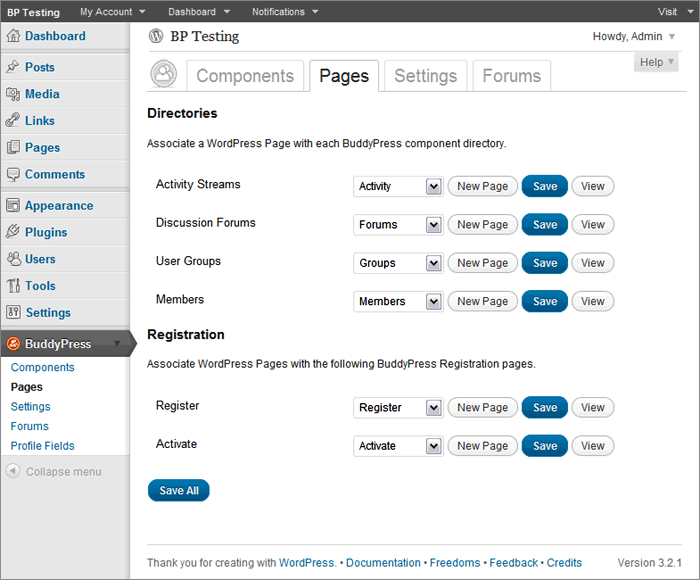
Now if you are using the bp-default theme, go to BuddyPress Pages again and double-check that BP components are indeed associated with respective pages https://mercime.files.wordpress.com/2011/11/bp-installation-wizard-08.gif
If that doesn’t cut it, https://buddypress.org/community/groups/how-to-and-troubleshooting/forum/topic/when-asking-for-support/
May 1, 2012 at 11:55 pm #133822In reply to: [RESOLVED]CSS bp problems – The Global Sport theme
Participant@nsbalgcom I see you’ve installed the BP Template Pack plugin. Now you need to fix the alignment within the BP template files to be compatible with your WP theme WPSN – via 1st method of changing 16 BP template files or via 2nd method of creating only the header-buddypress.php, sidebar-buddypress.php and/or footer-buddypress.php.
Initial scan of online source code shows that you need only to implement the 2nd method and adding some styles to fix the alignment of your theme. https://codex.buddypress.org/theme-development/wordpress-to-buddypress-theme/#fixalignment
May 1, 2012 at 11:14 pm #133820In reply to: do not have associated WordPress Pages
starprintbrokers
MemberJust gettng back to this project.
@mercime, I did confirm that Salutaion will work with the current BuddyPress theme.
Hugo, if this doesn’t work, then I will ask my host provider to wipe out the entire site and I’ll start over. It’s not such a loss, as I am still building the site. I can easily create those missing pages with those names, but would imagine there is code and are layouts that I cannot replicate. I would say my skill level is probably just short of intermediate, so I would rather play it safe than build any more content. I’ve save what I built in Word docs anyway!
May 1, 2012 at 9:18 pm #133819In reply to: Activaty or Forum Directory with slider
Participant@b1gft If that slider by aesthetic can be added via widget area – check out http://justintadlock.com/archives/2010/11/08/sidebars-in-wordpress
May 1, 2012 at 8:36 pm #133818In reply to: Getting Started…
Tilley46
ParticipantI had changed the permalinks before (Day& Name), and saved the settings, but still, whenever I clicked ‘view’ on the ‘Registration’ page, it took me to the ‘Home’ page I created. I deleted that, and then ‘Register’ linked to a page that says ‘Sorry, but you are looking for something that isn’t here’. I deleted ALL pages, uninstalled BuddyPress, re-installed, but then, instead of getting the Installation Wizard, got an error message saying that ‘The following active BuddyPress Components do not have associated WordPress Pages: Activity Streams, Discussion Forums, User Groups, Members, Activate, Register. (REPAIR)’. Was hoping that starting over from the beginning would solve the issue, but no luck. Even now, despite creating all new pages and associating them w/ the BuddyPress components, I still get ‘Sorry, but you are looking for something that isn’t here.’ on both the ‘Register’ and ‘Forums’ page and the ‘Forums’ page says that ‘The forums component has not been set up yet.’ I’m assuming that’s due to my re-installing BP, but not yet having gone through the installation wizard…? I don’t know what the hang-up is… Shouldn’t there be a unique ‘Register’ page created/linked to through the BP component ‘Register’? I’m at a bit of a loss…
May 1, 2012 at 8:21 pm #133817In reply to: Tie Blog to Group?
valuser
ParticipantThe plugin BuddyPress Groupblog at https://wordpress.org/extend/plugins/bp-groupblog/ MAY go some of the way in answering your queries.
” The BuddyPress Groupblog plugin extends the group functionality by enabling each group to have a single blog associated with it. Group members are automatically added to the blog and will have blog roles as set by the groupblog admin settings.”May 1, 2012 at 7:38 pm #133816In reply to: User profile extension?
ParticipantYou will need a BP plugin for the image gallery and a BP plugin to insert the banner image/s of choice like this per member.
For the image gallery:
1. Free – BP Album/Media
2. Premium – BP Gallery by BuddyDev.comFor the banner image/s of user – no plugin available at this time. Check out @sbrajesh – Buddydev.com http://buddydev.com/plugins/bp-custom-background-for-user-profile/ which you could adapt to upload image/banner to the hook available before member header in template
May 1, 2012 at 7:32 pm #133815Participant== every single table in my database says pressfix ==
BuddyPress did not add any pressfix in front of your table names. Check your wp-config.php file to see what prefix you added to your tables. BP creates _bp_ tables in your database. It also adds BP options in wp_options table https://codex.buddypress.org/buddypress-site-administration/deleting-buddypress/
May 1, 2012 at 6:46 pm #133814Hugo Ashmore
ParticipantI’ve installed – re-installed, manually modified DB’s, a hundred times and never had anything remotely like this happen especially not caused by BP. BP doesn’t cock up in this manner, table prefix sounds like something your theme has done.
As for fix? try renaming your tables back to the wp default ‘wp_’
May 1, 2012 at 6:09 pm #133813In reply to: use wp register forum not BP, any ideas?
yadigit
Participant@paul gibbs Removing the registeration folder in my theme worked just fine.
I have no idea why I never tried it before. Thanks a lot!
You rock.May 1, 2012 at 5:00 pm #133811roclimb
ParticipantI don’t think thats the case here because every single table in my database says pressfix in front of the name.
Buddypress crashed my site so I had to delete the folders from my wordpress folder manually. I am only on a localhost MAMP environment not live with it. I installed budypress it crashed my admin and site so I went into the folder where buddy press folder was located and deleted it. No the site works and admin panel dashboard works great but my database tables appear to be buddy press tables.Any suggestions to change them back?
May 1, 2012 at 4:36 pm #133808ParticipantA little more work is required to remove those empty tags used for clearing though
 May 1, 2012 at 1:11 pm #133802
Paul Wong-Gibbs
KeymasterThis question is best suited for the wordpress.org support forums as it doesn’t seem to involve BuddyPress.
May 1, 2012 at 9:07 am #133799Nasir Zia
MemberHi,
The code provided above worked, although a little change was required in sidebar coding…> Widgets, and drag & drop a widget into the corresponding widget panel.', 'swagger' ); ?>
May 1, 2012 at 8:04 am #133798In reply to: do not have associated WordPress Pages
ParticipantJust for clarity- you do know understand that in the event that bp hasn’t created pages or you get that message that associations are broken it’s a manual process to create those pages before navigating back to BP pages to now find them available in the selection dropdown.
With Saluation – if memory serves – you may need to go into each of those pages created for BP use and ensure that you have selected ‘buddypress’ in the layout options sidebar custom field.
May 1, 2012 at 7:12 am #133797Participant@babray add to the equation that Group Forums will be migrated over to Sitewide Forums (bbPress plugin)
May 1, 2012 at 6:56 am #133796In reply to: Anonymity with Buddy Press
Participant@oaklawn “I really need people to be able to post anonymously. … I would like to have people post without a display name “
Where? In posts? In blog post comments? In Group or Sitewide Forums? It can be done, you just need to delete the instances where username is shown in different templates of the different components.
May 1, 2012 at 6:01 am #133793In reply to: use wp register forum not BP, any ideas?
KeymasterGood question. I think if you delete the registeration/ folder in your theme (or parent theme), it will use WP’s. Let us know.
Also try removing the page mapping for the component in wp-admin – BuddyPress > Components
May 1, 2012 at 5:56 am #133792jakeyboy1989
Member@mercime Thanks again for your help.
I tried this previously with another colorlabs template and it simply displayed =0 when I tried loading the page, however, using a different template now, it seems to work.. I just need to try and adjust the files to make it look a bit better.
you can see what I have done here – http://www.jakewhitehead.com/socialbp/
Just hoping this will do what I want.
Can you hide some of these menus so only logged in users see them?
May 1, 2012 at 5:30 am #133790In reply to: Gaming Ladder and Tournament
ParticipantThere are no plugins that does what you need at this time. You can post the job offer at
https://buddypress.org/community/groups/bp-jobs-board/ or at http://jobs.wordpress.net/ -
AuthorSearch Results