Search Results for 'buddypress'
-
AuthorSearch Results
-
April 14, 2011 at 4:53 pm #110235
In reply to: [Resolved] – How to get two separate menus
Hugo Ashmore
ParticipantYou do this in a child theme, please see the BP codex for guidance on how to create a child theme (easy!)
https://codex.buddypress.org/theme-development/building-a-buddypress-child-theme/Mercime has shown you how and where it’s not really php coding it’s a matter of copy pasting .
April 14, 2011 at 4:43 pm #110234In reply to: [Resolved] – How to get two separate menus
rickgoz
ParticipantThanks a lot!
Is there anyway to do this without touching buddypress’s core?
I am not really good at php, could you tell me where do I have to put this code?
Thanks in advance
April 14, 2011 at 4:35 pm #110233In reply to: New theme – Buddypress UX
Participant@Nit3watch I re-factored the link in this thread:
https://buddypress.org/community/groups/how-to-and-troubleshooting/forum/topic/css-trick-how-to-style-activity-stream-odd-and-even-posts/
To locate the post I made with snippet and also pasted into the thread above, it may help?April 14, 2011 at 4:23 pm #110231ParticipantI take it all back permalinks are lovely
Hand crafted a new link, obvious really
April 14, 2011 at 4:11 pm #110229In reply to: New theme – Buddypress UX
ParticipantTurn on debugging, as I spotted a few deprecated functions pop up in warnings.
Uploading to repo is probably best slowed down it’s tempting to upload at every change but it’s inevitable that the quicker you rush to upload the more likely the second after you realise you forgot to change version numbers and a hundred other little things
April 14, 2011 at 3:06 pm #110228In reply to: New theme – Buddypress UX
nit3watch
Participantlol need to upload a new version again.. ganna rather wait a day or two and sort out things poperly
April 14, 2011 at 2:52 pm #110226In reply to: New theme – Buddypress UX
Alan
Membernicely done ,thanks for sharing
April 14, 2011 at 2:39 pm #110225In reply to: New theme – Buddypress UX
ParticipantThe fact that the sidebars may vary in length as well as the centre content makes life harder overlapping borders works but will still result in an apparent miss-match if one sidebar is longer than the other as is the case presently. Really your only two options are using a graphic (create a border take a slice of it of a few pixels but not too few 10 or 2 wide by ~20 high add an extra div as a child of the main #content / #container (parent that wraps content and sidebars) and then you add a background to each of these two divs and use position to place the graphic in from the edges by the sidebar width alternatively you could try a technique that can work but also can lead to issues depending on the layout: give the sidebars a huge amount of bottom padding, then an equal amount of negative bottom margin and overflow hidden on the parent element rn the borders on the sidebars rather than the center element.
April 14, 2011 at 1:34 pm #110223sladkoe6ka
Participantguys it is very easy!
Go to buddypress/bp-activity/bp-activity-templatetags.php
change the number in the line 172
‘per_page’ => 20, // number of items per pageApril 14, 2011 at 12:51 pm #110220In reply to: New theme – Buddypress UX
Participant@naijaping links at the top of the first post
April 14, 2011 at 12:34 pm #110218In reply to: New theme – Buddypress UX
Prince Abiola Ogundipe
Participantwhere can i download this theme please
April 14, 2011 at 12:28 pm #110216In reply to: New theme – Buddypress UX
ParticipantI just uploaded a new version, still in beta but making a few improvements. Note that if you have any questions, read the readme.txt first.
@hnla Im still searching regarding Faux columns, though if you could maybe have a look at the theme in the mean time I could reach a solution sooner.
Thanks and cheers
April 14, 2011 at 11:30 am #110215In reply to: Nested Comments are not indenting
dainismichel
Participanti was just wondering about this issue, because i have a community that i want to keep at “buddypress default.” in other words, it’s an “out the box community” however, i’d like it if the comments would nest. i’m at v. 1.2.6 and have not upgraded to 1.2.8, basically cuz it doesn’t say a new version is available under plugins.
April 14, 2011 at 8:56 am #110212In reply to: New theme – Buddypress UX
ParticipantI still need to clean the theme up a bit more, left some of my personal-project stuff in there >.<
@treis if you have a look at the Buddybar widget, I have simply copied most of whats in the widget to the static-sidebar. Personally I think its a bit too much going on hence I focused it on the ‘user’.
I have added modemloopers ‘drop-down menu’ functionality so if you would like, you can simply the main navigation by having ‘community’ and groups, members, activity all under the ‘community tab’. Im just ganna finish up some things and i will upload it.
I will post some css you can use to modify the header..
I would advise not working off it as of yet, once I have a ‘stable’ version I will let you know. If you make any changes, they will be over-written when you upgrade the theme. I will try get round to it later on today. I modified the them in a day and released it the same day hence I over-looked some things.
April 14, 2011 at 8:51 am #110211In reply to: U BuddyPress Forum Attachment
Sven Lehnert
ParticipantI needed to change the path in the settings, there has been a missing “/” after the domain.
Complete URL of upload directory
hope this helps you
 April 14, 2011 at 6:10 am #110208
In reply to: New theme – Buddypress UX
treis
MemberThis is a really good step. I’m developing a site that will most likely be used on netbooks, and the top pane navigation just takes up way too much space. This theme should give me a good base to modify and develop my own off of. Any tips? Basically what I want to do is:
(1) Move all the ‘Activity’ ‘Blogs’ ‘Groups’ etc. links to the left menu.
(2) Reduce the Header size by 2/3s or so.
(3) Make the left column a single column
(4) Get it to like facebook where the header and left pane don’t reload on clicks.
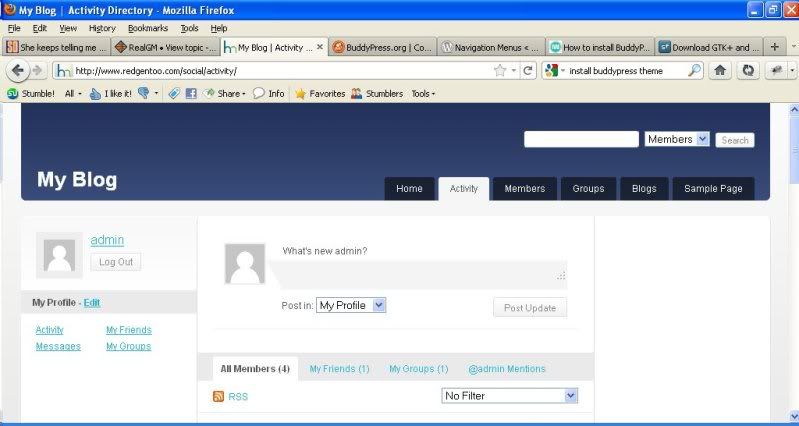
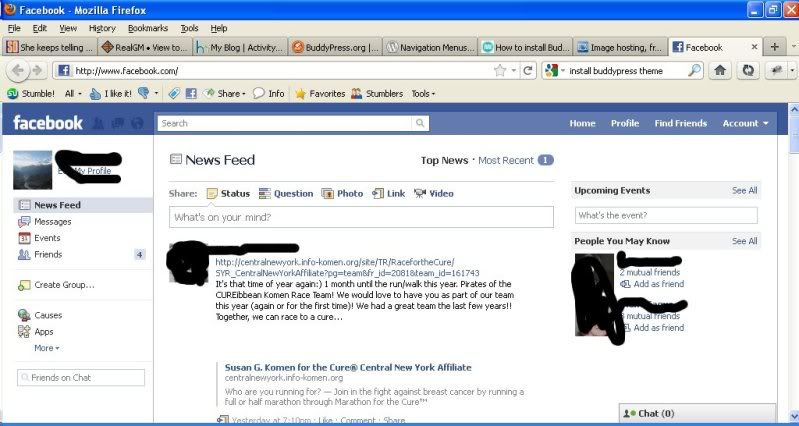
Compare the Activity screen of your theme compared to Facebook
http://i18.photobucket.com/albums/b119/treis/blog.jpg
http://i18.photobucket.com/albums/b119/treis/fb.jpgYou can see how much more information is provided on facebook and how much easier it is to navigate around.
April 14, 2011 at 6:07 am #110207In reply to: Forum Reply Button
skateage
ParticipantThat is not exactly what i was looking for… But it is awesome! this helps me in a big way. I had no idea anyone had messed with something like that. thanks @r-a-y
April 14, 2011 at 5:53 am #110205embergermedia
Member@msullens88 How did you combine @mentions, status updates, photos from bp-gallery into one activity feed? I have been looking for the answer to this for weeks. I have an activity feed on a users profile, but can’t get @mentions to show.
Your help would be greatly appreciated!
Thanks
-Paul
April 14, 2011 at 5:44 am #110202In reply to: Forum Reply Button
r-a-y
KeymasterApril 14, 2011 at 5:42 am #110201In reply to: How to delete Forum Topic Tags?
KeymasterIn the DB, topic tags are stored in BuddyPress under:
– wp_bb_terms
– wp_bb_term_relationships
– wp_bb_term_taxonomyTo be extra cautious, back up these tables before you purge the data.
April 14, 2011 at 5:25 am #110199In reply to: Switch language plugin
KeymasterTry the newest version of BuddyPress Multilingual:
April 14, 2011 at 3:07 am #110195In reply to: FATAL ERROR!!
Virtuali
ParticipantGo to your wordpress Admin Dashboard, and go to “Add plugin” then search “Buddypress”. Install the plain and simple Buddypress plugin first, then activate the template pack.
April 14, 2011 at 3:06 am #110194In reply to: Password Reset
ParticipantNot a buddypress issue. Use: https://wordpress.org/support/
April 14, 2011 at 2:38 am #110190ParticipantAh, the famous 404 not found
Try this reference link: https://codex.buddypress.org/troubleshooting/navigation-links-return-404-errors/
April 14, 2011 at 2:33 am #110189In reply to: FATAL ERROR!!
ParticipantIt means the that the function isn’t being recognized, do you have the buddypress plugin installed? The template pack can’t work without the actual plugin
-
AuthorSearch Results