Search Results for 'forum'
-
AuthorSearch Results
-
May 2, 2012 at 2:48 am #133830
sarbanharble
Member@mercime thanks for the advice. I did try the second method to no avail. I went ahead and adjusted the forum/index.php just to make sure I could align it correctly, which it looks to have worked okay. I’ll probably just do that to the other…15. Par for the course of a career in befriending the interwebs.
I’m not sure what happened but last I checked the button in question started functioning.
May 2, 2012 at 2:40 am #133829@mercime
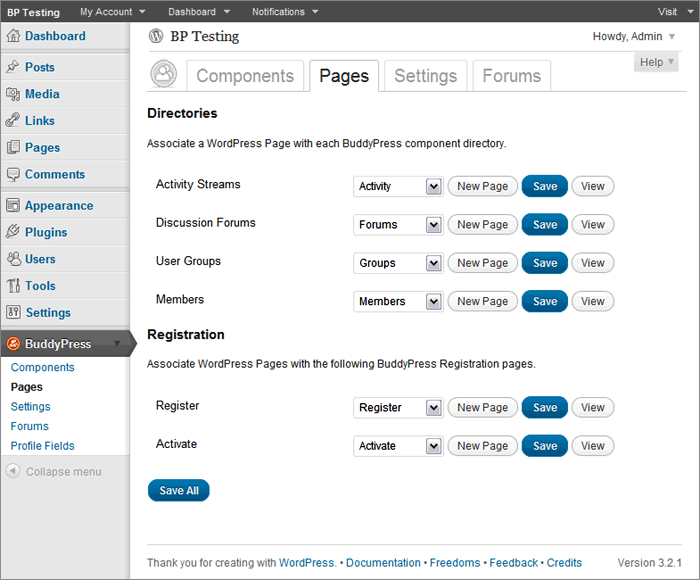
Participant@sarbanharble looks like you’ve not completed Step 3 of the BP Compatibility process for members, groups, activity and registration/activation pages- https://codex.buddypress.org/theme-development/wordpress-to-buddypress-theme/#step-three
Based on a quick scan of the HTML structure of The Unstandard theme, you can use the 2nd method per link above to fix alignment of the BP template files – i.e., create necessary content/files header-buddypress.php, sidebar-buddypress.php and/or footer-buddypress.php and upload these to your theme folder – instead of the 1st method which involves changing 16 BP template files.
May 2, 2012 at 12:26 am #133824In reply to: Getting Started…
ParticipantSanity check: When you said you activated the “default theme” in your first post, did you mean the WordPress default theme Twenty Eleven or the bp-default theme? It should be the bp-default theme. And if you’re using Twenty Eleven or any other WordPress theme, you need to install and activate the BP Template Pack plugin then go through Appearance > BP Compatibility process.
Now if you are using the bp-default theme, go to BuddyPress Pages again and double-check that BP components are indeed associated with respective pages https://mercime.files.wordpress.com/2011/11/bp-installation-wizard-08.gif
If that doesn’t cut it, https://buddypress.org/community/groups/how-to-and-troubleshooting/forum/topic/when-asking-for-support/
May 1, 2012 at 9:18 pm #133819In reply to: Activaty or Forum Directory with slider
Participant@b1gft If that slider by aesthetic can be added via widget area – check out http://justintadlock.com/archives/2010/11/08/sidebars-in-wordpress
May 1, 2012 at 8:36 pm #133818In reply to: Getting Started…
Tilley46
ParticipantI had changed the permalinks before (Day& Name), and saved the settings, but still, whenever I clicked ‘view’ on the ‘Registration’ page, it took me to the ‘Home’ page I created. I deleted that, and then ‘Register’ linked to a page that says ‘Sorry, but you are looking for something that isn’t here’. I deleted ALL pages, uninstalled BuddyPress, re-installed, but then, instead of getting the Installation Wizard, got an error message saying that ‘The following active BuddyPress Components do not have associated WordPress Pages: Activity Streams, Discussion Forums, User Groups, Members, Activate, Register. (REPAIR)’. Was hoping that starting over from the beginning would solve the issue, but no luck. Even now, despite creating all new pages and associating them w/ the BuddyPress components, I still get ‘Sorry, but you are looking for something that isn’t here.’ on both the ‘Register’ and ‘Forums’ page and the ‘Forums’ page says that ‘The forums component has not been set up yet.’ I’m assuming that’s due to my re-installing BP, but not yet having gone through the installation wizard…? I don’t know what the hang-up is… Shouldn’t there be a unique ‘Register’ page created/linked to through the BP component ‘Register’? I’m at a bit of a loss…
May 1, 2012 at 6:09 pm #133813In reply to: use wp register forum not BP, any ideas?
yadigit
Participant@paul gibbs Removing the registeration folder in my theme worked just fine.
I have no idea why I never tried it before. Thanks a lot!
You rock.May 1, 2012 at 3:31 pm #133807babray
MemberThanks for the reply but I’m afraid I have no idea what your are saying. Thanks anyhow.
BMay 1, 2012 at 2:22 pm #133803In reply to: [Resolved] Show Content ONLY to Moderators in Forums
Paul Wong-Gibbs
Keymasterbp_group_is_admin / bp_group_is_mod ?
May 1, 2012 at 1:11 pm #133802KeymasterThis question is best suited for the wordpress.org support forums as it doesn’t seem to involve BuddyPress.
May 1, 2012 at 7:12 am #133797Participant@babray add to the equation that Group Forums will be migrated over to Sitewide Forums (bbPress plugin)
May 1, 2012 at 6:56 am #133796In reply to: Anonymity with Buddy Press
Participant@oaklawn “I really need people to be able to post anonymously. … I would like to have people post without a display name “
Where? In posts? In blog post comments? In Group or Sitewide Forums? It can be done, you just need to delete the instances where username is shown in different templates of the different components.
May 1, 2012 at 6:50 am #133795In reply to: Activaty or Forum Directory with slider
b1gft
ParticipantAny help with this would be great thanks
May 1, 2012 at 6:01 am #133793In reply to: use wp register forum not BP, any ideas?
KeymasterGood question. I think if you delete the registeration/ folder in your theme (or parent theme), it will use WP’s. Let us know.
Also try removing the page mapping for the component in wp-admin – BuddyPress > Components
April 30, 2012 at 9:04 pm #130273Participant@jakeyboy1989 from your WP forums post as well – If you just want to make your WordPress theme compatible with BuddyPress, you don’t need to create a multisite installation.
Install and activate the BP Template Pack Plugin and go through Appearance > BP Compatibility process. Then post back here if you require further assistance.
April 30, 2012 at 8:04 pm #133773jakeyboy1989
MemberThanks for the tips @Paul Gibbs
The reason I want the two sites to be connected is so that my authors can network and get points, rankings, etc, for the posts they make (this was a feature requested by my users).
The key thing for me is that my users want the social features that I can provide through buddypress, but it is difficult to integrate with more extensive framework based wordpress templates (at least it seems that way for me) so I would love to be able to have buddypress on the same site, or a connected site, that has its own template and is hidden from users.
Also when I say authors it might sound misleading because this could be potentially 500-1000 different users so they need group and discussion forum features..
April 30, 2012 at 7:00 pm #133770In reply to: “Read More” in Activity Stream not there
storyaday
ParticipantApril 30, 2012 at 6:44 pm #133769ParticipantThank you, you are awesome. (I am not change log fluent)
April 30, 2012 at 6:05 pm #133766KeymasterI don’t know. I was going to have a quick read of all the releases changelogs to see if there was anything super-obvious.
April 30, 2012 at 5:42 pm #133764In reply to: Getting Started…
ParticipantThanks @mercime– I got the Home Page sorted and changed the general settings, but still can’t view or get the ‘registration’ page functioning. It appears that the pages ‘activate’, ‘activity’, ‘forums’, ‘groups’, ‘members’, and ‘register’ were all created when BP was installed and activated. However, when clicking ‘view page’ on both the ‘forums’ and the ‘register’ pages in the WP pages menu, it links to ‘Home’- the static Home Page I created- instead of a ‘forums’ or ‘registration’ page… Not sure what the issue is. Do I need to reinstall BuddyPress after having changed the general settings?
April 30, 2012 at 5:04 pm #133761In reply to: Change title of forum Directory
enguzelsohbet
Memberfine you site http://www.enguzelsohbet.com
April 30, 2012 at 4:36 pm #133756ParticipantAck. Something pre-1.5… (Sorry, I haven’t used the site much since last August. Will try to track down the info)
Is it my imagination? Did the forums always display this way? Is there any way to change it?
Thanks for responding.
April 30, 2012 at 4:23 pm #133755KeymasterWhat version did you upgrade from?
April 30, 2012 at 3:05 pm #133753In reply to: Change title of forum Directory
Toby Cryns (@themightymo)
ParticipantYou can add this to wp-config.php:
`define( ‘BP_FORUMS_SLUG’, ‘conversations’ );`
That will change the slug. To change the actual text that is rendered on the page, check out the “Custom Groups Name” plugin at http://hardlyneutral.com/wordpress-plugins/
…and if you are feeling adventurous, go ahead and start editing your translation files!
April 30, 2012 at 2:54 pm #133752In reply to: Change title of forum Directory
ParticipantBoth actually but the main one being Sitewide Forums
April 30, 2012 at 2:51 pm #133751In reply to: Forum page not showing
Participant== When the Forum page is activated, it does not show automatically on the site menu ==
If you’re using the custom menu in Appearance > Menu, then you’d have to add the link to the new Forum page to your custom menu.
== Where do I find instructions to set up this type of community site? ==
BuddyPress Codex https://codex.buddypress.org/
Configuring BuddyPress Components – https://codex.buddypress.org/getting-started/configure-buddypress-components/ -
AuthorSearch Results