@imath That’s what I originally though. However, I have a different website with the same theme and that works perfectly fine.
It is worth mentioning that 2 of my sites with this issue (MovieFloss.com, BeerAlien.com) are in the same web hosting. The one without any issues is hasted thought Bluehost (sdmetal.com). Because of this, I think the issue might be Hosting related. Could that happen?
Everything was working on the 2 sites until BP 10. Thank you for all your help BTW.
@moviefloss if there’s no more lines at the end of your error log, then I believe you should switch to a Twenty Twenty (one/two) theme to check if the issue is still there. From what I see the issue seems to be located into the “valenti” theme. If that’s the case, the theme author should fix the issue as it’s a premium theme and we cannot access to it.
Hello, i want to disable globally in my site, hidden groups.
I use Nouveau theme and i can’t see where the form is generated.
I tried with legacy template but it brokes my all frontend.
Thank you.
Hello, some informations about my installation :
– WAMP
– WP v.5.9
– BP 10.0.0
– Theme Buddy-x 4.3.1
– PHP 8.1.0
There is no other plugin : I try to create a functionnality for a client that can let you be able to repost an activity from other members on your own member profile only.
The thing is, I actually can insert into the database via ajax method the ID of any activity and the date of reshare. Then I can display on the member profile an array with all the shared activity and informations about them (all columns from the database wp_bp_activity table).
Now, I want to implement them inside the feed. My idea is to intercept the result of the ajax (bp_has_activities( bp_ajax_querystring( ‘activity’ )) that – apparently – return a JSON data Object. Then insert the shared activities with the date of repost, reorder all these activities by dates and display the complete new feed.
Intercept -> insert the shared activities -> reorder by dates -> display.
But I don’t know how I can intercept this query. In fact, even if I delete the activity-loop.php file it’s still the same, I have no control on the feed.
Anyone has an idea about this ? How to add these shared activities to a member feed ?
Thanks
@moviefloss & @pasindups
I think I understood your issue:
if you are you using the BP Default Theme or a theme based on it, or if you disabled the Avatar UI we introduced in version 2.3, I was able to find an issue with this very old way to set an avatar: you have a form with a simple button to upload your image and cropping happens after a page load.
Meaning, you don’t have a tabbed interface to upload/recycle/delete your avatar like shown below:
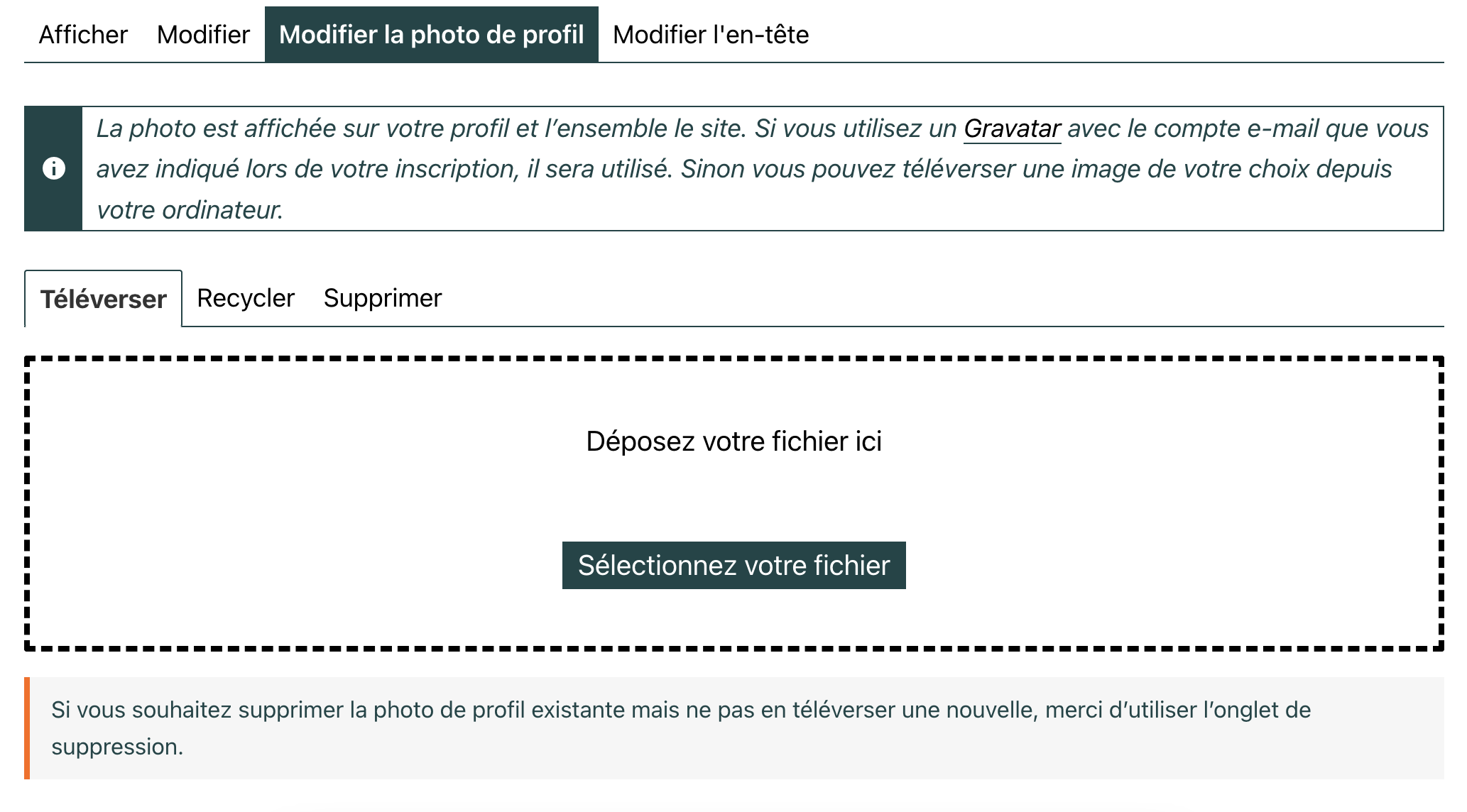
If so, it will be fixed in the 10.1.0 minor release we’ll soon make available. Probably this coming monday or tuesday.
If not I’d like to see the screenshot: to share an image here, just use any free image hosting service, and paste the link here, yes.
 Anonymous User 16480907
Inactive
Hello,
check this link and follow the instructions given on this page.
BuddyPress Template Override
Hello and good day.
I just installed Buddypress on a Zakra Pro theme.
It appeared to install correctly but my home page is is not showing correctly.
Instead of full screen, everything is shifted to the left.
I did a conflict test with no success.
I also restored a pre-buddypress backup to no avail.
Hi Shanebp thanks for the reply. Friend Connection is just enabled but i can’t see “add friend” button. I also tried to change several themes. 🙁
Hi @moviefloss & @pasindups
Uploading/cropping avatars works fine with me.
Can you try help me to reproduce the issue so that I can fix it?
1. Before uploading the picture, open the browser’s inspector and activate the network tab, the one which logs pages load, Ajax requests…
2. Upload the picture, according to what you described, you should see an error logged into this tab, double click on the line of this error and make a screenshot of the request result.
3. Repeat the operation activating the console tab of the browser’s inspector, but this time you might see JavaScript errors logged, I also need a screenshot if that’s the case 🙂
Tell me more about the picture you’re trying to upload: file extension, size in pixels.
Tell me more about the browser you are using: Firefox, Chrome, Safari, Edge, Internet Explorer 😬, another one ?
Tell me more about the active theme?
Tell me more about your WordPress configuration (regular, multisite) if Multisite how BuddyPress is activated (Network, on the main site of the network, on a subsite, other)?
If you are using some specific BuddyPress constants into your wp-config.php file which ones?
Thanks in advance for your inputs 😉
When I go to invite members to a group., the plus sign button is not visible. I use the Memberlite theme but I tried both the BuddyPress and the Twenty Twenty themes and still had the same problem. Do you have any idea what could cause this?
WordPress 5.9
BuddyPress 10.0
Website Link: http://www.sheldonfamily.net
You need to look at themes\buddyboss-theme-child\functions.php : Line 48 to see what arguments are passed in the filter hook and then change your function to include all those arguments.
And the ‘2’ in
add_filter( 'bp_members_signup_error_message', 'function_voornaam', 10, 2 );
needs to equal the number of arguments passed in the filter hook.
thank you. But then I get this error:
Fatal error: Uncaught ArgumentCountError: Too few arguments to function function_voornaam(), 1 passed in E:\Xampp\htdocs\wordpress\wp-includes\class-wp-hook.php on line 303 and exactly 2 expected in E:\Xampp\htdocs\wordpress\wp-content\themes\buddyboss-theme-child\functions.php:48 Stack trace: #0 E:\Xampp\htdocs\wordpress\wp-includes\class-wp-hook.php(303): function_voornaam('show_messagge') #1 E:\Xampp\htdocs\wordpress\wp-includes\plugin.php(189): WP_Hook->apply_filters('show_messagge', Array) #2 E:\Xampp\htdocs\wordpress\wp-content\themes\buddyboss-theme-child\functions.php(66): apply_filters('bp_members_sign...', 'show_messagge') #3 E:\Xampp\htdocs\wordpress\wp-settings.php(546): include('E:\\Xampp\\htdocs...') #4 E:\Xampp\htdocs\wordpress\wp-config.php(97): require_once('E:\\Xampp\\htdocs...') #5 E:\Xampp\htdocs\wordpress\wp-load.php(50): require_once('E:\\Xampp\\htdocs...') #6 E:\Xampp\htdocs\wordpress\wp-blog-header.php(13): require_once('E:\\Xampp\\htdocs...') #7 E:\Xampp\htdocs\wordpress\index.php(17): require('E:\\Xampp\\htdocs...') #8 {main} thrown in E:\Xampp\htdocs\wordpress\wp-content\themes\buddyboss-theme-child\functions.php on line 48
Yes, I have done that. So the complete code is then like this:
add_filter('bp_members_signup_error_message', 'function_voornaam');

function function_voornaam($value,  $fieldname)
{

    if ($fieldname == 'field_1') {

        return '<style>{font-family:bold}</style>  you have to enter name.';
    }
}
But then I get this error:
atal error: Uncaught ArgumentCountError: Too few arguments to function function_voornaam(), 1 passed in E:\Xampp\htdocs\wordpress\wp-includes\class-wp-hook.php on line 303 and exactly 2 expected in E:\Xampp\htdocs\wordpress\wp-content\themes\buddyboss-theme-child\functions.php:49 Stack trace: #0 E:\Xampp\htdocs\wordpress\wp-includes\class-wp-hook.php(303): function_voornaam('show_messagge') #1 E:\Xampp\htdocs\wordpress\wp-includes\plugin.php(189): WP_Hook->apply_filters('show_messagge', Array) #2 E:\Xampp\htdocs\wordpress\wp-content\themes\buddyboss-theme-child\functions.php(68): apply_filters('bp_members_sign...', 'show_messagge') #3 E:\Xampp\htdocs\wordpress\wp-settings.php(546): include('E:\\Xampp\\htdocs...') #4 E:\Xampp\htdocs\wordpress\wp-config.php(97): require_once('E:\\Xampp\\htdocs...') #5 E:\Xampp\htdocs\wordpress\wp-load.php(50): require_once('E:\\Xampp\\htdocs...') #6 E:\Xampp\htdocs\wordpress\wp-blog-header.php(13): require_once('E:\\Xampp\\htdocs...') #7 E:\Xampp\htdocs\wordpress\index.php(17): require('E:\\Xampp\\htdocs...') #8 {main} thrown in E:\Xampp\htdocs\wordpress\wp-content\themes\buddyboss-theme-child\functions.php on line 49
Hello all,
I’ve created a custom theme. I’ve kept it simple, and I like everything about it except that my /register page is blank! Along with all the other buddypress stuff and the forum, etc.
Is there some piece of code i need to include in my .functions.php or header or something to make all this work together?
When I switch to another theme, like twenty-twenty-one, the register page shows up, BUT the style makes all my pages look really bad! What can I do to make this bit work in my theme?
working on the site http://staging3.recordcollectorsoftheworldunite.com/
Thanks so much.
Hi
@webby87 thanks a lot 😍
@godsdead if you have more inputs about it, like ways to reproduce, please share them with us. I can’t reproduce the issue.
@windhillruss sorry to read about it, I’ll give it a look asap.
@giuseppe2016 just tested on 5.9 with the Twenty Twenty theme being a subscriber and I wasn’t able to reproduce, everything seems to be ok to me.
Hello community. I’d like to use Buddypress but with this configuration:
fresh wordpress installation 5.4.9 , php 8 , with only Buddypress 10.0 plugin activated on twenty nineteen theme it is not possible to add personal photo as subscriber role nor author role.
I had already tried with wordpress installation 5.9 , php 7.2 , with only Buddypress plugin activated on twenty twenty theme.
The only difference is that now it’s always written “There was a problem cropping your profile photo.”
https://amodio.live/members/buddy_test2/profile/change-avatar/
Someone has a solution or Buddypress has gone forever?
Do you know another plugin to use for creating a community?
Many thanks,
Giuseppe
Hello, I have researched the topic here and the codes that are suggested to be added into my functions.php of my theme do not work for me. I even tried to add it to the core of buddypress within the plugin, and that did not remove it either. I unchecked the settings and turned off registration, still there, any solutions?
Wordpress v5.9
Buddypress V10
Theme – Nouveau enabled
I’m trying to put the contents of a single activity onto a custom wordpress template page.
e.g. https://www.mysite.com/members/myusername/activity/2/
I looked at the \buddypress\bp-templates\bp-nouveau\buddypress\activity\activity-loop and \activity\single\home for code to put in my custom template:
<div class="entry-content" id="start-a-project">
    <div id="buddypress" class="buddypress-wrap twentysixteen bp-dir-hori-nav">

        <?php $prj_activity_args = array("include"=> 2 );  // only pull activity id=2 from WP_BP_ACTIVITY ?>
        <div class="activity" data-bp-single="2"> <!--hardcoding for testing-->
        <?php
        if ( bp_has_activities( $prj_activity_args ) ) : ?>
            <?php if ( empty( $_POST['page'] ) || 1 === (int) $_POST['page'] ) : ?>
                <ul id="activity-stream" class="activity-list item-list bp-list" data-bp-list="activity">
                    <ul class="activity-list item-list bp-list">
            <?php endif; ?>
            <?php
                while ( bp_activities() ) :
                    bp_the_activity();
            ?>
                <?php bp_get_template_part( 'activity/entry' );?>
            <?php endwhile; ?>
            <?php if ( empty( $_POST['page'] ) || 1 === (int) $_POST['page'] ) : ?>
                    </ul> <!-- .activity-list -->
                </ul> <!-- #activity-stream -->
            <?php endif; ?>
        <?php else : ?>
            <?php //bp_nouveau_user_feedback( 'activity-loop-none' ); ?>
        <?php endif; ?>
        <?php// bp_nouveau_after_loop(); ?>

        </div>
    </div>
I only want to pull one activity – so I passed array(“include”=> 2 ) to bp_has_activities() ; However, when the page is loaded, the <ul id=”activity-stream”> loads ALL the activities.
Could someone help me figure out why this is happening? I switched to the legacy theme and the code works fine. I think it’s something to do with the data-bp-list=”activity” that is causing all the activities to get loaded.
Hey, I have a buddypress based theme on my site. Can every post be moderated before they are posted? If yes please let me know where in the options/settings can I enable that.
Updates:
fresh wordpress installation 5.4.9 (the last one as in the Buddypress requirements) with only Buddypress 10.0 plugin activated on tweny nineteen theme.
Not working on 5.9 and twenty twenty theme too.
Both cases it is not possible to add personal photo as subscriber role nor author role.
Have you found a solution?
Many Thanks,
Giuseppe from Rome
Updates:
fresh wordpress installation 5.4.9 (the last one as in the Buddypress requirements) with only Buddypress 10.0 plugin activated on tweny nineteen theme.
It is not possible to add personal photo as subscriber role nor author role.
I don’t know what to say. Buddypress 10.0 has this bug on 5.4.9 too?
Let me add:
twenty twenty as theme
only buddypress 10.0 as active plugin
PHP 7.2.34
Wordpress 5.9
Are there some conflicts?
Please let us know,
Giuseppe
I am using the Gwangi theme when I register as a new user I put my email and in the end it tells me that it will take me an email to activate my account, but I do not receive any email, how can I solve it?
I am using the Gwangi theme when I register as a new user I put my email and in the end it tells me that it will take me an email to activate my account, but I do not receive any email, how can I solve it?
I can confirm that this is an issue using the rtMedia plugin! Tested on three themes and the Media Tab disappears from the Groups menu. Rolled back to 9.2 and all is ok. Logged this as a bug and also pointed it out to rtMedia. We’ll see how quickly someone sorts this out as it is fairly important!


