Most of the plugins you listed are in the WP Plugins directory. If you are utilizing the “Add Plugins” feature in the wp-admin area, you might want to try changing the criteria from “keyword” to “tag” (dropdown box to the right of the search box), e.g., with tag selected and then entering “google search” or “google custom search” (without the quotes) you will find:
- WP Google Search
- WordPress Google Search
- RDP Google Custom Search
- Server-Side Google Search
For the “Search with Google” plugin, you can use “cse” or “custom search engine” or “google+search”. There appears to be inconsistencies (which is expected) in the way plugin developers tag their plugins, e.g., some developers have used “google search” as a tag and another had used “google” and “search” as separate tags.
@emaralive
Sorry, I asked my question incompletely .
What I meant was why are these plugins not in the WordPress repository?
I can’t find these plugins in the WordPress plugins section?
Thank you for your attention.
MT
For the following items, there will either be URLs or Pages:
- Activate
- Activity
- Groups
- Members
- Register
The default when installing or upgrading to BuddyPress versions of 12 or greater is URLs. In order to change to Pages, the BP Classic add-on (plugin) should be installed and/or activated.
Most likely, the reason for the -2 for the Activity Directory slug in URLs is that there is a Page with the title of “Activity” and a slug with a name of “activity” which should be visible within the WP Pages area. The indicated items are WP posts that will either have a post type of “buddypress” (indicates URLs) or a post type of “page” (indicating Pages). Meaning they should all be of same post type, not a mixture of both nor duplicates,
Installing and/or activating the BP Classic add-on should revert all the previously indicated items to Pages and then you should be able to remove (trash) any duplicate Pages within the WP Pages area. You can the keep things as Pages or deactivate the BP Classic add-on to revert to the default of URLs.
If anyone comes to this post looking for help on using Divi with BuddyPress here’s the first thing that you need to do.
1. Log in to your WordPress site.
2. From the WordPress sidebar select “Divi > Theme Options”.
3. Go to the “General” tab (which should be selected by default) found below the Divi Theme Options text.
4. Click on the “Performance” sub-tab.
5. Disable “Dynamic CSS”.
This should fix the header and footer formatting issues that most people see when using Divi with BuddyPress.
Your question is more in line as a support question for the Buddyx theme folks. If you haven’t already tried their support forum for the Buddyx theme.
Furthermore, the first plugin you listed (WP Google Search) provides a search widget that you can add to any of the available widget areas provided by the Buddyx theme, the other plugins you listed may provide a widget as well. This approach might be easier than trying to add relevant code, e.g. a shortcode (if available) to a header file.
Update, in legacy view as to why when expanding your ‘Child groups’ each group is listed again.
So not sure exactly, however, cause is related to the template stack not getting loaded when called via ajax. Not being an expert in buddypress nor wordpress, I’d guess that BP now requires something special for ajax style calls (or frankly maybe the code should be rewritten to remove ajax… in my mind that’d be preferable)
This is the code line not getting executed when called via ajax… cuz your not in the groups directory… or wherever the groups directroy might be on your verson of BB
"public/class-hgbp.php"
    /* Changes to the groups directory view. **********************************/
    /**
     * Add our templates to BuddyPress' template stack.
     *
     * @since    1.0.0
     */
    public function add_template_stack( $templates ) {
        if ( bp_is_current_component( 'groups' ) ) {
            $templates[] = plugin_dir_path( __FILE__ ) . 'views/templates';
        }
        return $templates;
    }
Simply executing the template stack add, gets you much better results, but is the right answer, doubt it?
Anyone else having issues with nouveau and creating new groups?
wp version: 6.8.2
BB version: 14.3.4
From the frontend go create a group step 1 (enter name/details), press next
In legacy I get to step #2, and other steps just fine
In nouveau, I get a site crash
In both cases, a group is created but of course I never got to steps past #1
Here’s the php errors.log
[Thu Aug 28 20:57:57.144448 2025] [proxy_fcgi:error] [pid 3199895:tid 3199921] [client 47.146.236.56:57038] AH01071: Got error 'PHP message: PHP Fatal error: Uncaught Error: Call to a member function get_secondary() on null in /srv/buddypress/wordpress/wp-content/plugins/buddypress/bp-templates/bp-nouveau/includes/template-tags.php:802\nStack trace:\n#0 /srv/buddypress/wordpress/wp-content/plugins/buddypress/bp-templates/bp-nouveau/buddypress/groups/single/parts/item-nav.php(12): bp_nouveau_has_nav()\n#1 /srv/buddypress/wordpress/wp-includes/template.php(812): require('...')\n#2 /srv/buddypress/wordpress/wp-content/plugins/buddypress/bp-core/bp-core-template-loader.php(225): load_template()\n#3 /srv/buddypress/wordpress/wp-content/plugins/buddypress/bp-core/bp-core-template-loader.php(67): bp_locate_template()\n#4 /srv/buddypress/wordpress/wp-content/plugins/buddypress/bp-templates/bp-nouveau/includes/functions.php(1612): bp_get_template_part()\n#5 /srv/buddypress/wordpress/wp-includes/class-wp-block.php(586): bp_nouveau_render_primary_nav_block()\n#6 /srv/buddypress/wordpress/wp-includes/blocks.php(2359): WP_Block->render()\n#7 /...', referer:
https://fam.actlocalfest.org/groups/create/step/group-details/
Great plugin.
But yup, needs some attention to update to latest… logically works though, just visuals seem to be programmatic.
wordpress: 6.8.2
buddypress: 14.3.4
legacy:
almost works 100%, groups directory view shows a caret for groups, unfortunately when you expand the caret (groups are not getting filtered for the child groups, ie the children are simply the list of all groups again)
nouveau:
ehh, no tree view, but the include top-level groups only kind of functions, but again don’t think there’s any code to support this under nouveau
I hope to do some debugging and work on this plugin, wish me luck.
The login page shown in the 1st screenshot is due to having the Community Visibility option set to “Members Only” (Private Community) within BuddyPress options. This option was introduced in version 12.0.0 and there appears to be some situations in which the default WordPress login page appears as opposed to the intended “Private Community” login page. Nevertheless, the “Private Community” login page can be disabled by utilizing the bp_view_no_access_redirect_to_login_screen filter hook and you will want your callback function to return a value of true. The following link is the line of code where the filter hook resides for v14.3.4:
bp_view_no_access_redirect_to_login_screen
The registration page shown in the 2nd screenshot is actually the BuddyPress registration page. Why it looks different is because the Buddyx theme is utilizing CSS rules to alter/change the appearance. You should contact Wbcom Designs support regarding the restoration of the default appearance.
The snippet does what it is coded to do, therefore, either the snippet is not being invoked or there is something else (possibly a plugin, theme or other custom code) that is counteracting the snippet.
I’m not familiar with the “username only” plugin, is this plugin available via the WordPress plugins directory? I’m asking because this plugin or some other external factor (a different plugin or theme) might be disrupting the normal flow of events.
The snippet relies on the bp_get_title_parts filter hook which relies on the bp_modify_page_title() function to be invoked by the wp_title filter hook.
You can try hooking the snippet to the wp_title filter hook to see if that makes any difference, i.e., change:
From:
add_filter( 'bp_get_title_parts', 'yz_change_buddypress_browser_tab_title', 999 );
To:
add_filter( 'wp_title', 'yz_change_buddypress_browser_tab_title', 999 );
Hi
look at the these pictures and Their addresses
this page sometimes appears when the user logout the website :
https://drive.google.com/uc?export=download&id=13g-Cpfwjytvc145CNHnJoh1rhmkyRoVX
and this is Image address above : http://localhost/wordpress/members/user-name/
Even when the user clicks the register button in the image above, the registration page appears.
registration page pictures :
https://drive.google.com/uc?export=download&id=1Mud5JNDxA7uivFxwdSG8iTH0xrk5Lyvc
and this is Image address registration page : http://localhost/wordpress/user-name/
at the top right of the registration page is a login button , when the user clicks on login button the wordpress login page appears But I want the login page you saw in the first image to load.
Thank you in advance for your help.
Best regards,
MT
BuddyPress utilizes the WordPress login page by default. There are plugins that will alter or replace the standard WordPress login page.
I stated that the visibility for WordPress Fields are “currently” not user selectable. Why this decision was made was unknown to me, until recently, and appears to be along the same lines of why the “Requirements” metabox doesn’t appear for the WordPress Fields, as well.
Given this conversation, I looked for a possible reason that might uncover a decision to not include such capabilities and found that ticket #8487 (Add visibility and required controls to the WordPress profile fields) provides the history behind why the decision was made not to include the capabilities (visibility and requirements) and why these capabilities have yet to be incorporated (no one has provided a patch).
Why can’t the WordPress profile fields be selected by the user?
For example, the city field is useful for the admin, so it’s mandatory, but the user doesn’t want to make it public.
To do this, you need to create a custom city field not linked to the user’s WordPress profile, but this would then be a duplicate field.
Currently, the visibility for the following xprofile fields aren’t “user” selectable:
- 1st Text Field – labeled as “Name” by default
- Single Fields – Checkbox Acceptance
- WordPress Fields – Biography
- WordPress Fields – Text Field (First Name, Last Name, Website)
In your example, “surname” as you have applied would be “WordPress Field – Text Field – Last Name” and as indicated the visibility is not “user” selectable.
As to the other xprofile fields the visibility can be set for either:
- Allow members to override – visibility is selectable by users
- Enforce field visibility – visibility is set per selection
Admin can set the visibility during creation or editing of xprofile fields that allow for “Visibility” settings, e.g., Single Fields – Text Box will have a “Visibility” metabox whereby an Admin can set the “Visibility” parameters. See BuddyPress xProfile fields administration for other information.
Where can I set in admin which fields to make public and which private, and where can I set users to be able to decide? For example, I created the surname field and associated it with the WordPress profile field, but the user can’t decide whether to make it private because it’s always public.
Thanks
I’m not clear on which/what email that is not being sent. AFAIK, there are 2 emails sent for a successful email address change, for example from the WordPress (WP) backend:
- Email Change Request <- contained in subject line as sent by WP
- Email Changed <- contained in subject line as sent by WP – after a successful change of email address
For the BuddyPress (BP) frontend:
- Verify your new email address <- contained in subject line as sent by BP
- Email Changed <- contained in subject line as sent by WP – after a successful change of email address
For the BP process, please indicate which of the 2 emails is not being sent.
With BuddyPress 12.x.x or greater, URLs, a.k.a., BuddyPress Directories, is the default configuration (see BuddyPress URLs settings) as opposed to pages. See Navigation menus for additional set-up information.
In the event that you require BP pages, you will have to install and/or activate the BP Classic plugin.
As to shortcodes, there are no built-in (internally defined) shortcodes for BuddyPress.
Using WordPress version 6.8.2, with BuddyPress Xprofile Custom Field Types plugin version 1.2.8
So, I created an Xprofile repeater custom field.
If the member has more than 2 entries in the repeater custom field, I would like to have the repeater custom field as a dropdown option for that member to choose from, when they post in the activity stream, that will then display that option’s value in the activity post next to their username. If the member has only 1 entry in the xprofile repeater custom field, no dropdown, just show the value of that field.
Anyone know how I would do this?
What WordPress theme are you using? Also, when you are in the wp-admin area, go to Settings > Permalinks and make sure the “Permalink structure” is not set to “Plain”.
What might help is that you include a screenshot of the menus and what a page looks like with no content. For example, the following is a screenshot of a page (with content) when the “Activity” menu item is selected:
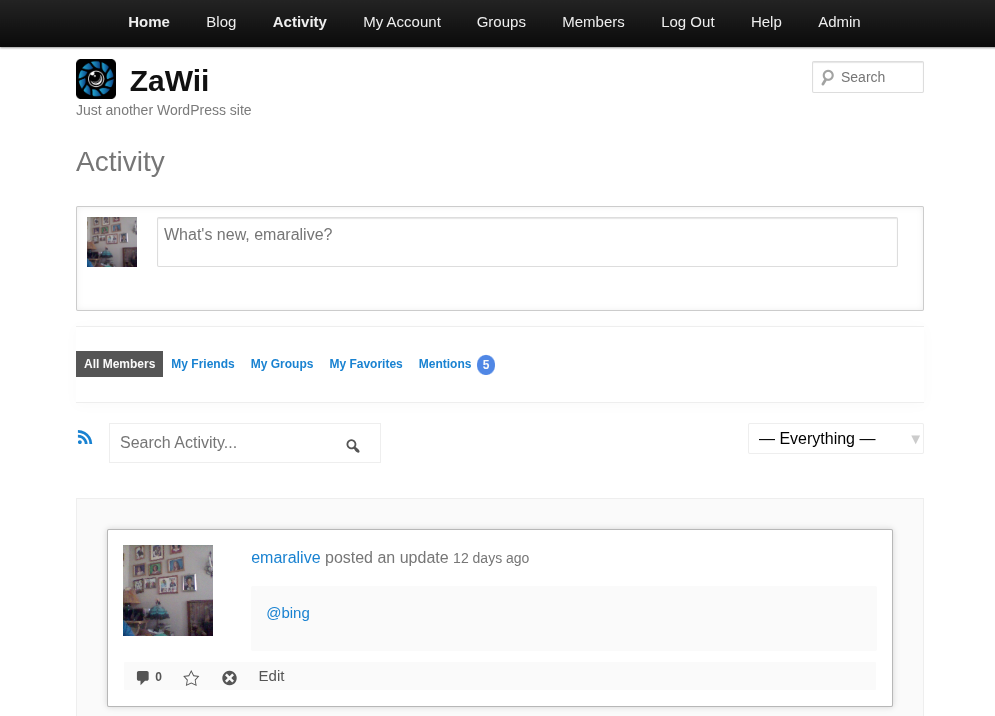
Additionally, what WordPress theme are you using?
If you had installed BuddyPress prior to version 12.x.x, e.g. versions 11.x.x and below, then you would have had pages. If you install versions 12.x.x and above, the default will be directories as opposed to pages. If you wish to have pages again, then you need to install and/or activate the BP Classic plugin.
Thanks a lot!
But isn’t it possible only with WordPress and part of the website’s software? Like at WIX and other website builders?
I used the /avatar block in my header, as I want users to be able to access it from anywhere.
The avatar shows up in the editor and on any page that is NOT BuddyPress. If the page IS a BuddyPress page, the avatar simply doesn’t load at all.
The header is a row with the images used to link the users to different parts of the site. They are equally spaced. On normal pages: 4 items, one being the avatar. On BuddyPress pages: 3 items, avatar suddenly decides to go Amelia Earhart on me.
What am I doing wrong, and how this be fixed?
Using Twenty Twenty-five theme and FSE with Gutenberg. Fresh install of WordPress, latest version as of today, as well as a fresh install of BuddyPress.
Thank you in advance.
Hi @locker17,
I don’t know the answer to your question (sorry!) But I’m also trying to reorder the members list in various ways, and I’d be interested in knowing what that plugin is that you’re using. Maybe the code in the plugin would yield some interesting ideas.
Unfortunately, if I’m not mistaken, imath left buddypress (and wordpress) sometime back.
Mike


