Skip to:
Content
Pages
Categories
Search
Top
Bottom

Search Results for 'wordpress'

Viewing 25 results - 1,776 through 1,800 (of 22,686 total)
  • Author
    Search Results
  • #308531
    computermobil
    Participant

    Hi there.
    Thank you for your reply but i can not confirm.
    I am running the latest WP version by now (5.2.4) and also the latest BP version (5.0) on diffrent servers and all of them showing a vulnerable warning for the php mailer.
    This is only on WordPress installations where BP is installed.
    Maybe an idea?

    Thank you in advance!

    #308523
    adrian122
    Participant

    Thanks, i did what you say and in debug log appears:

    “[16-Oct-2019 20:51:37 UTC] PHP Fatal error: Uncaught Error: Call to undefined function bp_xprofile_fullname_field_id() in /var/www/vhosts/27/196882/webspace/siteapps/WordPress-259852/htdocs/wp-content/plugins/buddypress/bp-members/bp-members-functions.php:1779
    Stack trace:
    #0 /var/www/vhosts/27/196882/webspace/siteapps/WordPress-259852/htdocs/wp-content/plugins/buddypress/bp-members/screens/register.php(204): bp_core_signup_user(‘rfds’, ‘pepe’, ‘rafa1@gmail.com’, Array)
    #1 /var/www/vhosts/27/196882/webspace/siteapps/WordPress-259852/htdocs/wp-includes/class-wp-hook.php(286): bp_core_screen_signup(”)
    #2 /var/www/vhosts/27/196882/webspace/siteapps/WordPress-259852/htdocs/wp-includes/class-wp-hook.php(310): WP_Hook->apply_filters(NULL, Array)
    #3 /var/www/vhosts/27/196882/webspace/siteapps/WordPress-259852/htdocs/wp-includes/plugin.php(465): WP_Hook->do_action(Array)
    #4 /var/www/vhosts/27/196882/webspace/siteapps/WordPress-259852/htdocs/wp-content/plugins/buddypress/bp-core/bp-core-dependency.php(359): do_action(‘bp_screens’)
    #5 /var/www/vhosts/27/196882/ in /var/www/vhosts/27/196882/webspace/siteapps/WordPress-259852/htdocs/wp-content/plugins/buddypress/bp-members/bp-members-functions.php on line 1779″

    #308502
    David Cavins
    Keymaster

    Appears to be a false alarm.

    We are using the PHPMailer class that is included in WordPress. In WP latest stable release (5.2.4) the version of PHPMailer is 5.2.22 and in 5.3 it’s 5.2.27. The problematic PHPMailer versions are < 5.2.20.

    #308498
    David Cavins
    Keymaster

    Can you enable debugging and see what php error is being thrown?

    Debugging in WordPress

    When you see the message “The site is experiencing technical difficulties.”, it means that there has been an error thrown, and you’ll need to know what is going wrong where to resolve your issue.

    Please let us know what problem is being recorded in your debug log.

    cviniciusj
    Participant

    Hi there!
    I’m going to make both of things.

    I know the base of users is the same of WordPress. So some users will be just regular costumers of WooCommerce store and others will be Members of a Community. How do I make it?

    There is no problem if I’ll have to make the register of BuddyPress members manually, because the costumers have to register them direct from forms to allow buying the stuff.

    In resume: A community member can also be a constumer, but a costumer can’t be a listed member on BuddyPress Community.

    #308450
    Raval
    Participant

    SSL Insecure Content Fixer

    It does not solve the problem completely but it helps for now.

    #308425
    esther
    Participant

    Is it possible to remove automatic links when http://www.domainname.com is typed into a text field? So this is not about automatic links to search a word after clicking.

    WordPress version 5.2.3
    BuddyPress version 5.0.0

    Website is offline due to security reasons by Google, that’s why I need to remove automatic links.

    #308400
    David Cavins
    Keymaster

    Note that you will have to have “Enable BuddyPress to WordPress profile syncing” checked in order for the function I provided to work.

    Also, “WP offers the ability to set the display_name to any of the other names (nickname, first name last name, username, and more)”, yes that’s true, but when your preference is saved, the value you chose is copied into the “display_name” field in the wp_user database, so don’t get distracted by that issue–it’s still the WP “display_name” that bbPress and BuddyPress care about.

    #308396
    David Cavins
    Keymaster

    Hi Tom-

    It sounds like you have a lot of balls in the air. For instance:

    Remember, I have removed the original xprofile_sync function.

    Honestly, I can’t know enough about your setup to tell you anything for sure. What I can tell you is this:

    • bbPress uses WordPress’s “Display Name” field, not a BuddyPress field.
    • BuddyPress only updates the WP “Display Name” field when profile syncing is enabled.
    • BP’s default sync function also updates WP’s “First Name” and “Last Name”
    • The replacement function I provided updates WP’s “Display Name” but _not_ the “First Name” and “Last Name” fields.

    Feel free to comment out the “nickname” update line. You won’t hurt anything. You’ll just not update the BP “nickname” field. Which won’t affect the name bbPress displays.

    #308346
    Mathieu Viet
    Moderator

    Thanks, that’s exactly what I’m doing with a fresh install of WordPress, BuddyPress and having the Twenty Twenty theme active and I can’t reproduce.

    The only explaination I see is there’s some custom code editing the query. Custom code can be:
    1- into the functions.php of the active theme or active child theme,
    2- into a /wp-content/plugins/bp-custom.php file,
    3- into any file located in the folder /wp-content/mu-plugins,
    4- into a plugin.

    That’s why we generally ask to deactivate all plugins except BuddyPress, switch the active theme to a Twenty “Something theme” and remove files of point 2 and 3.

    Reading our thread so far, you already did that testing right?

    Carsten
    Participant

    Theme – Gwangi dating Version: 2.0.0, Author URL: https://www.themosaurus.com
    BuddyPress: by The BuddyPress Community – 5.0.0
    WP Version: 5.2.3, WordPress address (URL): https://filipinowomen.online

    Hi there, I have this snippert, that figures out if the logged-in user is man or woman!

    —————————————————————————-
    add_filter (‘bp_ajax_querystring’, ‘modify_members_loop’, 20, 2);
    function modify_members_loop ($qs=false, $object=false)
    {
    global $wpdb;
    if ($object != ‘members’) return $qs;

    // figure out if the logged-in user is man or woman
    $gender = xprofile_get_field_data (3, bp_loggedin_user_id ());

    if ($gender == ‘Man’)
    $query = “SELECT user_id FROM {$wpdb->prefix}bp_xprofile_data WHERE field_id = 3 AND value = ‘Woman'”;
    else
    $query = “SELECT user_id FROM {$wpdb->prefix}bp_xprofile_data WHERE field_id = 3 AND value = ‘Man'”;

    $custom_ids = $wpdb->get_col ($query);

    $args = wp_parse_args ($qs);
    $args[‘include’] = implode (‘,’, $custom_ids);
    $qs = build_query ($args);

    return $qs;
    }
    ——————————————————————————–
    The problem is, that it doesn’t work with the widgets, who’s online…etc.
    So does anyone know, how to fix that?

    Note: A loggede in man, should only be able to see women’s profiles and women should be able to see men’s, even if a woman/man, try to search for their own gender!

    Best regards

    #308271
    Mathieu Viet
    Moderator

    Hi,

    First I’m sorry to read about these issues. I’ve just tested the first item of your list with latest BuddyPress, WordPress and Twenty Nineteen theme.

    I confirm that when I’m on the activity page of an hidden group and after scrolling down to load more activities, only the activities of this group are displayed.

    Have you tried to deactivate all plugins except BuddyPress, remove custom code, and switch to a Twenty “Something” theme to see if you still had the issue?

    About 404 on posts page, is it when you click on a the link of an activity relative to a page (meaning you activated the Site Tracking component and added some custom code to track the page post type) ?

    About BuddyBoss Media, have you tried to reach their support team ?

    FYI, this support topic explains how you can trouble shoot in case of issues, I advise you to read it.

    anarchemperor
    Participant

    WordPress 5.2.3 running Twenty Seventeen theme
    Buddy press 5.0

    Hello, I have a fresh WordPress install.

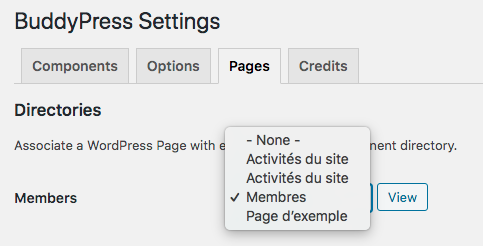
    I followed the steps and created all of the pages and then used the SETTINGS>PAGES> and it created the Register, Activate, groups, etc Pages but all of them are blank.

    In a previous attempt I had a “register” link at the lower bottom of the page not in the register Menu page. The version of the register page I see on the PAGES> panel shows register and the like but they lack the components like forms.

    #308151
    David Cavins
    Keymaster

    Hi Tom-

    I’d guess that you (or the previous site admin) edited the Display Name field to be called “Name.” You can check by visiting this screen on your installation: /wp-admin/users.php?page=bp-profile-setup

    “Display Name” is usually the first profile field created, so if you inspect the input, and it has the name=field_1, then you can guess that your “Name” field is the “Display Name” field I’m talking about, just renamed, similar to how you renamed the “Base profile.” It sounds like when you’re talking about “Forum Name” you’re talking about BP’s Base Profile > Display Name, but with your own naming convention.

    I also was wrong about the synchronization between Display Name and First and Last name. If I update the Display Field to be “Too Slim”, the WP First Name will become “Too” and the WP Last Name will become “Slim,” assuming that “Enable BuddyPress to WordPress profile syncing” (s you said). The WordPress “Display Name” field will become “Too Slim.” The WP “Display Name” is also looks like what is used by bbPress in its loops.

    So, if you want your users to be able to change the name used by the bbPress forums, you’ll need to have “Enable BuddyPress to WordPress profile syncing” checked. Then, the WP “Display Name” field is updated when the BP “Display Name” field is checked. If you want to leave WP’s First and Last Name fields to not be synced after sign-up, the following code could be added to your bp-custom.php file or wherever you keep your customization code:

    
    // Remove BP's action because it syncs nickname, display_name, first_name and last_name.
    remove_action( 'xprofile_data_after_save', 'xprofile_sync_wp_profile_on_single_field_set' );
    function my_custom_xprofile_sync_wp_display_name_only_on_single_field_set( $user_id = 0 ) {
    	// Bail if profile syncing is disabled.
    	if ( bp_disable_profile_sync() ) {
    		return true;
    	}
    
    	if ( empty( $user_id ) ) {
    		$user_id = bp_loggedin_user_id();
    	}
    
    	if ( empty( $user_id ) ) {
    		return false;
    	}
    
    	$fullname = xprofile_get_field_data( bp_xprofile_fullname_field_id(), $user_id );
    
    	bp_update_user_meta( $user_id, 'nickname',   $fullname  );
    
    	wp_update_user( array( 'ID' => $user_id, 'display_name' => $fullname ) );
    }
    add_action( 'xprofile_data_after_save', 'my_custom_xprofile_sync_wp_display_name_only_on_single_field_set' );
    

    It’s a modified version of this function, leaving the first and last name logic out: https://github.com/buddypress/BuddyPress/blob/5.0.0/src/bp-xprofile/bp-xprofile-functions.php#L803

    #308141
    Mathieu Viet
    Moderator

    Well Laurent nice catch!

    I think it’s a bug we introduced in version 2.5. I will investigate more asap. You can follow our progress from this ticket:
    https://buddypress.trac.wordpress.org/ticket/8138

    #308140
    Mathieu Viet
    Moderator

    Hi Laurent,

    Thanks for your feedback, in my “souvenirs” WordPress was sending to the previous e-mail too.. I’m going to check asap. I’ll be back 🙂

    #308139
    Mathieu Viet
    Moderator

    Hi !

    I would try to deactivate BuddyPress from the Administration if you can still access to it. Otherwise using your FTP access I would remove the buddypress folder that should be into the /wp-content/plugins directory of your site. I would then go within the admin to switch to a “TwentySomething” WordPress theme, download a fresh version of BuddyPress, reactivate it. See what happens. If it’s fixing the issue, then ask for help to the author of your theme. Otherwise, eventually redo previous steps to remove/re-download BuddyPress. Before reactivating BuddyPress, deactivate all other plugins. See what happens. If it’s fixing the issue reactivate the other plugins one by one until the bug is back. Once it’s back ask for help to the author of the plugin. Otherwise, try to find the error_log file with your host to see the potential error message.

    I also advise you to read the Basic Trouble Shooting part of this forum topic:
    https://buddypress.org/support/topic/when-asking-for-support-2/ (especially if you use bp-custom.php or the wp-content/mu-plugins/ folder.

    FYI 4.4.0 just like 4.0.0 requires at least WordPress 4.6, 5.0.0 requires at least WordPress 4.7

    laudag
    Participant

    WP 5.2.3
    WordPress as a directory install?
    BP 5.0.0
    Child theme of Virtue premium

    My problem doesn’t seem to be an issue, by a fonctionnality which seems weird.
    When a user wants to change his email adresse in his buddypress profile, then an activation mail is sent… to the old email that have been just changed, not on the new one. In case this user changes his adress because he doesn’t have any access to this old email, he is stuck.
    But if he changes his email adress in the WP user admin (actually, he can’t do that because he doesn’t have this access, only buddypress profile. it’s me who can make the test), WP send an activation email to the new adress.
    And I can see that the fist example is an activation mail sent by Buddypress (email layout of buddypress), and in the second, it’s sent by WordPress.
    So, it seems obvious that it’s a Buddypress action. I would like so that Buddypress send the activation mail on the new email adress of the user not the old one.

    But impossible to find any clue, or any option in the Buddypress setting, or any information in this forum or in the web. As if only me have this problem…

    Somebody could help me ?
    Thank you very much !

    Laurent DAGANY

    rocketmena
    Participant

    Hi,

    Am using youzer buddypress community plugin for my wordpress website. Currently i bought a new plugin for event calendar, its shortcode not supporting in buddypress pages (showing page as blank) but its working fine in other pages, actually i need to include that calendar in my buddypress community page. Ho to resolve this issue? please help.

    #308126

    Thank you to everyone who contributed to 5.0.0!

    (I’ve updated WordPress.org and BuddyPress.org to this latest version.)

    #308092
    smilingtimes
    Participant

    Here you go for who ever is having the issue it was driving me crazy, this little plugin fixed my issue my profile pics when user was uploading from mobile they were upside down now they look normal again

    Fix Image Rotation

    Have an amazing day <3

    #308039
    irishdirector
    Participant

    Help! Groups function not working with BuddyPress through our site which we updated with WordPress. Any ideas on how to get this updated for our members to access the group? Shows up at the top of the page with:

    Warning: call_user_func_array() expects parameter 1 to be a valid callback, function ‘bp_group_new_topic_button’ not found or invalid function name in /nfs/c09/h02/mnt/128956/domains/ndchicago.org/html/wp-includes/class-wp-hook.php on line 286

    Also will not allow new users to be added, and only shows one page of posts. Our WordPress version is WordPress 5.2.3, BuddyPress is legacy BuddyPress plugin. Any help is greatly appreciated.

    #308028
    furious373
    Participant

    Wordpress 5.2.3 Buddypress 4.4.0

    When uploading a profile picture, the picture uploads but the crop tool don’t work. It’s a small 2×2 square that’s unusable.

    I’m using the current KLEO theme and Buddypress Noveau.

    leleskaya
    Participant

    Hi all
    I just installed BuddyPress in my site – https://www.maesbrasileirasnaeuropa.com – and when I go to the register page, for instance, all comments in my site are displayed.

    You can take a look at https://www.maesbrasileirasnaeuropa.com/registro.

    Actually, it’s not ALL the comments but “old comments” that were added when my site was hosted in WordPress.com. New comments do not really appear in the pages.

    Anyone knows how to fix it?!

    #308003
    David Cavins
    Keymaster

    Sure, you can add a filter to the bp_activity_can_comment filter point. It is designed to only allow comments on certain types of posts/objects, but there’s no reason you couldn’t take the current user into account in your filter.

    You can read more about filters here:

    add_filter()

    The filter I’m talking about is here in the code:
    https://github.com/buddypress/BuddyPress/blob/4.4.0/src/bp-activity/bp-activity-template.php#L2871

    Here’s an example of a filter based on who should be able to comment:
    https://github.com/buddypress/BuddyPress/commit/f968ef5198b48273a477227876fbb1d94b108755

Viewing 25 results - 1,776 through 1,800 (of 22,686 total)
Skip to toolbar