@norby500 my developer is busy until Thursday… so once he have some time I will get back at you!
Please someone reply to it…
I’m using latest BP / WP 3.1.1. I have the added field in the first group and it now will stop the user regsitration if they do not complete that field BUT no new users are getting the validation email. I’ve got various users on different IPs and email domains – all local and they appear to finish the registration but never get the validation email and I never see their information on the admin side because that last step is not done. Yet – I get 1 phony user registrationeach day from an IP address from China. This may not be a Buddypress issue but I’m stumped and so is my IT department. I personally was able to complete registration from my home computer and my work one, which has much higher security but that was 4 months ago. I’m concerned that one of the updates in the last 4 months is causing my problem since it worked for me in January. http://fayettevilleforward.org/
Hey folks:
I just installed and activated the Jet Stream events plugin at http://www.howistyle.info. However, I have no idea how to create events. I see it was installed correctly as there is a Jet Event system link under the Buddypress tab in the dashboard. However, when I click on the events tab under Activity it just takes me to my sites home page. I see that when I hover over it, it is supposed to to take me to http://www.howistyle.com/members/admin/events, but again, I am just taken to the home page. It does the same thing when I click on My events and Invitation to events.
Is there some extra step in activating this plug-in that I missed?
@guigoz
I’m very glad my solution was helpful for you! and your welcome
@Ahjira @stevenkword
As Suzanne mentioned, the `bp_message_thread_delete_link()` functions are only for the message index. On single message pages, the `$thread_template` global is used in place of the `$messages_template` global, and the usable template tags all begin with `bp_the_thread_` instead of `bp_message_thread_`. While there is no `bp_the_thread_delete_link()` function, it’s pretty easy to just directly add the code from the `bp_get_message_thread_delete_link()` function with appropriate substitutions.
First, at the top of the members/single/messages/single.php template file, add this line:
“
Then, wherever you want to add a delete link, add something like the following:
`<a href="loggedin_user->domain . $bp->messages->slug . ‘/inbox/delete/’ . $thread_template->thread->thread_id, ‘messages_delete_thread’ ) ); ?>” title=”Delete this message” class=”button”>Delete`
the “ code block above contains the adapted version of the `bp_message_thread_delete_link()` function.
@Mikey3D just tried your code and it even conrol members page. whatever number you set is for both activities and members page.
thanks
I’m with @tfirma2000 still experiencing the same behavior. Any other suggestions?
Whereas I can well imagine what prompts such an article, I’m not sure it’s apposite, The snippet ” I can only be honest and say not much has changed for almost a year” is a little unfair and a surprising comment to make really, a fair bit has changed over the last year and lets not forget A/ how complicated this kind of app is and B/ that there are only three core commiters to the svn trunk.
Of course I don’t want to judge Bowe’s post given I can only read a small section of it, I will however tend to agree that there has been a slow up in plugin development and perhaps the plugins authors have exhausted their honeymoon period with BP and are not able to devote so much time to it.
For the record I will point out once more just how much work is involved in coding and testing/debugging plugins and constructing themes- for those that are not aware  – it’s a huge amount of time and we must not forget that this is an open source project despite WP’s involvement and all the work that is done is given freely all the long hours are given with little expectation of any return apart from the gratitude of the community – yes it’s true that some coders do manage to monetize their work too an extent but they are a small fraction of those that have contributed their work -. The pace of the project is governed strictly by the time that people are prepared or are able to put in, allied to that fact we have a situation where we have simply three core coders doing 90% of the work, these three all have paid jobs and are not able to commit to full time ( it’s surprising how much time is given though! ) on the project, understandably.
What I would wag my finger at and offer a generalised admonishment to is the wider community for it’s lack of direct involvement at any level. An open source project is carried by it’s community they drive it along and sadly I see very little participation from them, there are those that are pretty active in using BP have experience and knowledge yet are seldom seen on this site. There are many levels at which people can help, checking patches out and reporting back ( if one has a localhost dev environment ) reporting bugs to the trac system, adding to the codex which could really do with some tlc, many ways of contributing and at various skill levels we do not all have to be of the caliber of Boone, Paul or JJJ to help out and push things forward. ( oh and I consider myself one of those that could be helping more fwiw, time and pressure of earning a scant living though  )
)
I have always been one who was vocal – at least early last year – when changes did need to be effected and things seemed to be in slight turmoil or turpitude, some of those changes came to be some didn’t , there are still many things that could be improved with this project and hopefully they might happen with time as for pushing for those things a lot has been said publicly and privately and there is little point going over old ground.
Ah yes, should have known twitter would be useful. Nooow I’m following all those guys. Looking forward to all this newness!
If you search @bowe twitter feed I’m sure you’ll find some clues as to what it is.
In an older post on his website – thanks to Google cache – Bowe said – “And I’m also working on a something extremely secret called Infinity, which should make all you BuddyPress lovers really happy!” Ooo wee!
The infinity platform seems interesting as well 
So as a relative newbie to the wordpress/buddypress community I subscribe to a number of sites for news, tips, etc. One of those sites, Bowe’s bp-tricks.com, appears to be undergoing a bit of maintenance. As of the writing of this post, the splash page displays an image of a re-designed interface and what appears to be an article entitled “The Current State of BuddyPress: A Critical Analysis”.
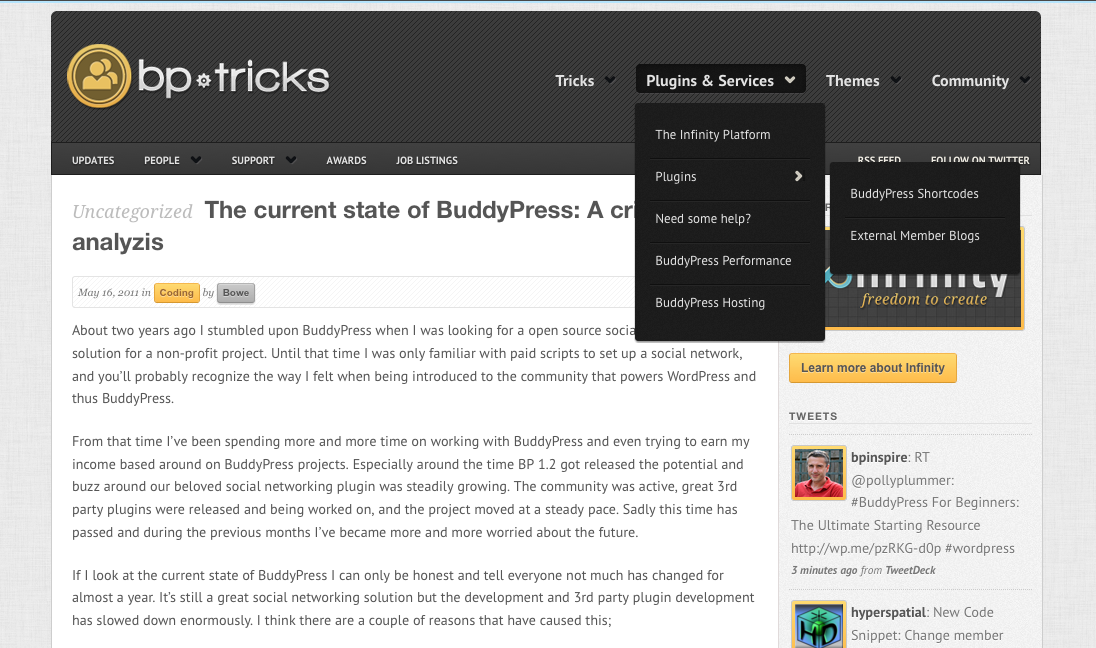
Now, I’m a ‘noob’ and am not at all qualified to debate the health or potential future of BuddyPress. I wonder if @boonebgorges @djpaul @r-a-y @hnla or some of the other pros have anything thoughts? It’ll be interesting to see the actual article once he finishes his work on the site.
Ok so for the person that googles this later, it appears to be working network wide even though I activated it only in the root site. This should activate all of the options.
So it appears to work if not activated network wide, although I do want this active across the network…
Hey folks:
I have buddypress installed at http://www.howistyle.info. I noticed that in Mozilla the member avatars in the members widget are not aligned under each other, and on the members page in Mozilla, Firefox and Chrome and IE 8. They are are cascading. Any idea how to rectify this?
here are the links to view:
http://www.howistyle.info (the members avatar is in the right sidebar)
http://www.howistyle.info/members
Hello, I have installed :CubePoints + WordPress 3.1.2. + BuddyPress 1.2.8 + CubePoints Buddypress Integration 1.9.1
For some reason “points” is not appearing on the members profiles, and no CubePoints items are appearing on the menu bar. Had anyone else seen this issue? I am pretty stuck.
Thanks
Yes, but I don’t think it will work on the current version of BP. However, I think @Mercime is working on creating the same style for the current version
Hi guys!
Is the old buddypress theme stilll available, the one with orange/silver layout? I really liked it and would like to use it on a site i’m currently developing.
Regards
Terrible advice in this thread from people recommending edits to core bp files — any changes to them will be lost next time you upgrade Buddypress. Never edit core. Use the custom query filter instead.
@DJPaul ‘s Welcome Pack works fine for me, always has.
I was extremely excited about BP as an extension of the free, public site I’ve created for local and family historians with research interests in a specific geographic location. BP provides precisely the community functions I want to have available for researchers to share.
I really like the WP theme (Panorama) that I’ve set up.
Unfortunately, I don’t like the display of BP content within the theme.
I’m not great at creating CSS, but I can tweak existing code — if I know what to do.
What I want is the forum portion to display much like it is here on the buddypress.org site. However, what I’m getting is a display that looks like the CSS file is missing or broken. I can’t figure out how to attach a file to a post, so here is a link to a screen shot — https://docs.google.com/leaf?id=0B0bN3UCRBvwDNzhmZGNkYmQtYTVkNC00YTQwLWI1ZDQtNmExMzQ2Yjc5YjY0&hl=en&authkey=CNeT6rQI
Is it possible in WordPress to run a secondary theme for a system like the bbforum portion of BuddyPress, leaving the main theme in place for everything else?
Any assistance would be tremendously appreciated!


