Search Results for 'buddypress'
-
AuthorSearch Results
-
July 27, 2015 at 12:49 pm #242461
In reply to: Use “Jetpack publicize” to publish activity updates
Henry Wright
ModeratorAre activity updates a wordpress custom posts types?
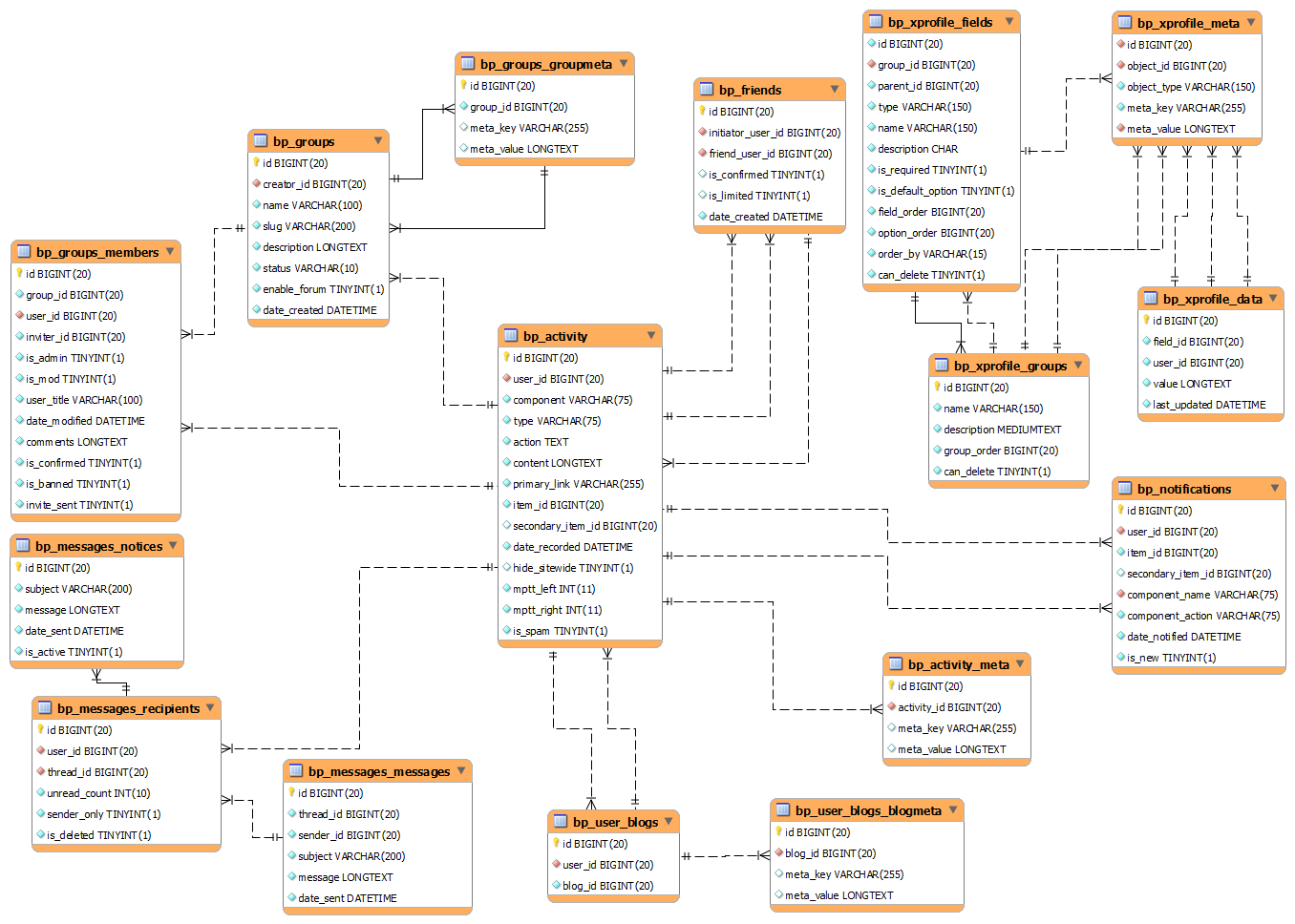
No. Activity items aren’t custom posts; instead, they live in the bp_activity table. See here for a diagram.
July 27, 2015 at 12:45 pm #242460ModeratorJuly 27, 2015 at 12:33 pm #242458In reply to: Disqus Comments and BuddyPress
ModeratorThis isn’t possible out-of-the-box but there may be a plugin in the WordPress Plugin Directory that adds Disqus functionality.
Adding items to the BuddyPress activity stream is very easy. Check out the bp_activity_add() article for more info.
July 27, 2015 at 6:42 am #242456In reply to: Only show posts from selected post categories
joepesci
ParticipantHi, not on the buddypress specific activity steam, but my own. I just want to know how to create a custom field or something in order for the logged in user to select which news sources they want to see.
July 26, 2015 at 9:09 pm #242450In reply to: Add tinymce to Activity Post Reply Form
danbp
Participantbuddypress/bp-templates/bp-legacy/buddypress/activity/entry.php
Go here to search inside BuddyPress
July 26, 2015 at 8:52 pm #242448In reply to: add whats new form to a member activity/friends tab
Participantuse this function
bp_get_template_part( 'activity/post-form' );Add this to bp-custom.php or child theme’s functions.php
function whats_new_my_friend() {
	if ( bp_is_user_friends_activity() ) :
		bp_get_template_part( 'activity/post-form' );
	endif;
}
add_action( 'bp_before_member_body', 'whats_new_my_friend' );
July 26, 2015 at 4:42 pm #242440In reply to: Using a theme just for BuddyPress
kjgbriggs
Participantchecking the Functions file, there is a huge amount of php requirements specified at the top (13 of them), I am guessing this will mess with me trying to make a child theme out of it.
On a lighter note.
The CSS files are included separately so I have the styles for BBPress and BuddyPress separated out for me.I have tried adding these to my custom CSS, but they don’t seem to change that much, just the overall placement of things.
July 26, 2015 at 1:34 pm #242436In reply to: Using a theme just for BuddyPress
djsteveb
Participant@kjgbriggs – just took a look at your oblivion thing you like – it appears to be the forums layout you are concerned with here – which may end up being more of a “bbpress” theme-ing issue – not so much buddypress… last I checked you can add “bbpress” as an auto-addon for buddypress – but if it’s not profiles and activity stream stuff – you may need to look up some “bbpress” specific theme things if you run into issues – not sure if they go over all that at bbpress dot org these days or not.. I have not checked those forums / docs in years.
July 26, 2015 at 10:56 am #242427In reply to: Using a theme just for BuddyPress
ParticipantSorry for not providing enough info.
My main theme is called Divi and is created by Elegant Themes.
The theme I want to use just for BuddyPress stuff is called Oblivion and is created by Sky Warrior Themes.An example of the BuddyPress forums nd layouts is here on the Oblivion demo:
http://skywarriorthemes.com/oblivion/forums/
I just want the styling for the BuddyPress and BBPress stuff from Oblivion in Divi.
I did a bit of Googling and came to the conclusion that the best way to do this was to use a Child Theme.
Divi is updated quite a lot so I would either have to not update anymore or lose the styling if I were to add the styles to Divi directly.
There is little information I can find on having a child theme for specific things such as buddyPress though and I am unsure of how to do it.
July 25, 2015 at 9:18 pm #242421In reply to: Registration issues
Participant@rochellebarlow
You need to direct this question to the “OptimizeMember” plugin writer.I will suggest if you do not find it easy to work with that one, perhaps look into others like “s2member” or the membership plugins from wpmudev – and others.
Some places provide better tutorials and support than others – some are easier to work with than others.
This is not really a buddypress issue however I do not believe.
(I am not a bp dev, just another random internet user of bp – and I have not looked into your particular optimize things)
July 25, 2015 at 9:08 pm #242420In reply to: Rename nav tabs based on member type
ParticipantHi @maelga,
Querying by member type is explained here:
Then, you’ll have to create a custom function to get a navbar specific to each member type.
July 25, 2015 at 8:55 pm #242418In reply to: Using a theme just for BuddyPress
Participant@kjgbriggs – setting up a child theme is just a way to essentially make a new theme – using another “parent” as your template. When you activate, it’s just ONE theme that it handling everything for your wp/bp site.
You do no provide enough details about your theme names, and what you like about the main one and the one that ‘looks better with buddyprees’ – however, if you just like the layout of the bp components with he second theme more, then yes I believe you could make a child theme from your primary theme, and then go into your secondary theme and start to pull some of the layout code for the bp specific components and add those to your main theme.
If it’s overall colors and such you are trying to mix, like have a red header for your main site and a blue header for your bp pages – that is not going to be so easy..
it’s easy to learn about child themes here: https://codex.wordpress.org/Child_Themes
and a little more digging to learn about bp specif pages and components here:
for minor changes you can keep things simple by activating your second theme that you like with the bp looking better, go to the bp pages where you like the layout, right click on the element that looks good and click inspect elements – this will give you the css rules that are working the way you like.. things like alignment properties, bold, colors perhaps – copy those – put them into your new child theme styles and such..
of course some things can be more tricky if your second theme has fancy functions.php, java and all that included.
July 25, 2015 at 8:43 pm #242416In reply to: Cannot Deactivate BuddyPress
Participant@chetbutikofer – I have not run into that exact thing – but you can go into your site via ftp or file mananger, under wp-content / plugins and simply delete the buddypress folder. That will usually deactivate just about any wp plugin.
July 24, 2015 at 11:13 pm #242224In reply to: Buddypress on multisite
valuser
ParticipantSuggestions in this post MAY be of some help.
https://buddypress.org/support/topic/multi-communities-in-one-website/July 24, 2015 at 10:58 pm #242220In reply to: Secret code necessary for registering
Participantnote sure if these work or not – never used them:
https://wordpress.org/plugins/wp-invites/https://wordpress.org/plugins/buddypress-private-community/
Let me know if you try them and they fail or work!
July 24, 2015 at 9:53 pm #242218In reply to: Buddypress on multisite
Participant@mattfl850 – this info will help with that journey:
bottom of the page: https://codex.buddypress.org/getting-started/installation-in-wordpress-multisite/I am sure this is possible, it’s not the way I would do it… might also want to consider some of the info here: http://halfelf.org/2011/dont-use-wordpress-multisite/ (updated may 2015 😉
Others may agree or disagree, and you may be keeping your server tuned like a well oiled machine – hidden from the SE spiders and brute force attackers and all that.
Of course I am not an expert, or a bp dev or anything – just another user who has tried a few different setups and spent many hours trying to do what it “possible” and should be “simple” – and pulled my hair out trying to make things like that work well :))
Not sure if anything is changed in recent updates, but I will mention that when I did this kind of conversion; I had to install the role scoper plugin (now called press permit) – in order to hide people’s private pics they uploaded – as they were visible in the media gallery for other bp users on my sites who had signed up for a “blog” (not called “site” in multi-site) – that was a painful thing to find out the hard way – maybe things have changed with that and other issues – not sure.
Have fun with that and let me know how it works out for ya!
July 24, 2015 at 7:46 pm #242213In reply to: Have a problem with login
Participant@ajay25 – maybe the wp plugin “good question” ( https://wordpress.org/plugins/good-question/ ) will do what you are asking (?)
Maybe “buddypress humanity”I imagine there are other similar ones in the wp repo these days
July 24, 2015 at 6:55 pm #242212In reply to: activity stream
blogook
ParticipantThanks so far.
I am using latest version of WordPress and Latest of Buddypress
Lets forget about css for now, I think I need to redo how activity stream is generating the html. If I want to get done as in my example (1st post) then I need to generate my own HTML. I am considering writing my own plugin to make it do what I want..
What buddypress filter can I use to adjust the html below?
<div class="activity-inner">
<p>Si quicquam extra virtutem habeatur in bonis. Qua ex cognitione facilior facta est investigatio rerum occultissimarum. Tum ille timide vel potius verecunde: Facio, inquit.</p>
<p>Videmus igitur ut conquiescere ne […]<img src="http://somewebsite/wannabe/wordpress/wp-content/uploads/2015/07/Unknown.jpg"></p>
</div>
July 24, 2015 at 1:58 pm #242207In reply to: Template look and feel issues
Easy Web Scripts
ParticipantI am not using a buddypress template.
July 24, 2015 at 10:08 am #242203In reply to: Template look and feel issues
ModeratorTake a look at the BuddyPress Template Hierarchy article. If your theme uses BuddyPress templates then you’ll be able to override them.
July 24, 2015 at 9:13 am #242199In reply to: activity stream
Participant@jgob – The simple answer would be sure, there is a way, edit the css.
there is no real way to answer your question I don’t think – there are no details. What is messed up? What is cleaner? Who decides these things?
What you are asking is highly dependent on which theme you are using.
As is suggested here: https://buddypress.org/support/topic/when-asking-for-support-2/
Best to have the info so people may take a look.
Without that info – right click on your pictures, inspect elemment, go to your css and change things is all I can tell ya.
July 24, 2015 at 12:08 am #242191In reply to: BP_Group_Member_Query type alphabetical
Garrett Hyder
ParticipantHi @shanebp,
Sorry for the confusion, I’ve created a bp_group_list_managers that’s a merge of bp_group_list_admins and bp_group_list_mods to provide a single consolidated listing.
function bp_group_list_managers($group=false) {
    global $groups_template;
    if(empty($group)) {
        $group =& $groups_template->group;
    }

    // fetch group admins if 'populate_extras' flag is false
    if (empty($group->args['populate_extras']) || true) {
        $query = new BP_Group_Member_Query(array(
            'group_id'   => $group->id,
            'group_role' => 'admin',
            'type'       => 'alphabetical',
        ));

        if (!empty($query->results)) {
            $group->admins = $query->results;
        }
    }

    // fetch group mods if 'populate_extras' flag is false
    if (empty($group->args['populate_extras']) || true) {
        $query = new BP_Group_Member_Query(array(
            'group_id'   => $group->id,
            'group_role' => 'mod',
            'type'       => 'alphabetical',
        ));

        if (!empty($query->results)) {
            $group->mods = $query->results;
        }
    }

    $admins = (array)$group->admins;
    $mods = (array)$group->mods;

    usort($admins, 'bp_group_member_sort');
    usort($mods, 'bp_group_member_sort');

    $group->managers = array_merge($admins, $mods);

    if (!empty($group->managers)) { ?>
        <ul id="group-managers">
            <?php foreach((array)$group->managers as $manager) { ?>
                <li>
                    <a href="<?php echo bp_core_get_user_domain($manager->user_id, $manager->user_nicename, $manager->user_login); ?>"><?php echo bp_core_fetch_avatar(array('item_id' => $manager->user_id, 'email' => $manager->user_email, 'alt' => sprintf( __( 'Profile picture of %s', 'buddypress' ), bp_core_get_user_displayname($manager->user_id)))) ?></a>
                </li>
            <?php } ?>
        </ul>
<?php } else { ?>
    <span class="activity"><?php _e( 'No Managers', 'buddypress' ) ?></span>
<?php }
}
As you can see I set the type here to alphabetical and was first confused why it did nothing then I realized the BP_Group_Member_Query’s were never even called as I guess populate_extras was set so not empty. This meant that the $group->admins and $group->mods came from the global $group_template->group which wasn’t ordered. I’m curious how to make that global $group_template->group admin/mod lists could be alphabetically ordered by default.
For now I just amended my method to simply force the BP_Group_Member_Query’s to be used instead which has allowed for the alphabetical ordering.
Hope that clears things up.
Thanks
July 23, 2015 at 11:32 pm #242188In reply to: BP_Group_Member_Query type alphabetical
shanebp
ModeratorBP_Group_Member_Query is a class extension of BP_User_Query
Take a look at the code examples here:July 23, 2015 at 5:40 pm #242171In reply to: Accessing Original $wp_query
ModeratorDid you read: https://codex.buddypress.org/developer/the-bp-global/
July 23, 2015 at 5:05 pm #242168In reply to: Accessing Original $wp_query
WTHeel
ParticipantI just did, but it did not work. I looked at the function, saw $groups_template, and added the following inside and outside of the loop:
var_dump($groups_template);Here’s the code from buddypress.php:
<?
/*
Template Name: BuddyPress
*/

get_header();
$plp_user_check = plp_user_check($current_user);
	var_dump($groups_template);
	echo "<br>Course Path: " . bp_get_group_slug();
include("forums-header.php");
?>

<?	if( have_posts() ): ?>

		<? 	while( have_posts() ): the_post();
				var_dump($groups_template);
				echo "<br>Course Path: " . bp_get_group_slug();
				the_content();
			endwhile;
		?>

	<? else: ?>

		<div id="post-404" class="noposts">

			<p><? _e('None found.','example'); ?></p>

		</div><!-- /#post-404 -->

	<? endif; wp_reset_query(); ?>

</div><!-- /#bodyContainer
<?	get_footer(); ?>
The first var dump just returned “NULL”. The second one returned:
object(stdClass)#644 (1) { ["group"]=> NULL } -
AuthorSearch Results