Search Results for 'buddypress'
-
Search Results
-
Still a satisfied user for buddypress for some time but I’m getting the following error in global.js on http://www.swnk.org after I updated to the newest version:
Uncaught TypeError: undefined is not a function.It’s referring to this line:
jq.cookie( 'bp-activity-oldestpage', 1, {I thought it might be conflicting jquery in my code or something, but after disabling jquery.site.js, the problem remained. It seems like I’m not including two versions of jquery either. I also tried to to define jq again as jquery (just trying everything I could think of) but that didn’t help either.
As a result the slider on the homepage doesn’t work anymore, and probably more jquery code that isn’t executed.
Anybody any idea how to fix this?
In the registration form, buddypress fields using internet explorer appear better than using firefox in terms of height, in firefox I need to make the fields larger (give additional height than the default). Do you replicate the same issues on multiple browsers?
I use the code below to give additional heights to the fields in registration when it comes to firefox.
/* Adjust BP registration fields*/
#buddypress #signup_form.standard-form input[type="text"], #buddypress #signup_form.standard-form textarea, #buddypress .form-allowed-tags, #buddypress #commentform input[type="text"], #buddypress #commentform textarea {
    height: 36px;
}
Thanks
Topic: Buddypress notifications
How to have obvious buddypress notification system on site and on wp touch? I would like to have a facebook style notification system on my website, if anyone could point me in the right direction that would be great!
Trying to get property of non-object in …\wp-content\plugins\buddypress\bp-core\bp-core-functions.php(137) : runtime-created function on line 6
When I have DEBUG true I’m still getting this. I thought it might just be an issue with the previous release but it’s still there. I figured it was time to mention it.
Hi I’m developing a site for a client and I might have found a bug, not sure yet.
The thing is that I get two different values for the active members count when accessing the Members page, one for the All Members string and a different one for Viewing member n to N (of M active member). I leave the strings ids below for reference.
After some debugging I found out that these values come from very different functions:
- All Members count is returned from the function bp_core_get_active_member_count() (L583: wp-content/plugins/buddypress/bp-members/bp-members-functions.php)
- Viewing member n to N (of M active member) is set in function do_user_ids_query (L433: wp-content/plugins/buddypress/bp-core/bp-core-classes.php). To save you some tracing, do_user_ids_query is called by BP_User_Query::__construct (L175: wp-content/plugins/buddypress/bp-core/bp-core-classes.php), called by bp_core_get_users (L106: wp-content/plugins/buddypress/bp-members/bp-members-functions.php), called by BP_Core_Members_Template::__construct (L181: wp-content/plugins/buddypress/bp-members/bp-members-template.php
</u>The SQL query run by these two functions is different and return different values when a user is not active (in my case I have some users with user_status=2), the first showing the correct value and the second the wrong one since it does not take into account “user_status”
- All Members – CORRECT COUNT. Query: SELECT COUNT(user_id) FROM wp_bp_activity WHERE component = ‘members’ AND type = ‘last_activity’ AND user_id NOT IN ($exclude_users_sql).
- Viewing member n to N (of M active member) – WRONG COUNT. Query: SELECT COUNT(u.user_id) FROM wp_bp_activity u WHERE u.component = ‘members’ AND u.type = ‘last_activity’.
Shouldn’t these two values be retrieved using the same function?
Also, it would be great if a filter hook was added to bp_core_get_active_member_count to allow users to set the expiration time of the transient, right now it is 0 by default which in a live site where information is updated constantly doesn’t make much sense. I found a workaround for this using apply_filters( ‘bp_core_get_active_member_count’, $count ) but it would be easier if we were allowed to change the transient expiration time.
String IDs
#: bp-templates/bp-legacy/buddypress/activity/index.php:19
#: bp-templates/bp-legacy/buddypress/members/index.php:19
#: bp-themes/bp-default/activity/index.php:39
#: bp-themes/bp-default/members/index.php:35
#, php-format
#@ buddypress
msgid "All Members <span>%s</span>"
#: bp-members/bp-members-template.php:347 #, php-format #@ buddypress msgid "Viewing member %1$s to %2$s (of %3$s active member)"
WP 3.9.2
BP 2.02Hi,
I’m having difficulty installing a child theme for Buddypress. I followed instructions in http://codex.buddypress.org/themes/building-a-buddypress-child-theme/. I created a theme folder bp-responsive inside of my WP themes folder. I created style.css inside that bp-responsive folder and pasted the following code:Theme Name: BuddyPress Responsive
Theme URI: http://example.org/themes/dusk/
Description: Child theme for BuddyPress.
Version: 1.0
Author: John Doe
Author URI: http://example.org/
Template: bp-default
Tags: buddypress, two-column, grey, dark
*/@import url(“../buddypress/bp-themes/bp-default/style.css”);
Not sure if the last line for necessary, but even without it, it still doesn’t work.
I uploaded this newly created folder to a server, but when go to Appearance>Themes – it shows the Broken Themes warning:
The following themes are installed but incomplete. Themes must have a stylesheet and a template.
Name Description
BuddyPress Responsive The parent theme is missing. Please install the “bp-default” parent theme.I don’t where I’m doing wrong. Can you please point out?
in my buddypress website http://www.epcet.yogeshojha.com/, when i click the groups, it is redirected to http://www.epcet.yogeshojha.com/groups/groupname/forum/. How do i remove the ending /forum/ ?
Topic: Styling BuddyPress
I changed limited styles in buddypress but have one problem that I can’t change one element as appears in this image.
I am trying to change this code from auto to fixed and I think it will resolve the problem:
#buddypress #whats-new-options {
	overflow: auto;
	height: 0;
}
But when I change it to fixed, nothing changes and when I use inspect element, it gives auto again!
I will share some CSS i changed if this is helpful:
/* Adjust BP registration fields - I added 36px height because some fields don't look right on firefox*/
#buddypress #signup_form.standard-form input[type="text"], #buddypress #signup_form.standard-form textarea, #buddypress .form-allowed-tags, #buddypress #commentform input[type="text"], #buddypress #commentform textarea {
    height: 36px;
    width: 90%;
}
I changed the font height for the following items to become 1.0rem.
#buddypress button,
#buddypress a.button,
#buddypress input[type=submit],
#buddypress input[type=button],
#buddypress input[type=reset],
#buddypress ul.button-nav li a,
#buddypress div.generic-button a,
#buddypress .comment-reply-link,
a.bp-title-buttonI wish this helps.
Thanks!
I tried to apply the section ‘B. Full Width Layout’-description for my page, where I use the ‘Reddle’-theme.
1st:
I created a new folder wp-content/themes/reddle-child.
2nd:
I created a new file buddypress.php with that content:
<?php
/**
 * BuddyPress: Full-width Page Template, No Sidebar
 *
 * A full-width template for all BuddyPress pages.
 *
 * @ since Reddle 1.0 and BuddyPress 2.0.3
 */

get_header(); ?>

		<div id="primary">
			<div id="content" role="main">

				<?php while ( have_posts() ) : the_post(); ?>

					<?php get_template_part( 'content', 'page' ); ?>

					<?php comments_template(); ?>

				<?php endwhile; // end of the loop. ?>

			</div><!-- #content -->
		</div><!-- #primary -->

<?php get_footer(); ?>
I.e.: I deleted the line
<?php get_sidebar(); ?>from the page.php of the ‘Reddle’-theme.
3rd:
I created a new file functions.php with that content:
?php
// Remove sidebar body class in BuddyPress pages
function mme_remove_sidebar_body_class($wp_classes) {
    if( function_exists ( 'bp_loaded' ) && !bp_is_blog_page() && is_active_sidebar( 'sidebar-2' ) ) :
        foreach($wp_classes as $key => $value) {
             if ($value == 'sidebar') unset($wp_classes[$key]);
        }
    endif;
    return $wp_classes;
}
add_filter('body_class', 'mme_remove_sidebar_body_class', 20, 2);
4th:
I created a new style.ccs with that content:
/*
Theme Name: Reddle
Theme URI: http://theme.wordpress.com/themes/reddle/
Author: Automattic
Author URI: http://automattic.com/
Description: Everything about Reddle's minimal design elegantly adapts to how you want to use your blog and what you want to use it for. Want to use your blog for a simple one-column link blog? A two-column business site with a custom header and no posts? Reddle can do that too — and look good doing it too.
Version: 1.3.1
License: GNU General Public License v2 or later
License URI: http://www.gnu.org/licenses/gpl-2.0.html
Tags: red, white, one-column, right-sidebar, two-columns, fixed-width, flexible-width, custom-background, custom-header, custom-menu, featured-images, microformats, post-formats, rtl-language-support, sticky-post, translation-ready

Reddle, Copyright 2014 Automattic, Inc.
This theme, like WordPress, is licensed under the GPL.
Use it to make something cool, have fun, and share what you've learned with others.
*/

@import url("../reddle/style.css");

/* =Theme customization starts here
-------------------------------------------------------------- */

.buddypress .entry-header,
.buddypress .entry-content,
.buddypress .entry-summary,
.buddypress .entry-meta {
    max-width: 1040px;
    width: 100%;
}

@media (max-width: 1069px) {
    .buddypress .entry-header,
    .buddypress .entry-content,
    .buddypress .entry-summary,
    .buddypress .entry-meta {
        padding-left: 20px;
        padding-right: 20px;
    }
}
5th:
I uploaded all three files to the ‘reddle-child’-folder; but the sidebar is still displayed.
Vague suspection: The ‘Reddle’-equivalent for the ‘sidebar body class’ in the ‘Twenty Thirdteen’-theme is called different. – But how can I recognise, what is in the ‘Reddele’-theme the equivalent for the ‘sidebar body class’ in the ‘Twenty Thirdteen’-theme?
Hi
I’m wondering what the limit of buddypress is with mysql. I guess it wouldn’t manage, lets say more than 50k users? If for some reason the limit is getting reached, how hard is it to move it over to a NoSQL database? Or is there any way too use buddypress with any type of NoSQL from the beginning, so that it could (hypothetically) manage a million+ users?
Best,
LukasI would like to reshape the registration page
1st:
I would like divide it horizontal (instead of vertical).
2nd:
I would like to have boarders around each of the two parts ‘account details’ and ‘Profildetails’ – gladly similar to that design:
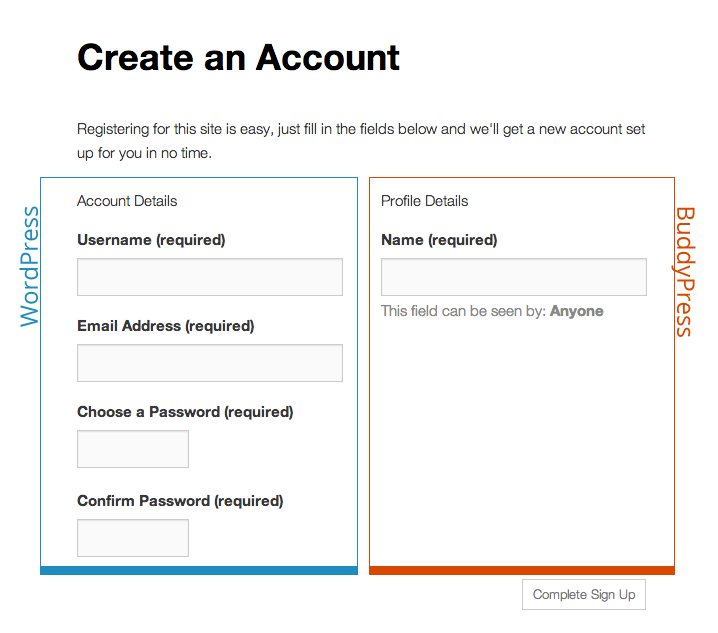
via http://codex.buddypress.org/getting-started/guides/modifying-the-registration-form/
3rd:
I would like to insert explanatory text between the two headlines and the corresponding form field.
Below ‘account details’:
‘Diese Daten werden für Deine Registrierung als neues Mitglied und die Einrichtung Deines eigenen Blogs (Webseite) benötigt.’
‘Profildetails’:
‘Diese Daten werden künftig in Deinem Profil angezeigt. Einige Angaben sind verpflichtend, um aussagekräftige Profile zu erhalten; bei anderen Formularfeldern ist es Dir selbst überlassen, ob Du Angaben machst oder nicht.’
4th:
I would like get all profile field groups displayed on the registration page.
I know that I get all profile fields displayed on the registration page, when I assign all fields to ‘base’-field group. But I would prefer to use the field group titles for structuring the registration page.So, it should be lilke:
Basisinformationen
– Name
– Teamgründung bzw. Geburtsjahr
– Geschlecht
– Ergänzende Hinweise zu Deinem GeschlechtKontaktdaten
– Telefonnummer
– Eigene Webseite
– E-Mail-AdresseGeographisches
– Staat
– Bundesland
– Landkreis bzw. kreisfreie Stadt5th:
I guess, it would be most comfortable, to have within the Dashboard check boxes for deciding, whether a certain field group or field should be displayed on registration page or not.
6th:
a) I would like to delete the check box ‘Ja, ich will eine neue Seite erstellen’.
And I would like, that the users have not only to decide for a user account, but automatically for a blog as well.b) I would like to delete as well: ‘I[ch] möchte, dass meine Webseite in Suchmaschinen erscheint und öffentlichen Verzeichnissen um dieses Netzwerk herum.: Ja Nein’.
Instead ‘Yes’ shall be the standard answer for all blogs of the network.


