Search Results for 'profile fields'
-
Search Results
-
Ok I know i can echo out each indiviual custom field inside the members loop like so:
<?php if ( bp_has_members( bp_ajax_querystring( 'members' ) ) ) :
       		echo bp_member_profile_data('field=Gender');

?>
 <?php endwhile; ?>
but how do i go about accessing the whole object or array on a per user basis is there a function for this?
I’ve tried get_user_meta(); but no luck it looks like buddypress doesn’t store it’s profile field data there, which is where i would have thought it was kept….
I could use $wpdb but it seems a little overkill.
Any advice is appreciated
ChrisTopic: Extended profile
I want to add resume fields ( work experience) in a metabox that is expandable in xprofile page. I know there is a resume plugin but that output is under a sub nav. I want it to appear as part of user profile.
I have tried ACF and the likes but the metabox does not appear in user profile. I WANT IT TO APPEAR IN USER PROFILE, AND SHOULD ALSO BE EDITABLE FROM THE FRONT END AND NOT ONLY ADMIN
is this possible or not?
I would like to have a search function, which allows to search for members due to more than one criteria, e.g.:
— for all male members of a certain year of birth
or
— for all female members of a certain town or federal state.
Most comfortable would be a long ist of check boxes, text and number fields (corresponding to the extended profile fields),
so that the users can decide, which criteria they want to use, and maybe to combine, for searching.
I would like to reshape the registration page
1st:
I would like divide it horizontal (instead of vertical).
2nd:
I would like to have boarders around each of the two parts ‘account details’ and ‘Profildetails’ – gladly similar to that design:
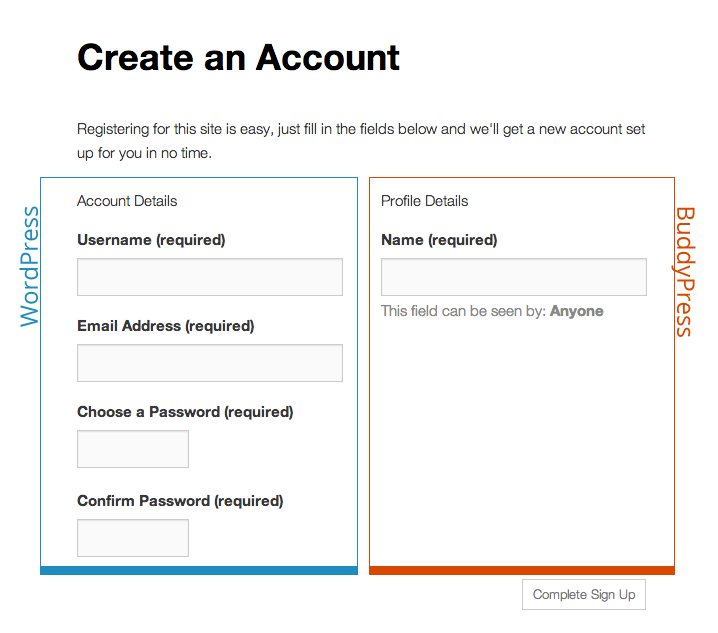
via http://codex.buddypress.org/getting-started/guides/modifying-the-registration-form/
3rd:
I would like to insert explanatory text between the two headlines and the corresponding form field.
Below ‘account details’:
‘Diese Daten werden für Deine Registrierung als neues Mitglied und die Einrichtung Deines eigenen Blogs (Webseite) benötigt.’
‘Profildetails’:
‘Diese Daten werden künftig in Deinem Profil angezeigt. Einige Angaben sind verpflichtend, um aussagekräftige Profile zu erhalten; bei anderen Formularfeldern ist es Dir selbst überlassen, ob Du Angaben machst oder nicht.’
4th:
I would like get all profile field groups displayed on the registration page.
I know that I get all profile fields displayed on the registration page, when I assign all fields to ‘base’-field group. But I would prefer to use the field group titles for structuring the registration page.So, it should be lilke:
Basisinformationen
– Name
– Teamgründung bzw. Geburtsjahr
– Geschlecht
– Ergänzende Hinweise zu Deinem GeschlechtKontaktdaten
– Telefonnummer
– Eigene Webseite
– E-Mail-AdresseGeographisches
– Staat
– Bundesland
– Landkreis bzw. kreisfreie Stadt5th:
I guess, it would be most comfortable, to have within the Dashboard check boxes for deciding, whether a certain field group or field should be displayed on registration page or not.
6th:
a) I would like to delete the check box ‘Ja, ich will eine neue Seite erstellen’.
And I would like, that the users have not only to decide for a user account, but automatically for a blog as well.b) I would like to delete as well: ‘I[ch] möchte, dass meine Webseite in Suchmaschinen erscheint und öffentlichen Verzeichnissen um dieses Netzwerk herum.: Ja Nein’.
Instead ‘Yes’ shall be the standard answer for all blogs of the network.1st:
As yesterday mentioned, my startpage:
and the subdomains:
http://balletttaenzerinnenkrzbg36.1a-spielwiese.de/
http://kampfsportlerinnenneuwied.1a-spielwiese.de/
work, and I can login into the different dashboards (entire network, 1a-spielwiese.de, subdomains).
2nd:
But it seems, all this gives me no access to the social network function of BuddyPress:
a) E.g., wenn I (using my superadmin-profile) try to do something with the BuddyPress-toolbar, e.g. sending a message, I become redirected to the login form:
Between the WordPress-Logo and the two form fields (user name and password) is written:
“Bitte melde dich nochmal an.
Du musst Dich anmelden, um Zugriff zur angeforderten Seite zu bekommen.”(Please login again.
You have to be logged in, for accessing the page at issue.)Within my browser adress line appears:
b) The admins of the indiviual blogs can login to their own blogs, but not not the start page of entire network.
c) As well there are buttons for making friendship nearby the avatars respec. user names.
As well there is no opportunity to post something into the activity stream.
What could be the cause of the misfunctions and how can I resolve the problem(s)?
—
The same problem description in German:
http://forum.wpde.org/buddypress/133446-login-zur-netzwerk-funktion-von-buddypress.html
I have the default registration page of buddyPress (The one I chose under settings>buddypress>pages>register).
I have added fields at the registration so that I can build the user profile. Under each field there is a message which is [This field can be seen by: Everyone Change]. I try to change the color of the word [change] at registration to #0773ca so that users can see it and distinguish it from the regular font color of the other elements of the page.If I change the color using theme options> links > link color. This will change the default colors for the tabs under buddypress user profile (Activity, Profile, Notifications 0, Messages 0, Friends 0, Groups 0, Forums) to the same color I chose for the link. I don’t want to change the color of the links in the user profile as explained above.
Please advice.Thanks!
Under users> Profile fields> Add new field.
I want to write in the field description the following message:
By registering in this site, you agree to the <b> terms and conditions</b>I found that this field is not compatible with font awesome and the link itself can’t be opened in target=”_blank” new window.
Any suggestions?
Could anyone suggest plugins for:
(1) I need my users to compile their profiles mostly by selecting categories and tags from an extensive database. This needs to be as user friendly as possible. They also need to be able to create categories and tags to add to the database.
(2) I need to make the registration and edit profile dialogues prettier and add some custom fields.
(3) I need users to be able to add content and docs to the database and compile a category tag profile to these docs to make them searchable.
(4) I need a search function which uses the searchers profile as the search criteria and returns a hierarchical list of users (or documents in a doc search).
(5) Best plugin to populate my site with some sample users.I have been through the list of plugins but there are so many and hard to know which is suitable or better.
Latest WP and BP versions
My thanks.
Topic: profiles


