Search Results for 'profile fields'
-
Search Results
-
Topic: edit profile fields missing
Searched endlessly without a clear answer. Don’t get why we can create endless profile custom profile fields but they’re totally inaccessible afterward. Clicking the “your profile” link in the backend brings up a page that has none of the custom fields and a ton of wordpress junk that we don’t even use.
Think this should be more plug n play instead of requiring massive PHP editing. 🙁
Topic: Extended Profiles deleted
Hi,
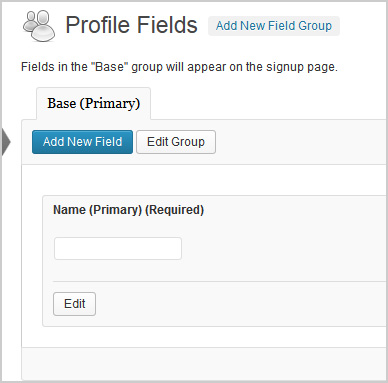
The pic above shows what the extended profile field should look like. I had a plugin called Buddypress Real Names which allowed me to delete that field above. Silly me, now my extended profiles are not working. It shows blank under profile fields on my registration page and does not send a confirmation email to new users. However, if extended profiles are turned off, all works fine.
1. Which version of WordPress are you running?
3.7.12. Did you install WordPress as a directory or subdomain install?
Directory3. If a directory install, is it in root or in a subdirectory?
root4. Did you upgrade from a previous version of WordPress? If so, from which version?
No5. Was WordPress functioning properly before installing/upgrading BuddyPress (BP)? e.g. permalinks, creating a new post, commenting.
Wordpress seems to be working fine6. Which version of BP are you running?
1.87. Did you upgraded from a previous version of BP? If so, from which version?
No8. Do you have any plugins other than BuddyPress installed and activated? If so, which ones?
Yes.
Admin Toolbar Remover
All In One WP Security
AVH First Defense Against Spam Plugin
BP Profile as Homepage
BuddyPress
BuddyPress Activity Plus
BuddyPress Activity Privacy
BuddyPress Wall
Contact Form
Custom Meta Widget
Disable RSS
Dynamic Widgets
Email Login
EU Cookie Law Compliance
Facebook Friends Inviter
Google Analytics for WordPress
Google XML Sitemaps
Restrict Usernames
Velvet Blues Update URLs
W3 Total Cache
WordPress SEO
WP-SpamFree
WP Block Admin
WP Content Filter
WP FLogin9. Are you using the standard BuddyPress themes or customized themes?
Standard10. Have you modified the core files in any way?
No11. Do you have any custom functions in bp-custom.php?
No12. If running bbPress, which version? Or did your BuddyPress install come with a copy of bbPress built-in?
Not running bbPress13. Please provide a list of any errors in your server’s log files.
14. Which company provides your hosting?
Mweb15. Is your server running Windows, or if Linux; Apache, nginx or something else?
UnixTopic: Registration Question
I am using BuddyPress on a Jobs website for the enhanced profile features. I do not need a forum or social media type community. I would like potential employers to be able to search registered people for potential job matches. I would also like Job Seekers to be able to create a Resume like profile. I created new profile fields and broke them into groups like Work Experience, Education, etc. When someone registers they fill out name, address, phone, and email. Then click Register (works great). They get an activation email sent to them (great) but when they log in they are sent to the WordPress dashboard (not great – very confusing). I need them to be sent to the page where they can complete the resume portion of the registration fields I created.
I have the testing site here: http://plc.bradstreets.net
Also the Avatar image in not letting them upload an image.
Hi, I have a blog with buddypress being used, and I use the display posts plugin which would provide the functionality I need via use of a shortcode by the authors on their profile page. What I need to do is get buddypress to recognize and use shortcodes instead of outputting the shortcode itself.
For example when I add a field called My Articles in the profile field under the Author Bio, and add the shortcode [display-posts author=”alana”] is just outputs that exact shortcode not the information that should be posted.
Can someone help me get buddypress to use the shortcode please.
Thanks guys, keep it going like this!
When I started with BuddyPress years ago I really had a hard time getting trough all template logic, actions, filters and stuff like that to change some data-output.
Yesterday I started testing and building again upon Beta 1 (1.9) and I really like how easy you can target and print User-profile info into the member listing page.
At my screenshot I simply added a Gender profile field and targeted it by some CSS lines to make a visual difference.Right now I have a very simple way to show if some profile is Male or Female.

I also added the ‘order by’ select option + search field to the menu to make it more compact.
First page almost done – a few more to go 🙂
Hello,
We are running WP 3.6, BuddyPress 1.8.1, and bbPress 2.4. This is an internal WP setup. For at least some of our custom profile fields, we want the user to have access to rich editing such as TinyMCE or equivalent. I do not know how to do this. Would someone please point me in the right direction.
Thanks
Hello,
We are running WP 3.6, BuddyPress 1.8.1, and bbPress 2.4. This is an internal WP setup. We want to allow people to use HTML in their profile fields, especially the ones we have added. However, there is a lot of manipulation going of the HTML and it is often corrupted or simply not interpreted. We tried turning of the normal WP filtering without success.
Would appreciate any guidance on how to get this working.
Thanks
hello!
i’m using buddypress and the buddypress profile search plugin, i really like it, but the only thing i really dont know is how to change the field label of the questions in the search form.
e.g.
how old are you? ‘ are not consistent to how they would be searched “i’m looking for someone the age of”Is there a way to customize the labels for the fields on the search form?
thanks in advanced
benTopic: 2.0 top features – ideas
BuddyPress 1.9 Beta 1 is out.
Last calls for 2.0 features scope. What are your top 5 feature requests for 2.0?
(if there are Trac tickets, feel free to post links, but please ensure they are for features not bugs)I’ll get the discussion going with my top 5:
- Upload profile image at activation https://buddypress.trac.wordpress.org/ticket/4132
- Allow admin to select fields to display in user “excerps” on Groups’ user list page https://buddypress.trac.wordpress.org/ticket/4126
- New profile field type: Number https://buddypress.trac.wordpress.org/ticket/4694
- Use taxonomies instead of/in addition to BP Xprofile tables https://buddypress.trac.wordpress.org/ticket/4796
- Hierarchical groups https://buddypress.trac.wordpress.org/ticket/3961
I am using WPUF Pro and their Buddypress Integration Add On plugin to create a custom registration form for my Buddypress site. The add on maps registration fields to the Buddypress xprofile fields using a Meta Key. Unfortunatly I am having a hard time finding out what the Buddypress xprofile meta key should be so that the registration fields map correctly.
Can someone tell me how to find the value for Buddypress member profile field meta keys? How to see the values in Buddypress or in DB?
Thanks!


