Search Results for 'theme'
-
Search Results
-
Hi BuddyPress Community,
I’m having an issue with my website where BuddyPress profile pages aren’t rendering correctly when viewed in the Chrome browser. Here are the details:
The layout appears broken, with profile sections overlapping or not displaying at all.
The issue seems to occur only in Chrome (tested on both Windows and macOS), while other browsers like Firefox and Edge render the pages just fine.
Clearing the browser cache and disabling extensions in Chrome doesn’t resolve the issue.
What I’ve Tried:
Checked the BuddyPress templates in my theme and confirmed there are no customizations causing conflicts.
Switched to a default WordPress theme (Twenty Twenty-Three), and the issue persists.
Tested the website in incognito mode on Chrome, but the problem still occurs.
Verified there are no JavaScript errors in the browser console.
Could this be related to Chrome’s rendering engine or a specific CSS/JS compatibility issue with BuddyPress? Are there any settings in BuddyPress or Chrome I should check to fix this? Should I share with you the URL of the site so that you can check if this issue is happening on your end or not?
Any guidance would be greatly appreciated!Hello BuddyPress team,
I’m using the BuddyPress plugin version 14.3.1 alongside WordPress 6.6.2 and have been encountering deprecated class error messages in my site logs. These messages point to line 6085 of the file wp-includes/functions.php and indicate the use of outdated classes like BP_REST_Activity_Endpoint and BP_REST_Members_Endpoint. The notices suggest replacing them with BP_Activity_REST_Controller and BP_Members_REST_Controller, respectively, as they’ve been deprecated since version 15.0.0.
Here are some examples of the error messages:
PHP Deprecated: The BP_REST_Activity_Endpoint class is deprecated since version 15.0.0! Use BP_Activity_REST_Controller instead. in /wp-includes/functions.php on line 6085
PHP Deprecated: The BP_REST_Members_Endpoint class is deprecated since version 15.0.0! Use BP_Members_REST_Controller instead. in /wp-includes/functions.php on line 6085
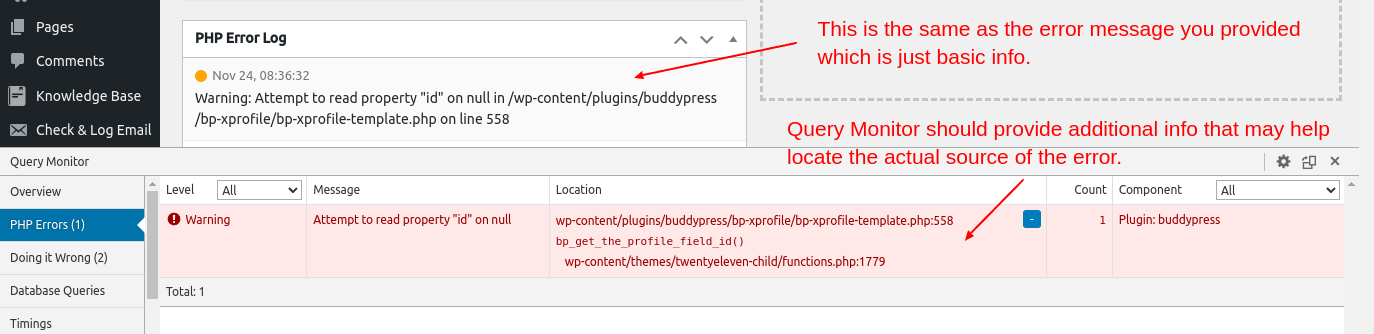
I’ve attempted troubleshooting by switching to the default WordPress theme and disabling non-essential plugins (including BP Classic), but the errors persist. Using the Query Monitor plugin, the deprecated notices seem to be directly linked to BuddyPress.Could you confirm if this behavior is expected? Is there a patch or a recommended solution to address this issue, as I’m already running the latest version of the plugin?
Thank you for your assistance, and I look forward to your guidance.
Best regards,
Rafael João Ribeiro
fisicagames.com.brFor context, I am not a developer.
I created a child theme manually for BuddyX and the child theme works. However, the child theme does not have one of those preview picture that shows what the theme looks like in the Appearances -> Themes page and I wanted to add one.
Version details: BuddyX Version: 4.7.5 with Buddypress Version 14.2.1 and WordPress Version 6.7.1.
I know that in the buddyx folder in the hosting back end (wp-content -> themes -> buddyx), there is an image file called “screenshot.png”. This is a PNG file and it is what the original theme preview picture is. So I assumed that if I add an image file to my buddyx-child folder, it will also be the preview picture.
To test this, first I copied that original “screenshot.png” to the child theme folder and purged the cache in my wordpress dashboard and sure enough, it became the preview picture of the child theme.
Now that I know it works, I downloaded this file, deleted it from the child theme folder, and edited it by opening it in a image editor and adding the word “CHILD” in large letters across the picture, saved it first as “screenshot.jpg” then also “screenshot.png”, with the intention of using that so I can tell the child theme and the parent theme apart visually. When I uploaded either of them (the new jpg and the png, one at a time and deleting the one I don’t need from the folder) the picture nonetheless showed the orignal “screenshot.png” without the word “CHILD” on it.
As an experiment, I then uploaded a random jpg and renamed it in my hosting back end, to “screenshot.jpg” without changing the extension. When I purged the cache in my wordpress dashboard, the preview picture for the child theme showed this new jpg instead of the old original “screenshot.png”. (Nothing shows if you don’t rename the file to “screenshot”, it must be “screenshot”). So it seems the image can be jpg or png as long as it is called “screenshot”.
So then I deleted this random jpg, and I tried to upload the new “screenshot.png” with the word “CHILD” on it again, but the same thing happened. This is really strange since I deleted the original “screenshot.png” and cleared my cache but it still seems to remember what it was before.
What is even stranger is that when I upload ANY jpg file then rename it to “screenshot” and keep the extension as “jpg”, the picture that shows as the preview picture in my wordpress dashboard is the random jpg I uploaded earlier. This happens no matter what jpg file I upload.
Stranger still: If I upload a jpg file and change the name to “screenshot” as well as change the extension to “.png”, then the image that shows as the preview picture is the original “screenshot.png” from the parent theme. Same if I upload any PNG file.
Anyone have any ideas?
Hi,
[21-Nov-2024 07:34:39 UTC] PHP Notice: Function _load_textdomain_just_in_time was called incorrectly. Translation loading for the
buddypressdomain was triggered too early. This is usually an indicator for some code in the plugin or theme running too early. Translations should be loaded at theinitaction or later. Please see Debugging in WordPress for more information. (This message was added in version 6.7.0.) in /wp-includes/functions.php on line 6114Can you please fix this problem?
Thank youUsing WordPress 6.7
Installed as a root directory
Wordpress is working fine
Using BuddyPress 14.2.1
No other BuddyPress plugins installed
Using Themify theme Peak, no mods
No custom functions
Using bbPress 2.6.11
Hosted by ‘Omnipresents’ is in association with LiquidNet Ltd.
Server running Rocky Linux 8
I have not overloaded any BuddyPress template files
Template Pack BuddyPress NouveauI am trying to set up a forum. Everything is working so far except for recent post, comments, archives, categories are not appearing. Ive tried looking through the forum and looking around in Buddypress with no luck. Any ideas?
Hi,
WordPress version: 6.7
BuddyPress version: 14.2.1
https://onehomeplanet.com
The issue still happens with Twenty Twenty-Five themeThough BP says that changes are saved, they are only saved under BP Edit tab and in WordPress user profile, but not under BP View tab (which is the content visitors will see…).
Thanks for your help,
Philippe
Topic: Any buddypress builder?