Search Results for 'wordpress'
-
AuthorSearch Results
-
July 30, 2015 at 12:37 am #242557
In reply to: New user login info and forum display
micatuca
ParticipantCheers Dan,
With the second question, where would I add that code?
Also, with the third point, is there no way I can get register and have my login details sent to me automatically, similar to what happens when a new user is created within wordpress?
July 30, 2015 at 12:32 am #242556In reply to: New user login info and forum display
danbp
Participant1) depends which type of forum you use (standalone or group forum)
https://wordpress.org/plugins/bp-registration-options/
https://wordpress.org/plugins/bbpressmoderation/2) see here how to do that
https://buddypress.org/support/topic/add-dynamic-menu-link/#post-2424873) i’m not aware of such feature for BP
July 30, 2015 at 12:03 am #242555In reply to: Add dynamic menu link
ParticipantTry this:
// depending the theme Main Menu, somwhere near Home, About, etc
function bpfr_custom_setup_nav( $items) {

    if ( is_user_logged_in() ) {
        $items = '<li><a href="'. bp_get_loggedin_user_link() .'activity/news-feed/">News feed</a></li>';
    }
    return $items;
}
// 10 is the priority, 1 is the position in the menu
add_filter( 'wp_nav_menu_items', 'bpfr_custom_setup_nav', 10, 1 );
References:
https://codex.wordpress.org/Function_Reference/wp_get_nav_menu_itemsJuly 29, 2015 at 10:05 pm #242553In reply to: Change ’email from’ settings ?
Henry Wright
ModeratorA plugin isn’t strictly necessary, it’s just the easiest option. Alternatively, you can use the wp_mail_from and wp_mail_from_name hooks.
July 29, 2015 at 9:34 pm #242551In reply to: Change ’email from’ settings ?
ModeratorIt is actually the default WordPress from email address and name that are used. If you want to change these, try the WP Change Default Email plugin.
July 29, 2015 at 7:31 pm #242546In reply to: Suggestion – Blog Posting from Front-end
Participantthank you for the suggestion. 🙂
But BP is not a blog plugin, but a community tool. And WordPress has already a blog.
Some use BuddyPress for doing something very different as blogging. Some use it as a blog farm (on multisite).
As plugin, it is integrated to WP, so i doubt that BP devs want to do the opposite. 😉
You can anyway post a future request on Trac
July 29, 2015 at 7:21 pm #242544In reply to: What file handles registration
ParticipantThe register process is part of WordPress.
For BP, you can see in
\buddypress\bp-templates\bp-legacy\buddypress\members\register.php…but !
the username is already in use is not part of WP or BP.
Do you use an extra plugin ?July 29, 2015 at 7:01 pm #242542In reply to: Cannot invite members to group
Participant@bigswp,
if you have the same config today as @enaijo 5 months ago, update first.
Actually: WordPress 4.2.3 BuddyPress 2.3.2.1 and bbPress 2.5.8-5815If the issue is still in, ensure that you have some friendship, as you can only invite friends to join a group.
If all this is ok, you can open a ticket.
Give details about your config and any hint about how to reproduce your issue and mention this topic.Login to Trac uses same credentials as here.
https://buddypress.trac.wordpress.org/reportJuly 29, 2015 at 5:44 am #242521In reply to: How to invite facebook friends to join ?
djsteveb
Participant@enad12 – I suggest looking at the plugins in the wp-repo and see if any of them may suit your needs.
https://wordpress.org/plugins/search.php?q=invite
https://wordpress.org/plugins/search.php?q=facebook
I myself avoid adding anything facebook to any of my sites as much as possible. In the very few places that I did add anything fbook, I would make sure that they loaded all assets from my site and not a third party server – for site speed and privacy issues as well.
for example the “2 Click Social Media Buttons” plugin requires a double click in order to turn on these third party integration / sharing things – and the author has a write (in German that may needs translating) on his site – which is linked to in the plugin descript – that describes some of the laws in Germany and Europe in regards to leaking user info to third parties – so if you are going down that road I would look more into that and whatever laws you may need to follow in your area of the world in regards to those kinds of things.
July 28, 2015 at 5:28 pm #242509In reply to: Moving the Buddypress Admin Bar menu
ParticipantJuly 28, 2015 at 5:01 pm #242504In reply to: User Profile fields hide on Profile page
Participantbiographical information, fax and maybe even addresses. These are WordPress or theme specific fields which are not visible on frontend profiles. BP doesn’t use them if you use the xtended profile component.
Anyway…Try this snippet, and use it to your need from within your child-theme functions.php
function remove_user_fields(){

// Print jQuery that removes unneeded elements
  ?>

  <script type="text/javascript">
    jQuery(document).ready( function($) {
    // the magic goes here...
      var ids = ['#description', '#comment_shortcuts', '#color-picker']; // Check in page source for other ID's
      for (var i = 0; i < ids.length; i++) {
        $(ids[i]).closest('tr').remove();
      }
    });
  </script>

  <?php
}

add_action( 'admin_footer', 'remove_user_fields' );
July 27, 2015 at 6:45 pm #242479In reply to: Custom login-form
ModeratorThere will be plugins in the WordPress Plugin Directory that can do both of these things. Theme My Login won’t do exactly what you need but it’s a great plugin I’d recommend if you need to to bring the login page into your theme.
July 27, 2015 at 1:15 pm #242464July 27, 2015 at 12:49 pm #242461In reply to: Use “Jetpack publicize” to publish activity updates
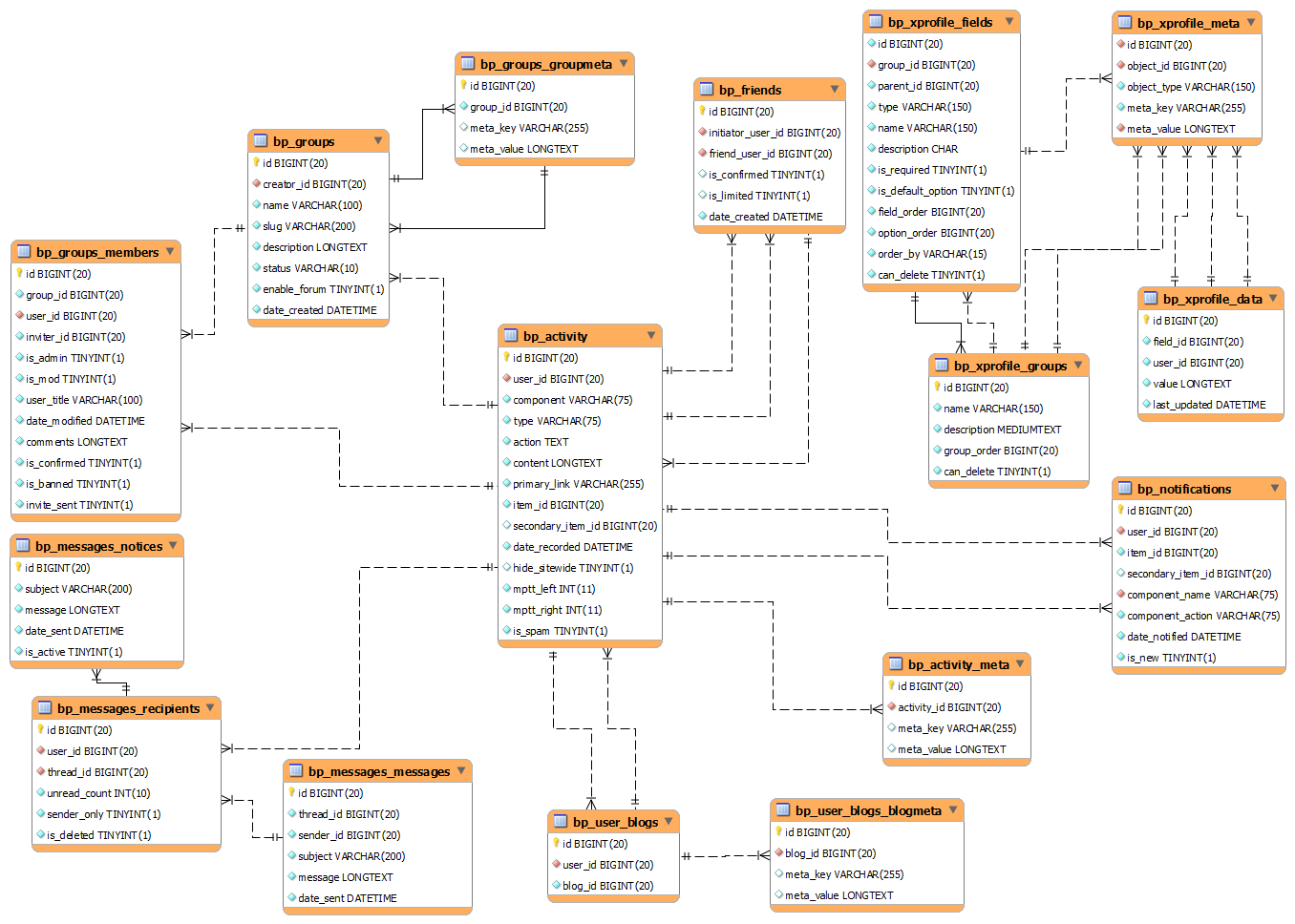
ModeratorAre activity updates a wordpress custom posts types?
No. Activity items aren’t custom posts; instead, they live in the bp_activity table. See here for a diagram.
July 27, 2015 at 12:45 pm #242460ModeratorJuly 27, 2015 at 12:33 pm #242458In reply to: Disqus Comments and BuddyPress
ModeratorThis isn’t possible out-of-the-box but there may be a plugin in the WordPress Plugin Directory that adds Disqus functionality.
Adding items to the BuddyPress activity stream is very easy. Check out the bp_activity_add() article for more info.
July 26, 2015 at 9:11 pm #242451In reply to: What’s wrong with my plugin?
bp-help
Participant@azaleamollis
Because its not as a straightforward process as it should be these are the the steps I took to remove my plugins from the WP repo.
1.) Send the request to plugins@wordpress.org to remove the plugin using the same email you used when submitting the plugin make sure you state your reason why, be it personal or lack of time to support the plugin etc..
2.) Log into the SVN and delete all of the relevant php in the files between the opening and closing php tags.
3.) As long as you don’t update the readme.txt then current users will continue to be able to use your plugin unless the code is somehow depreciated. If that happens then they will have to figure it out on their own or find another solution. If you don’t want even your current users using your plugin then update the readme.txt as a higher version number with the empty php files which will basically render the plugin completely useless when it is updated.
Dirty trick but it gets the job done! Good luck!July 26, 2015 at 8:08 pm #242446In reply to: What’s wrong with my plugin?
Azalea Mollis
ParticipantThx for the answers guys, the encouragement is really appreciated.
@henrywright
He won’t be back I bet. He intentionally didn’t use the support forum to share what was his problem, he just wanted to ruin someone else’s work.
@djsteveb
My plugin does everything you mentioned, it has nice error messages that inform users how to choose an acceptable password and uses wordpress’s built-in js password strength checker, zxcvbn so I would be surprised if it failed.“and people are tired of being frustrated by technology”
I can understand this, I’m also tired of being frustrated by not having a Porsche but I still don’t expect others to provide it for free :). Users should contribute to the development via the support forum first if they want to use open source stuff.@bp-help
Yes, I know. I also got a feature request from someone who claimed the plugin worked well, but he/she still didn’t bother with leaving a good review. Just the feature request 🙂 I agree with you, it seems WP plugin development is not something that’s worth the time.How did you remove yours from the WP repo? Just delete the files? But what happens to people who currently use the plugin?
July 26, 2015 at 12:56 pm #242433In reply to: Making display name unique
David Ar
ParticipantI tried that plugin, it didn’t work.
About that code in WordPress stackexchange, where am I supposed to put that code? What file?July 26, 2015 at 12:05 pm #242432In reply to: What file handles the display name?
ParticipantThat’s a pure wp question !
See https://codex.wordpress.org/Function_Reference/get_userdataJuly 26, 2015 at 12:02 pm #242431In reply to: Making display name unique
ParticipantHi @david-ar,
consider first https://codex.wordpress.org/Function_Reference/get_currentuserinfo
then read here: https://codex.wordpress.org/Function_Reference/get_currentuserinfo
and finally some snippet, http://wordpress.stackexchange.com/questions/82239/make-display-name-unique
As alternative, it exist a wp plugin called Credible Names
July 25, 2015 at 8:55 pm #242418In reply to: Using a theme just for BuddyPress
Participant@kjgbriggs – setting up a child theme is just a way to essentially make a new theme – using another “parent” as your template. When you activate, it’s just ONE theme that it handling everything for your wp/bp site.
You do no provide enough details about your theme names, and what you like about the main one and the one that ‘looks better with buddyprees’ – however, if you just like the layout of the bp components with he second theme more, then yes I believe you could make a child theme from your primary theme, and then go into your secondary theme and start to pull some of the layout code for the bp specific components and add those to your main theme.
If it’s overall colors and such you are trying to mix, like have a red header for your main site and a blue header for your bp pages – that is not going to be so easy..
it’s easy to learn about child themes here: https://codex.wordpress.org/Child_Themes
and a little more digging to learn about bp specif pages and components here:
for minor changes you can keep things simple by activating your second theme that you like with the bp looking better, go to the bp pages where you like the layout, right click on the element that looks good and click inspect elements – this will give you the css rules that are working the way you like.. things like alignment properties, bold, colors perhaps – copy those – put them into your new child theme styles and such..
of course some things can be more tricky if your second theme has fancy functions.php, java and all that included.
July 25, 2015 at 12:47 am #242237In reply to: Buddypress on multisite
ParticipantI think it’s tools -> Export to export your posts and pages.
make a full backup is fairly easy – and you could easily recreate what you currently have with a zip file and an export of your database.
just get to your phpmyadmin, export (click add drop table under advanced) –
via file manager compress / zip your whole site.
(you might want to make a separate zip file of your wp-content folder to easily re-add your pics and plugins and themes and such with new install) – and download that – to upload laterreal instructions here https://codex.wordpress.org/WordPress_Backups
then you could delete all the files in your your folder – reinstall wp (if you use a new db, then your old one will still be there if you decide to revert)
I would do a folder for your /sys and a separate install in /rust or whatever, and put a custom html index.ht page in your root that says welcome click here for my rust group, click here for my game group.. or something like that.. but that’s me and my limited knowledge of what you are going for.
pretty easy to import your posts and pages into a new wp.. if you plan to re-use pics and stuff, upload your wp-content folder and unzip – sometimes this is best done before you import posts and pages with the wp tool – sometimes you click “download and import attachments” – sometimes not. sometimes you have delete all the pages and posts and them re-import them and select the other option (don’t download import pics) or whatever.. I can’t remember which works and which fails – but it’s all fairly quick and painless regardless – and good practice for fixing a major problem in the futre.
July 24, 2015 at 10:58 pm #242220In reply to: Secret code necessary for registering
Participantnote sure if these work or not – never used them:
https://wordpress.org/plugins/wp-invites/https://wordpress.org/plugins/buddypress-private-community/
Let me know if you try them and they fail or work!
July 24, 2015 at 9:53 pm #242218In reply to: Buddypress on multisite
Participant@mattfl850 – this info will help with that journey:
bottom of the page: https://codex.buddypress.org/getting-started/installation-in-wordpress-multisite/I am sure this is possible, it’s not the way I would do it… might also want to consider some of the info here: http://halfelf.org/2011/dont-use-wordpress-multisite/ (updated may 2015 😉
Others may agree or disagree, and you may be keeping your server tuned like a well oiled machine – hidden from the SE spiders and brute force attackers and all that.
Of course I am not an expert, or a bp dev or anything – just another user who has tried a few different setups and spent many hours trying to do what it “possible” and should be “simple” – and pulled my hair out trying to make things like that work well :))
Not sure if anything is changed in recent updates, but I will mention that when I did this kind of conversion; I had to install the role scoper plugin (now called press permit) – in order to hide people’s private pics they uploaded – as they were visible in the media gallery for other bp users on my sites who had signed up for a “blog” (not called “site” in multi-site) – that was a painful thing to find out the hard way – maybe things have changed with that and other issues – not sure.
Have fun with that and let me know how it works out for ya!
-
AuthorSearch Results