My client has a shopify store and he wants me to create a community webiste about his store so that his customers can chat and discuss about his products at one place together.
So the question is, Can I use buddypress to create a community for a website that is not built on wordpress? If NO then, Do you suggest any platform that allows me to create a commmunity?
Thanks!
possible to move buddypress plugin off WordPress?
Hi is it possible to remove buddypress plugin off WordPress?
HI, I hope someone can help me. I have bbpress for our Forum which has bbPress Digest (https://wordpress.org/plugins/bbpress-digest/). The plug-in works great but we had to get BuddyPress in order to edit our user profiles. The combo of both is great, but we don’t want to have a group email digest, we want our clients to be able to change it individually like we can with bbPress Digest. I can’t find a way to show the bbPress Digest options (which is edited in the WordPress user profile.) Can someone help with either a solution or potentially look at our setup and suggest a solution?
 Anonymous User
Inactive
Hi @pierremaitre
Even if you haven’t disabled the new Widget block editor or are not using the Classic Widget plugin, you can keep BP Legacy widgets using a specific filter, I advise you to read this developer note: https://bpdevel.wordpress.com/2022/01/16/legacy-widgets-in-buddypress-10-0-0/
WordPress 5.8.3, BuddyPress 10.0.0
Site in SiteGround Staging
Theme: Blocksy; Same problem with WP Twenty Nineteen
New site, integrating BuddyPress with bbPress.
All goes well until the following step: “If you do not have a group, create a new group under Groups->Add New. Proceed through the setup steps. There will be a ‘Forum’ settings step. Check the ‘Yes. I want this group to have a forum’ option. Continue with the setup steps and create the Group.”
When I click on “Add New” the following message appears: “Oops! That page can’t be found.”
If I understand what you’re asking, you should be able to add profile fields in the WordPress Dashboard under Users->Profile Fields. As long as you set “Visibility” to Everyone, then I believe that Buddypress will display those fields in the person’s profile.
Thanks, but are you answering the question in the subject line, or the question in the body?
Do my existing WordPress users automatically become BuddyPress users?
I’m new to BuddyPress, and have an existing WordPress site. When a user is created in BuddyPress, I’m assuming they are also a WordPress user. But what about my existing users? Do they automatically become BuddyPress users?
@mikegillihan thanks for the tip. A default install of the latest WordPress, bbPress and BuddyPress has this issue, still.
I was having the same issue; likely reason was my SEO plugin (Yoast SEO) only runs wp_get_user_contact_methods() in wp-admin. I re-registered the contact methods, and the BuddyPress-WordPress Text Fields now save the user contact data.
Hi @vapvarun, below is the error info that I copied from the fatal crash email. Hope it is helpful.
################
When seeking help with this issue, you may be asked for some of the following information:
WordPress version 5.8.3
Current theme: BuddyX (version 4.2.8)
Current plugin: Wbcom Designs – Shortcodes & Elementor Widgets For BuddyPress (version 2.4.0)
PHP version 7.4.27
Error Details
=============
An error of type E_ERROR was caused in line 444 of the file /home/mykepo/public_html/wp-content/plugins/shortcodes-for-buddypress/buddypress-shortcodes-element.php. Error message: Uncaught Error: Call to undefined function Elementor\bp_nouveau_before_activity_directory_content() in /home/mykepo/public_html/wp-content/plugins/shortcodes-for-buddypress/buddypress-shortcodes-element.php:444
Stack trace:
#0 /home/mykepo/public_html/wp-content/plugins/elementor/includes/base/controls-stack.php(2172): Elementor\Buddypress_Shortcode_Activity_Widget->render()
#1 /home/mykepo/public_html/wp-content/plugins/elementor/includes/base/widget-base.php(584): Elementor\Controls_Stack->render_by_mode()
#2 /home/mykepo/public_html/wp-content/plugins/elementor/includes/base/widget-base.php(708): Elementor\Widget_Base->render_content()
#3 /home/mykepo/public_html/wp-content/plugins/elementor/includes/base/element-base.php(534): Elementor\Widget_Base->get_raw_data(true)
#4 /home/mykepo/public_html/wp-content/plugins/elementor/includes/base/element-base.php(534): Elementor\Element_Base->get_raw_data(true)
#5 /home/mykepo/public_html/wp-content/plugins/elementor/core/base/document.php(876): Elementor\Element_
################
https://wordpress.org/plugins/shortcodes-for-buddypress/ and BuddyX both mine, seems working fine together, I have just tested on a template with preinstalled BuddyPress and Shortcode for Buddypress and BuddyX theme at https://tastewp.com/template/kXs6JdadkV0
You can check in debug log for any errors and send that to our support we will check
not updated from last 4 years, will suggest to avoid it
Mass Messaging in BuddyPress
Hi @vapvarun. Thanks for your suggestion. I have tried the plugin you suggested. There is another plugin (BuddyPress Activity Shortcode) I have also tried. But both plugins crashed my site upon activation. I have to remove them in safe mode.
Hi!
I am trying to create a shortcode to place the activity loop in a new page, so I can customize and highlight some activities. To start, I inserted the standard loop inside a shortcode function (code as below). But the standard loop failed to show. Just to ensure that my shortcode is ok, I just inserted a “testing 123” text to check.
FYI, I am using BuddyX theme (WordPress version 5.8.3). I test the code below in functions.php before place it into Code Snippets plugin. Currently, the code is still inside functions.php.
I placed the shortcode ([mkp_activity]) in a page (link to the page as below). I also try to place the shortcode in widget area. But the loop just did not appear.
Test Page
function mkp_bp_activity_shortcode() {

$message = 'testing 123';
return $message;

if ( bp_has_activities( bp_ajax_querystring( 'activity' ) ) ) :
    while ( bp_activities() ) : bp_the_activity();

        locate_template( array( 'activity/entry.php' ), true, false );

    endwhile;
endif;

}
add_shortcode('mkp_activity', 'mkp_bp_activity_shortcode');
I am new to this. I am not sure if I am doing this completely wrong. Appreciate any advice. Thanks!
Regards,
CK
I remember seeing on my wordpress dashboard, under the budypress plugin a link so i could bypass the login page and redirect me to the wp-admin login page… can someone help me qith this? i can’t login!!
my website: https://cbppintranet.com/
HELP!!!!
@niccrockett – thanks for pointing this out!
I had never seen or noticed ‘“Activity auto-refresh” under Options in BuddyPress’ settings’
I really hope some kind of slider for seconds.milliseconds can be added to the bp options!
One of my hosts demanded that I add the ‘heartbeat control’ plugin from wp-rocket (free in the wp-repo: https://wordpress.org/plugins/heartbeat-control/ ) in order to keep my wordpress requests down – maybe this can help you in the short term(?)
I found that having two tabs open with 8 wordpress sites being updated on same server was hammering it with requests from all 16 tabs every so many seconds or whatever – the admin-ajax ddosed my own server account and I did not realize it was a thing.
surely some kind of javascript timer could pop up a button /tap to refresh/ kind of thing or something? and then the automated refresh can be turned off.. I’d like that.. think I’m gonna turn it off anyway.
Since this is months old, I’ve already settled back then with the plugin “BuddyPress to WordPress Full Sync” which allows me to sync any arbitary xProfile fields to WordPress fields.
@imath I can confirm by now this works as expected when following your steps. Without being able to verify anymore what my problem was back then, I have a feeling this must have been related to validation as sometimes BuddyPress provides zero feedback when something was wrong. In my current WordPress version (5.8.3), the Twitter field is expected to be a simple username (not full URL / @), other fields like Instagram are expected to be the full URL. So perhaps the issue was that some fields didn’t match validation criteria, so BuddyPress just silently swallowed the input?
Cheers
when filling out register form it just refreshes the page – seems to fail with no error message I can see.
How would I find out what is happening in the browser and on the server to debug?
tried with turning off plugins and back to default theme,
also did the list of things to check from here:
(
– check the WordPress settings allows account to be created (Anyone can register checkbox needs to be active) See: wordpress.org/support/article/settings-general-screen/#membership
– check your permalink settings are using one of the pretty permalink options (not plain), see this documentation page wordpress.org/support/article/using-permalinks/#mod_rewrite-pretty-permalinks
– check the activate and register actions are associated with a public WordPress page. You can find some inputs about it from this documentation page : codex.buddypress.org/getting-started/configure-components/#settings-buddypress-pages
NB: the registration and activation pages are only displayed to users who are not logged in,
)
site is https://www.chatyolo.com/register/ – it’s kind of NSFW
1. Which version of WordPress are you running?
5.8.3
2. Did you install WordPress as a directory or subdomain install?
main directory
6. Which version of BP are you running?
9.2
8. Do you have any plugins other than BuddyPress installed and activated? If so, which ones?
301 Redirects, All in One SEO, AdRotate, Error Log Monitor, Forminator Pro,
Slide Anything – Responsive Content / HTML Slider and Carousel, Wise Chat Pro, Wordfence Security,
WP Activity Log, Smush Pro, Query Monitor,
9. Are you using a standard WordPress theme or customized theme?
tried both -happens with 2021 theme, zakra, and astra
13. If running bbPress, which version? Or did your BuddyPress install come with a copy of bbPress built-in?
2.6.9 – it’s turned off through and still issue
20. What BP Template Pack is activated in your installation? You will see that under Dashboard > Settings > BuddyPress – Options page.
was on legacy, switched to neavox
Tried with firefox and chrome and different computers..
had a few other profile fields – then removed them from the base signup and it still fails –
Help greatly appreciated
Anonymous UserInactive
Just checked https://www.danskeosteopater.dk/find-en-osteopat/members/?s=anders & it seems to work as expected.
If you’re talking about the search form displayed on the right side of your page, it’s not generated by BuddyPress. Have you tried to reach the plugin author of the BP Profile Search plugin there https://wordpress.org/support/plugin/bp-profile-search/ ?
Anonymous UserInactive
Hi, I’m back 🙂
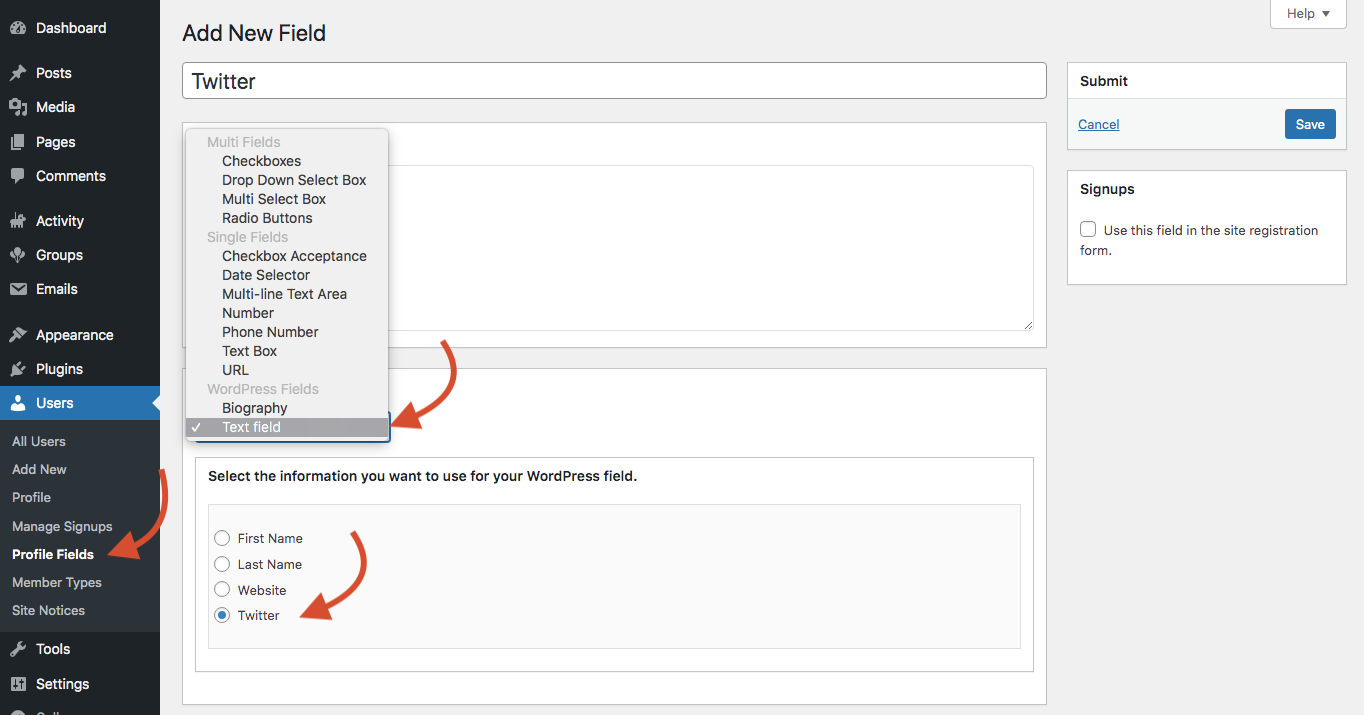
I confirm this is working as expected. I’ve used this code to generate the Twitter WP Contact method: https://gist.github.com/imath/c634d9bfb575f128d76a25aaa76fc2e5
Then, I’ve created a new xProfile field using the WordPress text field type, as shown in the below screenshot.
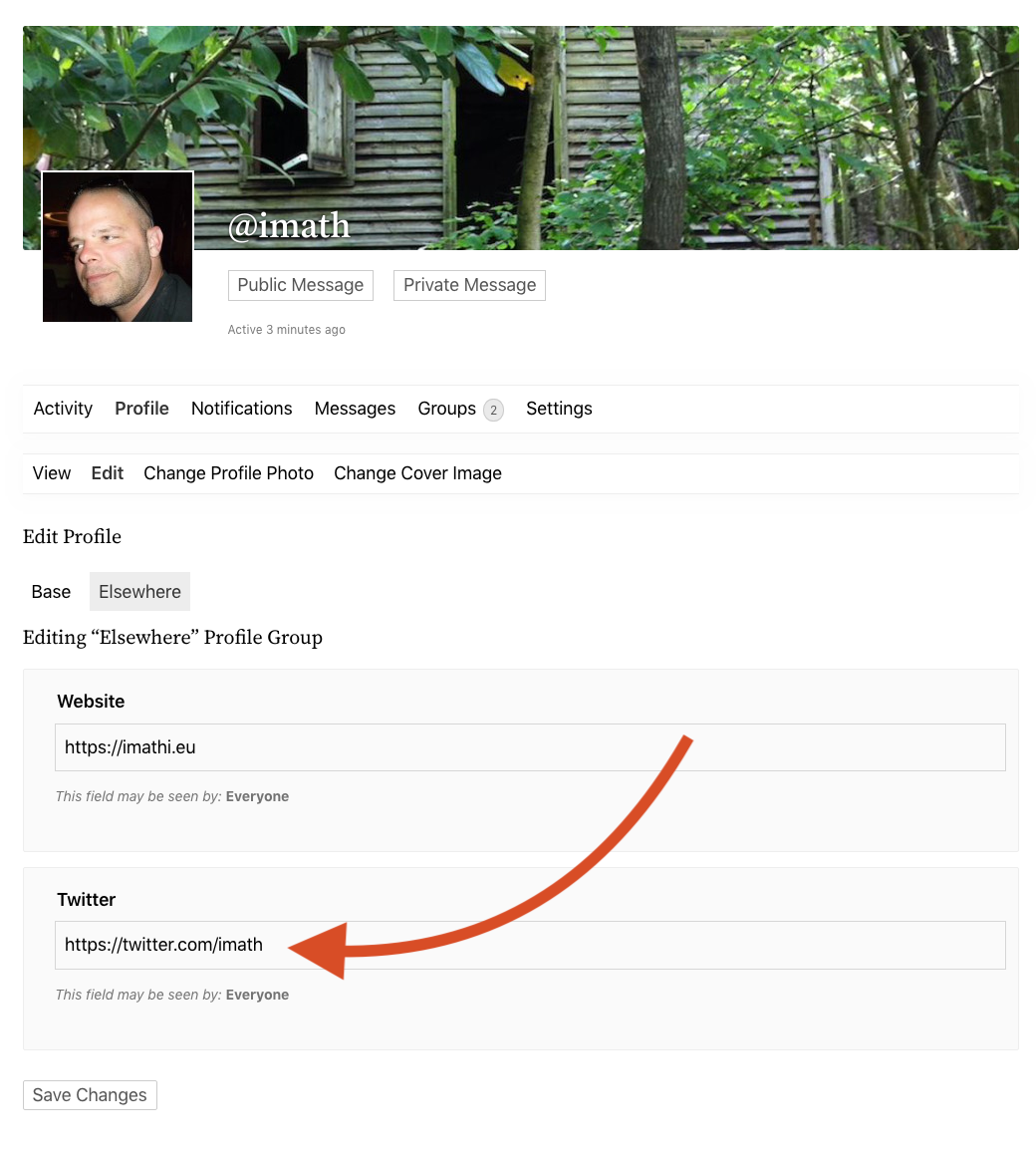
Once done, I was able to find the new input inside the user’s profile edit screen on front-end, see screenshot below.
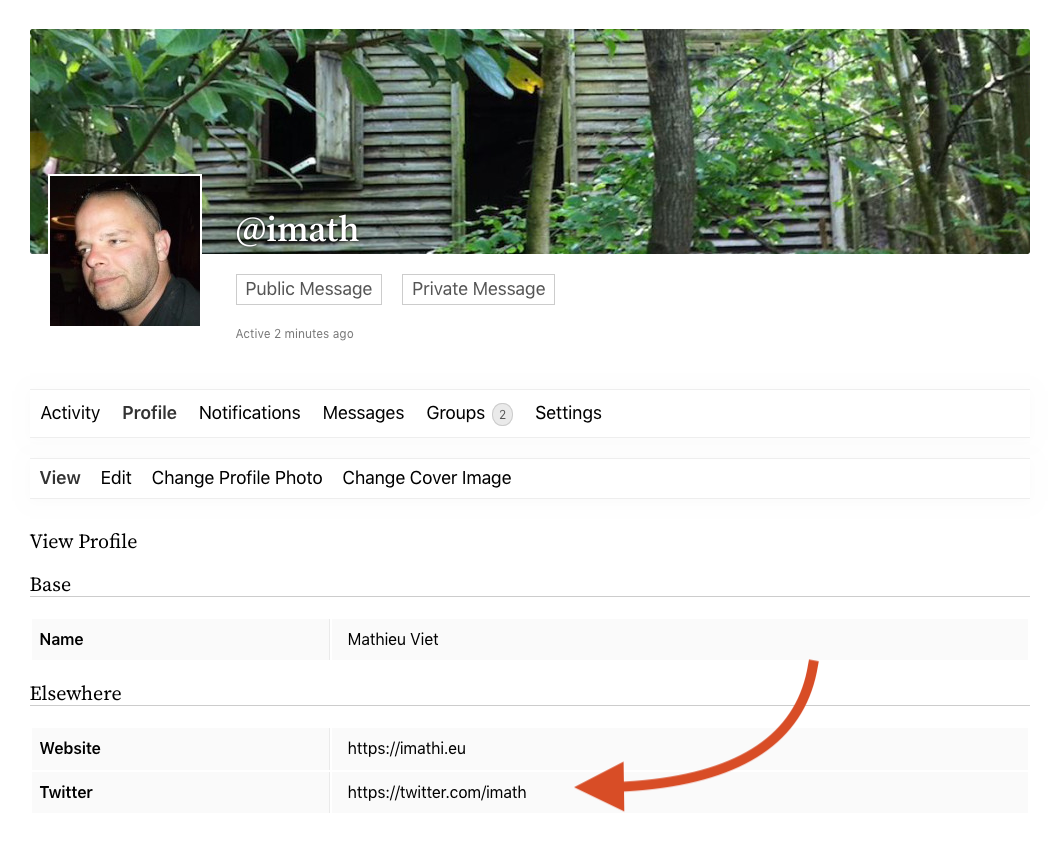
When I’ve submitted my edits, the twitter link was saved successfully and on the user’s profile view screen, it is displayed as a clickable link:
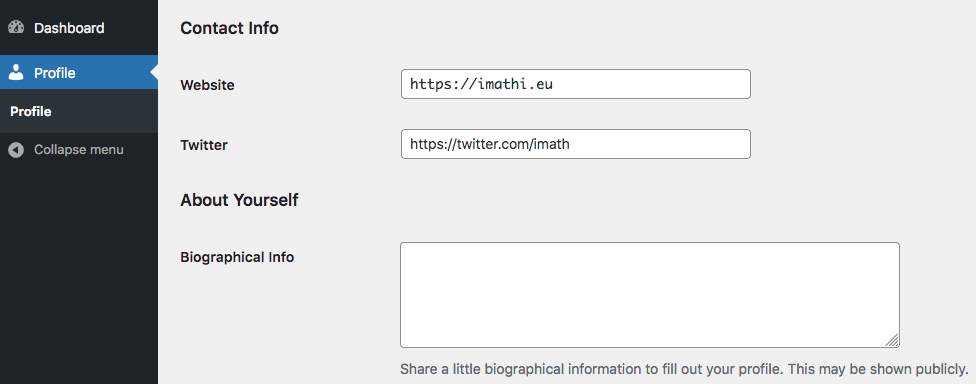
The same goes for the WP Dashboard profile, see below:
Anonymous UserInactive
Hi,
Just like WordPress PHP8 is ok with BuddyPress, see our PHPUnit corresponding GH action: https://github.com/buddypress/buddypress/runs/4734025743?check_suite_focus=true


