Search Results for 'buddypress'
-
Search Results
-
How can I change the default list view to show most popular groups as the home tab in the BuddyPress Groups Widget? I don’t want to edit the bp core files for this site. Is it possible to make this change via bp-custom.php? If so, can someone point me to the right code? Thanks!
Topic: How to search for members?
Hi all:
I have a rather stupid question I’m hoping someone can enlighten me on. Does the ability to search for members come with Buddypress or does it require an external plugin? I’m having some theme compatibility issues, and I can’t find any obvious way to search for members, so I’m not sure if it’s a theme issue or if I need to install something.
If I need a plugin, any recommendations?
Thanks!
Topic: No activation mail
Hallo,
The registration doesn’t work. If somebody tries to registrate the person will not get the activation mail.
How can I solve this in a simple way? I am a wordpress and buddypress beginner.
Thank you
I’ve read all the answers to previous questions about how to remove “last active x minutes ago” throughout the site, and the easy fix is adding something like
span.activity {
display:none !important; }to the end of the CSS file. But I can’t figure out which one I should add it to, I’ve tried all the ones I can find. I am using the latest Buddypress, default theme, and my site is at: http://www.alltorontosparties.org/
Thanks!!
Topic: Change registration form
Hi!
I would like to know how to change the contact form like this:
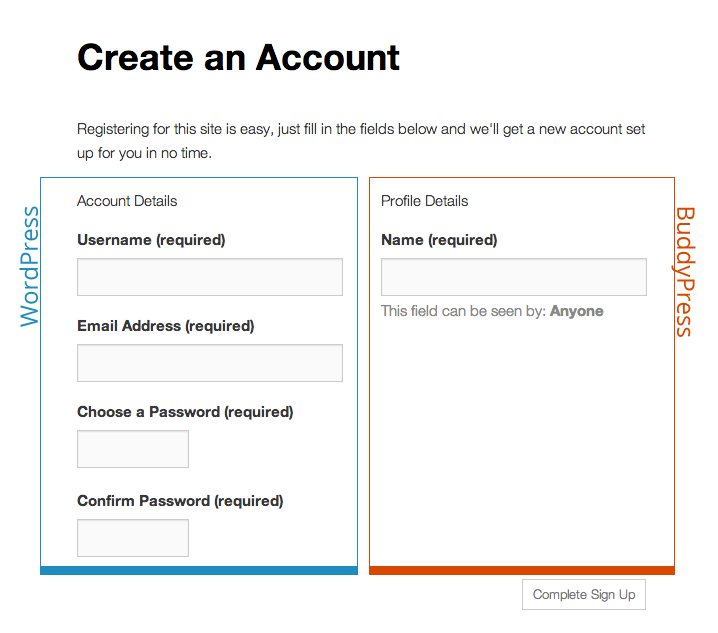
or similar. Which files I have to edit?Sorry for my poor english.
Hi, I really like BuddyPress and have spend months setting up a new site. It not until after the site goes live, you *truly* get to test scenarios, tweaks, bugs, flaws, patterns, etc.
We get TONS of Spam registrations and Spam users create Groups! I go through hours per day deleting new users.
To BuddyPress developers or experienced BuddyPress users (over 1 year live):
1. Is there a checklist somewhere for security? I will promise to follow all your suggestions and enable step by step security!
2. Are there *recommended* plugins? Either paid or free is fine. We don’t care about paid. We just want the Spam to stop! If we cannot stop Spam, we cannot use BuddyPress 🙁We have tried a few and they just don’t work good, e.g. captcha, honeypot, etc.
Thank you for your help in advance!
Sorry for my poor English.
Topic: Buddypress & BBpress
The basic feature of bbpress forums is working perfectly for me, but after I installed buddypress for the group feature, it all changed!!!
I run both bbpress and buddypress, the link /forums seems like fake feature. I studied some articles, it says like the buddypress has it’s own forums but all the forums will need to base on group, is that right?
If so, is there any chance I can have both individual forum(s) and groups forum(buddypress)? is there an premium plugin for it?
The official document mentions “The site admin can set up general forums and the group admins can enable their own group forums.” here. But I just couldn’t get it works.
Anyone else seeing this?
Warning: Illegal string offset ‘content’ in /public_html/example.com/wp-content/plugins/buddypress/bp-activity/bp-activity-template.php on line 2527Seeing it on some profiles.. and a google search for ”
/buddypress/bp-activity/bp-activity-template.php on line 2527
” with quotes around it is showing more than 100 pages already indexed with this error showing on various profiles.Tried changing to twenty twelve theme and see the same thing, have not tried pulling plugins yet..
Version 2.0.1
wp 3.9.1
several pluginsTopic: Remove Bp gray bar
Hi,
A gray bar showed up on the top of my site after I installed Buddypress. I want to remove this bar, how can I do that?
Thanks
Is there a way to edit home.php file that’s in the bp-legacy/buddypress/members/singles folder so that the navigation links Activty, Profile, Notifications, Messages, etc links only show for specific user roles. I have custom roles set up already, and for one of the roles I want to hide those links.
Using wordpress 3.8.1 and BP 1.9.2
Thanks, Sheri
Topic: Language of Item-Nav
Hey there,
i was wondering if it’s prossible to change the language of this menu? I’ve already changed the whole language of buddypress with a Language-Package but if you have a look at the Picture, you will see there a 4 items, which are not translated.
I don’t see the File, which i need to edit therefore…


WP 3.9.1
BP 2.0.1
website: localhost dev site using MAMP
Scenario
I am building a member home page that includes a group activity stream to provide a group “wall” sort of experience. To do this, I made a copy of the ‘activity’ folder from bp-templates/bp-legacy/buddypress and placed it in my theme folder. Then in my member homepage template, I included an activity stream by adding:
<?php locate_template( array( 'activity/index.php' ), true, false ); ?>The Problem
Everything on the activity feed works, including adding, favoriting, and deleting status updates, but when a member comments on a status update, the comment is added, animation and all, but with no content – just ‘replied’ and the ‘Reply’ button, as shown here:
https://www.dropbox.com/s/0yh2e1b5f2fw7zk/problem.png
However, after a manual refresh, the comment is there with all its content, working perfectly.
Other Threads
I have found several others posting with similar problems, but no solutions that have worked for me:
What I’ve Tried
I’ve tried disabling all other plugins and removing all custom functions from my theme, and there was no change. I can’t try it in a different theme, since the problem IS my theme. The problem only occurs in my custom template. When I go to the group’s page, or to a member’s page, commenting works perfectly.
Thanks for reading!