Search Results for 'buddypress'
-
Search Results
-
Topic: header class=”entry-header”
Hello everybody !
I am using WordPress 3.8.1 and the last version of Buddypress, 1.9.1. I am also using the twenty fourteen theme.
I have trouble about changing the member page and especially how to delete the header with the <h1>. The code I want to delete is :
<header class="entry-header"><h1 class="entry-title"><a href="http://localhost/KNB/members/admin/">admin</a></h1></header>I dont know where to find the code. Thanks a lot.
Hello,
Does anyone know if it is still the case that Uppercase letters should not be used in usernames. I understand the problem originally related, not to their use with BuddyPress, but with what would have been an incompatibility with WPMU (which did not allow their use).
I set up my original admin username with capital letters, and that doesn’t appear to have caused any problems, and I’m running a multisite. So I wonder if the situation has now changed.
If it is now safe – is it possible to edit the file which screens for this? (I’ve tried using the ‘Allow Capital Letters In Username – (BuddyPress)’ plugin, but this introduces other problems.)
Thanks.
After upgrading to 1.9.1 all buddypress pages are empty but only when logged in. You can see the content as a visitor but once you sign in there’s no content, just an empty template. Any thoughts?
Thanks.
C.
Topic: Registration info problem
Hello,
I am buddypress newcomer and I have a problem with setting my buddypress registration as I want it to look like.
1. I want to insert my welcome massage in my language an something different that is now – “Create an Account – Registering for this site is easy. Just fill in the fields below, and we’ll get a new account set up for you in no time.” How can I change that?
2. The Profile Details fields – I have like 15 of them can I break a page so it isnt so long? Like 2 or 3 pages?
3. I want to change field descriptions into my language. How?
4. I would like to have a member base of my members on my mail. I would like ALL REGISTRATION INFO IS SENT TO MY MAIL when someone registrate (public, the info that friends see, member see, even the “only me” fields). When someone register now i only get username an mail. Like a classic form thats sends all info that is inserted. I want some fields to be specificly private info – only me and the registrator.
CAN ANYONE HELP PLEASE?!!
Topic: Label – Change group to team
Hi,
I’ve edited buddypress-en_US.po files, changed group to team.
But I still have on 3rd step of creating a team text showing group:
“Group Forum
Create a discussion forum to allow members of this group to communicate in a structured, bulletin-board style fashion.
Yes. I want this group to have a forum.”Did I miss something? Or this is from bbpress?
hi, i am trying to install the buddypress wall plugin but im getting stuck with the FAQ instructions that states i must custom ise the plugin templates as of these instructions …….
sing Child Theme of the BP Default ?
If you use a child theme for buddypress default theme, you must costumise the plugin template for your theme.
By copying /wp-content/plugins/buddypress-wall/includes/templates/bp-default/ to your WordPress theme you can override the template that comes with the plugin.
The files template will be placed in the buddypress activity,groups and members directory.
9 template should be customised :
activity/activity-wall-loop.php
activity/entry-wall.php
activity/index-wall.php
activity/post-wall-form.phpgroups/single/activity-wall.php
groups/single/home-wall.phpmembers/single/activity-wall.php
members/single/home-wall.phpFor example, to update the activity/activity-wall-loop.php template,
open the template file in your favorite editor or IDE and open the template
activity/activity-loop.php (without -wall-) and replacing the template activity-wall-loop.php
by code from activity-loop.php and keeping only the bp-wall php code (marked between <!– bp-wall-start –> and <!–bp-wall-end–>) in the activity-wall-loop.php.for example in activity-wall-loop.php, the
code
<?php bp_wall_load_sub_template( array( ‘activity/activity-wall-loop.php’ ) ); ?>is used to load activity-wall-loop.php instead this code
<?php locate_template( array( ‘activity/activity-loop.php’ ), true ); ?>
used in the default buddypress template.so you must replace the template content and keep the bp-wall script.
as you can see there not very informative for a novice, i have copied the bp-deafault folder as stated to my child theme folder from the buddypress wall directory also copied it to my computer for editing with notepad++ , now this is where im getting lost, it then states i must open the activity/activity-loop.php , where do i get this file from? i looked in buddypress/plugins and there are similar files in buddypress/plugins/bp-theme/bp-default/activity folder and a buddypress/plugins/bp-theme/bp-legacy/budypress/activity , which directory should i be copying from? then this bit also confuses me
For example, to update the activity/activity-wall-loop.php template,
open the template file in your favorite editor or IDE and open the template
activity/activity-loop.php (without -wall-) and replacing the template activity-wall-loop.php
by code from activity-loop.php and keeping only the bp-wall php code (marked between <!– bp-wall-start –> and <!–bp-wall-end–>) in the activity-wall-loop.php.for example in activity-wall-loop.php, the
code
<?php bp_wall_load_sub_template( array( ‘activity/activity-wall-loop.php’ ) ); ?>is used to load activity-wall-loop.php instead this code
<?php locate_template( array( ‘activity/activity-loop.php’ ), true ); ?>
used in the default buddypress template.so you must replace the template content and keep the bp-wall script.
now this bit has me totally lost again!….ok i have established that once i have the “CORRECT” two files open in notepad++, i then have to copy and replace some code from activity-loop.php to the activity-wall-loop.php…which part of the code is it i am meant to be copying and replacing? you say keep only the bp-wall code but which part is that? the whole lot? the top? the code under the top?
please could someone help me its driving me crazy, i can do it but just cant understand his lack of detail in how to do it, the plugin author is known not to respond very often in support and i need to try solve this now to cary on working on my theme instead of putting it on hold for weeks.
all i need is for someone to explain the above in an easier more detailed manor, i will be very greatfull, ty in advance.
Wordpress 3.8.1 bo 1.9.1
Hi,
I have spent hours trying to figure this out. My objective is to allow the user to change their online notification settings but disable the settings>general tab whilst leaving the settings>email menu tab in tact, or disable the output of “change email” and “change password” so it doesn’t show at all on the font end under settings>general.I do not want users to be able to change their passwords or email address through buddypress as I am using formidable pro for my registration for the site.
Is it just a case of editing out a few lines of code or do I need a php script to put in my theme functions.php?
regards
Hello,
I have been using buddypress for a while with no issues with emails. However, last week I noticed that users are not receiving notification emails anymore. User registration emails are still successfully sent out but for some reason I cant get new notification emails to work. I have tried disabling all plugins and even using different themes with no luck.
Using buddypress 1.9.1 and WP 3.8.1.
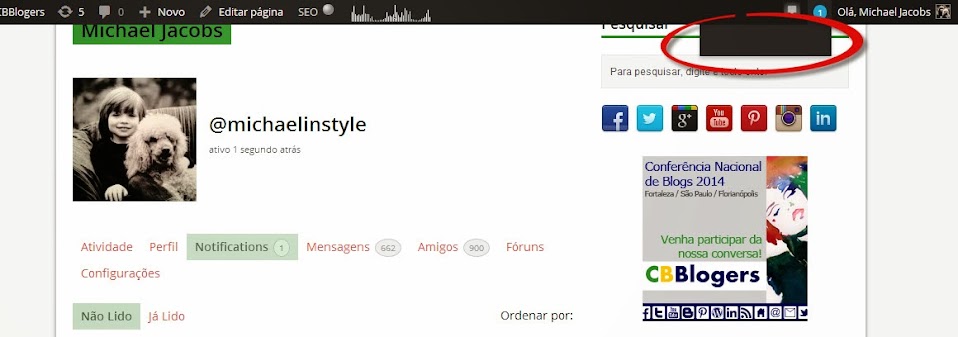
I recently upgraded to Buddypress v1.9.1 and now I am experiencing some issues with notifications:
1 – When I mouse over the notification circle in the header of the page, the list of notifications is displayed as blank, even when I have notifications pending. Screenshot: https://lh5.googleusercontent.com/-gvkfWwp6rSg/Uu5iQpXEayI/AAAAAAAAM-0/tA7ok02oXC4/w958-h337-no/buddypress+blank+notification+list.jpg
2 – When I click on the notification circle, I am taken to the list of current notifications, but the title of the notifications in each row is blank. Screenshot: https://lh6.googleusercontent.com/-xGABzryuamc/Uu5iQvKZjkI/AAAAAAAAM-w/l25EnNCkEXo/w705-h445-no/buddypress+blank+notification+title.jpg
Please help….
Thanks much,
Michael
Hi all
I would like to amend the member’s directory so that if a person is not a friend with a member the a href links to the member’s profile are removed. The links are on the avatar and the member’s name.This would leave the only call to action for a non-friend as “add friend”.
However, if a person is a friend, then the links are restored. (with the action “cancel friendship”).
I found this post http://buddypress.org/support/topic/how-do-i-check-if-a-particular-profile-is-a-friends/ which I thought I could use to vary when the a href links are shown, but I can’t find where in buddypress the actual code is that drives the members info and so the a href links.
Please can you provide some assistance?
Thanks
GHi, I was adjusting the registration.php file. Just changing the text eg. “Account Details/Profile Details” to “Create an Account/Create a Profile”
When I uploaded the page back, the layout is completely messed up.
http://unicefchallenge.com/register/
I’M GOING CRAZY, ANY ADVISE ASAP?Thank
`<?php get_header( ‘buddypress’ ); ?><div id=”content”>
<div class=”padder”><?php do_action( ‘bp_before_register_page’ ); ?>
<div class=”page” id=”register-page”>
<form action=”” name=”signup_form” id=”signup_form” class=”standard-form” method=”post” enctype=”multipart/form-data”>
<?php if ( ‘registration-disabled’ == bp_get_current_signup_step() ) : ?>
<?php do_action( ‘template_notices’ ); ?>
<?php do_action( ‘bp_before_registration_disabled’ ); ?><p><?php _e( ‘User registration is currently not allowed.’, ‘buddypress’ ); ?></p>
<?php do_action( ‘bp_after_registration_disabled’ ); ?>
<?php endif; // registration-disabled signup setp ?><?php if ( ‘request-details’ == bp_get_current_signup_step() ) : ?>
<h2><?php _e( ‘Create an Account’, ‘buddypress’ ); ?></h2>
<?php do_action( ‘template_notices’ ); ?>
<p><?php _e( ‘Please create the username and login information you would like to use on the Challenge site.’, ‘buddypress’ ); ?></p>
<?php do_action( ‘bp_before_account_details_fields’ ); ?>
<div class=”register-section” id=”basic-details-section”>
<?php /***** Basic Account Details ******/ ?>
<h4><?php _e( ‘Create an Account’, ‘buddypress’ ); ?></h4>
<label for=”signup_username”><?php _e( ‘Username’, ‘buddypress’ ); ?> <?php _e( ‘(required)’, ‘buddypress’ ); ?></label>
<?php do_action( ‘bp_signup_username_errors’ ); ?>
<input type=”text” name=”signup_username” id=”signup_username” value=”<?php bp_signup_username_value(); ?>” /><label for=”signup_email”><?php _e( ‘Email Address’, ‘buddypress’ ); ?> <?php _e( ‘(required)’, ‘buddypress’ ); ?></label>
<?php do_action( ‘bp_signup_email_errors’ ); ?>
<input type=”text” name=”signup_email” id=”signup_email” value=”<?php bp_signup_email_value(); ?>” /><label for=”signup_password”><?php _e( ‘Choose a Password’, ‘buddypress’ ); ?> <?php _e( ‘(required)’, ‘buddypress’ ); ?></label>
<?php do_action( ‘bp_signup_password_errors’ ); ?>
<input type=”password” name=”signup_password” id=”signup_password” value=”” /><label for=”signup_password_confirm”><?php _e( ‘Confirm Password’, ‘buddypress’ ); ?> <?php _e( ‘(required)’, ‘buddypress’ ); ?></label>
<?php do_action( ‘bp_signup_password_confirm_errors’ ); ?>
<input type=”password” name=”signup_password_confirm” id=”signup_password_confirm” value=”” /><?php do_action( ‘bp_account_details_fields’ ); ?>
</div><!– #basic-details-section –>
<?php do_action( ‘bp_after_account_details_fields’ ); ?>
<?php /***** Extra Profile Details ******/ ?>
<?php if ( bp_is_active( ‘xprofile’ ) ) : ?>
<?php do_action( ‘bp_before_signup_profile_fields’ ); ?>
<div class=”register-section” id=”profile-details-section”>
<h4><?php _e( ‘Create a Profile’, ‘buddypress’ ); ?></h4>
<?php /* Use the profile field loop to render input fields for the ‘base’ profile field group */ ?>
<?php if ( bp_is_active( ‘xprofile’ ) ) : if ( bp_has_profile( array( ‘profile_group_id’ => 1, ‘fetch_field_data’ => false ) ) ) : while ( bp_profile_groups() ) : bp_the_profile_group(); ?><?php while ( bp_profile_fields() ) : bp_the_profile_field(); ?>
<div class=”editfield”>
<?php if ( ‘textbox’ == bp_get_the_profile_field_type() ) : ?>
<label for=”<?php bp_the_profile_field_input_name(); ?>”><?php bp_the_profile_field_name(); ?> <?php if ( bp_get_the_profile_field_is_required() ) : ?><?php _e( ‘(required)’, ‘buddypress’ ); ?><?php endif; ?></label>
<?php do_action( bp_get_the_profile_field_errors_action() ); ?>
<input type=”text” name=”<?php bp_the_profile_field_input_name(); ?>” id=”<?php bp_the_profile_field_input_name(); ?>” value=”<?php bp_the_profile_field_edit_value(); ?>” /><?php endif; ?>
<?php if ( ‘textarea’ == bp_get_the_profile_field_type() ) : ?>
<label for=”<?php bp_the_profile_field_input_name(); ?>”><?php bp_the_profile_field_name(); ?> <?php if ( bp_get_the_profile_field_is_required() ) : ?><?php _e( ‘(required)’, ‘buddypress’ ); ?><?php endif; ?></label>
<?php do_action( bp_get_the_profile_field_errors_action() ); ?>
<textarea rows=”5″ cols=”40″ name=”<?php bp_the_profile_field_input_name(); ?>” id=”<?php bp_the_profile_field_input_name(); ?>”><?php bp_the_profile_field_edit_value(); ?></textarea><?php endif; ?>
<?php if ( ‘selectbox’ == bp_get_the_profile_field_type() ) : ?>
<label for=”<?php bp_the_profile_field_input_name(); ?>”><?php bp_the_profile_field_name(); ?> <?php if ( bp_get_the_profile_field_is_required() ) : ?><?php _e( ‘(required)’, ‘buddypress’ ); ?><?php endif; ?></label>
<?php do_action( bp_get_the_profile_field_errors_action() ); ?>
<select name=”<?php bp_the_profile_field_input_name(); ?>” id=”<?php bp_the_profile_field_input_name(); ?>”>
<?php bp_the_profile_field_options(); ?>
</select><?php endif; ?>
<?php if ( ‘multiselectbox’ == bp_get_the_profile_field_type() ) : ?>
<label for=”<?php bp_the_profile_field_input_name(); ?>”><?php bp_the_profile_field_name(); ?> <?php if ( bp_get_the_profile_field_is_required() ) : ?><?php _e( ‘(required)’, ‘buddypress’ ); ?><?php endif; ?></label>
<?php do_action( bp_get_the_profile_field_errors_action() ); ?>
<select name=”<?php bp_the_profile_field_input_name(); ?>” id=”<?php bp_the_profile_field_input_name(); ?>” multiple=”multiple”>
<?php bp_the_profile_field_options(); ?>
</select><?php endif; ?>
<?php if ( ‘radio’ == bp_get_the_profile_field_type() ) : ?>
<div class=”radio”>
<span class=”label”><?php bp_the_profile_field_name(); ?> <?php if ( bp_get_the_profile_field_is_required() ) : ?><?php _e( ‘(required)’, ‘buddypress’ ); ?><?php endif; ?></span><?php do_action( bp_get_the_profile_field_errors_action() ); ?>
<?php bp_the_profile_field_options(); ?><?php if ( !bp_get_the_profile_field_is_required() ) : ?>
‘ );”><?php _e( ‘Clear’, ‘buddypress’ ); ?>
<?php endif; ?>
</div><?php endif; ?>
<?php if ( ‘checkbox’ == bp_get_the_profile_field_type() ) : ?>
<div class=”checkbox”>
<span class=”label”><?php bp_the_profile_field_name(); ?> <?php if ( bp_get_the_profile_field_is_required() ) : ?><?php _e( ‘(required)’, ‘buddypress’ ); ?><?php endif; ?></span><?php do_action( bp_get_the_profile_field_errors_action() ); ?>
<?php bp_the_profile_field_options(); ?>
</div><?php endif; ?>
<?php if ( ‘datebox’ == bp_get_the_profile_field_type() ) : ?>
<div class=”datebox”>
<label for=”<?php bp_the_profile_field_input_name(); ?>_day”><?php bp_the_profile_field_name(); ?> <?php if ( bp_get_the_profile_field_is_required() ) : ?><?php _e( ‘(required)’, ‘buddypress’ ); ?><?php endif; ?></label>
<?php do_action( bp_get_the_profile_field_errors_action() ); ?><select name=”<?php bp_the_profile_field_input_name(); ?>_day” id=”<?php bp_the_profile_field_input_name(); ?>_day”>
<?php bp_the_profile_field_options( ‘type=day’ ); ?>
</select><select name=”<?php bp_the_profile_field_input_name(); ?>_month” id=”<?php bp_the_profile_field_input_name(); ?>_month”>
<?php bp_the_profile_field_options( ‘type=month’ ); ?>
</select><select name=”<?php bp_the_profile_field_input_name(); ?>_year” id=”<?php bp_the_profile_field_input_name(); ?>_year”>
<?php bp_the_profile_field_options( ‘type=year’ ); ?>
</select>
</div><?php endif; ?>
<?php do_action( ‘bp_custom_profile_edit_fields_pre_visibility’ ); ?>
<?php if ( bp_current_user_can( ‘bp_xprofile_change_field_visibility’ ) ) : ?>
<p class=”field-visibility-settings-toggle” id=”field-visibility-settings-toggle-<?php bp_the_profile_field_id() ?>”>
<?php printf( __( ‘This field can be seen by: <span class=”current-visibility-level”>%s</span>’, ‘buddypress’ ), bp_get_the_profile_field_visibility_level_label() ) ?> <?php _ex( ‘Change’, ‘Change profile field visibility level’, ‘buddypress’ ); ?>
</p><div class=”field-visibility-settings” id=”field-visibility-settings-<?php bp_the_profile_field_id() ?>”>
<fieldset>
<legend><?php _e( ‘Who can see this field?’, ‘buddypress’ ) ?></legend><?php bp_profile_visibility_radio_buttons() ?>
</fieldset>
<?php _e( ‘Close’, ‘buddypress’ ) ?></div>
<?php else : ?>
<p class=”field-visibility-settings-notoggle” id=”field-visibility-settings-toggle-<?php bp_the_profile_field_id() ?>”>
<?php printf( __( ‘This field can be seen by: <span class=”current-visibility-level”>%s</span>’, ‘buddypress’ ), bp_get_the_profile_field_visibility_level_label() ) ?>
</p>
<?php endif ?><?php do_action( ‘bp_custom_profile_edit_fields’ ); ?>
<p class=”description”><?php bp_the_profile_field_description(); ?></p>
</div>
<?php endwhile; ?>
<input type=”hidden” name=”signup_profile_field_ids” id=”signup_profile_field_ids” value=”<?php bp_the_profile_group_field_ids(); ?>” />
<?php endwhile; endif; endif; ?>
<?php do_action( ‘bp_signup_profile_fields’ ); ?>
</div><!– #profile-details-section –>
<?php do_action( ‘bp_after_signup_profile_fields’ ); ?>
<?php endif; ?>
<?php if ( bp_get_blog_signup_allowed() ) : ?>
<?php do_action( ‘bp_before_blog_details_fields’ ); ?>
<?php /***** Blog Creation Details ******/ ?>
<div class=”register-section” id=”blog-details-section”>
<h4><?php _e( ‘Blog Details’, ‘buddypress’ ); ?></h4>
<p><input type=”checkbox” name=”signup_with_blog” id=”signup_with_blog” value=”1″<?php if ( (int) bp_get_signup_with_blog_value() ) : ?> checked=”checked”<?php endif; ?> /> <?php _e( ‘Yes, I\’d like to create a new site’, ‘buddypress’ ); ?></p>
<div id=”blog-details”<?php if ( (int) bp_get_signup_with_blog_value() ) : ?>class=”show”<?php endif; ?>>
<label for=”signup_blog_url”><?php _e( ‘Blog URL’, ‘buddypress’ ); ?> <?php _e( ‘(required)’, ‘buddypress’ ); ?></label>
<?php do_action( ‘bp_signup_blog_url_errors’ ); ?><?php if ( is_subdomain_install() ) : ?>
http:// <input type=”text” name=”signup_blog_url” id=”signup_blog_url” value=”<?php bp_signup_blog_url_value(); ?>” /> .<?php bp_blogs_subdomain_base(); ?>
<?php else : ?>
<?php echo home_url( ‘/’ ); ?> <input type=”text” name=”signup_blog_url” id=”signup_blog_url” value=”<?php bp_signup_blog_url_value(); ?>” />
<?php endif; ?><label for=”signup_blog_title”><?php _e( ‘Site Title’, ‘buddypress’ ); ?> <?php _e( ‘(required)’, ‘buddypress’ ); ?></label>
<?php do_action( ‘bp_signup_blog_title_errors’ ); ?>
<input type=”text” name=”signup_blog_title” id=”signup_blog_title” value=”<?php bp_signup_blog_title_value(); ?>” /><span class=”label”><?php _e( ‘I would like my site to appear in search engines, and in public listings around this network.’, ‘buddypress’ ); ?>:</span>
<?php do_action( ‘bp_signup_blog_privacy_errors’ ); ?><label><input type=”radio” name=”signup_blog_privacy” id=”signup_blog_privacy_public” value=”public”<?php if ( ‘public’ == bp_get_signup_blog_privacy_value() || !bp_get_signup_blog_privacy_value() ) : ?> checked=”checked”<?php endif; ?> /> <?php _e( ‘Yes’, ‘buddypress’ ); ?></label>
<label><input type=”radio” name=”signup_blog_privacy” id=”signup_blog_privacy_private” value=”private”<?php if ( ‘private’ == bp_get_signup_blog_privacy_value() ) : ?> checked=”checked”<?php endif; ?> /> <?php _e( ‘No’, ‘buddypress’ ); ?></label><?php do_action( ‘bp_blog_details_fields’ ); ?>
</div>
</div><!– #blog-details-section –>
<?php do_action( ‘bp_after_blog_details_fields’ ); ?>
<?php endif; ?>
<?php do_action( ‘bp_before_registration_submit_buttons’ ); ?>
<div class=”submit”>
<input type=”submit” name=”signup_submit” id=”signup_submit” value=”<?php _e( ‘Submit’, ‘buddypress’ ); ?>” />
</div><?php do_action( ‘bp_after_registration_submit_buttons’ ); ?>
<?php wp_nonce_field( ‘bp_new_signup’ ); ?>
<?php endif; // request-details signup step ?>
<?php if ( ‘completed-confirmation’ == bp_get_current_signup_step() ) : ?>
<h2><?php _e( ‘Check Your Email To Activate Your Account!’, ‘buddypress’ ); ?></h2>
<?php do_action( ‘template_notices’ ); ?>
<?php do_action( ‘bp_before_registration_confirmed’ ); ?><?php if ( bp_registration_needs_activation() ) : ?>
<p><?php _e( ‘You have successfully created your account! To begin using this site you will need to activate your account via the email we have just sent to your address.’, ‘buddypress’ ); ?></p>
<?php else : ?>
<p><?php _e( ‘You have successfully created your account! Please log in using the username and password you have just created.’, ‘buddypress’ ); ?></p>
<?php endif; ?><?php do_action( ‘bp_after_registration_confirmed’ ); ?>
<?php endif; // completed-confirmation signup step ?>
<?php do_action( ‘bp_custom_signup_steps’ ); ?>
</form>
</div>
<?php do_action( ‘bp_after_register_page’ ); ?>
</div><!– .padder –>
</div><!– #content –><?php get_sidebar( ‘buddypress’ ); ?>
<script type=”text/javascript”>
jQuery(document).ready( function() {
if ( jQuery(‘div#blog-details’).length && !jQuery(‘div#blog-details’).hasClass(‘show’) )
jQuery(‘div#blog-details’).toggle();jQuery( ‘input#signup_with_blog’ ).click( function() {
jQuery(‘div#blog-details’).fadeOut().toggle();
});
});
</script><?php get_footer( ‘buddypress’ ); ?>’
Wordpress version 3.8.1
Buddypree version 1.9.1
I am quite new to this and i have no clue what is going on, i just want to build a site.
Ok, so I downloaded wordpress and then installed buddypress, I tried to use several of the buddypress themes, but it keeps saying download the parent theme.
I tried to look for the custom bp file but can’t find a sign of it anywhere, I am really confused as to what the hell is going on.
Can someone please help me.
Thanks
Matt