`
Save file.
 chr313
Just giving this a bump/reminder.
 Andrew
@mercime Well, testing the theme on it’s own on my local server shows that comments work without issues, so I don’t think it’s a theme issue.
@Hugo, The problem described by the first poster, perfectly fit my situation, So i thought it would be fine to chime in with my voice here. I actually thought I was doing something good to keep forums threads to a minimum. I’ll be sure to start a new thread next time.
I haven’t de-activated the theme, because unfortunately, the site is now live, and I didn’t test it thoroughly before launch. So I geuss I’ll get it setup up a dev server and then do the testing you suggest.
In general, besides plugin conflicts and permalinks, are there any other culprits? server side things?
 @mercime
@cipes Hi there. The issue should be brought to the attention of your theme author who should be able to answer your question. Cheers.
@mercime@artisantopia do post the pastebin url for content-page.php file. If you don’t have it, do ask the theme author where `et_template_part( ‘content’, themeblvd_get_part( ‘page’ ) )` is so I can help you fix alignment of the BP template files.
 security_man
outstanding, thanks!
there is a plugin out there that tells you what template is being parsed, but it does not seem to work on buddypress. that would be a huge benefit for folks who are not as familiar with the buddy press system as others are… just sayin 
AndrewHi @mercime I have the same problem. WP 3.3.1 and BP 1.5.4. I’m using a child theme based off a Theme from themeforest.net (Gratitude – http://themes.zenthemes.net/gratitude/ )
You can see the live site with the errors here http://yogamalafoundation.org I de-activated buddypress plugins (which subsequently also weren’t working ) and then I reset permalinks. Still no go. Any help would be uber appreciated.
 Paul Wong-Gibbs
Doesn’t look like there’s a filter you can us before it makes the query. You could filter the query itself — bp_activity_get_user_join_filter — however, that’s obviously not the most robust solution.
If you make an enhancement ticket for this issue on https://buddypress.trac.wordpress.org/, we can address it in a future version of BuddyPress. Thanks.
 @ChrisClayton
i believe your referring to: members/single/activity/permalink.php
” or at least an easier way to figure out what template controls what in buddypress?”
When i’m trying to figure out where templates are located, if i’ve forgotten – i look at the url path first, if it’s at members/*something* i’ll look inside the /members/single directory and the component (in this case /members/single/activity), if it doesn’t seem to exist there, i turn to the secondary component directory (in this case /activity/) But… that’s just me.
@mercime@johnnyscience http://ohiocannabis.com/forums/forum/medical would be the normal structure of a default sitewide install. /forums/ is the slug of the sitewide forums directory and /forum/ refers to the specific forum – medical.
However when I go to ohiocannabis.com/forums/ I get a “The forums component has not been set up yet.” error which leads me to think that there’s a conflict of the /forums/ slug between Group Forums and Sitewide Forums or that you have not created a page named Forums and added the bbPress shortcode on that page.
Check Codex reference for setting up Sitewide Forums – https://codex.buddypress.org/getting-started/installing-group-and-sitewide-forums/
For more information about the Sitewide Forums (bbPress plugin 2+) please post at the bbpress.org forums
@mercimeB. COPY your theme’s sidebar.php and Save As > sidebar-buddypress.php
Open up sidebar-buddypress.php and at the TOP, above all code contained within, add this
``
Then at the BOTTOM of sidebar-buddypress.php, below all other code, add this:
`
jQuery(document).ready( function() {
if ( jQuery(‘div#blog-details’).length && !jQuery(‘div#blog-details’).hasClass(‘show’) )
jQuery(‘div#blog-details’).toggle();
jQuery( ‘input#signup_with_blog’ ).click( function() {
jQuery(‘div#blog-details’).fadeOut().toggle();
});
});
`
Save file.
C. Upload header-buddypress.php and sidebar-buddypress.php to your theme folder in server wp-content/themes/unstandard/ at the same directory where your regular header.php and sidebar.php files are in
D. Final note: Copy the style modifications for some BP elements https://codex.buddypress.org/theme-development/theme-dev-bp-template-pack-walkthrough-twenty-ten-bp-1-5/3/ and paste those at the bottom of your theme’s stylesheet, then adjust to taste.
@mercime@sarbanharble I downloaded The Unstandard theme from http://5thirtyone.com
See if the instructions below to fix alignment will work for you:
You will only need to create two new files, header-buddypress.php and sidebar-buddypress.php
If you’ve revised any of the BP template files transferred to your unstandard theme folder in server during the BP Compatibility process, please delete the 6 BP folders transferred to your Unstandard theme folder in server – activity, blogs, forums, members, groups, register – then re-run Appearance > BP Compatibility again to make sure that you have clean template files.
A. COPY your theme’s header.php and Save As > header-buddypress.php
Open up header-buddypress.php and at the BOTTOM of the file, below other code contained within, add this:
`
Save file.
@ChrisClayton@yadigit – The official way to remove it is via adding the tag ‘buddypress’ to your theme style.css comment header (the section where you tell wordpress your theme’s name).
eg.
`
/**
* Theme Name: My Themes
* Tags: buddypress, awesome
**/
`
Theirs also an internal config line that you can add to wp-config.php or plugins/bp-custom.php
`define( ‘BP_SILENCE_THEME_NOTICE’, true );`
 Toby Cryns (@themightymo)
Step 1: Build a BuddyPress child theme: https://codex.buddypress.org/theme-development/building-a-buddypress-child-theme/
Step 2: Add a style for h1: http://www.w3schools.com/css/css_intro.asp
Toby Cryns (@themightymo)FYI: For folks who stumble on this thread. A whole treasure trove of BuddyPress template functions: https://codex.buddypress.org/developer-docs/functions/
 sarbanharble
@mercime thanks for the advice. I did try the second method to no avail. I went ahead and adjusted the forum/index.php just to make sure I could align it correctly, which it looks to have worked okay. I’ll probably just do that to the other…15. Par for the course of a career in befriending the interwebs.
I’m not sure what happened but last I checked the button in question started functioning.
@mercime@sarbanharble looks like you’ve not completed Step 3 of the BP Compatibility process for members, groups, activity and registration/activation pages- https://codex.buddypress.org/theme-development/wordpress-to-buddypress-theme/#step-three
Based on a quick scan of the HTML structure of The Unstandard theme, you can use the 2nd method per link above to fix alignment of the BP template files – i.e., create necessary content/files header-buddypress.php, sidebar-buddypress.php and/or footer-buddypress.php and upload these to your theme folder – instead of the 1st method which involves changing 16 BP template files.
@mercime@starprintbrokers before deleting everything. Follow my instructions in my post above to change to bp-default theme etc.
@mercime@nsbalgcom Open up your theme’s header.php file, copy all, paste in pastebin.com, click submit, and post the generated URI here.
Do the same for your theme’s (The Global News Theme, right?) index.php, page.php, sidebar.php, and footer.php
@mercimeSanity check: When you said you activated the “default theme” in your first post, did you mean the WordPress default theme Twenty Eleven or the bp-default theme? It should be the bp-default theme. And if you’re using Twenty Eleven or any other WordPress theme, you need to install and activate the BP Template Pack plugin then go through Appearance > BP Compatibility process.
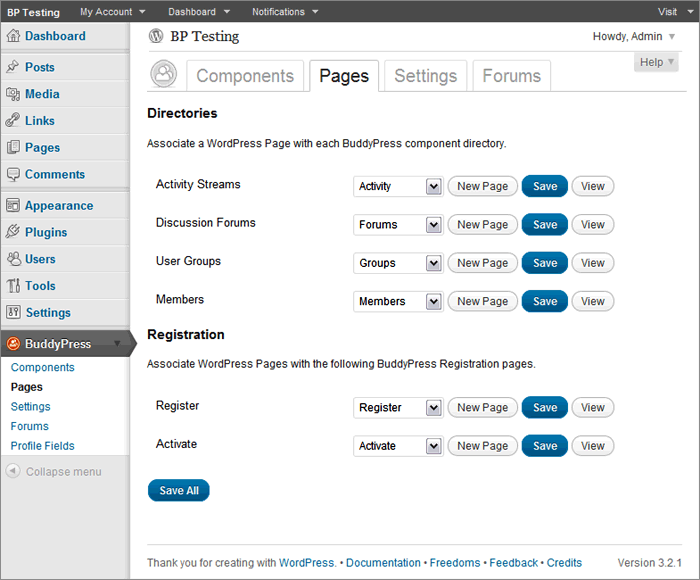
Now if you are using the bp-default theme, go to BuddyPress Pages again and double-check that BP components are indeed associated with respective pages https://mercime.files.wordpress.com/2011/11/bp-installation-wizard-08.gif
If that doesn’t cut it, https://buddypress.org/community/groups/how-to-and-troubleshooting/forum/topic/when-asking-for-support/
@mercime@nsbalgcom I see you’ve installed the BP Template Pack plugin. Now you need to fix the alignment within the BP template files to be compatible with your WP theme WPSN – via 1st method of changing 16 BP template files or via 2nd method of creating only the header-buddypress.php, sidebar-buddypress.php and/or footer-buddypress.php.
Initial scan of online source code shows that you need only to implement the 2nd method and adding some styles to fix the alignment of your theme. https://codex.buddypress.org/theme-development/wordpress-to-buddypress-theme/#fixalignment
 starprintbrokers
Just gettng back to this project.
@mercime, I did confirm that Salutaion will work with the current BuddyPress theme.
Hugo, if this doesn’t work, then I will ask my host provider to wipe out the entire site and I’ll start over. It’s not such a loss, as I am still building the site. I can easily create those missing pages with those names, but would imagine there is code and are layouts that I cannot replicate. I would say my skill level is probably just short of intermediate, so I would rather play it safe than build any more content. I’ve save what I built in Word docs anyway!
@mercime@b1gft If that slider by aesthetic can be added via widget area – check out http://justintadlock.com/archives/2010/11/08/sidebars-in-wordpress
 Tilley46
I had changed the permalinks before (Day& Name), and saved the settings, but still, whenever I clicked ‘view’ on the ‘Registration’ page, it took me to the ‘Home’ page I created. I deleted that, and then ‘Register’ linked to a page that says ‘Sorry, but you are looking for something that isn’t here’. I deleted ALL pages, uninstalled BuddyPress, re-installed, but then, instead of getting the Installation Wizard, got an error message saying that ‘The following active BuddyPress Components do not have associated WordPress Pages: Activity Streams, Discussion Forums, User Groups, Members, Activate, Register. (REPAIR)’. Was hoping that starting over from the beginning would solve the issue, but no luck. Even now, despite creating all new pages and associating them w/ the BuddyPress components, I still get ‘Sorry, but you are looking for something that isn’t here.’ on both the ‘Register’ and ‘Forums’ page and the ‘Forums’ page says that ‘The forums component has not been set up yet.’ I’m assuming that’s due to my re-installing BP, but not yet having gone through the installation wizard…? I don’t know what the hang-up is… Shouldn’t there be a unique ‘Register’ page created/linked to through the BP component ‘Register’? I’m at a bit of a loss…
 valuser
The plugin BuddyPress Groupblog at https://wordpress.org/extend/plugins/bp-groupblog/ MAY go some of the way in answering your queries.