`
Save files.
 walkingcloud
Hey aces if you share an email I can send you the log in info, and you can see BuddyPress is installed properly. You can even delete the current BuddyPress, and install- upload BuddyPress again. The issue is from BuddyPress or the server “Godaddy” …
walkingcloudI have WordPress experience, and after I installed BuddyPress there was no errors shown as I have seen on other plugins. I know from experience if a plugin has problems a message box appears stating an error of the plugin being installed. After I installed BuddyPress no error messages appear, yet we see the ‘You have no groups’ message, and it’s starange…
Perhaps the server “Godaddy” is not loading all theBuddyPress files properly?
 Boone Gorges
It looks like BuddyPress was not properly installed. You should never see the ‘You have no groups’ message, unless you have manually deleted something from the database.
 @mercime
@foundsheepgmailcom you need to paste the source code of your theme’s full page template and post the generated URI here.
walkingcloudI also noticed this post…?
https://buddypress.trac.wordpress.org/ticket/3725
@mercimeCheck the content of your wp-content/themes/wp-davinci-prem/ folder it should at least contain the 6 BP folders I mentioned in my previous post – /activity, /blogs, /forums, /groups, /members, and /registration
If one or more are absent, something went awry with the BP compatibility process. You should download a zipped copy of BP to your hard drive; unzip the folder, then open up the unzipped folder and open the bp-default theme folder in buddypress/bp-themes/bp-default/ and upload the the missing BP folder/s note above to your theme folder in server – wp-content/themes/wp-davinci-prem/
@mercimewalkingcloudThank you for the reply aces, and I like the hat 
aces:
If I click on ‘complete sign up’ without filling anything in then it redirects to the home page whearas I think it should stay on the same page but with error messages.
walkingcloud:
Yes, it should stay on the same page after clicking on ‘complete sign up’ but with error messages, until the user adds his or her info, and then clicks ‘complete sign up’ to sign up…
aces:
What plugins are your using? Single or multi-site? Any unusual permalink or .htaccess settings?
walkingcloud:
I have removed all plugins, and also removed BuddyPress. Then downloaded BuddyPress again to try it fresh, and clean… But still the same issue occurs?
Yes, I did indeed change the “permalink” to /%postname%/ to make clean SEO urls like:
http://www.totalicious.com/register
Should I just use the default “permalink” if so the url will be longer, and include dates etc. I have seen other BuddyPress owner sites, and it appears they are using /%postname%/ with no problems.
Don’t think we messed with the .htaccess settings or altered the Name field in any way from the default, far as I know. You could check via the source code to confirm that it’s ok, right?
 Paul Wong-Gibbs
Best place for this is https://buddypress.trac.WordPress.org as an enhancement ticket. Patches welcome!
Question, though: what happens if it inserts multiple items into the table_name_fields?
 aces
acesThere is something wrong with your register page as, I think, it should have Name ( at least ) as a required field under the profile details section.
If I click on ‘complete sign up’ without filling anything in then it redirects to the home page whearas I think it should stay on the same page but with error messages.
What plugins are your using? Single or multi-site? Any unusual permalink or .htaccess settings?
Have you altered the Name field in any way from the default:
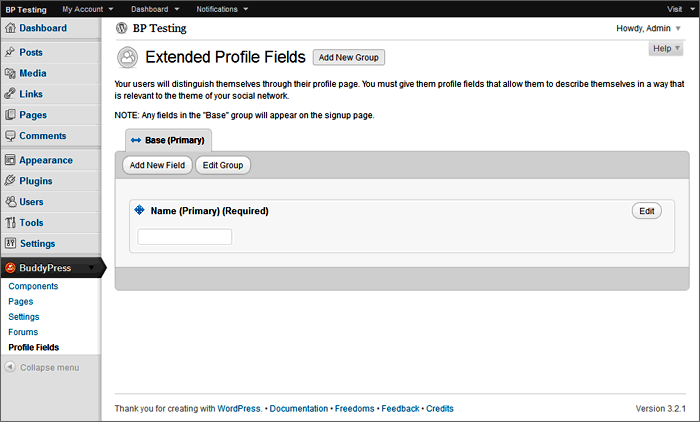
This seems to be similar to @allentan‘s problem: https://buddypress.org/community/groups/installing-buddypress/forum/topic/registeration-doesnt-work/
 notpoppy
@boonebgorges Thanks for the reply!
I’m not quite sure how to use your solution, though. is it something that goes in functions.php? If so, how do I then use it in the theme?
Boone GorgesThe purpose of the BuddyBar is to provide a number of handy links throughout an entire WP/BP installation. I’d suggest that you just get rid of it on small screen sizes.
> Has anyone been able to reduce all the basic menu items into one easy to understand menu?
Easier said than done. The top tab menu (in the header) plays a fundamentally different role in the site than the profile-level menu; the former is for sitewide content, while the latter is for user-specific content. They can be combined into a single menu pretty simply, but such a combined menu quickly becomes overrun with many options and submenu. It’s not obvious that this is preferable to having several simpler menus.
For the purposes of device size responsiveness, I might suggest that you think of the profile-level nav as the primary navigation, and that the top-tab global nav be considered secondary; you could drop that down to the bottom of the page without much loss in overall functionality, especially for logged in users.
Please share your thoughts and your results as you continue to work on responsive designs for BP. It’s a new area for everyone working on the project, and we’re always interested in hearing new ideas about how it might be done in a user-friendly way.
Boone Gorges> I got this error when I click on the groups tab
This is a problem with the BuddyPress Groups Extras plugin. Try disabling it. You should also turn down the PHP error reporting level; it should never show this kind of (relatively harmless) error on the public site.
> And I can’t seem to create my test group’s own forum. In the link I gave in my first post, they have their own forum separately each in each group.
You’ll have to give more details about “can’t seem to create”. Are you getting an error message? What are you doing to try to set it up? You should have done the following:
1) Gone through the Group Forums setup at Dashboard > BuddyPress > Forums Setup
2) Gone to an individual group’s Admin tab, and then to Settings
3) Checked the ‘Enable group forum’ checkbox, and saved changes.
Boone GorgesIt sounds like you have a javascript issue with your theme. What theme is it? Did it come with BuddyPress compatibility built in, or did you use the BP Template Pack to set it up yourself?
 faithcoach
Thanks, but there is no /registration folder in the buddypress pluging group at all.
 dsmndwng
@mercime ! Worked like a charm! Thank you so much. Saved me hours and hours of headaches. Thanks again
@mercimeB. At the bottom of the same 16 files, replace:
`
`
with the following (except for registration/register.php):
`
`
with the following for registration/register.php:
`
jQuery(document).ready( function() {
if ( jQuery(‘div#blog-details’).length && !jQuery(‘div#blog-details’).hasClass(‘show’) )
jQuery(‘div#blog-details’).toggle();
jQuery( ‘input#signup_with_blog’ ).click( function() {
jQuery(‘div#blog-details’).fadeOut().toggle();
});
});
`
Save files.
C. Upload the 6 BP folders containing the 16 files you revised up to your server wp-content/themes/thestyle/
D. You might also want to check out the style modifications made in BP Twenty Ten for reference especially with removing the bullets and bringing in the extended width of the BP elements. https://codex.buddypress.org/theme-development/theme-dev-bp-template-pack-walkthrough-twenty-ten-bp-1-5/3/
E. If you want to go the extra mile – In each of 16 files, you might want to change the BP Templates’ page title’s header tag from `
` or `
` to:
`
`
Just watch out when you do this in the /activity/index.php page template.
@mercime@dsmndwng Based on the HTML structure of your theme, you’d need to use the first option, i.e., change 16 template files within the 6 BP folders transferred to your TheStyle theme folder in server during the compatibility process.
If you’ve previously changed any of the BP template files in your theme folder, replace all of them for a clean slate by deleting the 6 BP folders in server – /activity, /blogs, /forums, /groups, /members, and /registration – then re-run Appearance > BP Compatibility.
Download the 6 clean BP folders to your computer hard drive.
A. At the top of each of those 16 template files I linked to above, replace
`
with
`
Save files.
 9087877
If you made a child theme just target the #header in your style.css and use something like this:
`#header {
background-image: url(http://yourdomain.com/wp-content/uploads/2012/03/logo.gif);
background-repeat: no-repeat;
}`
Just replace the URL with the URL to the image you uploaded in your dashboard/media/library.
If you edited bp default.css which you should never do because it can be done in a child theme which future proofs it to some degree and over-rides the default.css anyway. Then I would suggest just opening the buddypress.1.5.5.zip (or whatever version you have). Just copy the file from buddypress/bp-themes/bp-default/_inc/css/default.css and replace with the one on your server in /wp-content/plugins/buddypress/bp-themes/bp-default/_inc/css/default.css
Hope this helps!
 teoh89
Hi @mercime,
Thanks so much for your reply. I did according to the instructions of the web and came up with the current site – forum.ultiasia.com
I got this error when I click on the groups tab:
Warning: in_array() [function.in-array]: Wrong datatype for second argument in /home/teoh89/public_html/forum_ultiasia/wp-content/plugins/buddypress-groups-extras/bpge.php on line 106
And I can’t seem to create my test group’s own forum. In the link I gave in my first post, they have their own forum separately each in each group.
Where did I go wrong? Hope you can help me out. Thanks!
 Etienne ROSENSTIEHL
I made many changes. I probably did both. Now you know the problem, do you know a solution ?
(I use a very basic structure : WordPress, BussyPress, bd-default theme and Private BuddyPress.)
 enderpal444
Still havent figured this out and would LOVE an answer. From what I can tell the comment form only has 3 custom functions in the bp-default functions.php and I removed all the filters in my child theme funtions.php but they don’t remove and I don’t get it. Help me @boonebgorges
 ajshanahan
More for anyone else finding this thread than anything else:
Well – after literally two hours of scrolling back through the support forum (seriously dudes, fix the forum search issue, then maybe you’d get fewer help requests!) I find this:
The gist of which is that it’s nothing to do with plugins, etc – it’s to do with a corrupted database. In my case I think this was caused by installing and deactivating plugins, I can’t think that I did anything other than that, so I would suggest it should be a bug, but not sure whether to add it to Tracker. Any thoughts?
 richardpd
How do I find my BP forum posts here at BP support? I can find my WP forum posts at wordpress.org but not BuddyPress!
My ‘Your Activity’ link tells me the number of my posts but nowhere can I find a link to my posts (so I cannot review them!).
I follow Mercime (a moderator on this site)-but I cannot see a way to private message her for help?!
I am having lots of trouble running BP on my site and am finding help hard to get here.
NB Why does my post say ‘Deleted User’ when I am logged in as richardpd?
NNB-Fixed ‘Deleted User’ issue…I was not logged in properly?! I am not sure how that happened but I changed my WP.org settings & relogged in & is fine now!!
@mercime== It appears that my comments on my wall are threaded, but my comments in the forum are not. ==
That is correct, that is the default layout – activities are threaded just like comments in blog posts while forums have no threads.
== This has the effect of having people able to reply on the wall and it not showing in the forum. ==
You can “Disable activity stream commenting on blog and forum posts” so that your members can respond directly in your blog posts and forum posts instead. Go to dashboard menu > BuddyPress > Settings and click disable on that setting.


