This feature is already there in Google group and I have not heard in buddypress so far. Can we come up with a plugin or codec which can integrate forum activity using a group email?
Like to see these features:
1. Post the email sent to group email in forum if the sender email matches with a forum member.
2. Option to send an email to group email if someone replies in bp forum.
I try with different themes but same problem. Is a problem with Buddypress 1.5.4 with wordpress 3.3.1 ?
Some help please? many days looking for information about issue and nothing
Germany:
Ich möchte unten Seiten Archive und Meta weg haben was muss ich machen ?
English
I would have gone down sides of Archives and Meta what do I need?
The Site http://radio-schwabenpower.de/seite/members/
Hello,
to understand better my request please look at here:

I look forward to your reply.
Thanks
Website is close to public. Can I send you a screenshot picture?
thanks
@allinfinite, you might want to have a look at how the Buddypress Mobile plugin detects mobile users and then instead of switching them to a new theme, redirect them (or whatever else you want to achieve) instead.
https://plugins.svn.wordpress.org/buddypress-mobile/trunk/buddypress-mobile.php
Also, apparently (i havent played with it, just echoing things i’ve heard so take it with a grain of salt) despite the name, $is_iphone also returns true for android, so if android and iphones are the only smartphones you want to show that page for, then that built-into wordpress function will work
See here on how to use it: https://wordpress.org/support/topic/is_iphone-documenation#post-1991224
Why do you have the code to BP’s members/index.php as the index.php of your theme in pastebin.com? I suggest you re-upload your boulevard theme files again, just in case.
If you’ve tried to revise the BP template files transferred to your boulevard theme folder during the compatibility process, I suggest you delete those 6 folders from your theme folder. Then re-run Appearance > BP Compatibility again just to make sure you have clean template files.
Looks like you only need to create two files and upload it to your boulevard theme folder in server.
A. Copy header.php and Save As > header-buddypress.php.
Open up header-buddypress.php and at the bottom of the file, below all other code, add this:
`
`
Save file.
B. Copy sidebar.php and Save As > sidebar-buddypress.php
Open up sidebar-buddypress.php and at the top of the file, above all other code, add this:
`
`
At the bottom of the same file, below all other code, add this:
`
jQuery(document).ready( function() {
if ( jQuery(‘div#blog-details’).length && !jQuery(‘div#blog-details’).hasClass(‘show’) )
jQuery(‘div#blog-details’).toggle();
jQuery( ‘input#signup_with_blog’ ).click( function() {
jQuery(‘div#blog-details’).fadeOut().toggle();
});
});
`
Save file.
C. Upload header-buddypress.php and sidebar-buddypress.php to wp-content/themes/boulevard
D. Style modifications for BP templates – you might want to use some or all of styles listed in this page https://codex.buddypress.org/theme-development/theme-dev-bp-template-pack-walkthrough-twenty-ten-bp-1-5/3/
Standard BuddyPress is what you see at http://testbp.org/ and not quite sure why you’re referring to the Twenty Ten and Template Pack plugin integration.
Could be many reasons why the new styles are not being rendered in your site. Site URL?
What theme are you using? Is your custom theme a child theme of bp-default theme or a stand-alone BuddyPress theme?
I have an issue with the coding of the content on all of my Buddypress pages in my custom theme. For example, the profile page content is not aligned within the page. It is off to the right as well as a slight overlap into the right sidebar. Here is a picture of the problem…
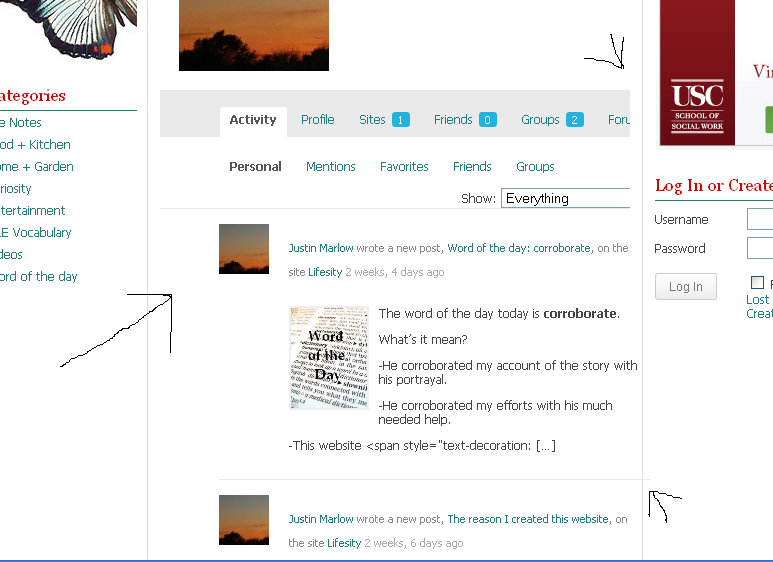
I’ve checked the divs and nothing seems to be out of place. What am I missing?
Hi guys,
i am new to Buddypress, and am interested in it as part of an LMS solution.
Everytime I install it on a clean install, I can’t access my wp-admin!!!
If I do a clean WP3.3.1 install, then on that install BP and select to use the default theme, I can view the front end but just can’t access the dashboard anymore.
Please help!!
Because my problem now is that everything now go right, but the appearance is not like the stander buddypress …like I see here https://codex.buddypress.org/theme-development/theme-dev-bp-template-pack-walkthrough-twenty-ten-bp-1-5/3/ I make modification of style.css …I have copy the block on the website and paste at the bottom of the duotive-three style.css ….but nothing happen!!
here you can see the changement : http://pastebin.com/G9C4r9Me.
I need to see Activity,Message,Groups, etc … like TAB … Now all of this voice are a long vertical list and are not in orrizzontal ….
Thank you again
Buddydevs premium plugin also supports videos. (from the page @mercime linked to – “Multiple types of media Supported [including] Video gallery [&] Can be extended with few code to support any [type] of media you want”)
http://buddydev.com/plugins/bp-gallery/
The Buddypress Album team are currently working on their second version called ‘buddypress media’ that will support videos. But it’s in development and doesn’t have a stable version yet.
http://code.google.com/p/buddypress-media/
@sbrajesh you have a spelling error on that page BTW.
Hello:
The extended profile fields are not showing up on my iPhone. I’m using the BuddyPress Mobile plugin. I also didn’t see the extended profile fields using other mobile site plug-ins. It shows “Profile Details,” but nothing shows up below that. Can someone help me figure out why they’re not showing up?
Thanks.
http://www.humandalas.com/meme
When you go to my page from a smartphone, it is blank because I have the default load page set to my buddypress stream (not supported by smartphones).. How do i make it load the ‘recent posts’ page instead, just for smartphones??
@mysmallbizu
Please don’t hijack another thread with a different problem. It would be better start a new topic!
Scratch that even with the default bp template files still get the same error, @djpaul any thoughts?
Ok done.. thank you.. just a request, can I send a screenshot picture? I need to show you what I want to re-create.
Thanks.
Anybody got that code to work? I tried to impliment it but cant seem to figure it out… Is there a plugin in progress? @dtay1984 Did it work for you?
You install it just as you would without BuddyPress. No difference. At least in my experience 
how do i install bbpress plugins while using it as buddypress addon?
thanks in advance for any suggestion.
Can anyone tell us why this message appears after install in plugins>>>> Fatal error Call to undefined function bp_core_redirect() in /home/*******/public_html/*******wp-content/plugins/buddypress-private-community/mm-buddypress-private-community.php on line 386 ?? also crashes whole site…Thanks DS


