Search Results for 'buddypress'
-
Search Results
-
I’m looking for a way to remove or replace […] at the end of blog post excerpts on the Activity Stream. I’ve found a way to replace […] on the blog page by using the following code.
function new_excerpt_more( $more ) {
return ”;
}
add_filter(‘excerpt_more’, ‘new_excerpt_more’);excerpt_more is a WordPress filter. It helps with the blog page, but not the BuddyPress Activity Stream.
I found another filter, bp_get_activity_content_body but so far I haven’t been able to make the filter do what I want it to do.
Can someone please point me in the right direction? What BuddyPress filter can I use to remove or replace […] on the Activity Stream?
Thx!
My website was designed on a localhost and I used OceanWP Version: 1.6.10 and Everything worked very fine even up until now. After moving the site to a live server which we set up bu ourself in our office, the first thing that happened was that aside from the home page, other pages are returning erro 404 when visited. I search online for solution and after trying series of suggested solutions, i found out that adding index.php to a custom hyperlink fixed the error.
Now the problem I am having is that the Activity and Member page are not working. Also, when you click on a members name from the widget i embed on the home page to display online members, the result i get is page not found.
Please any suggestion as regards what could be done to make the site work on live server?Topic: NextGen Clash
Hi, after going mad trying to track down a problem which meant my BuddyPress user profile page was loading up everything except the page it is meant to, I’ve found a compatibility issues between BuddyPress and NextGen gallery. It’s been mentioned a few times online now I’ve searched but I can’t really find a solution for it, can you advise please?
Topic: Buddypress.org shutting down
Hey Guys,
Is buddypress approaching EOL?
seems like no one is home in this official support forum
seems like theres always spam now on this
seems like there are now more “MEMBERS” plugins like buddyboss that compete with buddypressShould we start looking at alternatives?
Hi there,
i haven`t found a solution for my question so i hope to find the answer here.
Unfortunately my installed buddypress is displaying some information very ugly and i’d like to get rid of it.
So far i haven´t figured out where i can change the look of following table:
<table class=”profile-fields bp-tables-user”><tbody><tr class=”field_1 field_name required-field visibility-public field_type_textbox”><td class=”label”>Name</td><td class=”data”><p>martin</p></td></tr><tr class=”field_3 field_dci-nummer optional-field visibility-public alt field_type_number”><td class=”label”>DCI Nummer</td><td class=”data”><p>9315451735</p></td></tr></tbody></table>
Can you please be so nice and tell me where i find the settings of that table exactly? I am not a trained coder but i am good at learning when someone leads me in the right direction. So please bare with me a little.
Thanks
There are a few decent enough anti-spam and moderation tools available but I am not 100% satisfied with them. Some of the best, seem to be premium only which I feel is something that can be changed.
Which is why I have started a project to create a fully free community maintained reporting and moderation addition for BuddyPress. My background is in PHP development so I am confident that given enough time (and that is the limiting factor here), I can create something quite special. There is nothing special about me, so more coders, testers, etc. means faster development.
What I am aiming towards is something that works a little like Facebook’s community standards reporting feature. Admins and moderators can see the reports, add comments, take actions, and update the report accordingly.
Users can see the progress of their reports and will know if the admins agreed with them or not (and hopefully their reasons).
I’d like to be able to offer users the chance to report spammy users, bad content, and so forth.
I also hope to make it all largely extensible by coding it in such a way that others can write extensions to make it do whatever they need it to do for a particular edge case.
What is slowing me down is the amount of each day I spend in too much pain to sit at my computer and write code. Which is why, I have taken to putting all of my open personal projects on GitHub (including this one, which is new) in the hope that I am not the only PHP nerd with spare time and a desire to make this happen.
If you want to contribute, you will be very welcome. Do the usual – form my repo and feedback any work you feel you can contribute. I’ll keep chipping away at this in those hours when my body lets me do stuff because I need this for my own projects. The more of us there are, though, the better this can be.
https://github.com/lordmatt/bp-report-stuff
Let’s make this happen.
Hi i want some help that i want to make profile fields city dropdown which is that at the time of registration as a buddypress member when user select a country from country dropdown then against that country cities want to appear in city dropdown to select please help Thank You !
Topic: BuddyPress Customizations
I am new to WordPress and Buddypress. I have a couple of items I am struggling with and would love a little direction.
1. In Buddypress, when you visit a group that is private, you receive a default message that says “This is a private group. To join you must be a registered site member and request group membership.” I would like to add a button directly below this message that says “Register”. This would need to be connected with the default message in some way so that the register button appears every time (and for every different group) the default message is displayed. I tried before but it seemed to connect the button only to one particular group. How can I go about adding this to the default message and what file and where in that file would I edit such a thing?
2. Once they press the button to register, how do you get them to redirect back to the group they were originally linked to?
3. In Buddypress, is there any way to turn off the public, private, or hidden options when creating a group and just make all groups private automatically?
I would really appreciate any assistance. Thank you.
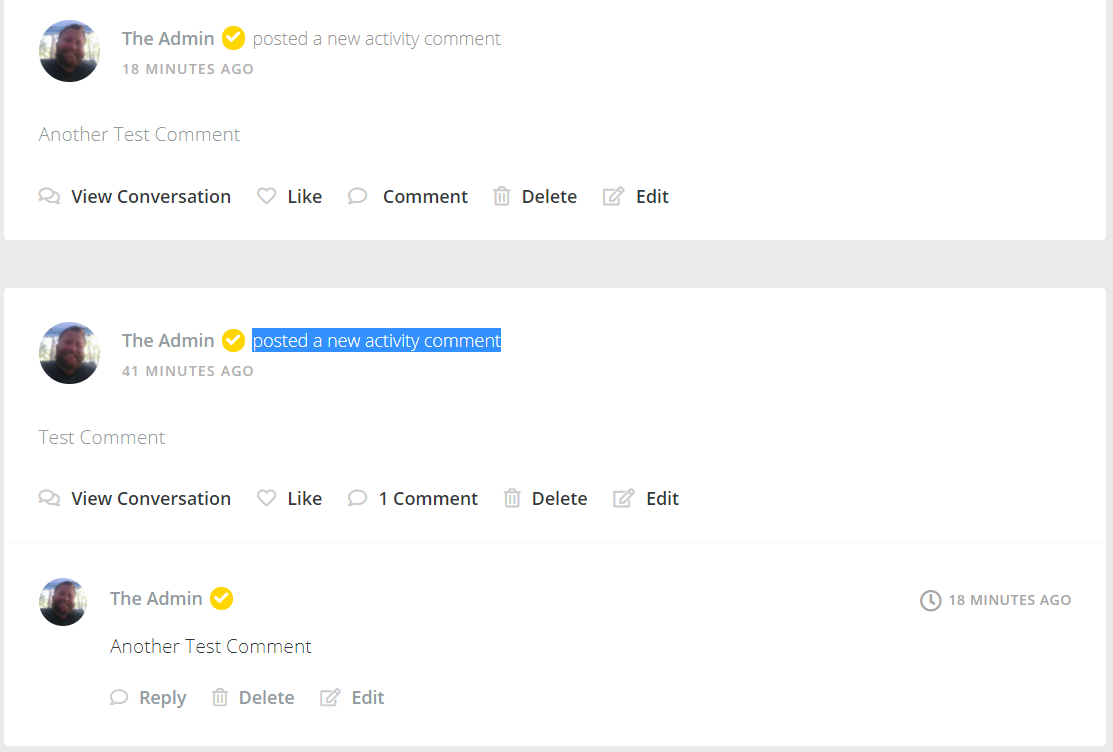
When you comment on a buddypress post, that comment shows up as again in your feed as “posted a new activity comment”.
I’d like to just see the comments on the original post. How do I filter these “Activity Comments” out?
I am new at asking for assistance in these forums. So, bear with me please. I am working on a WordPress site that involves BuddyPress groups as well as the membership system that PMPro provides. I am using these on the Kleo theme. I am looking to have a site that has many users who will make groups for their needed purpose. What I need to figure out is, once that group is made the user will send a link to the group they created to the guests they want to join said group. The guest that received that link will click on it and be sent to the group, however, they will still need to sign up to the site to access the group.
What I would like to know how to do:
1. The guest will be able to see the group (from clicking on the sent link) but I would like there to be a button on that page prompting user to sign up to the site to join the group.
2. Immediately after registration, which will be a form on its own page, the guest will be redirected back or to the same group page as the link clicked.I am fairly novice at this kind of thing and not really even sure where to even start, so I hope that I explained it well enough and I appreciate any assistance greatly. Thank you!
In my BuddyPress forum I can see headings like “46 messages in [topic] (+2 hidden)”
What does it mean if a post is “hidden” in BuddyPress?
How can I find which are the “hidden” posts?
Who can see them, and who can’t?
Can a moderator change this status? If yes, how?Topic: Emails Not working
Hi,
Suddenly my emails / buddypress notifications have stopped. The only recent change has been adding Sucuri WAF. I’m using Mailgun to send out the emails.
Any advice?
Topic: Creating Pages
We have been using BuddyPress Groups Extras plugin to add extra pages to each of our groups for some time now. But, the plugin hasn’t been updated in quite some time.
Is there a way to add blank pages to groups where the user can update them? TYIA
I installed a the latest version BuddyPress to my ISP Manager / Centos 7 server in that I install the latest version of WordPress on Mariadb 10.3 database . After installing BuddyPress by using W_-CLI command line, I could not see Group inside the Menu bar option which is supposed to show up but I can see some other buddy options: Activity, Forum, Logout, Settings, Profile, and Notification.
It also looks like buddypress pages that showing in the Menu Bar is different depending on which database being used. In my case I have an old version of Mariadb5.5.60 but fewer litems showing up in the menu option drop-down list.
Any suggestions will highly appreciated
Daniel


