Search Results for 'buddypress'
-
AuthorSearch Results
-
June 4, 2015 at 6:58 am #240175
In reply to: Members Directory Page Broken After Update
jturet
ParticipantThe page exists, however there is no content. Thanks Hugo, your work is greatly appreciated!
Edit: I should also mention that other Buddypress pages such as Groups and Activity have no such issue.
June 4, 2015 at 6:56 am #240174In reply to: Members Directory Page Broken After Update
Hugo Ashmore
ParticipantI can confirm that the url path is stripped out but the actual members page should still work either directly navigated to or clicking the page link as nested under a parent dropdown which should result in page being found but at it’s root position my-site.com/members/
Can we confirm that the page does still exist and is viewable, in the meantime I’ll open a trac ticket to log the page hierarchical issue.
This issue is ticketed for looking into:
https://buddypress.trac.wordpress.org/ticket/6475#ticketJune 4, 2015 at 3:29 am #240168In reply to: Group tab questions
mrjarbenne
ParticipantJune 4, 2015 at 3:28 am #240167In reply to: BuddyPress on another domain
ParticipantYou can do that by adding this constant in wp-config.php
define ( 'BP_ROOT_BLOG', $blog_id );I’m thinking you probably want option B: https://codex.buddypress.org/getting-started/installation-in-wordpress-multisite/#b-network-wide-activation-buddypress-root-blog-in-secondary-site
June 4, 2015 at 3:23 am #240166In reply to: Fatal Error When Plugin activated
ParticipantWell, I just tested it and it didn’t work. Hopeful someone can come in and suggest an alternate fix. One of the issues is that the code I’ve pasted there was pulled from a source that switched to smart quotes rather than regular quotes, but that doesn’t seem to be the only issue as I’ve rectified that on my test and it didn’t help.
Here’s the source:
How to Add, Remove, and Change the Order Of BuddyPress Component Menu
June 4, 2015 at 2:26 am #240162In reply to: Fatal Error When Plugin activated
ParticipantUse, or create, the bp-custom.php file in your plugins folder: https://codex.buddypress.org/themes/bp-custom-php/
Add this to it (make sure you add a
<?phptag if you are creating a bp-custom file for the first time.function bbg_change_profile_tab_order() { global $bp; // Change Menu Order $bp->bp_nav[‘profile’][‘position’] = 10; $bp->bp_nav[‘friends’][‘position’] = 20; $bp->bp_nav[‘groups’][‘position’] = 30; $bp->bp_nav[‘blogs’][‘position’] = 40; $bp->bp_nav[‘messages’][‘position’] = 50; $bp->bp_nav[‘settings’][‘position’] = 60; // Remove a menu item $bp->bp_nav['activity'] = false; } add_action( ‘bp_setup_nav’, ‘bbg_change_profile_tab_order’, 999 );I haven’t tested this. I hijacked it from here: http://themekraft.com/customize-profile-and-group-menus-in-buddypress/
June 4, 2015 at 2:14 am #240161In reply to: Toolbar Empty for Mobile Logged Out Users
Osisis
ParticipantThis post may help. https://buddypress.org/support/topic/admin-bar-in-mobile-view/
June 4, 2015 at 1:58 am #240157In reply to: Fatal Error When Plugin activated
mackeykevin
ParticipantOk since you are my godsend I hate the activity page.. How do I edit the buddypress menu to remove the page from the menu? Matter of fact how do I change the order of the items in the menu? You are the man remember that always
June 4, 2015 at 1:54 am #240156In reply to: End User Blog
ParticipantMS integrates wonderfully with BuddyPress. When network activated on a Multisite, activity from across the network is recorded on the users Profile. Just be sure to check Site Tracking under Settings/Buddypress once you network activate BuddyPress (https://cloudup.com/i_-p1kJGUwd). Once upon a time, BP was ONLY compatible with Multisite: you couldn’t run it on a single WP install.
Note that this will give your users the ability to have their own blogs. This is separate from the ability to post from the front end. For this you would need to make a theme like P2 your network default. http://premium.wpmudev.org/blog/how-to-set-the-default-theme-for-wordpress-multisite/
June 4, 2015 at 1:45 am #240154In reply to: Comments on activity don’t work on my theme.
ParticipantGiven that you have been able to diagnose that this is a theme issue, particularly on a theme that you paid for, I would suggest going back to the theme author to see if they can help. X Themes seems to be a popular issue tonight. You’re the second one I’ve come across:
https://buddypress.org/support/topic/fatal-error-when-plugin-activated/#post-240153
June 4, 2015 at 1:43 am #240153In reply to: Fatal Error When Plugin activated
ParticipantIt’s hard to know what that file is doing without seeing the whole thing. It’s not a standard BP file, it’s something your theme developer has added to provide additional functionality to the theme (something that would probably be better left as a plugin, but that’s another argument entirely). BuddyPress has its own theme compatibility layer, that should make it look nice in any theme. Your theme is clearly trying to do something fancy with BuddyPress in a way that is messing things up.
A quick google search reveals a few different people having issues with the xTheme and BP.
https://theme.co/community/forums/topic/buddypress-error/
https://theme.co/community/forums/topic/buddypress-website-down/This topic seems to suggest that if the activity stream isn’t activated in Settings/BuddyPress/Activity Streams then there is an error:
https://buddypress.org/support/topic/buddypress-website-dowm/
You could try commenting out the line as suggested in the above link. You could comment out line 427. You could temporarily delete the entire buddypress.php file in your theme (use your FTP program to throw it on your desktop and then delete it).
In the end, the X themes developer should really be the one to fix this.
June 4, 2015 at 1:22 am #240150In reply to: Fatal Error When Plugin activated
Participant@mrjarbenne:
Thanks so much i forward my help to Theme X support, I thought it was a BuddyPress issue, that is why i came here. I do have access to my server and a FTP. What should line 427 say? I know silly question but it is a shot in the dark if it is supposed to be something specificagain thanks so much, i am excited to get buddy press working again
June 4, 2015 at 1:20 am #240149In reply to: Display Username by Default
ParticipantPlease don’t post the same question multiple times. See this link for a response: https://buddypress.org/support/topic/default-to-display-name-publicly-as-username/
June 4, 2015 at 1:17 am #240148In reply to: Default to “Display name publicly as” username.
ParticipantYou could use this plugin — https://github.com/r-a-y/buddypress-usernames-only — to override the Display name so that only the username shows. I find this makes a lot of sense in communities where @mentions are a prevalent means of connecting. By default the Display name on the profile will still be the Nice Name, rather than the username, but you can change that by adding this snippet to your wp-config.php file
define( 'BP_SHOW_DISPLAYNAME_ON_PROFILE', false );June 4, 2015 at 1:09 am #240146In reply to: Wrong Member Count
ParticipantIf you go into Tools/BuddyPress there is a function called Data to Repair: Count Total Members which might help. Otherwise I have noticed that occasionally user count is updated when the user actually starts participating on the site, not immediately after they register. I can’t test this, but I feel like I noticed something similar previously, and it sorted itself out.
June 4, 2015 at 12:59 am #240145ParticipantOn a multisite, you activate BuddyPress Network wide, and it then exists as a Social Network on the main domain (it doesn’t affect your multisite otherwise, and subdomains or subdirectories — depending on how you have set things up — will not be able to create their own social networks). Once activated, BP will track your users’ activity across the entire network (comments they leave on other blogs, posts they create, etc.)
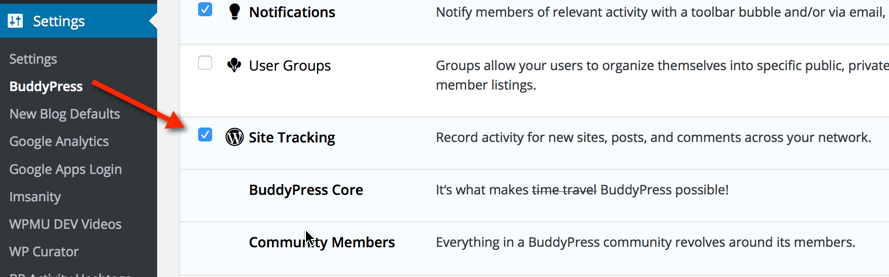
Once activated, go into Network Admin/Settings/BuddyPress, and make sure that Site Tracking is enabled to get the full benefit. Users will need to be subscribers on the main domain in order to contribute: a role they should be assigned automatically when they are registered.
June 4, 2015 at 12:51 am #240144In reply to: Fatal Error When Plugin activated
ParticipantIf you change themes you will lose all the customization that your theme provides through that Cornerstone custom page builder (I assume this is your theme http://themeforest.net/item/x-the-theme/full_screen_preview/5871901)
I would suggest — because you have paid for the theme — that you go back to the theme developer and let them know that code in their theme is causing an error. The error message you provided shows exactly where the offending code is. It looks as though your theme has some additional customizations applicable to BuddyPress specifically.
If the theme author won’t help, and you have FTP access to your site’s server, you could go in under public_html/DRSTEPHANIEDANIEL.COM/wp-content/themes/x/framework/functions/global/plugins/buddypress.php and see what is on line 427 of that buddpress.php file that might be screwing things up.
June 3, 2015 at 11:04 pm #240140In reply to: xprofile_insert_field_group() ignoring ID
Henry Wright
ModeratorYeah sounds like it could be your database preserving referential integrity. i.e. Can’t delete a profile group unless all fields belonging to that group have been deleted first.
Check what’s going on by looking at your database. This may help:
June 3, 2015 at 10:54 pm #240139In reply to: xprofile_insert_field_group() ignoring ID
CodeMonkeyBanana
ParticipantYeah something weird is going on as when I create a new field it automatically has the data of a previous field I have deleted.
I am guessing when I segmented the fields it caused an issue with the delete process. It deletes from admin panel but sometimes it says “there was an error deleting” so I guess part of the data remains.
I am going to have to get to grips with buddypress schema.
June 3, 2015 at 9:11 pm #240133In reply to: Log in Log out menu items missing
soundling9
ParticipantI just realized the BuddyPRess option in Screen options was unchecked. I got it working now.
June 3, 2015 at 7:34 pm #240126In reply to: Per-group Identity?
shanebp
ModeratorI can’t create a profile field for every possible group.
You can create a custom profile field by extending
BP_XProfile_Field_Type.
That custom field could pull in the group names for that member and allow them to enter a name per group name.You can filter the member name by using the filter hook in
bp_member_name(), found in:
buddypress\bp-members\bp-members-template.phpHow, when and why you apply that filter is up to you.
The same filter may not work for bbPress, but they probably have something equivalent.
June 3, 2015 at 7:10 pm #240119In reply to: BP_ENABLE_MULTIBLOG stops activate working
r-a-y
KeymasterCan you try the patch in this ticket?
https://buddypress.trac.wordpress.org/ticket/6371June 3, 2015 at 6:47 pm #240114In reply to: Per-group Identity?
Tony G
ParticipantWell, group meta allows meta data to be applied to groups. I’m thinking along the lines of data in the usermeta table which is only consumed by specific groups. This might be expressed as a name/value pair in the profile. So with reference to my original example, a GroupName profile value would include:
school:Robert
home:Bobby
coolGame:ZarconThe BuddyPress Profile Shortcodes plugin allows for custom fields and related shortcodes to be used. This is much closer to my needs but still not quite there. I can’t create a profile field for every possible group. Ideally there would be a pulldown of groups to which the user belongs, where they can enter the name they wish the use for that group, and the group/name pairs would be displayed in a grid.
Now I’m thinking one of the better user meta plugins could handle that. But I would also need to customize it so that there can only be one WP user with a specific value for a specific group. This is a unique key per group, as some reference to @Bobby can’t apply to more than one person, but the @Bobby in one group can be different from @Bobby in another group.
On the client side, I would then need to modify bbPress to get the user name that’s specifically for the current group, rather than using wp_get_current_user()->display_name or whatever it has there. For example:
get_user_meta($user_id,’groupName_’.$group_id,true)
or better
get_user_meta($user_id,’groupNames’,false)[$group_id]Actually I’d rather abstract all requests for a user name to a function which can then be replaced with custom code just once. I don’t suppose anyone has already done that, or it’s been proposed as a BP/BBP enhancement?
I’m a noob with coding into WP, haven’t touched BP/bbP, and know little about the APIs, so please bear with me on the syntax and other specifics and focus on the concepts. Thanks.
The more I try to flesh it out above the more it seems possible for me to do this myself. But it would be really helpful if someone has already done it. Or if someone with knowledge in this area can see a more direct line from an exiting plugin to the solution I’m describing.
Thanks for your time!!
June 3, 2015 at 6:00 pm #240113In reply to: Fatal Error When Plugin activated
ParticipantFatal error: Call to undefined function bp_get_activity_directory_permalink() in /home4/ab49180/public_html/DRSTEPHANIEDANIEL.COM/wp-content/themes/x/framework/functions/global/plugins/buddypress.php on line 427
June 3, 2015 at 3:35 pm #240102In reply to: $bp class type for autocomplete?
ParticipantThis works:
/*** * @var $bp BuddyPress */ global $bp; -
AuthorSearch Results


