Note that there is a Trac ticket for this also, should it turn out to be some kind of BuddyPress bug: https://buddypress.trac.wordpress.org/ticket/6194
I checked out the code and sadly, buddypress only seems to notice if there isn’t any notice to display while displaying them. I had to write a slightly modified version of the widget to get the desired functionality. For anyone who needs this too, feel free to use this: https://gist.github.com/chlab/ad608eafe2e1262140fb
It’s no more than a copy of the regular widget which fetches the notices in an output buffer and aborts when there isn’t any content to display.
Just noticed:
since yesterday’s BuddyPress Update to v2.2 the dropdown menu no longer works.
We use WP4.1 and everything on latest revisions.
We use a commercial theme (i.e. paid for) called DynamIX version 3.1.2 by themeva
http://themeforest.net/item/dynamix-business-corporate-wordpress-theme/113901
I don’t know if it is more helpful to open a thread up for different problems, or if they are related and should be in one thread – I don’t have that much insight into how this works, and figure if there are different causes to these issues (except for v2.2 update, which is the single cause for these) inside the update, it may be easier to have different threads to help resolve them?
The drop-down menu is on every single page, as part of the header, see arrow on the top right.
NSFW: http://scaffies.nl/
Details for all issues and changes are on the Change Log:
NSFW: http://scaffies.nl/change-log-2015/
Hi there! We’ve installed BuddyPress as a way to network our staff members at the Michigan State University Writing Center (writing.msu.edu) through a staff-only site with resources and forums (staff.writing.msu.edu).
For the past couple of weeks, users have had difficulty logging in to our BuddyPress site. As site administrator, I haven’t been able to manually add users or even update the BuddyPress plugin — when I try to reach the dashboard, all that I get is a white screen. I’m not able to edit anything at all.
Any help with this issue is greatly appreciated! Thanks.
Sorry!
Indeed, the New Post generates an activity item with ‘user wrote a new item’ – if a then change the CPT to ‘page’ but leave the action ID as my custom one the WordPress Admin and the Frontend both show my custom activity message! my code is below – the %3$s makes sense as I not running multi-site:
// Don't forget to add the 'buddypress-activity' support!
add_post_type_support( 'sd_article', 'buddypress-activity' );

function customize_page_tracking_args() {
    // Check if the Activity component is active before using it.
    if ( ! bp_is_active( 'activity' ) ) {
        return;
    }

    bp_activity_set_post_type_tracking_args( 'sd_article', array(
        'component_id'             => buddypress()->activity->id,
        'action_id'                => 'new_sd_article',
        'bp_activity_admin_filter' => __( 'Neuer Artikel veröffentlicht', 'custom-domain' ),
        'bp_activity_front_filter' => __( 'Artikel', 'custom-domain' ),
        'contexts'                 => array( 'activity', 'member' ),
        'bp_activity_new_post'     => __( '%1$s hat den neuen <a href="%2$s">Artikel</a>', 'sozialdynamik' ),
        'bp_activity_new_post_ms'  => __( '%1$s hat den neuen <a href="%2$s">Artikel</a>, on the site %3$s', 'sozialdynamik' ),
        'position'                 => 100,
    ) );
}
add_action( 'bp_init', 'customize_page_tracking_args' );

----->
I hope this is clearer!! :0)
Hello,
we just received “official” confirmation from our Chat & Messenger vendor in Hongkong that they completed the adaptation to the new BuddyPress code last night, shortly after we reported the trouble after the BP v2.2 update, breaking both products.
Thanks to them and everyone else who helped resolve these issues!
Brandon, London UK
for the Scaffies Admin Team.
 Anonymous User
Inactive
Hi i’m sorry. It must be because i’m french, but i’m not sure to understand what you reported 🙁
If i “rephrase” like this :
When adding the buddypress-activity support for my custom post type and specifying custom action strings arguments i don’t manage to have my custom strings displayed into the activity stream but instead the default action string eg : user wrote a new item
Would it be ok with your description of the trouble ?
%3$s should do something if your config is multisite. Is your config multisite ?
I would also prefer to show the page title as is shown when a blog is posted as supposed to just showing “User has posted a new ‘item’” – perhaps a %4$s can be added???
This would require some more activity meta. I haven’t included this part in core, so you’ll need to add a filter to achieve your goal. But let’s try to fix things step by step. I’m going to investigate on the “rephrase” i’ve just done.
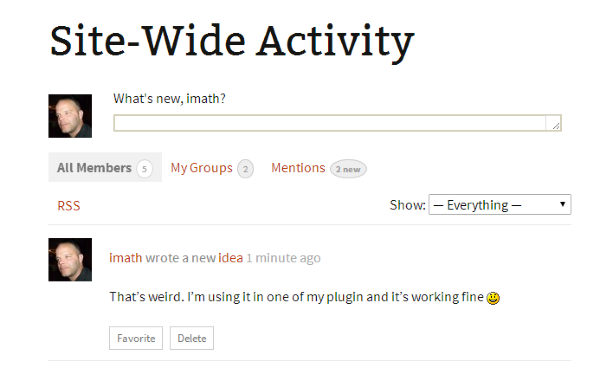
My first impression is i’m a bit surprised as i’m using Post type activities for one of my plugin and everything seems to be ok… See this image :
Anonymous UserInactive
@philippmuenchen @henrywright
Ok got it.
First i’ve just created this ticket and suggested a patch to solve the issue.
Now, you can still have it working by simply requesting a ‘not single’ member type using false as an extra argument eg :
bp_get_member_type( bp_get_member_user_id(), false );
So you’ll get the member type name, but not the singular name. If you want to have the singular name, here’s another gist :
https://gist.github.com/imath/3a5c5ade44eae997fdfd
Anonymous UserInactive
Let’s take an example : Custom Tags for your custom post type.
if the question is : “is it possible to have an activity generated each time a custom post type tag is created ?”
My reply is it’s not included in core. And by the way, creating a post tag doesn’t generate an activity.
Post types activities is easing the process of generating activities when an item of a ‘buddypress-activity’ supported post type is added.
We still need to work on generating activitiies when a comment is made on a post type.
About generating an activity when a taxonomy (hierarchical or not) is created is an interesting idea but seems inmho specific to a given post type. For example i have difficulties seeing an interest for post categories or post tags (but why not afterall!) but i do see an interest for one of my plugin. So i will explore this for the plugin i have in mind 😉
Hi @jessy-marco
Thanks for pointing this out. I’ve opened a Trac ticket to try to get this fixed.
Hi, I am a site developer but this is my first project using BuddyPress and bbpress for forums.
I seem to have everything working the way the client wants except for one thing.
During User registration the form asks a few questions like eligible to vote etc? this info is stored on the users Extended Profile page.
I need to give my client (the site owner) access to all user data so he can manage response accordingly but setting him as Editor he couldnt see the Extended Profile data for other users.
So I created a user type of “Editor Plus” and allowed him to edit, delete and create user.
He can now click into the other user profiles but still cannot view the Extended Profile Info.
I have tried 15 different User/Admin plugins none of them allow him access to this extended data?
My only option at this point is to make him an Administrator but im very nervous about doing that as he is a fiddler and could easily break the site.
I seem to remember a few years ago I used a plugin to make myself Super Admin and then I could limit what other Admins could access but I cant find or remember what it was.
This is only an issue for 2 user who will be running and managing the site so even if there is a code hack that i can put in for those 2 user to access the Extended Info pages?
Thanks
Mark
hi @philippmuenchen,
here’s a gist published by @imath to sort the member directory by member_type.
That (working)example is based on this Codex article
Greetings,
I’m at my wit’s end with a bug so hopefully someone can help me out here.
I am using BBPress 2.5.4 and BuddyPress 2.2.0.
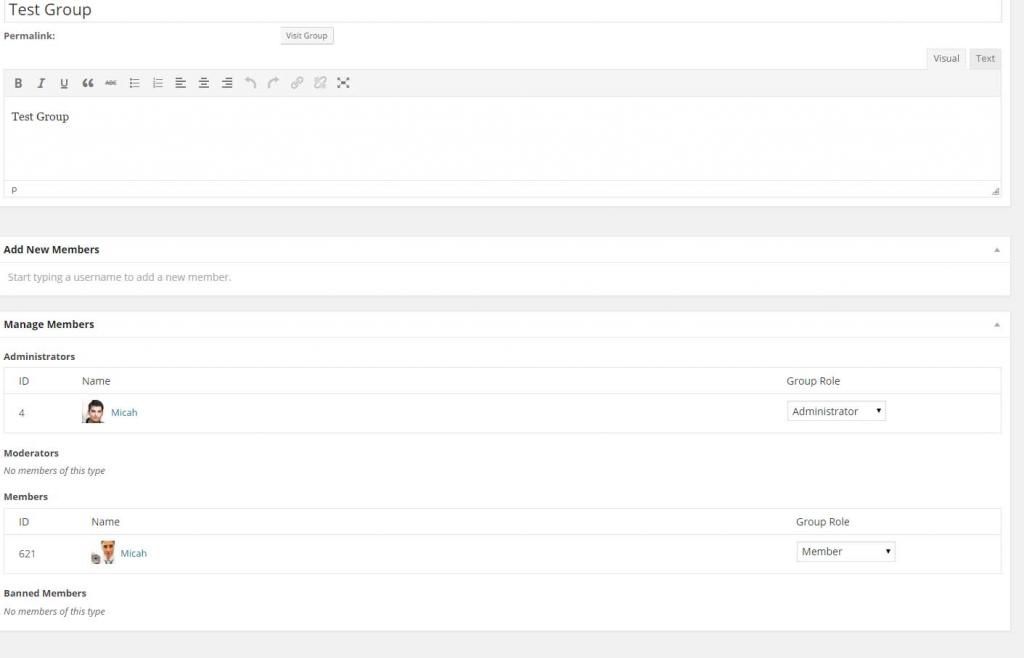
When I add a user to a group it adds the correct user ID and the correct user Avatar, but for some reason it only displays the name of whoever added that user.
Here is an image. You can see the name is the same and it links to the same user profile page, even though the ID number is clearly different.
Would love any advice!
Hi all,
I try to use BuddyPress linked with iFlyChat.
I’ve got 5 different team in my society, with supervisors and agents. I need my agent to speak only with his supervisor.
I need your talent to help me 🙂
I would like to allow only admin / moderator to add friends (their team members).So in iFlyChat, moderator would see all his team, and agent would see only his supervisor (and can’t add other friend).
Thx for your support and sorry for my English 🙂
I agree but it doesn’t pickup specific page template (the one I put in “Groups”) but generic template…
I use WP4.1 and BP2.2
Anyway I could achieve what I want by modifying generic page setting in my theme, and also SEO title with this topic.
Releases
I need changelogs for some versions of BP, but they are broke!
Hmm, it sounds harsh that you get burned and have problems on each update because ive not really had many problems when updating in the past, maybe a few small ones but not many, and if i have had a few problems ive just held off updating for a couple of weeks until the fixes have been issued into buddypress or the plugins.
After trying out “ALOT” of themes (paid and free) with buddypress and wordpress over the past 2 years i have made my own conclusion that the best themes to use in both cases are usually the bare bones and lightweight themes that can have things integrated by yourself as and when needed, this way you are cutting out alot of problems that can be caused within the theme itself, i know some themes look amazing but they can also cause alot of problems for you in the future if not regular updated by the developer.
If your comfy with design i would always opt for a lightweight and barebones theme and build upon that. less things built into a theme = easier to troubleshoot! (This is just my opinion)
I have tried numerous themes that have caused wiered things to happen with certain plugins, yet work fine on the default themes for example.
As for setting up a local test server, this is quite easy to do now, you should definitely look into using something like XXAMP and give it a try.
I still havent got round to testing the new buddypress update yet on my themes and plugins as i fell asleep lol.
Hi Henry,
I’m just new with wordpress and buddypress 🙂 it’s gonna be hard for me to start coding something.
As you said, i’m gonna try to open a topic in ideas forum.
thx for your support 🙂
You have to merge your .pot file with the latest one located in /wp-content/plugins/buddypress/buddypress.pot.
Read the “Updating your custom language file” section of this codex article:
Customizing Labels, Messages, and URLs
—
For other plugins, placing your custom translations in /wp-content/plugins or /wp-content/languages/plugins/ should work.
I’m running 2.2.0 on WP 4.1 on a local development server.
I activated Buddypress when ‘Anyone can Register’ was off. Switched it on, but the Activate and Register pages are not autogenerated as the Codex suggests they should be.
I’ve tried reinstalling and retrying with all other plugins deactivated and default WP theme 2015 activated. I’ve also followed the (now-outdated) codex instructions about template hierarchy and created copies of the template files in a child theme directory. None of these work.
I can successfully create pages ‘Activate’ and ‘Register’ in WordPress and select them in Settings > Buddypress > Pages, but both just load the home page, not ‘activate.php’ or ‘register.php’. (This is true regardless of what theme is active, so is not theme-related).
Can anyone assist?
Put your language file here:
/wp-content/languages/buddypress/
And you will not have to worry about upgrades removing your language file.
This is what I use. It blocks access to all the BP and bbPress components, but allows visitors to see the blog. I’m sure you could customize it to kill access to that too.
When you attempt to access a page you shouldn’t be able to see, you are redirected back to the home page
/**
 * Block public access to site with some exceptions.
 */
function hwdsb_block_access() {
	if ( is_user_logged_in() ) {
		return;
	}

	$redirect = is_buddypress();

	$site_path = bp_core_get_site_path();

	// subdirectory install
	if ( is_multisite() && ! is_subdomain_install() ) {
		global $current_blog;
		$site_path = $current_blog->path;
	}

	// strip site path from URI
	$path = substr( esc_url( $_SERVER['REQUEST_URI'] ), strlen( $site_path ) );

	if ( ! $redirect && function_exists( 'is_bbpress' ) ) {
		$redirect = is_bbpress();
	}

	// redirect if we match a condition and we're not on the homepage
	if ( (bool) $redirect === true && $path != '' ) {
		bp_core_redirect( bp_core_get_root_domain() );
		exit();
	}

}
add_action( 'template_redirect', 'hwdsb_block_access', 0 );
Another option might be something like this: https://wordpress.org/plugins/buddypress-private-message-for-friends-only/. I haven’t used it myself, so I’m not positive it still works.


