Search Results for 'buddypress'
-
AuthorSearch Results
-
February 12, 2013 at 12:24 am #152868
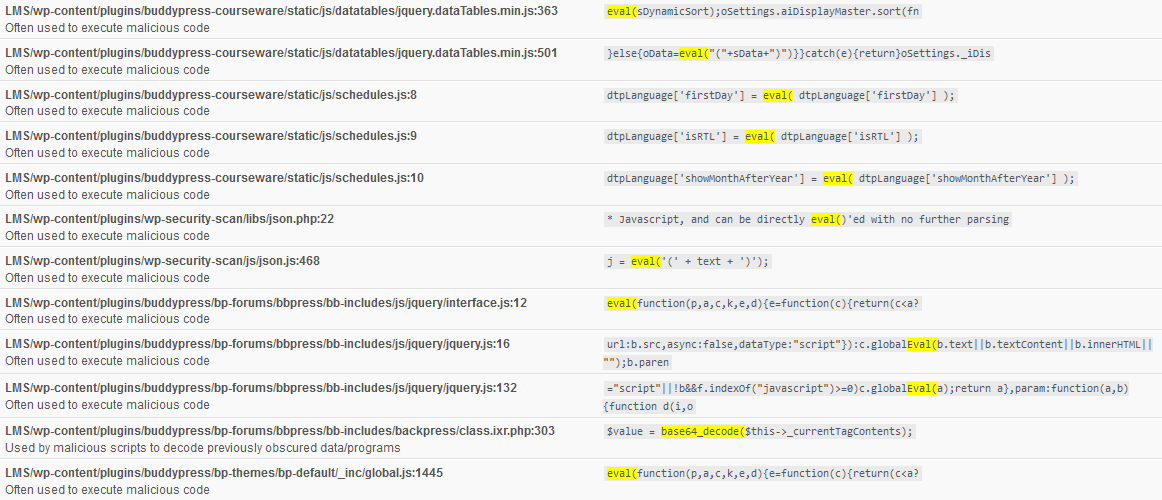
In reply to: base64_decode on BuddyPress & bbpress
mtrulete.cb
ParticipantHere’s the image:
 February 12, 2013 at 12:09 am #152867
NumberOneComputer
ParticipantHow do I change some of the css in your theme?
Best regards
February 11, 2013 at 11:55 pm #152866modemlooper
ModeratorUnfortunately, you have a theme that is heavy handed with it’s css and is forcing it’s style over the BP css. Theme compatibility is working it’s just that your theme has css that is styling the BP markup in an unflattering light.
Theme compatibility is not perfect. It’s main goal is to get BuddyPress inside a WordPress and function. How it looks can rely on the WordPress as in your case.
You will need to change some of the css in your theme to fit BP inside better.
February 11, 2013 at 11:37 pm #152865ParticipantToday I download new buddypress 1.7> trunk-6784 then install it but I still have the same problem
Best regards
February 11, 2013 at 7:57 pm #152855In reply to: [Resolved] Alignment Issue for TheStyle Theme
arredoannunci
Participantthis is the header-buddypress
take a look on line 199 (where is the error)
is the line that I always error
thank you very much
February 11, 2013 at 7:34 pm #152853In reply to: Remove BuddyPress 'change password'
Hugo Ashmore
ParticipantThe simplest approach would to simply remove the markup in /members/single/settings/general.php
February 11, 2013 at 7:29 pm #152852In reply to: BuddyPress Compatible
ParticipantI suspect that it’s line 146 the opening if statement for the dynamic sidebar missing a closing statement, but frankly trying to debug a page like that with so many conditionals and formatting that is not optimal is next to impossible, I would be isolating blocks of code and removing them to try and locate the point of error e.g. removing all the sidebar code and seeing if the page ran .
February 11, 2013 at 7:03 pm #152849In reply to: [Resolved] Alignment Issue for TheStyle Theme
ParticipantHello Hugo, you are very helpful to people like me who want to learn,
could you tell me how to do?
I followed the procedure twice for my template (http://bpsocialnetwork.wordpress.com/2013/01/22/u-design-theme-themeforest/)
but both times I have always the same error:
Parse error: syntax error, unexpected ‘<' in / members / miproduco / wp-content / themes / u-design / header-buddypress.php on line 199Now as you can see I reinstalled everything (without modification) but not good
please help meFebruary 11, 2013 at 6:39 pm #152846In reply to: BuddyPress Compatible
Patryk
Participant@mercime your instruction is incorrect, I’m looking for the error number of days and I can not find it
February 11, 2013 at 4:51 pm #152842In reply to: [Resolved] "Enable Group Forum" settings not saving
macbort
ParticipantThanks for the reply, @ubernaut.
Your hunch seems to be correct – It saved correctly when I temporarily switched to the bp-default theme.
The regular theme I’m working with is a Genesis child theme w/ the Genesis Connect plugin to hook-up with BuddyPress. There appears to be an issue with that, however.
I’ll pursue my troubleshooting further in that direction.
Cheers!
February 11, 2013 at 4:31 pm #152840omgbud
ParticipantHi,
open up this file sidebar.php. can be found at buddypress/bp-themes/bp-default/sidebar.php
around line 33, you can see this line:
`if ( is_user_logged_in() ) :`
This is the start of sidebar login widget box and below you can see line with the words “Please create an account to get started.”. If you do not want those words appear delete this line around line 37:
`printf( __( ‘Please create an account to get started.’, ‘buddypress’ ), bp_get_signup_page() );`
Just below the line above you can remove the login form and replace your subscription form or whatever.
Hope it helps.
///////////////
February 11, 2013 at 4:19 pm #152838In reply to: [Resolved] Alignment Issue for TheStyle Theme
ParticipantNo, I have not solved the problem
I tried them all, I also followed the steps several times
and the result: wrong page (as stated above)
Now I uninstalled BuddyPress
I can also reinstall (but do not know how to solve the last error)February 11, 2013 at 3:57 pm #152836In reply to: Buddypress admin page not found
Jchamp311
ParticipantFebruary 11, 2013 at 1:32 pm #152821Paul Wong-Gibbs
KeymasterI’m not aware of any great event management plugins for BuddyPress.
February 11, 2013 at 1:30 pm #152820KeymasterSet your users to the Contributor role, not Editor. Contributors can write drafts, but can’t publish.
I also want these people to receive notifications every time a new post is published.
If you specifically mean notifications inside BuddyPress, I’m not aware of any plugins that do this. You’ll have to write something yourself. If you mean notifications more generally, consider using the Jetpack plugin — users can subscribe to your site, and receive email updates when a post is published.
Regardless of what type of notification you meant, you’ll probably have to write some custom code to get it to send a message to your users when e.g. you promote them to Editor.
February 11, 2013 at 1:26 pm #152819In reply to: base64_decode on BuddyPress & bbpress
KeymasterI see no image. Can you share the link? I suspect these are red herrings coming from some code in the included version of bbPress.
If you aren’t sure, re-download BuddyPress from https://buddypress.org/download/
February 11, 2013 at 12:09 pm #152814In reply to: [Resolved] Alignment Issue for TheStyle Theme
ParticipantHello,
I tried to follow the whole procedure
now I get this error:
Parse error: syntax error, unexpected ‘<' in /membri/miproduco/wp-content/themes/u-design/header-buddypress.php on line 199link page: http://miproduco.altervista.org/activity/
where am I wrong?
can you give me some advice?
thank you very much and I apologize for the inconvenienceFebruary 11, 2013 at 7:50 am #152811Slava Abakumov
Moderator@grimbog
Is there any ETA when it will be ready for testing?February 11, 2013 at 6:36 am #152809In reply to: [Resolved] Website and bio (Extended profiles)
ParticipantHi, I am using this useful plugin named “Custom Profile Filters for BuddyPress” to remove link of any fields I want.
This plugin dont come with admin panel, so need to edit the custom-profile-filters-for-buddypress.php file.
After this line:
`$no_link_fields = array( // Enter the field ID of any field that you want to appear as plain, non-clickable text. Don’t forget to separate with commas.`You can add in the field (field name must match) that need to be linkless:
`’bio’,
‘something’ ,`This plugin allows you to setup social field too like just enter facebook username or id and it will auto generate the url.
https://wordpress.org/extend/plugins/custom-profile-filters-for-buddypress/
Note: this plugin is old and not update, there is an error with the social field url, but just need to apply this fixed:
Hope it helps.
February 11, 2013 at 6:18 am #152808ParticipantHi,
this is a code I use personally, but requires you to edit the bp-groups-actions.php, sorry i do not know how to write function.
open buddypress/bp-groups/bp-groups-actions.php
around line 150
After this line:
`do_action( ‘groups_group_create_complete’, $bp->groups->new_group_id );`Add this code:
` $to = “YOUREMAILADDRESS”;
$name= bp_core_get_username(bp_loggedin_user_id());
$groupname = bp_get_new_group_name(bp_get_new_group_id());
$groupurl = bp_get_group_permalink( $bp->groups->current_group );
$subject = “$name created new group $groupname”;
$body = “$name created new group $groupname, visit $groupurl”;
mail($to, $subject, $body);
`That’s it, when a user hit the Finish create group button this code will send to the email stated address with the newly created group link. use at your own risk. Hope someone better can create a theme function or a plugin for this.
This is needed to keep track of newly created groups to alert you if spammers are creating groups to spam.
Hope it helps.
February 11, 2013 at 6:02 am #152806Saurabh
ParticipantThis is a very very late answer. Might be irrelevant now, but BuddyPress Media has evolved from being a Kaltura port.
It is now a powerful stand alone media manager for BuddyPress.
Regards.
February 10, 2013 at 10:42 pm #152801zanzaboonda
ParticipantAaand now it’s randomly working. LOL Maybe it just took time to update after fixing those things? IDK.
Anyway, thanks for all of your hard work. I love BuddyPress!
<3February 10, 2013 at 10:11 pm #152800ParticipantI pasted it into the WP Edit CSS section and got an error for lines 53 and 55. I think the <b and need to be deleted.
But I’m still having the same problem. lol
February 10, 2013 at 10:03 pm #152798ParticipantI just realized that my individual groups do not display properly/aren’t responding to the CSS adjustments. Any idea why that could be or what I could add to the CSS?
Thanks! 🙂
February 10, 2013 at 8:30 pm #152796ParticipantIf you didn’t recive my url, you can go to see my profile
Best regards
-
AuthorSearch Results


