Search Results for 'custom activity page'
-
Search Results
-
Topic: BP 2.8.2 – Activity Problem
hello support team,
I’m facing a problem after updating buddypress to 2.8.2. Once I submit any text into activity stream it shows the website in an IFRAME, see the screenshot below plz. Can provide login if that helps.
Screenshot: http://nimb.ws/ufhcbA
Also when I’m trying to upload an image into activity stream, or trying to upload an image in Groups avatar or cover photo or my individual cover photo, it says “An error occured. Please try again later”. It was working all fine 2 days ago & after the buddypress update it doesn’t seems to work.
I’m using:-
WP 4.7.3
BP 2.8.2
BBpress 2.5.12
rtMedia for WordPress, BuddyPress and bbPress 4.3.1
Gravity Forms 2.0.6.9 – For customized registration page
Gravity Forms User Registration Add-On 3.3.9 – For mapping user registration with WP & BP fields.Please help!
Thanks,
SiddI search for a plugin or code.
I wish a notification in the administration of the keywords I would have chosen, without deleting his keywords in the front office. This feature must work with all buddypress, message, activity, group, and custom pages.
I use WordPress 4.7 and BuddyPress 2.7.4. I have Woffice theme based on Unyson.
Thank you in advance for your help
Excuse me if this request is in the wrong place:
I have added a working custom date field to my activity page by editing the post-form.php and the the bp-custom.php. This is in my bp-custom.php:
// CUSTOM DATE FIELD
function add_date_to_activity( $content, $user_id, $activity_id ) {
bp_activity_update_meta( $activity_id,'thedate', $_POST['thedate'] );
}
add_action( 'bp_activity_posted_update', 'add_date_to_activity', 10, 3 );
function my_datemeta() {
$my_datemeta = bp_activity_get_meta( bp_get_activity_id(),'thedate' );
if (is_user_logged_in()) : {
echo "<span class='datefont'>" . $my_datemeta . "</span></br>";
}
endif;
}
add_action( 'bp_activity_entry_meta','my_datemeta' );
Now I am trying to sort the posted activities by this date field instead of the standard sort by activity-id’s. Is there any way to override the standard sort function?
Thanks in advance, i’d be happy to share more information if necessary
Topic: New Theme for Free
I’ve been developing a new theme called Centro which supports the core functionality of WordPress & BuddyPress.
It’s currently still in development but has been released and is available on GitHub.
You can view a demo on buddycore or here also and a download is available via GitHub.
Issues will be answered and resolved via GitHub.
Enjoy! Happy New Year!
**********************
Some Features
**********************
Colour customizations in wp-admin.
Support for posts and pages
Archive pages for search and taxonomies
Post thumbnails and post formats
Post commentsActivity streams
Member profiles
– xProfile
– Settings
– Friends
– PMs
– Notifications
– MultisiteRegistration
– Basic member
— With blog creationResponsive
HTML5
Cross Browser (IE10+)*************************
Group support will definitely be added in the next updates
Plan to add support for BBPress and possibly WooCommerceAll of this depends on how many people are using the theme and feature requests from users.
The problem:
I want to display different types of names on the updates in the activity stream like:
– first name + last name for updates which the user posts on their stream
– username/display name when there are updates in groupsi have written the following code:
/**
 * Get the fullname of the current member in the loop.
 *
 * Full name is, by default, pulled from xprofile's Full Name field.
 * When this field is empty, we try to get an alternative name from the
 * WP users table, in the following order of preference: display_name,
 * user_nicename, user_login.
 *
 * @return string The user's fullname for display.
 */
function bp_get_member_name_custom() {
	global $members_template, $bp;
	// print_r($members_template->member->id);
	$firstname= bp_get_profile_field_data('field=vorname&user_id='.$members_template->member->id);
	$lastname= bp_get_profile_field_data('field=nachname&user_id='.$members_template->member->id);
	if(!empty($firstname) || !empty($firstname)){
		$fullname = $firstname.' '.$lastname ;
		return apply_filters( 'bp_get_member_name_custom',$fullname );
	}else{
		$name_stack = array(
			'display_name',
			'user_nicename',
			'user_login'
		);

		foreach ( $name_stack as $source ) {
			if ( !empty( $members_template->member->{$source} ) ) {
				// When a value is found, set it as fullname and be done with it.
				$members_template->member->fullname = $members_template->member->{$source};
				break;
			}
		}
		return apply_filters( 'bp_get_member_name_custom', $members_template->member->fullname );
	}
	/**
	 * Filters the display name of current member in the loop.
	 *
	 * @since 1.2.0
	 *
	 * @param string $fullname Display name for current member.
	 */
}

add_filter( 'bp_get_member_name_custom', 'wp_filter_kses' );
add_filter( 'bp_get_member_name_custom', 'stripslashes'   );
add_filter( 'bp_get_member_name_custom', 'strip_tags'     );
add_filter( 'bp_get_member_name_custom', 'esc_html'       );

// full name to all memebr list
add_filter('bp_get_member_name','bp_get_member_name_custom');


// Fullname in group memeber list
function bp_get_group_member_link_custom() {
	global $members_template, $bp;

	$firstname= bp_get_profile_field_data('field=vorname&user_id='.$members_template->member->id);
	$lastname= bp_get_profile_field_data('field=nachname&user_id='.$members_template->member->id);
	if(!empty($firstname) || !empty($firstname)){
		$fullname = $firstname.' '.$lastname ;
		return apply_filters( 'bp_get_group_member_link_custom', '<a href="' . bp_core_get_user_domain( $members_template->member->user_id, $members_template->member->user_nicename, $members_template->member->user_login ) . '">' . $fullname . '</a>' );
	}else{
		$name_stack = array(
			'display_name',
			'user_nicename',
			'user_login'
		);

		foreach ( $name_stack as $source ) {
			if ( !empty( $members_template->member->{$source} ) ) {
				// When a value is found, set it as fullname and be done with it.
				$members_template->member->fullname = $members_template->member->{$source};
				break;
			}
		}
		return apply_filters( 'bp_get_group_member_link_custom', '<a href="' . bp_core_get_user_domain( $members_template->member->user_id, $members_template->member->user_nicename, $members_template->member->user_login ) . '">' . $members_template->member->display_name . '</a>' );
	}

}
add_filter('bp_get_group_member_link','bp_get_group_member_link_custom');

/**
 * Fetch the display fullname for a user.
 *
 * @param int|string|bool $user_id_or_username User ID or username.
 * @return string|bool The display name for the user in question, or false if
 *                     user not found.
 */
function bp_core_get_user_displayname_custom( $user_id_or_username ) {
	if ( empty( $user_id_or_username ) ) {
		return false;
	}
	// return $user_id_or_username;
	if ( ! is_numeric( $user_id_or_username ) ) {
		$user_id = bp_core_get_userid( $user_id_or_username );
	} else {
		$user_id = $user_id_or_username;
	}

	if ( empty( $user_id ) ) {
		return false;
	}

	global $bp;
	$firstname= bp_get_profile_field_data('field=vorname&user_id='.$user_id);
	$lastname= bp_get_profile_field_data('field=nachname&user_id='.$user_id);
	// return $user_id;
	if(!empty($firstname) || !empty($firstname)){
		$fullname = $firstname.' '.$lastname ;
		return apply_filters( 'bp_core_get_user_displayname_custom', $fullname, $user_id );
	}else{

		$display_names = bp_core_get_user_displaynames( array( $user_id ) );

		if ( ! isset( $display_names[ $user_id ] ) ) {
			$fullname = false;
		} else {
			$fullname = $display_names[ $user_id ];
		}
		return apply_filters( 'bp_core_get_user_displayname_custom', $fullname, $user_id );
	}

}
add_filter( 'bp_core_get_user_displayname_custom', 'strip_tags', 1 );
add_filter('bp_core_get_user_displayname_custom');
add_filter('bp_core_get_user_displayname','bp_core_get_user_displayname_custom');

// Fullname on profile page on other member
add_filter('bp_displayed_user_fullname','bp_core_get_user_displayname_custom');
which is creating the following output on my site:
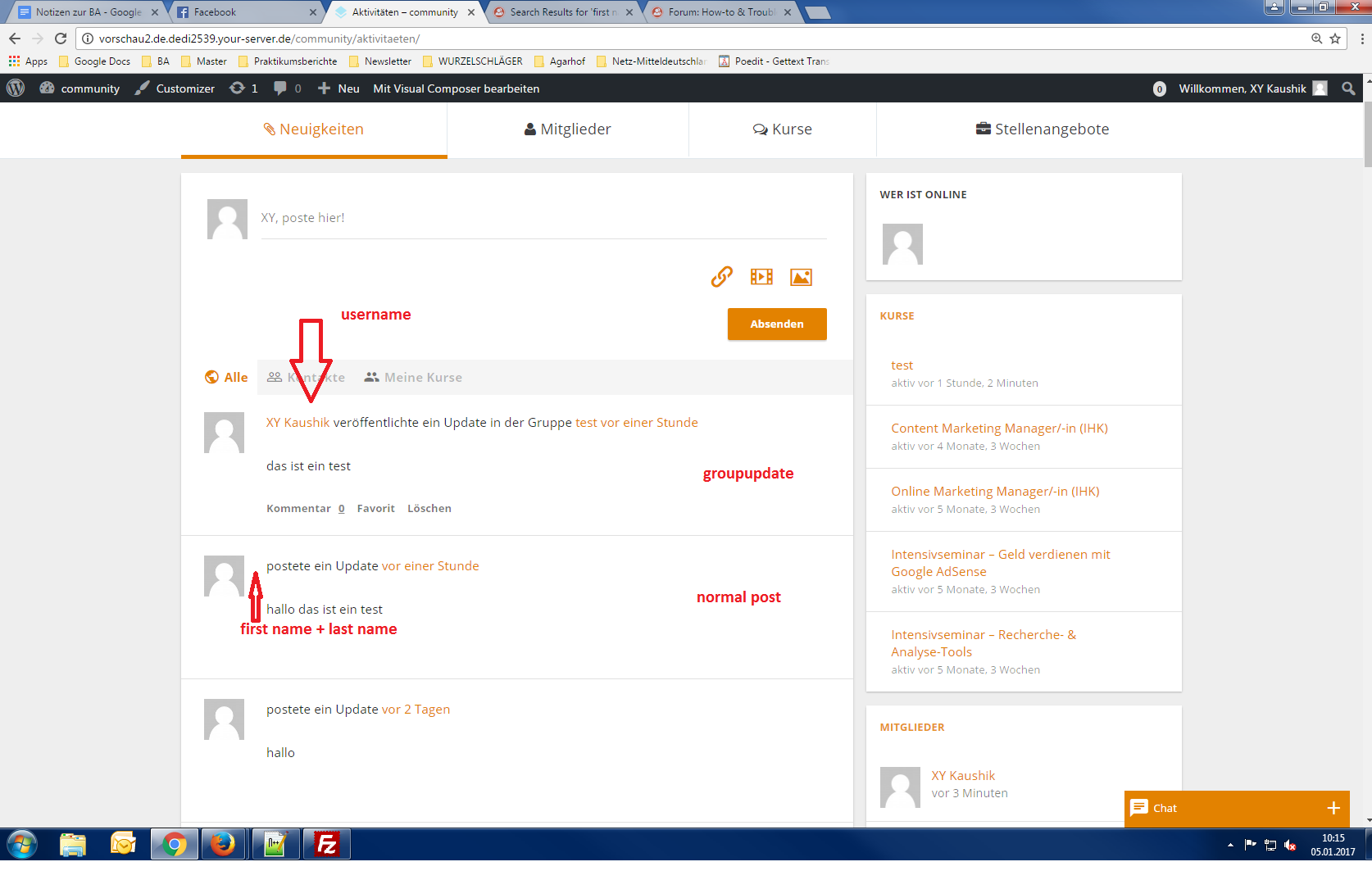
It was working before updating to WordPress 4.7.
Can anyone help since i can’t find a solution or error?
Or am i thinking to complicated?i’m currently working on:
Wordpress Version 4.7.
Buddypress Version 2.7.4
BP Xprofile Member Type Field Version 1.0.2Hello, sorry for my bad english but I’m Italian. I want to create a sub-menu under the menu Activity (and this is ok) and view a template’s page when I click on the sub-menu. I can not do this last step: associate the template. If I make an item (not sub) it’s work but if I make the sub-item don’t work.
I think that the error is on this line:
bp_core_load_template( apply_filters( 'bp_core_template_plugin','members/single/swap' ) );
And where do I put the file swap.php? in which folder? Thank you
This is my code:function bpfr_custom_profile_sub_nav() { global $bp; $parent_slug = 'activity'; //Add subnav item bp_core_new_subnav_item( array( 'name' => __( 'Swap' ), 'slug' => 'swap', 'parent_url' => $bp->displayed_user->domain . $parent_slug.'/', 'parent_slug' => $parent_slug, //'parent_slug' => $bp->slug 'screen_function' => 'swapluisa', 'position' => 1, ) ); } add_action( 'bp_setup_nav', 'bpfr_custom_profile_sub_nav' ); function swapluisa() { //add title and content here - last is to call the members plugin.php template add_action( 'bp_template_title', 'my_groups_page_function_to_show_screen_title' ); add_action( 'bp_template_content', 'my_groups_page_function_to_show_screen_content' ); bp_core_load_template( apply_filters( 'bp_core_template_plugin','members/single/swap' ) ); } add_action( 'bp_setup_nav', 'my_bp_nav_adder', 50 ); function my_groups_page_function_to_show_screen_title() { echo 'My new Page Title'; } function my_groups_page_function_to_show_screen_content() { echo 'My Tab content here'; }Topic: new query arg
This code allows you to sort activity from most favorited activity to least favorited activity.
class BP_Loop_Filters {
	// Constructor
	public function __construct() {
		$this->setup_filters();
	}

	// Filters
	private function setup_filters() {
		add_filter( 'bp_activity_get_user_join_filter', array( $this, 'order_by_most_favorited' ),     10, 6 );
		add_filter( 'bp_activity_paged_activities_sql', array( $this, 'order_by_most_favorited'),      10, 2 );
		// Maybe Fool Heartbeat Activities!
		//add_filter( 'bp_before_activity_latest_args_parse_args', array( $this, 'maybe_fool_heartbeat' ), 10, 1 );
	}

	/**
	 * Ninja Warrior trick to reorder the Activity Loop
	 * orders by most likes highest to least
	 */
	public function order_by_most_favorited( $sql = '', $select_sql = '', $from_sql = '', $where_sql = '', $sort = '', $pag_sql = '' ) {
		$r = $select_sql;
		if ( empty( $r['meta_query'] ) || ! is_array( $r['meta_query'] ) ) {
			return $sql;
		} else {
			$meta_query_keys = wp_list_pluck( $r['meta_query'], 'key' );
			if ( ! in_array( 'favorite_count', $meta_query_keys ) ) {
				return $sql;
			}
			preg_match( '/\'favorite_count\' AND CAST\((.*) AS/', $sql, $match );
			if ( ! empty( $match[1] ) ) {
				$sql = str_replace( 'ORDER BY a.date_recorded', 'ORDER BY '. $match[1] .' + 0', $sql );
			}
		}

		return $sql;
	}
}

// 1, 2, 3 go !
function bp_loop_filters() {
	return new BP_Loop_Filters();
}
add_action( 'init', 'bp_loop_filters' );
with query args like this:
	// order activity by favorited.
	$query_args = array(
		'meta_query' 	=> 	array(
			array(
				'key'     => 'favorite_count',
				'value'   => 1,
				'type'    => 'numeric',
				'compare' => '>='
			),
		),
	);
Does anyone know how to add a new parameter argument for this? instead of
favorite_count, I would like something likeorderby_favorite_count.The reason is, I’ve got custom pages where I like to manipulate the activity loop in a variety of ways, and if I don’t use that
class BP_Loop_Filters, then this query args code:$query_args = array( 'meta_query' => array( array( 'key' => 'favorite_count', 'value' => 1, 'type' => 'numeric', 'compare' => '>=' ), ), );will get activities that have been favorited at least x amount of times, but ordered by date_recorded.
So I would like to be able to
1. order activities from most favorited, to least favorited, and
2. order activities by date with activities that has been favorited at least x amount of times.At the moment I can only do one or the other.
Any help appreciated.
Topic: Newbie questions
Hey guys. I’m building a social media focusing on educational matters but I’m having some problems (as I’m not a dev and have never tried to build anything so complex):
1) How can I change labes like “following”, “followers”, “follow”, “friends”, etc. sitewide?
2) How can I make the BuddyPress Login widget for non-logged users I’m using in redirect to a page other than wp-login? (And the same with the Activity widget for logged users)
3) How can I customize the tabs on the Activity page? (I want to hide some options)
Thank you very much!
Can anymore provide some guidance on hiding BuddyPress user profile fields and custom tabs from non-logged in users?
I’ve been trying to figure out how to prevent non-logged in users from viewing my BuddyPress pages, but I can’t seem to quite make everything work. So far, I’ve been able to figure out how to restrict access to the Members page and redirect non-logged in users to the login page. I put the following code in my bp-custom.php file, which is in my plugins folder. I got the code from this BuddyPress forum page (https://buddypress.org/support/topic/hiding-groups-activity-members-list-to-non-members/).
<?php

/**
 * Change BuddyPress default Members landing tab.
 */
define('BP_DEFAULT_COMPONENT', 'profile' );

/* Prevent logged out users from accessing bp activity page */
function nonreg_visitor_redirect() {
global $bp;
if ( bp_is_activity_component() || bp_is_groups_component() || bp_is_group_forum() || bp_is_page( BP_MEMBERS_SLUG ) ) {
if(!is_user_logged_in()) { //just a visitor and not logged in
wp_redirect( get_option('siteurl') . '/wp-login.php' );
}
}
}
add_filter('get_header','nonreg_visitor_redirect',1);

?>
However, non-logged in users can still view each user’s page and their profile tabs. How can I restrict access to those pages as well? I’d rather not use another plugin.
(Latest version of WP/BP; non-bundled custom theme, using child theme.)
When adding a custom index & members-loop to /members/ in my child-theme, to make some adjustments to the members directory layout, individual profile pages break completely, I think defaulting to the pages.php but loaded without any content.
childtheme/members/members-loop.php
<?php
//global $members_template;
//$reset_members_template = $members_template;

do_action( 'bp_before_members_loop' ); ?>

<?php if ( bp_has_members( bp_ajax_querystring( 'members' ) . '&per_page=21&type=alphabetical' ) ) : ?>

	<div id="pag-top" class="pagination">
		<div class="pag-count" id="member-dir-count-top"><?php bp_members_pagination_count(); ?></div>
		<div class="pagination-links" id="member-dir-pag-top"><?php bp_members_pagination_links(); ?></div>
	</div>

	<?php do_action( 'bp_before_directory_members_list' ); ?>

	<ul id="members-list" class="item-list" role="main">

	<?php while ( bp_members() ) : bp_the_member(); ?>

		<li>
			<div class="item-avatar">
				<a href="<?php bp_member_permalink(); ?>"><?php bp_member_avatar('type=full&width=80&height=80'); ?></a>
			</div>
			<div class="item">
				<div class="item-title"><a href="<?php bp_member_permalink(); ?>"><?php bp_member_name(); ?></a></div>
				<div class="item-meta"><span class="activity"><?php bp_member_last_active(); ?></span></div>
				<?php do_action( 'bp_directory_members_item' ); ?>
			</div>
			<div class="action">
				<?php do_action( 'bp_directory_members_actions' ); ?>
			</div>
			<div class="clear"></div>
		</li>

	<?php endwhile; ?>

	</ul>

	<?php do_action( 'bp_after_directory_members_list' ); ?>

	<?php bp_member_hidden_fields(); ?>

	<div id="pag-bottom" class="pagination">
		<div class="pag-count" id="member-dir-count-bottom"><?php bp_members_pagination_count(); ?></div>
		<div class="pagination-links" id="member-dir-pag-bottom"><?php bp_members_pagination_links(); ?></div>
	</div>

<?php else: ?>
	<div id="message" class="info"><p><?php _e( "Sorry, no members were found.", 'buddypress' ); ?></p></div>
<?php endif;

//$members_template = $reset_members_template;
?>

<?php do_action( 'bp_after_members_loop' ); ?>
childtheme/members/index.php
<?php

/**
 * BuddyPress - Members Directory
 *
 * @package BuddyPress
 * @subpackage bp-default - SSSMG
 */

get_header( 'buddypress' ); ?>

	<?php do_action( 'bp_before_directory_members_page' ); ?>

<div class="container">
<div class="row">
<div id="primary" class="col-md-10">

	<div id="content" role="main" class="<?php do_action( 'content_class' ); ?>">
		<div class="padder">
		<div class="buddypress">

		<?php do_action( 'bp_before_directory_members' ); ?>

	<form action="" method="post" id="members-directory-form" class="dir-form">

	<?php do_action( 'bp_before_directory_members_content' ); ?>

	<div id="members-dir-search" class="dir-search" role="search">
		<?php bp_directory_members_search_form(); ?>
	</div><!-- #members-dir-search -->

	<?php do_action( 'bp_before_directory_members_tabs' ); ?>

		<div class="item-list-tabs" role="navigation">
			<ul>
				<li class="selected" id="members-all"><a href="<?php bp_members_directory_permalink(); ?>"><?php printf( __( 'All Members %s', 'buddypress' ), '<span>' . bp_core_get_total_member_count() . '</span>' ); ?></a></li>

				<?php if ( is_user_logged_in() && bp_is_active( 'friends' ) && bp_get_total_friend_count( bp_loggedin_user_id() ) ) : ?>
					<li id="members-personal"><a href="<?php echo bp_loggedin_user_domain() . bp_get_friends_slug() . '/my-friends/'; ?>"><?php printf( __( 'My Friends %s', 'buddypress' ), '<span>' . bp_get_total_friend_count( bp_loggedin_user_id() ) . '</span>' ); ?></a></li>
				<?php endif; ?>

				<?php do_action( 'bp_members_directory_member_types' ); ?>

			</ul>
		</div><!-- .item-list-tabs -->

		<div id="members-dir-list" class="members dir-list">
			<?php //bp_get_template_part( 'members/members-loop' );
				locate_template( array( 'members/members-loop.php' ), true );
			?>
		</div><!-- #members-dir-list -->

		<?php do_action( 'bp_directory_members_content' ); ?>

		<?php wp_nonce_field( 'directory_members', '_wpnonce-member-filter' ); ?>

		<?php do_action( 'bp_after_directory_members_content' ); ?>

	</form><!-- #members-directory-form -->

	<?php do_action( 'bp_after_directory_members' ); ?>

</div><!-- #buddypress -->
</div><!-- .padder -->
	</div><!-- #content -->

</div><!-- primary -->
<?php get_sidebar( 'buddypress' ); ?>
</div><!-- row -->
</div><!-- container -->

	<?php do_action( 'bp_after_directory_members_page' ); ?>

<?php get_footer( 'buddypress' ); ?>
bp-custom.php
<?php
// bp-custom.php - BP hacks and mods will go here
/**
 * Include bbPress 'topic' custom post type in WordPress' search results */

function ntwb_bbp_topic_cpt_search( $topic_search ) {
	$topic_search['exclude_from_search'] = false;
	return $topic_search;
}
add_filter( 'bbp_register_topic_post_type', 'ntwb_bbp_topic_cpt_search' );

/**
 * Include bbPress 'forum' custom post type in WordPress' search results */

function ntwb_bbp_forum_cpt_search( $forum_search ) {
	$forum_search['exclude_from_search'] = false;
	return $forum_search;
}
add_filter( 'bbp_register_forum_post_type', 'ntwb_bbp_forum_cpt_search' );

/**
 * Include bbPress 'reply' custom post type in WordPress' search results  */

function ntwb_bbp_reply_cpt_search( $reply_search ) {
	$reply_search['exclude_from_search'] = false;
	return $reply_search;
}
add_filter( 'bbp_register_reply_post_type', 'ntwb_bbp_reply_cpt_search' );

/**
 * Ensure that multiselect boxes have trailing brackets in their 'id' and 'name' attributes.
 *
 * These brackets are required for an array of values to be sent in the POST
 * request. Previously, bp_get_the_profile_field_input_name() contained the
 * necessary logic, but since BP 2.0 that logic has been moved into
 * BP_XProfile_Field_Type_Multiselectbox. Since bp-default does not use the
 * BP_XProfile_Field_Type classes to build its markup, it did not inherit
 * the brackets from their new location. Thus this workaround.
 */
function bp_dtheme_add_brackets_to_multiselectbox_attributes( $name ) {
	global $field;

	if ( 'multiselectbox' === $field->type ) {
		$name .= '[]';
	}

	return $name;
}
add_filter( 'bp_get_the_profile_field_input_name', 'bp_dtheme_add_brackets_to_multiselectbox_attributes' );

// add the custom column headers to BP manage signups
function philopress_modify_user_columns($column_headers) {
        $column_headers['extended'] = 'Extended';
        return $column_headers;
}
add_action('manage_users_page_bp-signups_columns','philopress_modify_user_columns');

// dump all the pending user's meta data in the custom column
function philopress_signup_custom_column( $str, $column_name, $signup_object ) {
	if ( $column_name == 'extended' )
             return print_r( $signup_object->meta, true );
        return $str;
}
add_filter( 'bp_members_signup_custom_column', 'philopress_signup_custom_column', 1, 3 );

//* Redirect WordPress Logout to Home Page
add_action('wp_logout',create_function('','wp_redirect(home_url());exit();'));

//add @mentions to bbpress forum
function custom_bbpress_maybe_load_mentions_scripts( $retval = false ) {
	if ( function_exists( 'bbpress' ) && is_bbpress() ) {
		$retval = true;
	}
	return $retval;
}
add_filter( 'bp_activity_maybe_load_mentions_scripts', 'custom_bbpress_maybe_load_mentions_scripts' );

function bphelp_dpioml(){
	$bphelp_my_profile_field_1='Profession';
	$bphelp_my_profile_field_2='Primary Institution';
       if( is_user_logged_in() && bp_is_members_component() ) { ?>
        <div class="bph_xprofile_fields">
                          <?php if(bphelp_my_profile_field_1<>"") echo bp_member_profile_data( 'field='.$bphelp_my_profile_field_1 );  ?><br />
						  <?php if(bphelp_my_profile_field_2<>"") echo bp_member_profile_data( 'field='.$bphelp_my_profile_field_2 );  ?><br />
                </div><?php
       }
}
add_action('bp_directory_members_item', 'bphelp_dpioml');

?>
I’ve tried all sorts of different combinations but whatever I do, the only way to get both the profile pages and the members directory to display is to remove the index and members-loop customizations. Then everything works fine, but without the adjustments to the members directory that I want (removing recent updates, for instance). Any pointers would be brilliant!
Topic: Separate activity per post
Hello!
I have searched for such similar solution and tried to figure out how this would be possible, but could not come up with anything usefull.The point is:
1. I have two CPT.
2. Both look like profile page.
3. I want on both of them the default activity form (extended with rtMedia and some geolocation).
4. I want to be able to add with this form activities that will say i.e. “John posted a link in [cpt title].
5. All activities posted to that CPT should be listed under it.What would be the best way to do this? I have thought about filtering activity by some custom variable – ok, I could do this in the activity loop BUT hot to assign the form and make it post/save the activity as an actual activity of given CPT?
Something like comments but preserving activity abilities.I know it may be hard to do or even not possible but any feedback that could even partially help me accomplish this is great!
I’m developing a plugin that adds a custom group home page (
groups/single/front.php. The page will display the latest activity for each component that as active for the group. In the template, I’m checking withbp_is_active( {component} ).The problem is that some of the components return false even though they are active, a tab is displayed for them.
Only xprofile, activity, docs and members return true.
global $bp;returns["loaded_components"]=> ["loaded_components"]=> array(8) { ["forums"]=> string(6) "forums" ["members"]=> string(7) "members" ["profile"]=> string(8) "xprofile" ["activity"]=> string(8) "activity" ["groups"]=> string(6) "groups" ["settings"]=> string(8) "settings" ["events"]=> string(4) "bpeo" ["docs"]=> string(7) "bp_docs" }["active_components"]=> array(6) { ["xprofile"]=> string(1) "1" ["settings"]=> string(1) "1" ["activity"]=> string(1) "1" ["groups"]=> string(1) "1" ["members"]=> string(1) "1" ["bp_docs"]=> string(1) "1" }In the template:
<?php if ( bp_is_active( 'xprofile' ) ) : ?>
    <div class="buddypress-module xprofile intro">Intro</div>
<?php endif; ?>
<?php if ( bp_is_active( 'activity' ) ) : ?>
    <div class="buddypress-module activity">Activity</div>
<?php endif; ?>
<?php if ( bp_is_active( 'forums' ) ) : ?>
    <div class="buddypress-module forums replies">Replies</div>
    <div class="buddypress-module forums topics">Topics</div>
<?php endif; ?>
<?php if ( bp_is_active( 'blogs' ) ) : ?>
    <div class="buddypress-module blogs">Blogs</div>
<?php endif; ?>
<?php if ( bp_is_active( 'events' ) ) : ?>
    <div class="buddypress-module events">Events</div>
<?php endif; ?>
<?php if ( bp_is_active( 'bp_docs' ) ) : ?>
    <div class="buddypress-module docs">Docs</div>
<?php endif; ?>
<?php if ( bp_is_active( 'members' ) ) : ?>
    <div class="buddypress-module members">Members</div>
<?php endif; ?>`
Confirmed with twentysixteen
WordPress 4.6.1
BuddyPress 2.7.2Hi everyone!
We are using on our website Buddypress and want to make more SEO frendly profile url’s
example.com/{City}/{Instrument}/{Firstname-Lastname}
example.com/{City}/{Style}/{Band-Or-Ensemble name}it posible with standart post types with hierarchical categories, but I didn’t found posibility to add taxonomy to activity and groups.
ust small clarification:
I have url’s:
example.com/members/{user}
I want them to be more SEO friendly such as:
example.com/{City}/{Instrument}/{Firstname-Lastname}
example.com/{City}/{Style}/{Band-Or-Ensemble name}I have found the way, how to update url’s structure:
in functions.phpadd_filter( 'bp_get_member_permalink', 'custom_bp_get_member_permalink' ); function custom_bp_get_member_permalink(){ global $members_template; $url = get_site_url(); $city = xprofile_get_field_data('City', $members_template->member->id); $instrument = xprofile_get_field_data('Instrument', $members_template->member->id); $full_name = $members_template->member->fullname; return $url.'/members/'.convert_to_url_ready($city).'/'.convert_to_url_ready($instrument).'/'.convert_to_url_ready($full_name); }but I need to rewrite url’s to get user’s pages.
Wating for any ideas. Thanks in advance.hi.
i am using latest versions of both wordpress and buddypress.and working on a food website.
in this website , i wanted to allow only authors to post activity updates .
(because it will be much easier for users to track their favorite chef recipes in the activity page.)
so i’ve hide the ” personal ” submenu of activity tab : Activity > Personal (where people can post updates)
with the help of following code in bp-custom.php :function bpfr_hide_tabs() { global $bp; if ( bp_is_user() && ( !current_user_can(author) || !current_user_can(administrator) ) ) { bp_core_remove_subnav_item($bp->activity->slug, 'just-me'); } } add_action( 'bp_setup_nav', 'bpfr_hide_tabs', 15 );but now when i go to my profile (as a subscriber)
i will see a 404 page.
i’ve searched a lot and i noticed that , now that i’ve removed the default activity stream tab , i have to point it to another tab. so when a user profile is loading (or if a user clicks on activity tab),
instead of default activity> personal . it load activity > mentions / OR / favorites / OR / … (some other submenu than personal )so my question is:
how can i change the default activity stream tab
from
Activity > Personal
To
Activity > Mentions – Or to – Activity > Favorites – …thanks a lot for any help.
Hello
I would exclude automatically, some categories of the blog post, in the activity stream. It’s possible?I saw that the same problem was seen here: https://buddypress.org/support/topic/possible-to-exclude-post-categories-in-activity-stream-and-make-a-user-profile-private-like-with-pri/
But applying the same function with the latest version of BuddyPress, it does not work. is possilibe?
I also tried to customize the Post Types default ‘post’, following this guide: https://codex.buddypress.org/plugindev/post-types-activities/
changing fields as well:
add_post_type_support( 'post', 'buddypress-activity' ); function customize_page_tracking_args() { // Check if the Activity component is active before using it. if ( ! bp_is_active( 'activity' ) ) { return; } bp_activity_set_post_type_tracking_args( 'post', array( 'component_id' => buddypress()->blogs->id, 'action_id' => 'new_blog_post', // or 'new_post' 'bp_activity_admin_filter' => __( 'Published a new post', 'emt-buddypress' ), 'bp_activity_front_filter' => __( 'Posts', 'emt-buddypress' ), 'contexts' => array( 'activity', 'member' ), 'activity_comment' => true, 'bp_activity_new_post' => __( '%1$s shared a new <a href="%2$s">post</a>', 'emt-textbuddypress' ), 'bp_activity_new_post_ms' => __( '%1$s sahred a new <a href="%2$s">post</a>, on the site %3$s', 'emt-textbuddypress' ), 'position' => 100, ) ); } add_action( 'bp_init', 'customize_page_tracking_args' );Finally I tried to customize the content of the post, in activity stream, as always suggested in this post:
guide:https://codex.buddypress.org/plugindev/post-types-activities/
or this:
https://buddypress.org/support/topic/custom-activity-new-post-content-not-broken-after-update-the-post/This is my function:
function record_cpt_activity_content( $cpt ) {
    if ( 'new_post' === $cpt['type'] ) {
        $cpt['content'] = '<a href="' . get_permalink( $post->ID ) . '" class="activity-content-title" >' $post->ID). '</span><br />'
		. get_the_post_thumbnail( $post->ID, '') . '<br /> <br />'
		. get_post_field('post_content', $post->ID);
    }
    return $cpt;
}
add_filter('bp_before_activity_add_parse_args', 'record_cpt_activity_content');
The problem is that the added HTML
<a href="' . get_permalink( $post->ID ) . '" class="activity-content-title" >' $post->ID). '</span><br />tags are not preserved when the post is published. Solutions?
Thanks for your attention and assistance


