Hello @smithloo,
I usually grab Yoast or Rank Math, set it to index profiles with simple title/description templates, and keep the clean /members/username/ URLs. I let the plugin add basic Person schema, ask users to add a photo and bio for unique content, then confirm my XML sitemap includes /members/ and that robots.txt isn’t blocking it. Finally, I speed things up with caching and lazy-load avatars—and if I ever need privacy I just flip profiles to noindex or require login.
Hello,
My wish is to focus on optimizing speed and building native features. So that I no longer have to use external plugins or snippets.
Hi @maciejatmyshca
There was a ticket where I did some tests, imaged were showing when not logged in for me:
https://buddypress.trac.wordpress.org/ticket/9066
if it’s lazy loading I believe it’s mainly a WordPress thing as we do it in activity and for avatars only if I remember well.
@legiosmoke Hi,
I also encoutered issue with images not loading. Have you managed to sort it?
We have stabilished that the issue with images not loading is due to Lazy Load and possibly CDN. We use Smash Pro for this.
Do you use this plugin or another?
Many thanks
@imath Thank you for your reply.
We have stabilished that the issue with images not loading is due to Lazy Load and possibly CDN. We use Smash Pro for this. I am working on this with thier support currently but I wonder if you kindly would be able to advise further?
Many thnks
I can confirm JetPack Lazy Loading Images is what causes this error most of the time.
I found the solution for this problem. SiteGround, the hosting company for my website, uses lazy loading feature as part of their SG Optimizer. After disabling this feature I was able to crop and upload profile pictures. Problem resolved!
It still didn’t work…however I did find a solution that if I turn off JetPack Lazy Load it works even with Woo Commerce active
To narrow down the possible causes:
– turn off lazy-loading, perhaps from a plugin or your theme
– turn off Google Maps – note the error re no google api keys
– turn off any minify settings, perhaps from a plugin or your theme
– try switching momentarily to a WP theme like 2020 and see if issues persist
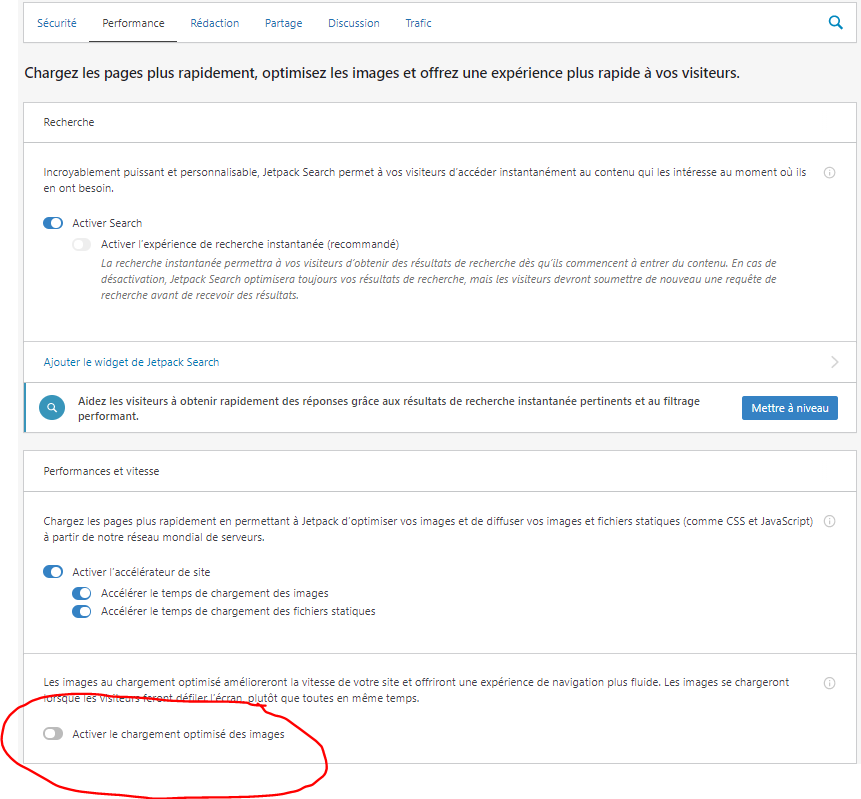
I had the same problem. Here is the solution in French
In Jetpak turn off the lazy loading option.
its work perfectly after !
Hi there
I’m having a problem where I place internal site links and rather than providing the plain text link, it fires an iFrame that displays the site template. The site uses Sydney theme and Elementor. From using the inspector, I think this may be part of the offending code, but I have no knowledge of php to be certain. Any help would be much appreciated!
You can see the resulting post here https://drive.google.com/file/d/1gXKcLpStsf3m9Pc4P-QDrqk_nt8Y4_dx/view?usp=sharing (this is the site template it’s pulling through).
`<iframe loading=”lazy” class=”wp-embedded-content” sandbox=”allow-scripts” security=”restricted” title=”“Read the latest issue of the NGCV E-News and sign up for the next issue.” — NGCV” src=”https://ngcv.org.uk/read-the-latest-issue-of-the-ngcv-e-news-and-sign-up-for-the-next-issue/embed/#?secret=F7fW6tPZ51″ data-secret=”F7fW6tPZ51″ width=”600″ height=”623″ frameborder=”0″ marginwidth=”0″ marginheight=”0″ scrolling=”no”></iframe>
function vap_loading_lazy_attribute_remove_actions() {
	remove_filter( 'bp_get_activity_content_body', 'bp_core_add_loading_lazy_attribute' );
	remove_filter( 'bp_activity_comment_content',  'bp_core_add_loading_lazy_attribute' );
}
add_action( 'bp_init', 'vap_loading_lazy_attribute_remove_actions' );
above can help to disable lazy load from activities, you can add inside child theme functions.php or using the code snippet plugin
Hello
Is there any way to disable lazy loading for recent BP 7.0? Also where is the code handling it? Seems like there is a problem with masonry layout because the size of image is different than replacement box before load.
Was having the same problem on a recent install of Buddypress troubleshooting led me to disable the lazy loading of iframe and video and that solved the problem with the activity update boxes not working
Turning off the Lazy Load functionality actually worked for me too! Thanks @eduardof
I was using the functionality on one of my clients’ site via the JetPack plugin which can be turned off from [your-site-url]/wp-admin/admin.php?page=jetpack#/performance
In the end I managed to fix this error by disabling the BJ Lazy Load plugin in charge of the lazy loading of images so that my site loads faster.
Thanks @shanebp, I shall investigate and I guess lazy load is really useful for mobiles.
Minify plugins usually cause these kinds of problems with BP.
Most users need to find this out on their own.
btw – most minify plugins have some method of excluding specific scripts, so there may be a way to continue using the the lazy load plugin.
UPDATE: I deactivated the A3 Lazy Load plugin and the cropping has started working!! 🙂
How do we log this for other users?
I got recurrent problems with cropping images. First it worked normally amd all of a sudden when – for example when I replace an existing avatar with a new one – the cropping fails and keeps failing.
Status:
Using latest WP and Buddypress.
Did not make changes or installed new plugins, etc.
Upload is normal. Cropping fails.
GD Library is installed and orking normal.
Lazy loading is not installed or active.
Is there a permanent fix. I’ve been searching for this since a couple of days and still to no avail.
Thx
Hi,
Whatever is doing the lazy loading is breaking this for you, on your profile page the link which works is
https://www.vhsfotoclub.de/wp-content/uploads/avatars/18/5ca4f3e4be1ce-bpfull.jpg
on your gallery list the link is
https://www.vhsfotoclub.de/wp-content/uploads/avatar%20lazyloads/18/5ca4f3e4be1ce-bpfull.jpg
I’m afraid this is not a buddypress issue.
@laschwi
Hello!
I recently ran into the same problem!
It was caused by a plugin called “Lazy Load”.
I stopped the “Lazy Load” plugin and now I can trim it!
I’d be honored if I could help you with the same cause!
By the way, I’m Japanese and I use a translation software to write here.
I’m sorry if the sentence is off.
I am Using autoptimize plugin in which i am using lazy load image option, that is loading my some images only. some time all the images are loaded some time only few are loaded help me with this site
I’ve noticed a few of these tickets from a year or so ago talking about how lazy loading is affecting the crop feature for profile images. I’m experiencing the same thing. When I use lazy loading through my theme, it doesn’t work at all. When I use lazy loading through WPRocket, the cropping feature works but on sections of profile like “notifications” and “achievement” the image just loads as a tiny tiny square.
Is there any way to bypass this lazy loading issue without turning lazy loading off? Can the profile image be removed on certain profile-nested sections?
Never mind, found the solution, there was a conflict with Smush plugin lazy loading option…


